














🥇 7 best author box plugins for WordPress 2026
You installed an author box plugin, and the layout broke, while an empty gray field with a Gravatar placeholder flaunts itself below the post. Every WordPress site owner goes through this at least once a year: the default author display is sparse, themes mangle it, and editing PHP templates by hand is scary.
An author box is not a "nice to have" checkbox. It's the face of your content. A visitor finishes reading an article, sees who wrote it, clicks through to the author's social profiles, and returns to the site with trust. For Google, this is an E-E-A-T signal: the content has a real person behind it with a biography and links. Without this, the search engine sees an anonymous page and ranks accordingly.
Below are seven proven, battle-tested WordPress author box plugins for 2026. From lightweight solutions for single-author sites to feature-packed options with guest authors and post ratings for editorial teams.
💡 Quick overview:
- Determine your number of authors and need for guest posts, as this drives plugin choice.
- Install Starbox or Simple Author Box if you have one author, setup takes 10 minutes.
- Configure Molongui Authorship or PublishPress Authors for editorial teams with co-authors.
- Add Meks Smart Author Widget to the sidebar if the post-bottom box doesn't fit your design.
- Enable Authorsy if you want to add reader ratings to posts alongside the author box.
Comparison table: top 5 plugins
Plugin | Best for | Guest authors | Price | Key feature |
|---|---|---|---|---|
Simple Author Box | Single author, blog | Pro only | Free / Pro $39 | Easiest start |
PublishPress Authors | Editorial team 2-5 authors | Yes | Free / Pro $69 | Custom profile fields |
Starbox | Single author, visual focus | No | Free | Ready-made themes + Rich Snippets |
Molongui Authorship | Editorial team, co-authors | Yes | Free / Pro $29 | Import from Co-Authors Plus |
Authorsy | Blog with reader engagement | Yes | Free / Pro | Post ratings + author box |
1. Simple Author Box: lightweight author box with AMP and RTL

A plugin from WebFactory, one of the most popular in its niche: 90,000+ active installations and a 4.5 rating on WordPress.org. Installs in a minute and immediately adds a clean box below posts with an avatar, name, bio, and social icons.
In practice, the free version is enough for a single-author blog. The box automatically appears at the end of each post and on category pages, adapts to mobile, and supports RTL languages. For fine-tuning, you can manually insert the function call in single.php or author.php.
The Pro version at $39 adds guest authors without creating an account, the ability to assign multiple authors to one article, avatar rotation on hover, and choice of box position before or after content.
- Pros: AMP compatibility, RTL support, 30+ social networks in profile, Bunny Fonts without tracking.
- Cons: Guest authors and multiple authorship Pro-only; on pages (not posts) the box doesn't display without manual invocation.
- Price: Free version in the WordPress.org directory, Pro $39/year.
- Download: 🔗 Simple Author Box on WordPress.org | 🔗 Pro version
2. PublishPress Authors: editorial standard with custom fields
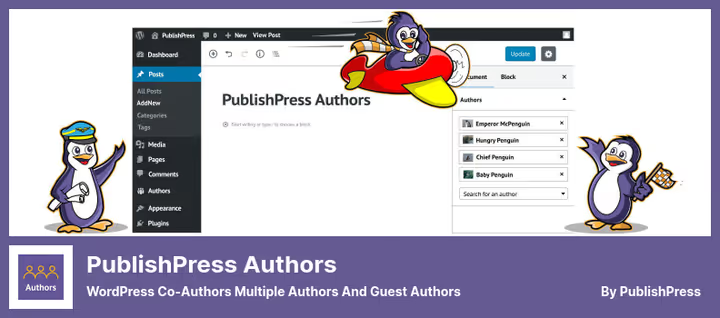
PublishPress Authors is the choice of sites where content is created by a team. 20,000+ active installations, last updated June 2026, version 4.15.0. The plugin can assign unlimited authors to a single post, both registered and guest.
When editing a post, a dropdown list appears in the sidebar: you select authors, and their boxes with bio and social links appear below the content. Output can also be placed via widget, Gutenberg block, or shortcode.
PublishPress's strong suit is custom profile fields and custom author box layouts. You can create additional fields for authors (position, company, links) and build a custom template for them without editing the theme.
- Pros: Unlimited number of authors per post, guest authors without accounts, custom fields and layouts.
- Cons: Pro at $69 is noticeably pricier than competitors; interface is more complex than Simple Author Box for single-author use.
- Price: Free in directory, Pro $69/year.
- Download: 🔗 PublishPress Authors on WordPress.org | 🔗 Pro version
3. Starbox: author box with ready-made themes and Rich Snippets

Starbox from the SEO Squirrly team solves the main pain of standard author display, boring design. 10,000+ installations, 202 reviews with an average rating of 4.8. The plugin offers several ready-made themes (Business, Fancy, TopStar, Drop-Down) and lets you choose a different theme for each author.
Google Authorship and vCard markup (Rich Snippets) are configured with one checkbox, the author photo lands in search results without schema gymnastics. This directly impacts snippet CTR: a face next to the title makes your page stand out among competitors.
To display anywhere in a post or sidebar, use the shortcode [starbox] or [starbox id=USER_ID]. Custom avatar upload without Gravatar saves time for authors who don't have a Gravatar account.
- Pros: Ready-made themes to choose from, Rich Snippets out of the box, custom avatar without Gravatar, shortcodes.
- Cons: No guest authors, no co-authors, registered users only; WPML compatibility has limitations.
- Price: Free in the WordPress.org directory.
- Download: 🔗 Starbox on WordPress.org
4. WP Post Author: three widgets and shortcodes for flexible placement
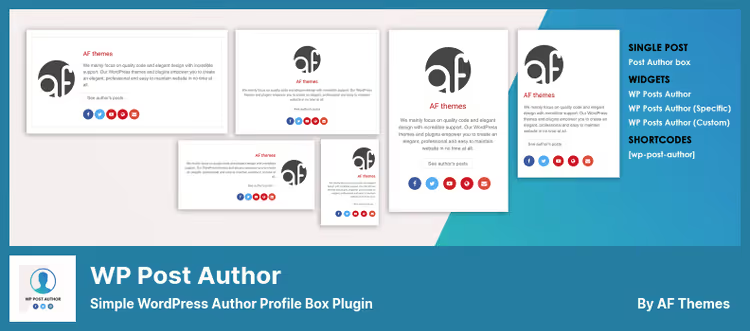
WP Post Author from AF themes (10,000+ installations, updated May 2026) solves the task of "I want the author box in the sidebar, below the post, and on a separate page." Three built-in widgets for the current post author, a specific author by ID, and a custom author, plus shortcodes with attributes.
The plugin pulls data from the standard WordPress profile: name, avatar, description, social links. For customizing the box appearance, CSS classes are provided, everything can be styled without editing theme templates.
Element control is flexible: you can hide the author role, email, enable the "Other posts by author" link. Facebook, Instagram, YouTube, X (Twitter), and LinkedIn are supported.
- Pros: Three widgets, shortcodes, CSS customization, link to other author posts.
- Cons: No guest authors or co-authors; settings interface is spartan, some parameters only via shortcodes.
- Price: Free.
- Download: 🔗 WP Post Author on WordPress.org
5. Authorsy: author box with built-in post ratings

Authorsy from Apselo is a fresh and actively developed plugin (version 1.0.8, updated late June 2026, tested with WordPress 7.0). Its signature feature is a built-in post rating system: readers give a thumbs up or thumbs down right from the author box. No one else in this roundup has this.
The free version delivers a full-featured author box with bio, avatar, and social links, support for multiple authors and guest authors on a single post. Author profiles are individually configurable, box colors and styles adapt to the theme without CSS.
The Pro version adds an author box on hover, detailed voting analytics, rating manipulation prevention (by IP and cookie), social sharing of positive ratings, and a "Top posts by rating" block. For sites with active communities, this works as a built-in social mechanic.
- Pros: Post ratings in the author box, guest authors, voting analytics, hover box in Pro.
- Cons: Plugin is young, only 1,000+ installations; analytics and anti-manipulation protection Pro-only.
- Price: Free in the WordPress.org directory, Pro pricing on developer site.
- Download: 🔗 Authorsy on WordPress.org | 🔗 Pro version
6. Molongui Authorship: co-authors, data import, and SEO markup
Molongui Authorship is the most feature-rich plugin in this roundup. 10,000+ installations, 4.9 rating on WordPress.org, version 5.2.9 from February 2026. It covers all authorship scenarios from a simple bio box to collaborative articles with drag-and-drop name ordering.
The main advantage is one-click migration. Moving from Co-Authors Plus, PublishPress Authors, or One User Avatar, Molongui imports all authors, guests, and relationships automatically. This saves you when switching authorship plugins on a live site with hundreds of posts.
In the Pro version at $29: byline modifiers (prefixes like "By," suffixes like "et al."), guest author archive pages, 30+ additional social networks, content search by author name, and a shortcode to display an author list anywhere.
- Pros: Import from three competing plugins in one click, drag-and-drop co-author ordering, custom byline, 90+ social networks.
- Cons: Some key features (guest archives, REST API, author search) Pro-only; interface is dense, requires half an hour to master.
- Price: Free in directory, Pro $29/year.
- Download: 🔗 Molongui Authorship on WordPress.org | 🔗 Pro version
7. Meks Smart Author Widget: author in sidebar with auto-detection
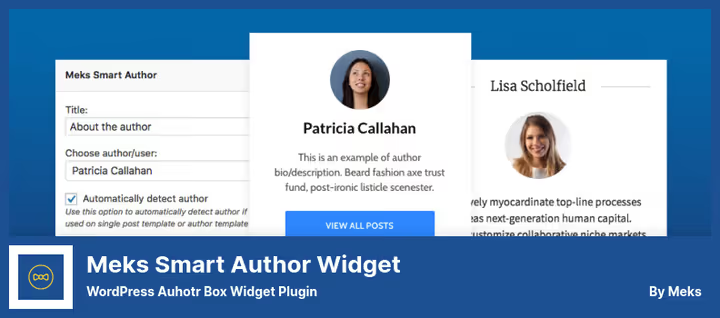
Meks Smart Author Widget from the Meks team is a niche solution for those who need the author not below the post but in the sidebar or any other widgetized area of the theme. The plugin is lightweight: install, add to widget area, and it immediately shows the author's name, avatar, and description.
The plugin's smart feature is auto-detection of the current post's author. On a single post page, the widget shows the author of that specific piece; on an author archive page, it shows that author's profile. Avatar size, author archive link, and name display are flexibly configurable.
Minimalist and doesn't bloat the site, suitable for themes with narrow sidebars where a full-format author box below the post doesn't fit the design.
- Pros: Auto-detects author, lightweight code, one-minute setup, replace widget title with author name.
- Cons: Widget only, no below-post output; no social networks; not updated since July 2024 (but stable and doesn't conflict with WP 6.8).
- Price: Free.
- Download: 🔗 Meks Smart Author Widget on WordPress.org
Understanding author box setup is easier than it seems. Watch a short overview of one plugin's capabilities, the example shows what changes after installation and how to configure appearance:
⁉️🤔 Frequently asked questions
Do I need an author box plugin if my theme already displays the author?
Built-in theme output is usually limited: name and Gravatar without social links or bio. If you have multiple authors and want to manage the box appearance, social networks, and markup, a plugin is essential. Disable the theme output in settings or via CSS and replace with a plugin from this roundup.
Which plugin should I choose for a single-author site?
If you have one author and no plans for guest posts, Starbox or Simple Author Box. Starbox provides ready-made themes and Rich Snippets without schema configuration, Simple Author Box offers the easiest start with AMP compatibility. Both are free and install in a minute.
Can I assign multiple authors to one post?
Yes, via PublishPress Authors, Molongui Authorship, or Authorsy. All three let you select unlimited authors from a dropdown list in the post editor. Molongui additionally provides drag-and-drop name ordering and custom byline in Pro, Authorsy adds reader ratings to co-authorship.
What should I do if I'm migrating from another authorship plugin?
Molongui Authorship imports data from Co-Authors Plus, PublishPress Authors, and One User Avatar in one click, authors, guest profiles, and relationships are preserved. After import, you can deactivate and delete the old plugin.
Does the author box affect SEO?
Yes, directly. Google considers E-E-A-T signals (Experience, Expertise, Authoritativeness, Trustworthiness) when ranking. An author box with bio, social links, and author archive links shows the search engine that real experts stand behind the content. Plugins like Starbox and Molongui add structured markup (Schema.org
Person) automatically, the author photo appears in search results.
What should I choose for a multilingual site?
Simple Author Box is tested with WPML and Polylang, author bio is translated separately for each locale. Molongui Authorship is also WPML-compatible. Starbox works with WPML with limitations, best to test on a staging site.
Which author box plugin to install in 2026?
An author box is not decoration, it's a trust tool. Search engines look at authorship, readers click through to social profiles and return to familiar names.
- If you have a single-author blog and want a beautiful box in 10 minutes, get Starbox: themes, Rich Snippets, and custom avatar out of the box.
- Need an easy start with AMP and RTL support, Simple Author Box, battle-tested by 90,000+ installations.
- Editorial team and collaborative articles, Molongui Authorship or PublishPress Authors. Molongui wins on migration and customization depth, PublishPress on custom profile fields.
- Want to add reader ratings and engagement to the author box, Authorsy: no one else has this combination.
- Author in sidebar, only Meks Smart Author Widget.
Install any of these plugins on a staging site and see how the box fits your theme. Share in the comments which author box plugin you use.

A professional team of writers and editors specializing in creating quality content.