














👤 11 best WordPress author box plugins 2026
Scrolling, heading, first paragraph, and the reader leaves. You have less than 8 seconds to hook them. But even if the text is good, a blank "Admin" placeholder at the end of the post screams something else: the blog doesn't care about the reader.
An author box closes this gap. It puts a face next to the content and adds humanity to the blog. And when there's an avatar under the post, a couple of lines about the author, and clickable social links, the reader gets exactly what they need for the next step: subscribe, go to Twitter, read more.
The problem is that standard WordPress out of the box only gives a name and a link to the author archive. No bio, no social links, no decent design. Plugins fill this gap entirely, and many do it for free.
We've collected 11 working solutions for author boxes on WordPress: from minimalist to feature-rich, with multi-authorship and guest support. All tested on the current version of WP, each with its own strengths and limitations.
💡 Quick overview:
- What problem an author box solves and why without it a blog loses reader trust
- 11 plugins: from lightweight one-click solutions to powerful all-in-ones with social media, tabs, and co-authorship
- How to choose the right option for your scenario: single blog, multi-author magazine, or guest post stream
Plugin comparison table
Plugin | Free | Pro version | Social media | Guest authors | Active installs |
|---|---|---|---|---|---|
Simple Author Box | Yes | Yes | 30+ | Yes | 70,000+ |
Ultimate Author Box Lite | Yes | Yes | 10 | No | 5,000+ |
Ultimate Author Box Pro | No | - | 10+ | Yes | N/A |
Guest Author Name | Yes | No | No | Yes | 10,000+ |
Starbox | Yes | Yes | 20+ | No | 30,000+ |
A Fancy WordPress Author List | Yes | No | Yes | No | N/A |
Author Bio Box | Yes | No | Yes | No | 7,000+ |
WP Post Author | Yes | Yes | 25+ | Yes | 20,000+ |
Fanciest Author Box | No | - | 10+ | Yes | N/A |
Molongui Authorship | Yes | Yes | 70+ | Yes | 80,000+ |
Booster Extension | Yes | No | Yes | No | 4,000+ |
1. Simple Author Box

🔗 Simple Author Box on WordPress.org
Our favorite among simple solutions. WebFactory Ltd made a plugin that doesn't try to be everything at once, and that's exactly why it's good. Install, activate, and a responsive author box is already at the end of each post. Author name, avatar via Gravatar, description, and social links, everything in place without extra fuss.
In practice, the customization hooks you. Colors, fonts, spacing pull from the active theme, but if desired, every element can be overridden. The plugin is RTL-friendly, supports AMP, and uses Bunny Fonts instead of Google Fonts, a nice bonus for GDPR compliance. Guest authors are added without creating a WordPress account, and for those who prefer manual control, there are template tags.
The Pro version extends the social network set to three dozen and adds fine control of visibility by post types. But in most scenarios, the free version is more than enough.
Pros:
- Instant installation, minimal settings for basic results
- GDPR-friendly (Bunny Fonts, no external requests without need)
- Guest authors without full accounts
Cons:
- Free version limited to ~5 social networks
- No built-in "Latest posts" tabs inside the box
2. Ultimate Author Box Lite
🔗 Ultimate Author Box Lite on WordPress.org
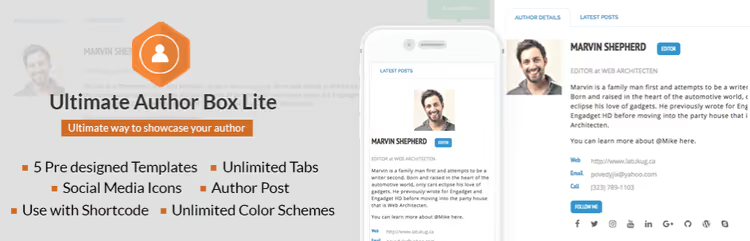
AccessPress Themes offers an author box constructor with five preset templates. Change backgrounds, colors, icons, and the box looks like a designer drew it specifically for your site. The plugin works through shortcodes and automatic insertion, supports posts, pages, and custom post types.
Liked the flexibility with avatars. You can pull photos from Facebook, Twitter, or Instagram, or upload your own, Gravatar is not mandatory. Visibility control by specific posts and pages saves you when the box isn't needed on some content.
The Lite version gives 10 social icons. If you need more, the authors offer a Pro upgrade with extended functionality (see next item).
Pros:
- Ready templates save time on styling
- Flexible avatar sources (social media + custom upload)
- Precise visibility control by posts
Cons:
- Lite limited to 10 social networks
- Some advanced settings only in Pro
3. Ultimate Author Box Pro
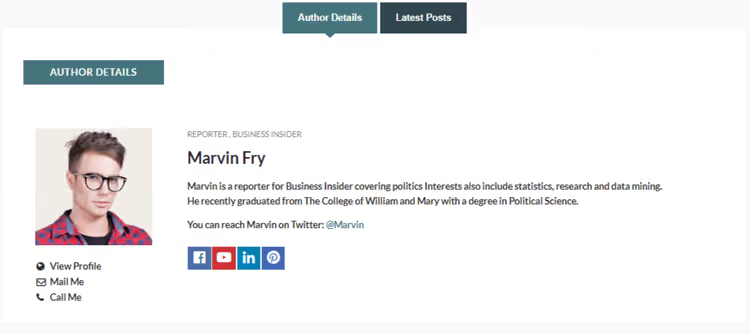
The premium version removes Lite limitations and adds tabs: author's latest posts, social profiles, contact information. From experience, it's the tabs that turn an author box from "just another block" into a full profile that people actually click.
Phone, email, position fields are available, useful for multi-author magazines where the editorial team is on display. The plugin is regularly updated and supports current WordPress versions. Look for it on the AccessPress Themes site or CodeCanyon as "Ultimate Author Box".
Pros:
- "Latest posts" and "Social media" tabs increase engagement
- Full author contact block
- Compatible with multi-author and guest scenarios
Cons:
- Paid version only, no free trial
- Tab design less modern than Fanciest Author Box
4. Guest Author Name
🔗 Guest Author Name on WordPress.org
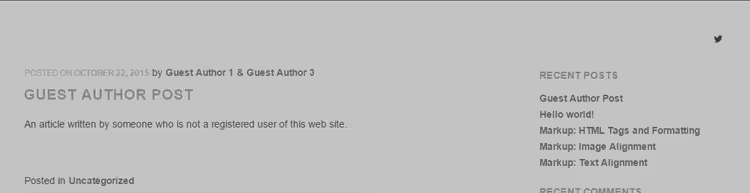
A specialized tool for one scenario: a stream of guest posts. If you regularly publish guest authors and don't want to create accounts, this plugin solves the problem elegantly, with one button.
The mechanics are simple: when publishing a post, specify the guest's name and a link to their site or social media. The plugin automatically forms a box with name, link, and optional avatar. No intermediate roles, email confirmations, or messing with profiles.
For sites with rare guest posts, it's overkill, easier to use the guest function inside Simple Author Box or Molongui. But if you have dozens of guests per month, the time savings are noticeable.
Pros:
- Instant guest author addition without an account
- Zero entry barrier, one button, one field
- Doesn't conflict with the main author box plugin
Cons:
- Basic functionality only, no social media inside the box
- Not suitable for permanent authors (they need a full profile)
5. Starbox

Starbox by Squirrly UK hooks you with preset themes, choose one of the ready ones, and the box looks decent without fine manual tuning. Convenient when you need to launch an author box on an existing blog in 5 minutes and not mess with CSS.
From the pleasant: built-in micromarkup (schema.org) for Google rich snippets, authorship data for Facebook and Google, links to all author posts, and position indication. The box can be placed above or below the post, for some formats, top placement works better (for example, in tutorials where it's important to immediately show the author's expertise).
The Pro version adds custom colors, additional social icons, and removes the watermark. But in our experience, 30,000+ active installs of the free version confirm: most have enough basic functionality.
Pros:
- Ready themes, minimal time for visual setup
- Built-in Schema markup for search snippets
- Flexible placement: top or bottom of post
Cons:
- Free version contains Squirrly branding
- Less customization than Molongui or WP Post Author
6. A Fancy WordPress Author List
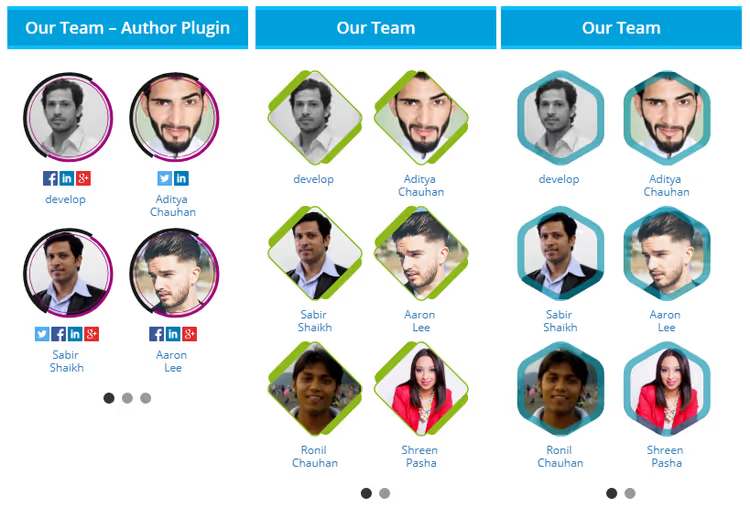
Not quite an author box plugin in the classic sense, it's a widget for displaying a list of authors in the sidebar or footer. Shows all writing authors of the blog in a compact grid with avatars and links to their archives. The idea is simple: add an "Our authors" block to the sidebar, and let readers explore.
A solution from ThematoSoup, the same developers who made Fanciest Author Box. The plugin is old (last update a few years ago), but it handles its narrow task. Works without errors on modern WordPress versions, although it has few active installations.
If you need specifically a widget author list, not an individual box under posts, take a look. But if the task is a classic author box, better take a tool from the first five of the list.
Pros:
- The only plugin in the roundup tailored for author lists
- Simple drag-and-drop widget, no shortcodes
- Can exclude individual authors from display
Cons:
- Not updated for a long time, no active support
- Doesn't replace author box under posts, it's a different tool
7. Author Bio Box
🔗 Author Bio Box on WordPress.org
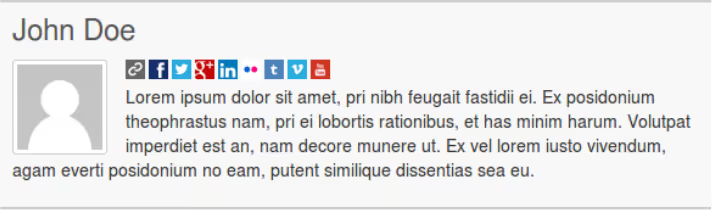
A lightweight and focused plugin without bloated functionality. Does exactly what the name promises: a bio box with avatar, description, and social icons. No tabs, guest authors, or co-authorship, just basic but carefully made functionality.
The admin interface is intuitive: colors, position on page, spacing, everything is configured from one screen. The plugin doesn't load extra scripts on the frontend and shows decent mobile performance. For a personal blog with one author, a neat and sufficient solution.
Pros:
- Minimalist and fast, no extra code
- Simple setup interface, everything on one screen
- Good mobile responsiveness
Cons:
- No guest authors or multi-author scenarios
- Fewer social networks than competitors like WP Post Author
8. WP Post Author
🔗 WP Post Author on WordPress.org
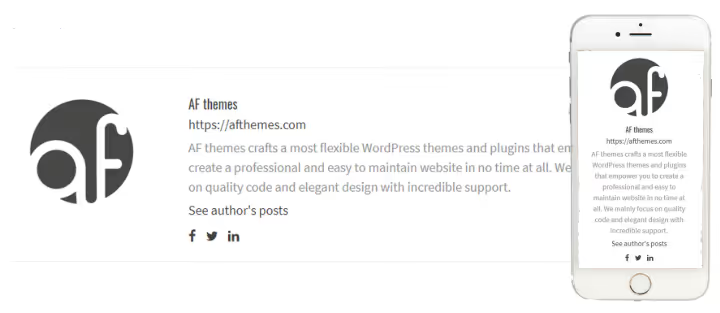
A multi-functional combine from AF Themes. Besides the basic author box (avatar, bio, social media, email, role), the plugin can: assign multiple authors to one post, add guest authors without registration, display author widgets in the sidebar, and even collect post ratings from readers.
On our test stand, the work speed pleasantly surprised, despite the abundance of functions, the frontend doesn't sag. Shortcodes allow embedding the author block anywhere in the theme, not just at the end of the post. For a multi-author magazine where it's important to show co-authors and manage box visibility by roles, one of the strongest options.
The Pro version adds registration and login forms right from the author box, an extended stylizer, and local avatars. 20,000+ active installs confirm demand.
Pros:
- Multi-authorship and co-authorship out of the box
- Sidebar widgets extend author visibility zone
- Shortcodes for manual placement anywhere in the theme
Cons:
- Abundance of settings can confuse beginners
- Some styling options only in Pro
9. Fanciest Author Box
A premium plugin from ThematoSoup (Slobodan Manic and Dragan Nikolic), sold on CodeCanyon and through the official fanciestauthorbox.com site. If author box design is a top priority for you, this is candidate #1.
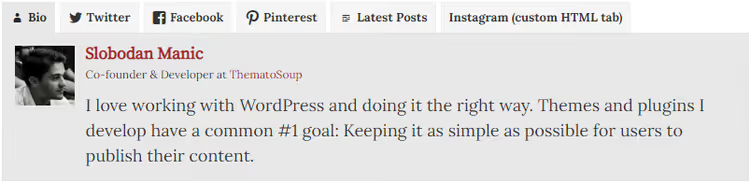
The plugin builds a box with tabs: bio, Twitter, Facebook, YouTube, Pinterest, LinkedIn, latest posts, and a custom HTML tab (for example, for an Instagram feed). Each tab is lazy-loaded, doesn't affect page speed. Retina-ready and responsive at a high level: on mobile, the box doesn't fall apart, but neatly restructures.
Supports Co-Authors Plus for joint authorship, can output to RSS feeds, and is customizable by colors without limitations. The only downside is price: it's a one-time purchase on CodeCanyon, not a subscription, but there's no free version.
Pros:
- Visually the best author box among all solutions in the roundup
- Lazy loading of tabs saves page speed
- Full color customization, Retina-ready
Cons:
- Paid only (CodeCanyon, one-time payment)
- Fewer social networks out of the box than Molongui (but has custom HTML)
10. Molongui Authorship
🔗 Molongui Authorship on WordPress.org
Leader in number of social networks, 70+ platforms, from obvious Twitter/Facebook/LinkedIn to niche ones like ResearchGate and SoundCloud. Developer Amitzy bet on maximum coverage, and it works: wherever your reader leads, an icon will be found.
But Molongui's main strength is not in social networks, but in multi-authorship. You can specify multiple authors and co-authors for one post, a scenario that in other plugins is either absent or requires workarounds. Guest authors are added without WordPress registration, and for permanent authors there's a full panel with statistics and related posts.
80,000+ active installs and regular updates make Molongui the most popular solution in this niche. The Pro version adds an extended stylizer, premium widgets, and priority support.
Pros:
- 70+ social networks, record of the roundup
- Best implementation of multi-authorship and co-authorship
- Huge user base and regular updates
Cons:
- Due to abundance of options, entry barrier is higher than average
- Free version contains upsell to Pro in admin
11. Booster Extension

🔗 Booster Extension on WordPress.org
Closes the roundup a plugin that goes beyond "just an author box". ThemeInWP packed into Booster Extension a whole set of engagement tools: "Share" buttons with share counts, reading time calculation, emoji reactions, post like/dislike, and, actually, an author box with social profiles.
If you were planning to install a plugin for social buttons and reactions anyway, Booster Extension kills two birds with one stone. The author box here is not the most advanced (basic social media, standard layout), but for a blog where social proof is more important than detailed author biography, it's sufficient.
The plugin is actively updated and compatible with current WordPress versions, the settings interface is logical and not overloaded. 4,000+ installs, more modest than leaders, but normal for a relatively young plugin.
Pros:
- Author box + social buttons + reactions + reading time, four functions in one plugin
- Neat interface without clutter of options
- Compatible with current WordPress versions
Cons:
- Author box is not the main focus of the plugin, inferior to specialized solutions
- Fewer social networks for author profile
If you prefer video format, here's a visual walkthrough of installing and configuring an author box in WordPress:
⁉️🤔 Frequently asked questions
Is it mandatory to install a plugin for an author box, can't you code it manually?
You can. But the standard "Post Author" block in Gutenberg and theme template functions usually output only name and a link to the archive. Social media, bio, avatar, micromarkup, each addition requires editing
functions.phpand a child theme. A plugin gives all this in 5 minutes without code, with a guarantee that the box won't break on the next theme update. For the vast majority of WordPress users, this is the optimal path. Exception: custom builds on Oxygen/Bricks, where it's easier to code in the builder.
Which plugin to choose for a single blog?
If the blog has one author and guest posts are rare, take Simple Author Box (free) or Fanciest Author Box (paid, for design). Both cover the "avatar + bio + social media" scenario without extra functionality.
For a solo blogger, multi-authorship and guest profiles are dead weight that only slows down the admin. Better take a lightweight tool and don't overpay for functions.
Do these plugins work with Gutenberg and block themes?
All 11 plugins from the roundup are tested with Gutenberg and correctly output the author box under content. Some (WP Post Author, Molongui) additionally offer blocks for the editor. If you use an FSE theme (Twenty Twenty-Four and similar), check that the plugin doesn't duplicate the built-in "Post Author" block, usually you can disable one of the two.
In practice, no conflicts with block themes have been noticed, but it's always worth running one test post after installation, 2 minutes save an hour of debugging later.
Can you output the author box not only at the end but also at the beginning of the post?
Yes, most plugins from the list (Starbox, Molongui, WP Post Author, Ultimate Author Box) allow you to choose position: top, bottom, or both at once. Starbox and WP Post Author give this option right in settings; Molongui, through shortcodes, which is more flexible but requires manual placement.
Top placement is justified for tutorials and expert analyses, where the reader wants to immediately understand who is writing. For news and entertainment content, bottom placement is more organic.
Which plugin gives the maximum social networks?
Molongui Authorship with 70+ platforms, absolute record holder. In second place, Simple Author Box Pro with 30+. For comparison: Starbox gives about 20, Author Bio Box, less than 10. The choice depends not on quantity, but on which networks your authors actually maintain.
Three to four relevant icons work better than a row of 15 inactive ones. Start with Twitter/X, LinkedIn, and GitHub, for technical blogs this is the core set.
Which author box plugin to choose
An author box is not just a "pretty block". It's a conversion element that turns an anonymous reader into a subscriber and repeat visitor. In 5-10 minutes of installation, you get a tool that works on trust passively, without daily effort.
If you need one universal choice: Molongui Authorship for multi-author projects, Simple Author Box for solo blogs. Budget allows spending on tools, take a look at Fanciest Author Box: visually it's head and shoulders above the rest.
If you run a stream of guest posts, take Guest Author Name as a supplement to the main plugin, not instead of it. And if you were planning to install a social-share plugin anyway, Booster Extension will save one spot in the installed list.
Choose the right one, install it, set up avatar and bio, and let your readers know who writes for them every day.

A professional team of writers and editors specializing in creating quality content.