














🚀 9 best request a quote plugins for WooCommerce in 2026
What is "request a quote" in WooCommerce and why your store needs it
Standard WooCommerce is designed for instant purchases: choose a product, pay, receive it. But what about stores where pricing is determined individually, such as antiques, wholesale orders, or web design services? Leave the price field empty and tell the customer to "call us"?
Phone calls as the only channel means lost leads. The manager is busy, the customer is in a different time zone, request details are not recorded in the CRM. The Request a Quote plugin solves this problem systematically: the buyer adds products to a quote cart, fills out a short form, and submits a request directly from the website. The administrator sees the request in the admin panel, sets a price, and the customer receives a notification and pays or continues negotiating.
💡 Quick overview:
- Choose a plugin for your scenario
- Set up the "Request a Quote" button for the products you need
- Receive requests and submit counter-offers in the admin panel
- Confirm the deal and receive payment after agreeing on the price
Below are 9 current request a quote plugins for WooCommerce in 2026: from lightweight free solutions to professional quoting systems with multi-product quote carts.

Plugin | Free version | Multi-product cart | Hide prices | Custom form | PDF invoices |
|---|---|---|---|---|---|
ELEX Request a Quote | ✅ wordpress.org | ✅ | ✅ | ✅ | ❌ |
WooCommerce Request a Quote | ❌ ($79/year) | ✅ | ✅ | ✅ | ❌ |
NP WooCommerce RFQ | ✅ wordpress.org | ✅ | ✅ | ✅ | ❌ |
YITH Request a Quote | ✅ wordpress.org | ✅ | ✅ | Partial | ❌ |
Webkul Quote System | ❌ ($39) | ✅ | ✅ | ✅ | ❌ |
WisdmLabs Product Enquiry Pro | ❌ ($49) | ✅ | ❌ | ✅ (drag & drop) | ❌ |
Formidable Forms | ✅ wordpress.org | ❌ | ❌ | ✅ (visual) | ❌ |
Call for Price | ✅ wordpress.org | ❌ | ✅ | ❌ | ❌ |
Quotify | ✅ wordpress.org | ✅ | ✅ | ✅ | ❌ |
1. ELEX Request a Quote

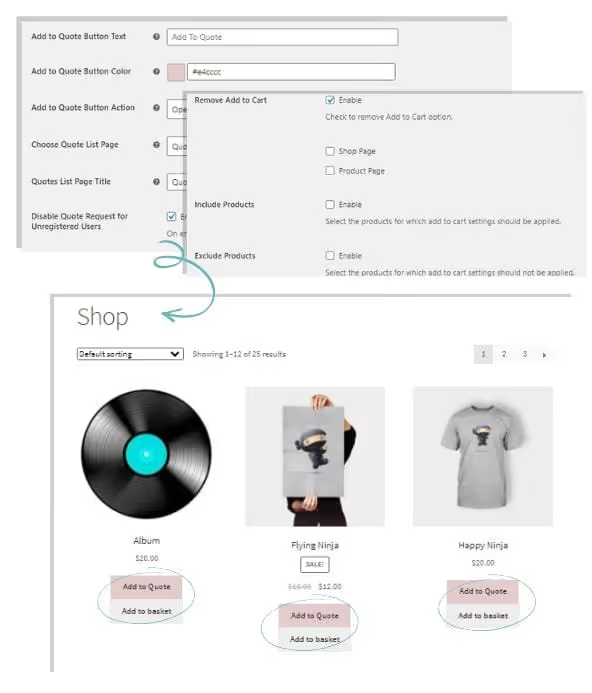
ELEX is one of the most flexible request a quote plugins. It allows you to enable the "Add to Quote" button alongside "Add to Cart" or completely replace the cart with a quoting workflow. It supports both simple and variable products. In practice, this means you can keep instant purchases for retail customers while simultaneously accepting requests from wholesalers on the same site.
Strengths:
- "Request a Quote" button for all products, selected categories, or individual products
- Flexible form configuration: fields, required status, custom notifications
- Accept / reject / modify price directly on the WooCommerce order page
- Email, chat, and SMS notifications to the administrator about new requests
- Payment acceptance after administrator approves the price
Notes: the free version on wordpress.org covers basic scenarios; advanced features (SMS, chat, export) are in premium licenses from elextensions.com. For a small store with 10-20 products, the free version is sufficient.
🔗 Download ELEX Request a Quote (WordPress.org)
2. WooCommerce Request a Quote Plugin

🔗 Request a Quote Plugin on WooCommerce.com
The official plugin from the WooCommerce team. The customer adds products to the quote cart just like a regular cart, fills out a form, and submits a request. The administrator sees the request, sets a price, and the customer receives a notification and pays.
The main advantage over free alternatives is button display rules: by user roles, product categories, or specific products. You can hide the price and replace "Add to Cart" with "Add to Quote" globally or selectively. For a B2B store with wholesale customers, this is almost a must-have.
Strengths:
- Full quoting system: request → counter-offer → payment
- Button visibility rules by roles, products, and categories
- Guest quote cart (unregistered users can also submit requests)
- Mini quote cart with prices
- Automatic email notifications at each stage
Price: from $79/year (single site). For a store with revenue of $2,000/month or more, it pays for itself by closing 1-2 wholesale deals that would otherwise go to competitors.
3. NP WooCommerce Request a Quote

🔗 WooCommerce RFQ on WordPress.org · Live demo
One of the oldest and most stable request a quote plugins in the ecosystem, active since 2015 and regularly updated (v2.4.12, April 2026). It is convenient because it does not break the standard purchasing flow: the customer can either buy immediately or request a quote, and both buttons work simultaneously.
Price visibility flexibility is a key feature. The price can be hidden by user role, IP address, or country. This is useful if you have different prices for different regions and do not want to show your wholesale price list to retail visitors.
Strengths:
- Add to Quote for simple and variable products
- Price visibility restrictions by role, IP, geography
- Sending products from a regular cart as a quote request
- Email notifications to both owner and customer
- "Quote sent" status in the admin panel
Notes: the interface is in English, and there is no Russian translation for the admin panel. For a store where the manager works in a Russian-speaking environment, it takes 10 minutes to get used to the terminology, but the functionality does not suffer.
🔗 WooCommerce RFQ on WordPress.org, download
4. YITH WooCommerce Request a Quote

🔗 YITH Request a Quote on WordPress.org · Live demo
YITH is an Italian studio known for hundreds of quality WooCommerce plugins. Request a Quote is no exception: clean code, regular updates (v2.50.0, May 2026), 50,000+ active installations. It works according to the classic scheme: customer adds products to the quote cart → submits a request → administrator sets a counter-price → customer accepts or rejects.
The free version on wordpress.org covers the basic "request-response" cycle. Premium (from €79.99/year) adds a multi-product quote cart, PDF quotes, custom forms, and integration with YITH plugins (catalog, B2B, multivendor).
Strengths:
- Quick setup: enable the plugin → "Add to Quote" button appears on the product page
- Hide "Add to Cart" globally or for individual products
- Email notifications to the customer when submitting a request
- Accept / reject offer from the customer side
Notes: the request form in the free version is minimal (name, email, message). If you need custom fields (phone, company, order volume), either purchase premium or look at ELEX or Quotify.
5. Webkul Quote System for WooCommerce
🔗 Quote System on store.webkul.com
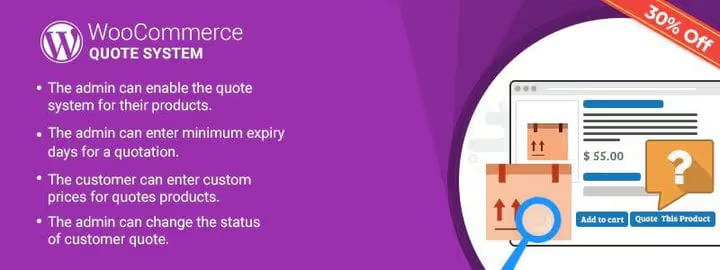
Webkul makes a plugin for full-featured B2B quoting with communication between customer and administrator. Unlike most alternatives, here the customer can propose their own price directly in the request, attach media files (technical specifications, drawings), and communicate with the manager within the system. The administrator sets a quote expiration date, and the customer sees the deadline and makes a decision.
The plugin is paid ($39 on CodeCanyon), with no free version. It is targeted at stores with non-standard products where each order requires individual calculation.
Strengths:
- Customer proposes their own price, administrator accepts, rejects, or adjusts
- Attaching files to the request
- Wholesale orders (multi-product cart)
- Quote expiration dates
- Customer-administrator correspondence within the system
Notes: support and documentation are in English. The plugin is not on wordpress.org (CodeCanyon and store.webkul.com only), so there are no automatic updates through the WP admin; update manually.
6. WisdmLabs Product Enquiry Pro

🔗 Product Enquiry Pro on WisdmLabs.com
WisdmLabs Product Enquiry Pro combines two scenarios: an "Ask a question about the product" form and a full-featured price request. A built-in drag & drop form builder is a rarity for this niche. You can build a form for a specific product or category: add an "Order volume" field, file upload, product variant selection.
The plugin is paid ($49 for one site). A free version called Product Enquiry for WooCommerce is available on wordpress.org, but its functionality is limited to single requests with no multi-product cart.
Strengths:
- Built-in form builder (drag & drop)
- Mini quote cart (widget)
- Custom email notifications with logo
- Compatibility with multilingual plugins
- Price request for product variants
- Request buttons on any page through page builders
Notes: license for 1 site, renewal is $24.50/year. For a network of stores on multisite, this is not budget-optimal.
7. Formidable Forms

🔗 Formidable Forms on WordPress.org
Formidable Forms is not a specialized quoting plugin but a universal form builder with calculations. You build a quote request form visually, add conditional logic (if category A is selected, show field X), multi-page format, and calculated fields. The result is a custom quoting form that calculates a preliminary cost on the fly.
Of the 9 plugins in this list, Formidable has the steepest learning curve, but the capabilities beyond "request a quote" are incomparably wider: surveys, calculators, user-generated content, CRM integration via webhooks.
Strengths:
- Visual drag & drop form builder
- Conditional logic and multi-page forms
- Calculated fields (price calculation based on customer selection)
- Data views (Views) displaying requests on the frontend
- Unlimited email notifications
- Stylish form design out of the box
Notes: the basic version on wordpress.org is free, but the quoting scenario (calculated fields, webhooks) requires a premium license from $79/year. If you only need a price request and nothing else, there are simpler plugins. If you plan to grow your site and add cost calculators, product configurators, and contact forms, Formidable will cover everything with one installation.
8. WooCommerce Call for Price

🔗 Call for Price on WordPress.org · Live demo
The lightest plugin in this selection (v4.3.0, April 2026). It solves one task and solves it well: it hides the price and replaces the "Add to Cart" button with "Call for Price" or any other custom text. No quote carts, email notifications, PDF quotes, just a button that leads to a request form or opens the phone number.
Ideal for stores with "made to order" products where prices change every day and a quoting workflow is not needed. It is enough to give the customer a signal that "price is on request" and a way to contact you.
Strengths:
- Simple and variable products
- Price hiding by range, stock availability, taxonomy
- Forced price request for selected products
- Microscopic footprint, does not affect site speed
Notes: it does not replace a full-featured quoting workflow. If the customer needs to add 5 products to a request and receive a counter-price, this plugin is not for you. For that scenario, use ELEX, YITH, or Quotify.
🔗 Call for Price, free download
9. Quotify, Product Quotation for WooCommerce
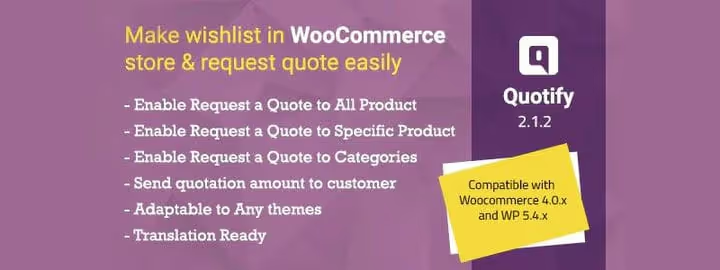
Quotify (formerly a premium plugin on CodeCanyon, now free on wordpress.org) is a modern and lightweight quoting plugin with a React interface. It replaces "Add to Cart" with "Request a Quote" globally or for selected products and categories. v2.7.7, updated June 2026, meaning the product is actively developing.
The main difference from the "old-timers" (NP RFQ, YITH) is the modern React admin panel where managing requests is intuitive. Multilingual support out of the box is a plus for stores with non-English-speaking audiences.
Strengths:
- Replace Add to Cart with Request a Quote (all products / selected / categories)
- Modern React interface for the quotes panel
- Multilingual support
- Lightweight code, minimal impact on speed
Notes: the plugin is relatively new in the wordpress.org ecosystem. There are few reviews so far (compared to NP RFQ or YITH). If long-term stability is critical, choose the proven NP RFQ or YITH. If you want a modern UI and are developing a new store, Quotify is a fresh and promising option.
In the video above, there is a step-by-step installation and setup of the Request a Quote plugin for WooCommerce. In 8 minutes, the full cycle is shown: from activating the plugin to the first customer request and administrator response.
⁉️🤔 Frequently asked questions
How does Request a Quote differ from the standard WooCommerce cart?
The standard cart leads to immediate payment at a fixed price. Request a Quote adds an intermediate step: the customer submits a request, the administrator sets a counter-price, and the customer accepts or continues negotiating. This is not a cart replacement but an additional sales channel for products with floating prices, wholesale orders, custom services, and antiques.
Does a B2B store need a request a quote plugin?
Yes, and it is almost an essential tool. B2B customers expect individual prices, deferred payment, and the ability to negotiate. Without a quoting workflow, you lose wholesale deals: a corporate buyer will not order 50 units at retail price through a standard cart. The plugin creates a separate track for them with a personalized price and post-payment.
Can two request a quote plugins be used simultaneously?
Technically yes, but in practice this creates conflicts: two "Add to Quote" buttons on the same product confuse the customer, and two notification systems duplicate emails. If you need both pre-order requests and post-order invoices, use one quoting plugin (ELEX, NP RFQ, or Quotify) and an additional PDF invoices plugin like WooCommerce PDF Invoices & Packing Slips. They work at different stages and do not overlap.
Which plugin is best for hiding prices from unregistered users?
NP WooCommerce RFQ can hide prices by user role, IP address, and country. Call for Price if you just need to remove the price and replace the button. Both are free and updated in 2026. For a wholesale store with multi-tier pricing, NP RFQ is better because it is more flexible in visibility settings.
Do I need to pay for a request a quote plugin if my store is small?
No. ELEX Request a Quote, NP RFQ, YITH Request a Quote, and Quotify have fully functional free versions on wordpress.org with regular updates in 2026. For a store with 10-50 products and a few requests per week, a free plugin is sufficient. Upgrading to premium makes sense when specific requirements arise: drag & drop form builder, PDF quotes, SMS notifications.
Do quoting plugins work with multilingual sites?
Most of them do. NP RFQ, YITH, and Quotify are compatible with WPML, Polylang, and Weglot. ELEX Request a Quote has built-in multilingual support. WisdmLabs Product Enquiry Pro officially claims compatibility with multilingual plugins. Formidable Forms translates forms through standard WordPress translation tools.
Which request a quote plugin to choose for your task
Go through a simple matrix:
- Need only a "Call for price" button without a quote cart → Call for Price (free, wordpress.org)
- Want to replace the cart with quoting with minimal setup → Quotify (free, fresh UI) or YITH Request a Quote (free, 50k+ installations)
- Need both buttons, "Buy" and "Request a Quote", simultaneously → NP WooCommerce RFQ (free, proven over the years) or ELEX Request a Quote (free, maximum flexibility)
- B2B wholesale: display rules by roles, hidden prices, multi-product requests → WooCommerce Request a Quote Plugin (official, premium) or NP RFQ (basic B2B free)
- Customer proposes their own price, attaches files, negotiates within the system → Webkul Quote System (premium, one-time license)
- Need a custom request form builder → WisdmLabs Product Enquiry Pro (premium) or Formidable Forms (free base + premium)
- Building a new store and want a modern stack → Quotify (React admin, fresh code, actively updated)
- Stability and 5+ years of support are critical → NP RFQ (since 2015, tens of thousands of installations) or YITH (since 2015, 50k+ installations)
All listed plugins are alive, updated in 2026, and tested on real stores. Start with a free option for your scenario, test on staging, run 10-15 requests, and only then decide on a premium license.

A professional team of writers and editors specializing in creating quality content.