













📋 Amelia plugin review: what the appointment booking system can do in 2026
A customer lands on your website, sees a "book a convenient time" form, and leaves for a competitor within a minute. The form doesn't load on mobile, available slots don't match the specialist's actual schedule, and the confirmation email arrives three hours after the visit. Every salon owner or private clinic operator has lost a booking at least once because of a buggy booking plugin.
Amelia solves this problem at the system level. Over six years on the market, the plugin has accumulated 90,000+ active installations and maintains a 4.6 rating on its plugin page. The team at Melograno Venture Studio (the same one behind wpDataTables) updates the product every 2-3 weeks: the latest release 2.4.1 came out on June 3, 2026 and has been tested on WordPress 7.0.
Below you'll find what Amelia can do under the hood, which scenarios it covers, how much it costs, and when to pay for Pro versus when the free version is enough.
💡 Quick overview:
- What Amelia is and which businesses use it, from salons to private clinics
- Key features: employees and schedules, calendar, booking form with search, service catalog
- Current 2026 pricing and what's included in the paid version
- Support quality and documentation, what to expect after purchase
- Verdict: when Amelia is justified and when a free plugin is enough
What Amelia is and which businesses it works for
Amelia is a booking plugin for appointments and events on WordPress from Melograno Venture Studio. It has been in the WordPress.org directory since December 2018. Unlike narrowly specialized competitors, Amelia isn't designed for a single niche. You take the core booking engine and configure fields, services, employees, and locations for your business: a beauty salon, private clinic, or online courses.
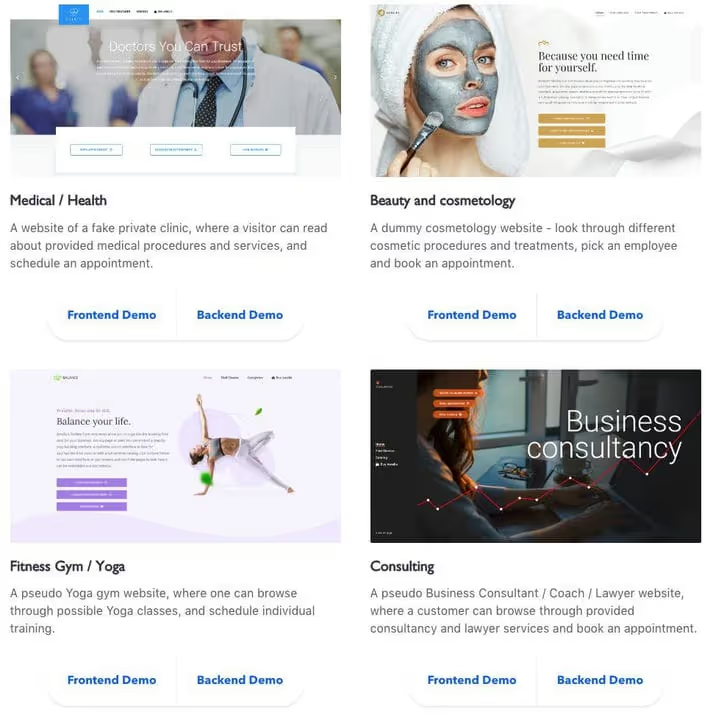
Industries where Amelia works right now:
- Beauty salons and spas
- Fitness clubs and personal trainers
- Private clinics and medical offices
- Psychologists, coaches, and consultants
- Auto repair shops and service centers
- Educational courses and tutors
- Photographers and studios
- Event agencies and organizers
The main advantage of this type of builder: you don't overpay for industry-specific features you'll never need. And the step-by-step wizard guides customers from service selection to confirmation without a single unnecessary click.
Key features of Amelia
The Amelia engine consists of three layers: the admin backend, the customer frontend, and the automation layer with notifications and integrations. Let's go through each one.
Employees, schedules, and locations
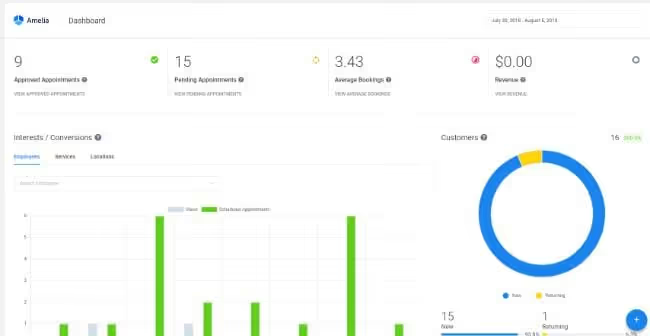
Each employee gets an individual schedule, assignment to specific services, their own appointment duration, and pricing. In practice this looks like: a hairstylist and a manicurist in the same salon see different booking grids. A customer physically cannot book the stylist for a manicure because the system won't show that slot.
A separate layer handles multiple locations. If you have three locations in different parts of the city, customers see the nearest one when booking. The system automatically checks for conflicts: one employee won't end up in two places at the same time, even if an admin makes a mistake during manual slot assignment.
Calendar and booking management
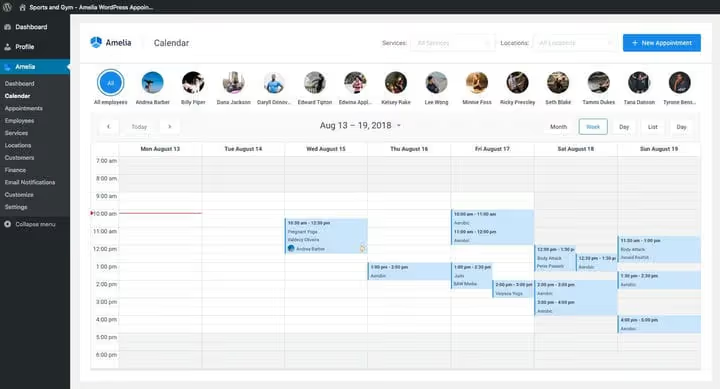
The calendar works in two modes. Customers see only available slots, with no internal information or other people's bookings. Administrators see the full picture: filters by employees, services, and locations, plus month, week, and day views. Built-in shared calendar viewing for the entire team is included.
A feature that's easy to miss but saves you from confusion: automatic timezone handling on the customer side. A visitor from another region sees times in their timezone, and the booking is created without slot discrepancies.
Booking interface with search
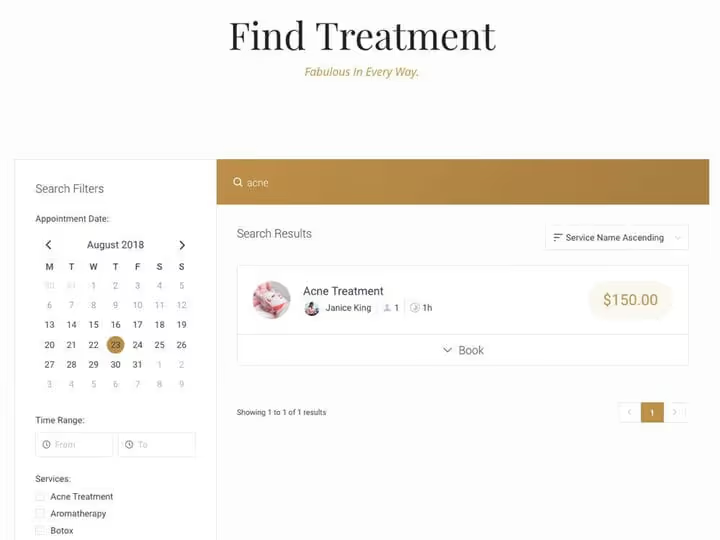
The booking form is a step-by-step wizard, not an endless page full of fields. Customers sequentially select a service, specialist, date and time, enter contact details, and confirm the booking. No scrolling through five screens.
The search bar filters services and employees by keywords. In practice: a customer types a trainer's name and sees only their available slots for the selected day, not a full list of dozens of gym staff. A simple feature, but rarely found in WordPress booking plugins.
Service catalog with categories
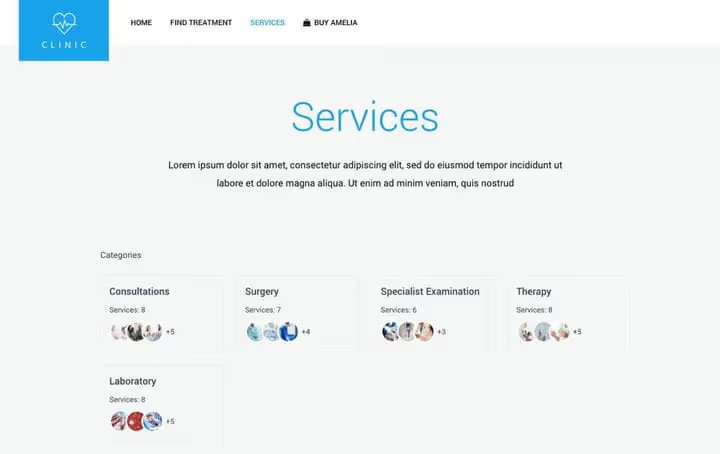
Services are grouped by category and displayed as cards, a grid, or a list. A separate shortcode can be inserted on any page, which is convenient when customers need to browse the catalog first and then book.
For each service you can configure: appointment duration with multiple price options (Pro and Developer), buffer time before and after, seat limits for group sessions, and days when the service is unavailable.
How Amelia looks in actual use (a six-minute interface and scenario overview):
How much Amelia costs in 2026
Amelia is sold via subscription or with a lifetime license through the developer's website. Three tiers according to data from June 2026:
Tier | Annual | Lifetime | Domains |
|---|---|---|---|
Basic | $79 | $199 | up to 3 |
Pro | $119 | $399 | up to 3 |
Developer | $249 | $589 | unlimited |
The difference between tiers is in the feature set. Basic already includes unlimited employees, group bookings, recurring appointments, custom notifications, multilingual support, integrations with Zoom, Google Meet and Google Calendar, and payments via Stripe and PayPal. Pro adds resources (shared assets with booking limits), custom form fields, and WooCommerce integration. Developer removes the domain limit and provides priority support.
The free Amelia Lite on WordPress.org is a fully functional working plugin. It includes: a step-by-step booking form, calendar, email notifications, payments via Square, 20+ languages, and one employee. For a private psychologist or beginning coach, this is more than enough.
An important note: the annual subscription includes updates and support. A lifetime license provides updates forever, but support is active for the first 12 months only. Renewing support for Lifetime costs $99 per year.
Support and documentation
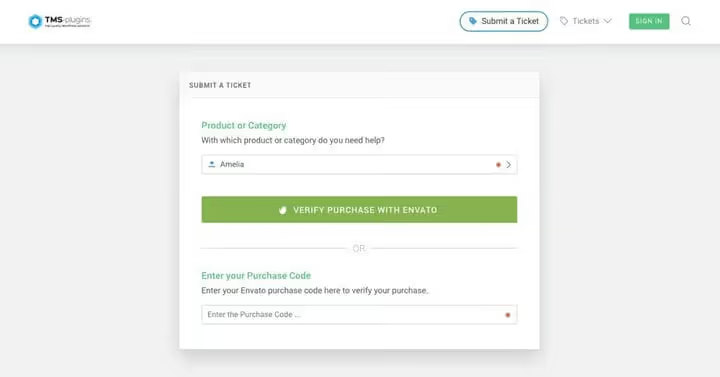
The Melograno Venture Studio team serves users through a ticket system on their support portal. Average response time is within one business day (European time). On WordPress.org, the plugin has a good ratio of resolved to open tickets, and the developer doesn't abandon the forum.
Documentation is available at wpamelia.com/documentation in both text and video formats. Every feature is explained step by step, from installation to setting up integrations with external calendars. There's also a public YouTube channel with update demos and working scenarios.
On a test site, Amelia installs via the WordPress admin panel in the standard way, doesn't require editing theme files, and doesn't conflict with popular caching plugins. The only caveat: for email notifications to work correctly, you need SMTP configured on the hosting side. This isn't specific to Amelia; any plugin with email triggers requires working mail delivery from the server.
Who should choose Amelia
Amelia isn't a cheap plugin, but it's not "premium for premium's sake" either. For $79 per year, you get a system that covers the complete customer booking cycle: from the first click on the form to the SMS reminder about the visit.
Choose Amelia if:
- You have a salon, clinic, or studio with multiple employees and different services. Built-in conflict checking prevents booking one specialist with two customers at the same time.
- Customers book online around the clock. The form accepts, confirms, and reminds on its own, without your involvement.
- You need integrations with Zoom, Google Meet, or Google Calendar. These are included even in Basic.
Don't choose Amelia if:
- You're a solo specialist with one or two services. Amelia Lite or simpler Bookly will work just as well, either cheaper or free.
- Your budget is strictly limited at launch. Check out our roundup of the best booking plugins for WordPress, which includes free alternatives for various scenarios.
A practical approach: install Amelia Lite from the WordPress.org directory, set up one service, and test it with real customers for a week. If you like it, upgrading to Basic takes two minutes without losing data. With 90,000+ active installations, this is a plugin that won't disappear in six months along with your booking database.
⁉️🤔 Frequently asked questions
How does Amelia differ from Bookly and Simply Schedule Appointments?
Amelia delivers enterprise-level functionality in a single interface without a pile of add-ons. Bookly sells each feature as a separate paid module, and the basic version quickly hits the need to purchase extensions. Simply Schedule Appointments is simpler and lighter, but doesn't handle multiple employees and locations. Amelia beats both in backend depth: a full-featured calendar with filters, employee utilization analytics, and built-in reporting.
Can you book customers for events, not just appointments?
Yes, the event module is included in all paid tiers, including Basic. You create an event with a date, time, location, and seat limit, and customers book tickets (paid or free). For webinars, there's Zoom integration on Pro and Developer. The free Lite version doesn't support events.
Does Amelia work with WooCommerce?
WooCommerce integration is available on the Pro and Developer tiers: customers pay for bookings through the WooCommerce cart. In practice, most users prefer the built-in Stripe and PayPal payments since it's one step faster. Both options work, and the choice depends on your specific business process.
Do you need a developer to set up Amelia?
No. The plugin is installed and configured through the WordPress admin panel. Shortcodes
[ameliastepbooking]and[ameliacatalogbooking]are inserted on any page using a standard block. The theme doesn't matter because Amelia inherits styles from the active theme.
Is there a mobile app for employees?
There's no native app, but the employee panel is a responsive web page that works on smartphones. Employees see their bookings, can confirm or cancel appointments, and manage their schedule. Plus there's integration with Google Calendar and Outlook Calendar: all bookings automatically sync to the familiar calendar app on their phone.
Will data transfer from the free version to the paid version?
Yes, upgrading from Lite to any paid tier preserves all data: services, employees, customers, and booking history. The process takes a couple of minutes: you activate the license key, and previously hidden settings become available.
Which booking plugin to choose: the verdict
Amelia meets the needs of businesses where customer booking accounts for half of daily operations. If you're catching orders in messengers and transferring them to a paper planner, setting up Amelia will free up at least an hour a day just by eliminating routine tasks.
The main criterion: when you have more than one employee and more than three services, Amelia pays for itself in the first month by preventing double bookings and missed customers. For solo specialists, the free Lite version is more than sufficient.
Try Amelia Lite for free; the booking form can be set up in 15 minutes. Decided you need more employees or integrations? Upgrading to Basic takes two minutes and won't affect your accumulated data.

A professional team of writers and editors specializing in creating quality content.