














📊 Blogger vs WordPress comparison: pros and cons 2026
Free and immediate, or under your control with long-term potential? The choice of platform for a blog comes down to exactly this fork. Especially when two veterans are at stake: WordPress and Blogger.
According to W3Techs data for June 2026, WordPress powers 41.9% of all websites on the internet and holds 59.3% of the CMS market. Blogger hasn't died, but its development froze after 2020: not a single significant update in six years. The gap has grown enormous, and not just in numbers.
Below is a comparison across eight criteria: from ease of start to monetization. With a table, screenshots and a concrete verdict for different scenarios. No revolutionary claims, only what's visible in practice.
💡 Quick overview:
- Personal diary: Blogger, 15 minutes to register, completely free, zero technical concerns
- Blog for traffic and earnings: WordPress, 2-4 hours to start, cost of domain and budget hosting for the first year
- Key dividing line: SEO, monetization and data ownership. Blogger is severely limited in all three areas
What WordPress and Blogger are in 2026
WordPress, an open-source content management system. This is no longer just a "blog engine": WordPress is used to build e-commerce stores, corporate portals, forums, educational platforms and SaaS products. Every second website with a CMS runs on WordPress, a share that has almost remained unchanged for the last five years.
Blogger, a free Google service for blogging, launched in 1999. You can create a blog in a few minutes through a Google account: no hosting or installation needed. But for the zero entry barrier, you pay with severe limitations in design, SEO, monetization and extensibility. The last major interface update was in 2020. Since then, the platform has virtually stopped evolving, and during these years Google has managed to shut down Google Reader, Google+, Google Podcasts and sell Google Domains.
Comparison table: WordPress vs Blogger
Criterion | WordPress | Blogger |
|---|---|---|
Cost | Free; hosting from $3/mo | Free |
Hosting | Your server | |
Themes | 11,000+ free + premium markets | ~50 templates |
Plugins | 59,000+ | No |
SEO | Full control (schema, sitemaps, redirects) | Basic (title, description) |
Monetization | AdSense + WooCommerce + affiliates + subscriptions | AdSense only |
E-commerce | Yes (WooCommerce) | No |
Data ownership | 100% yours | Google owns the platform |
Code access | Full (HTML, CSS, PHP) | Limited CSS + HTML |
Support | Documentation, forums, hosting support | Basic forum, documentation |
Migration | Quick export/import | Complex export, SEO risk |
1. Ease of setup
WordPress. Installation through a hosting auto-installer (Softaculous, cPanel) takes from 20 minutes. Next, choosing a theme, configuring permalinks and installing an SEO plugin. The main barrier is not installation, but the interface: menus for posts, pages, plugins, themes and settings appear simultaneously. A beginner needs 2-4 hours to get comfortable and publish the first post.
Blogger. Fifteen minutes from registration to a ready blog: Google account, choose a template, name it, and you can publish. No hosting, database, FTP. Google manages the entire infrastructure. The interface is minimalist: three main sections, familiar to any Google Docs user.

In terms of simplicity, Blogger wins outright. For someone without a technical background who wants to write here and now, the entry barrier is virtually zero. WordPress is more complex at the start, but the difference of 2-3 hours for a project that will live for years is not critical.
Ownership and control
WordPress. Open-source software that you install on your hosting. The site is entirely yours: you decide where to move it, how to expand it, when to delete it. Even if the hosting provider shuts down, you download a backup of the database and files and restore the site on another server in half an hour. No corporation will turn off your site with a button.
Blogger. The platform belongs to Google and runs on its servers. Google can change the terms, restrict access or completely shut down the service, and your content will disappear. Google has a long history of closing products: Google Reader (2013), Google+ (2019), Google Domains (sold to Squarespace in 2023), Google Podcasts (2024). Blogger has existed since 1999, but the absence of significant updates since 2020 is a signal that the service is not in the company's focus.
For anyone building a long-term content asset, the question of ownership is fundamental. WordPress doesn't depend on the product decisions of one corporation.
2. Design and templates
WordPress. The official WordPress.org repository has over 11,000 free themes. Premium markets like ThemeForest add another 5,000+ options. Page builders, Elementor and Divi, let you assemble layouts by dragging blocks without a line of code. Developers have full control over HTML, CSS and PHP: you can change every detail.
Blogger. About 50 built-in templates. The editor lets you change colors, fonts and basic layout, but the customization ceiling is low. To add a non-standard widget or section, you'll have to edit HTML/CSS manually in the theme editor. Third-party unofficial templates exist, but the quality of most leaves much to be desired.

The design gap is enormous. WordPress wins at every level: from free themes to premium builders and full custom development. Blogger is stuck in an era when "changing header color" was considered customization.
3. Content management
WordPress. The Gutenberg block editor provides visual editing with live preview. Supports auto-save, post revisions, scheduled publishing, working with HTML/CSS directly from the editor. The media library is intuitive: images and videos are uploaded by drag-and-drop. Third-party plugins extend the editor with additional blocks, from galleries to tables and forms.
Blogger. The editor is simple: text formatting panel, inserting images and videos, basic publishing settings. The environment is familiar to Google Docs users. But there are fewer capabilities: no post revisions, no advanced scheduler, media file management is primitive.
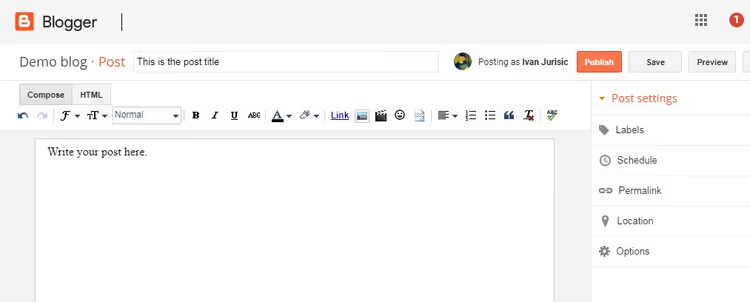
For a casual author, the difference is not critical. But when a blog exceeds 15-20 posts, revisions, a scheduler and media library in WordPress save hours of work.
4. SEO capabilities

The most important criterion for a blog that needs to be found in search. WordPress pulls away.
Blogger provides three SEO tools: title field, meta description field and URL slug setting. A set relevant for 2008. WordPress with the free Rank Math plugin provides: schema markup for articles and products (Schema.org), XML and HTML sitemaps, canonical URL management, robots.txt file, redirect manager, Open Graph tags, structured data and keyword analysis. One checkbox in Rank Math or Yoast closes indexing of archives and pagination pages. On Blogger, this requires manual JavaScript hacks.
The practical difference is confirmed by data from Google Search Console: WordPress blogs consistently gain more indexed pages in the first 90 days after launch than Blogger blogs of similar size. Clean sitemaps and correct canonical tags save crawl budget.
If search traffic matters at all, Blogger is not an option. WordPress SEO is on a qualitatively different level.
Monetization
Both platforms support Google AdSense. That's where the similarity ends.
WordPress opens at least five revenue paths that Blogger blocks completely: digital products through WooCommerce or Easy Digital Downloads, physical products through WooCommerce, paid subscriptions through MemberPress or Paid Memberships Pro, affiliate links with tools for cloaking and attribution, sponsored content with ad management.
Blogger supports only AdSense. Affiliate links can be inserted manually, but without plugins you can't track broken links and can't set up attribution. Selling a digital product requires a third-party service (Gumroad, PayHip) without native integration. Each extra link in the chain reduces conversion.
Blogger is structurally limited to display advertising. WordPress opens a full arsenal: from affiliate programs to selling courses and physical goods.
5. Support and community
WordPress. One of the largest communities among all CMS: official documentation at developer.wordpress.org, thousands of articles on specialized sites (WPBeginner, Kinsta, WPShout), support forums with hundreds of thousands of threads. Hosting providers provide first-level support. The WordPress developer market is huge: you can find a specialist in hours, not days.
Blogger. Support is limited to basic documentation and a forum with low activity. Don't expect individual help from Google. For a non-standard task, you're left alone with the problem.
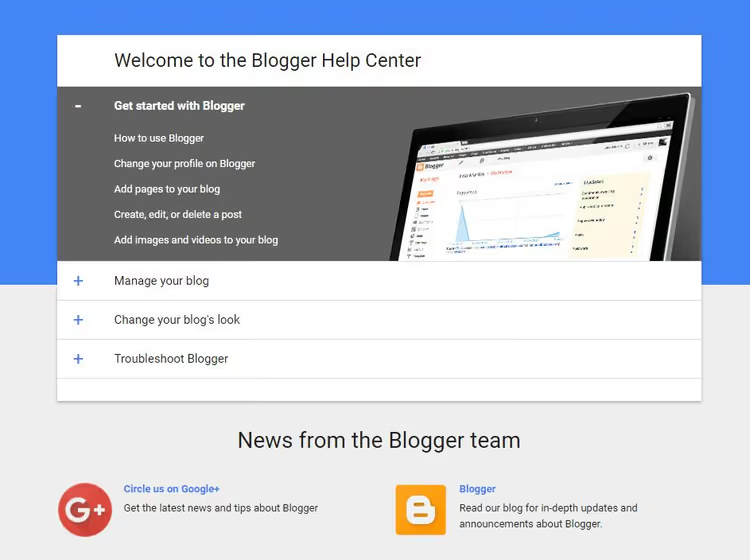
The volume of available help, documentation and specialists for WordPress is an order of magnitude higher. For Blogger, even finding an answer to a narrow question turns into an independent investigation.
Portability and migration
Changing hosting for a WordPress site is a routine operation: export database and files, import on new server, change DNS. Everything together takes from 30 minutes to a couple of hours depending on site volume.
Migrating from Blogger to another platform is fundamentally more difficult. Export is slow and multi-stage. There's a risk of losing search positions: the URL structure changes, and without carefully configured redirects, traffic drops. Google stores your data for a long time after export completion, but the migration process itself is a project, not a routine operation.
The ability to quickly move to another hosting without losses is insurance for your content asset for years to come. With WordPress, you have it.
Video: WordPress versus Blogger, visual comparison
To see the difference in interfaces with your own eyes, watch this comparison:
⁉️🤔 Frequently asked questions
Can I move a blog from Blogger to WordPress?
Yes, migration is possible. WordPress has a built-in import tool: go to Tools → Import → Blogger, authorize through Google and select the blog to transfer. After import, be sure to configure permalinks and redirects. The process takes from 30 minutes to several hours depending on content volume.
Which is cheaper: WordPress or Blogger?
Blogger is completely free, you only need a Google account. WordPress as software is also free, but requires hosting: from $3/mo on starter plans from Hostinger or SiteGround (first year with discount, renewal is more expensive later). With a domain, the first year of a WordPress blog costs about $50. In the second year, Blogger remains almost free ($12-15/year for domain), WordPress is around $100-150/year on budget hosting (prices vary, check with provider).
Do I need to know programming for WordPress?
No. A basic blog on WordPress is configured without code: installing a theme, replacing logo, creating pages through a builder (Elementor, Gutenberg). HTML and CSS open more possibilities, but for running a blog they're not required. Blogger also doesn't require programming at the start. The difference is that WordPress gives you a choice: either don't touch code at all, or change every detail of the site.
What's better for an SEO blog in 2026?
WordPress, no contest. Free SEO plugins (Rank Math, Yoast) give fine control over schema markup, sitemaps, canonical URLs and redirects. Blogger is limited to title and meta description. For a blog whose goal is search traffic and earnings, Blogger's toolkit is insufficient.
Can Google shut down Blogger?
Formally yes. Blogger belongs to Google, and the company has the right to change terms or close the service. Precedents: Google Reader (2013), Google+ (2019), Google Podcasts (2024), Google Domains (sold in 2023). Blogger has been running since 1999 and is unlikely to disappear tomorrow, but the absence of significant updates since 2020 is a signal that the service is not in Google's focus. WordPress doesn't depend on one corporation.
Which hosting to choose for WordPress as a beginner?
In practice, budget hosting with an auto-installer is enough to start: Hostinger (plans from a few dollars a month the first year, hPanel interface), SiteGround (quality support, plans on site). The main thing when choosing: free SSL, WordPress auto-installer and support in your language. For a personal blog without thousands of visitors, this is more than enough.
What to choose in 2026: final breakdown
The choice between WordPress and Blogger comes down to one question: what do you need a blog for?
If you need a personal diary without ambitions for traffic and earnings, Blogger works. Fifteen minutes to register, zero costs, zero technical headaches. This is enough for a hobby blog that friends and colleagues read. This is where Blogger's advantages end.
In all other cases, WordPress. The platform requires 2-4 hours for initial mastery and the cost of a domain plus minimal hosting for the first year, but returns this many times over:
- Full control. You own the data, code and design. One corporation's decisions don't determine the fate of your content.
- Search traffic. WordPress SEO tools with Rank Math or Yoast are a level that Blogger doesn't reach technically.
- Monetization without ceiling. From AdSense to selling courses, subscriptions and physical goods, all paths are open and integrated.
- Extensibility. 59,000+ plugins cover any task: from caching to e-commerce.
In practice, most bloggers who started on Blogger move to WordPress within a year or two when they hit another platform ceiling. If you already know that the blog should grow and earn, start with WordPress right away.
Try WordPress on a test site at a hosting provider. Most providers give 30 days for refund: that's enough to install a theme, write a couple of posts and understand if the admin panel suits you. The risk is minimal. Doesn't work out, you've lost nothing. Works out, you started with the right foundation.

A professional team of writers and editors specializing in creating quality content.