














🚀 How to add a welcome bar to a WordPress site
Someone opens your site, glances at the header, and closes the tab. Eight seconds. You offered them nothing at all: no discount, no newsletter, no free guide. Traffic exists. Leads do not.
A narrow strip at the very top of the page breaks this pattern. It greets visitors before they scroll down to a signup form or a "Buy" button. This is first-touch mechanics: you get a chance to say what matters most before the user leaves. According to Hello Bar, a properly configured top bar generates up to 11% of all site leads, and that is not magic but pure attention math.
Below, without fluff: which methods for adding a welcome bar to WordPress actually work in 2026, how free plugins differ from SaaS services, and how to squeeze maximum conversions out of that strip.
💡 Quick overview:
- Install a free plugin from the WordPress directory. Notibar, HashBar, or Simple Banner give you a ready-made bar in two minutes, with no external services or signups.
- Write a headline and a call to action. The bar's text matters more than its design: a short question plus a first-person verb on the button delivers the main conversion lift.
- Connect Hello Bar if you need A/B tests and targeting. The free Starter plan lets you test without risk, while paid plans unlock integrations with 30+ email services.
- Run an A/B test with a single variable. Change the headline, CTA, and design one at a time; that is the only way to learn what actually affected conversions.
What a welcome bar is and what problems it solves
Technically, it is a sticky bar that displays above the content, usually at the top of the page. Unlike pop-ups, the bar does not cover the screen or demand an immediate response: visitors read the message and continue scrolling.
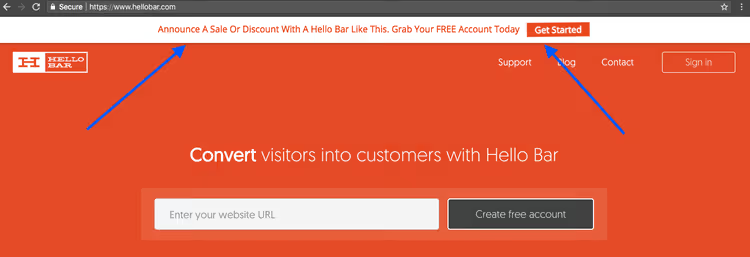
Four scenarios where a bar pays off fastest:
Lead magnet. A free checklist, template, or guide in exchange for an email. The bar contains a short question-style headline and a "Download" button. Without it, the same lead magnet sits in the sidebar, which only a small fraction of traffic ever reaches.
Promotion announcement. The bar appears above the first screen and ensures visitors do not miss a time-limited offer. It works better than a banner inside a post and requires no scrolling.
Urgent notification. Business hours changed, the site is under maintenance, shipping is delayed: the bar instantly delivers information to every incoming visitor.
Internal linking. Direct traffic to a key article, webinar, or new service without editing the menu or site structure.
Free plugins from the WordPress directory
If you need a simple bar without a monthly subscription, start with the WordPress directory. Here are three actively maintained options with updates current as of June 2026.
Notibar, Notification Bar for WordPress. 70+ ratings, 8,000+ active installs, compatible with WordPress 7.0. Multiple bars, a React customizer with live preview, display scheduling, and per-bar visibility rules. The free version is enough for most scenarios: one bar with a button, color and position settings. Notibar on WordPress.org
HashBar, Announcement, Notification Bar & Popup Campaign. 32+ ratings, 8,000+ installs, compatible with WordPress 7.0. Besides bars, it offers countdown timers, A/B testing, smart targeting, and basic analytics (features competitors hide in Pro versions). HashBar on WordPress.org
Simple Banner. 45 ratings, 50,000+ installs, compatible with WordPress 7.0. A minimalist tool: text, button, position (top/bottom), fixed or scrollable. No extra settings; install it, fill in your message, save. Great for one-off promotions and notifications that do not need targeting. Simple Banner on WordPress.org
All three plugins are open source, install in one click via "Plugins → Add New," and require no external account.
Hello Bar, a SaaS service with a free start
An alternative approach: not a plugin but an external service that connects to WordPress via an official module. Hello Bar is the best-known example of this model.
What it offers compared to directory plugins:
- Visual builder. Assemble a bar by dragging and dropping blocks, without touching CSS. Colors are pulled automatically from your site's theme.
- Built-in A/B testing on all paid plans, starting at $29 per month with annual billing.
- Smart targeting by geography, traffic source, device type, and date.
- Integration with 30+ email services (Mailchimp, ConvertKit, ActiveCampaign, and others) without Zapier.
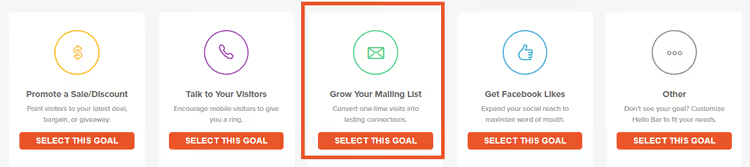
The free Starter plan gives unlimited pop-ups and bars with a view limit sufficient for testing on a small site. If the bar works, upgrade to Growth for A/B testing. Check current prices on the Hello Bar pricing page.
How to connect Hello Bar to WordPress:
- Sign up at hellobar.com and choose a campaign goal.
- Build your bar in the step-by-step builder.
- In the Hello Bar dashboard, click "I use WordPress" → download the plugin ZIP file.
- In the WordPress admin: "Plugins → Add New → Upload Plugin" → select the downloaded ZIP → activate.
- The bar will appear on your site automatically.
The optimal setup for most people: start with Notibar or HashBar (free, no external dependency), and when you realize the bar is generating leads and you want A/B tests, connect Hello Bar.
How to write a headline that converts
The bar's content (text, not design) determines the lion's share of results. No button animation will save a vague headline.
Three rules for a strong welcome-bar headline:
Keep it short. Visitors have two to three seconds to read. The longer the phrase, the higher the chance it gets ignored. Aim for five to eight words.
Be specific. "Join my mailing list" stopped working in 2018. But "Want my WooCommerce speedup checklist?" works because it promises immediate value.
Question and answer. The best mechanic: a question headline, an answer button. Headline: "Need more traffic to your site?" Button: "Yes, show me how." Neil Patel popularized this tactic; on his site Quick Sprout, a top bar with a single precise question brought in 11% of total leads. The audience visits for expert traffic content, and the question hits that need exactly.
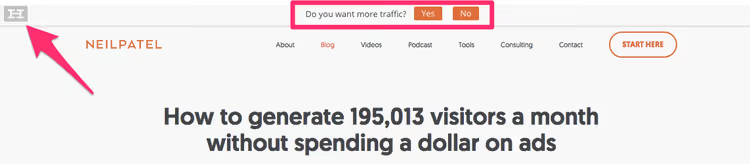
The CTA button is no place for "Submit" or "Learn more." Use first-person verbs: "Get the checklist," "Sign up for the webinar," "Yes, I want the discount." Visitors should mentally speak the button's phrase; then the click is almost inevitable.
A/B testing: one variable at a time
Once your headline and CTA are ready in a first draft, do not guess which version is better. Run an A/B test.
The cardinal rule of rigorous A/B testing: change exactly one element per iteration. If you alter the headline, button color, and image all at once, you will never know what actually affected conversions. The process:
- Step 1. Test the headline. Create two or three variants, wait for statistical significance.
- Step 2. Test the button text (CTA).
- Step 3. Only then test the design: color, animation, imagery.

Variant A is the baseline headline that already works. Use it as your reference when crafting alternatives.

Variant B tries a different angle: instead of a question, a direct benefit or specific number.

More than three variants in a single test is a mistake: you dilute traffic and wait exponentially longer for results. As soon as the system marks one variant with a star, stop the losers and create new variations based on the winner.
Technically, A/B tests are available in Hello Bar on paid plans and in HashBar's Pro version. If you use Notibar or Simple Banner, you can integrate Google Optimize or run manual splits via separate pages.
Targeting: the right message for the right person
The same bar for every visitor is missed opportunity. A user arriving from a search for "buy a monitor" and one reading a blog post about server configuration are different audiences with different purchase intent.
Three targeting filters that deliver the biggest conversion lift:
- URL path. Show a hosting-discount bar only to visitors reading articles about choosing a hosting provider. On other pages, display a different bar or none at all.
- Device type. A mobile bar should be more compact than its desktop counterpart. A separate CTA for smartphones ("Call us" instead of "Fill out the form") noticeably raises conversions.
- Date and time. Launch a New Year's bar on December 25 and auto-disable it on January 2. Or display a flash-sale bar only on weekends, without manually toggling it.
Hello Bar and HashBar support all three filters. Notibar offers targeting by URL and schedule. Simple Banner has no targeting and works only for general notifications.
If you have one bar but several user segments, create separate bars for each scenario and configure visibility rules. Setup takes longer, but conversions will grow dramatically.
⁉️🤔 Frequently asked questions
Can I add a welcome bar without a plugin?
Yes, via code in your theme's
header.phpor through thewp_headhook. A snippet of HTML, CSS, and JS creates a fixed div above the page. But you lose visual customization, A/B tests, targeting, and analytics. For a one-time notification, this approach works. For systematic lead generation, a plugin or SaaS is better.
Which plugin should I choose if my budget is zero?
Notibar. Actively updated, React interface with live preview, compatible with WordPress 7.0. The free version covers one bar with a button and color settings. Choose HashBar if you also need a countdown timer and A/B tests in the free version.
Hello Bar or a directory plugin: which is better?
A plugin if you need a simple bar with no external dependency and no monthly fee. Hello Bar if you plan regular A/B tests, integration with an email service, and smart targeting. The free Starter plan lets you test both approaches without risk.
Does a welcome bar slow down the site?
Plugins like Simple Banner and Notibar add minimal CSS and have virtually no impact on speed. Hello Bar loads an external script asynchronously, so the delay is imperceptible. On very slow hosting, an additional 100-200 ms delay is possible. After installation, check your site with PageSpeed Insights.
How much text should be on the bar?
Headline: five to eight words. Button text: two to four words. That is it. If you need to say more, that is what the post body or the landing page behind the bar is for.
Does a welcome bar hurt SEO?
No, as long as it does not block content from indexing. The bar is rendered via CSS and JS and does not affect the article's HTML markup. Google treats sticky elements favorably, provided they do not cover primary content on mobile devices.
Which tool to install in 2026
A welcome bar is one of the three most underrated conversion tools on WordPress, alongside the welcome pop-up and the postscript at the end of a post. The paradox is that the barrier to entry could not be lower: two minutes to install Notibar or Simple Banner, and you are already capturing leads from traffic that used to disappear.
A quick matrix for your task:
- Simple notifications and lead magnets → Notibar or Simple Banner. Free, no external services, instant start.
- **A/B tests and integration with **newsletters → HashBar or Hello Bar Growth, from $29/month on the Hello Bar website.
- A single weekend promotion → Simple Banner: install, launch, forget.
Install a free plugin today. If the bar brings in even one lead within a week, you are already ahead. And once you understand the mechanics and want to scale, move to tools with A/B testing. The first step is to install a bar and write an honest headline that addresses a real pain point for your visitor.

A professional team of writers and editors specializing in creating quality content.