













 AIIllustrative image: AI-generated
🚀 WooCommerce cart discounts: why you need them and how to set them up
A customer filled a cart with $80 worth of items, reached checkout, and closed the tab. According to Baymard Institute data for 2025, the average cart abandonment rate in ecommerce holds steady at 70.2%. Seven out of ten potential sales never make it to the register.
A cart discount catches the customer at exactly this moment. Not a pop-up on site entry, not a banner on the homepage, not a coupon from a newsletter, but a personalized offer right inside the cart, tied to the order total and customer profile. The person has already selected products, is one step away from payment, and just needs one final argument.
But the mechanism only works when the discount is personalized. A mass sale attracts discount hunters and eats into margins on all orders, including those that would have happened anyway. A targeted offer based on role, purchase history, or cart total solves exactly the problem you need: increasing the average order value for a loyal customer, converting a newcomer into a first-time buyer, or bringing back a customer who hasn't visited in three months. We'll walk through the complete setup process on WooCommerce.
💡 Quick overview:
- Why you need cart discounts: 7 business effects with numbers and scenarios
- How personalized discounts differ from coupons and mass sales
- Step-by-step setup through Wisdm Customer Specific Pricing: three steps from installation to fine-tuned exclusions
- Alternative: ELEX Dynamic Pricing and Discounts, flexible rules and purchase history integration
- Common questions: multi-currency compatibility, coupon conflicts, tax calculations
What are WooCommerce cart discounts
Out of the box, WooCommerce only offers coupons. You create a promo code, the customer enters it in a separate field, and receives a fixed or percentage discount. Three limitations make this mechanism weak for systematic conversion work: the code must be known, it's not tied to order total, and there's no personalization by customer type.
Cart discounts work differently. The customer simply adds products, and the system automatically recalculates the final price when the total reaches a specified threshold. No promo codes, no extra fields: visit, fill the cart, see the discounted price, check out.
Technically, this is implemented through the WooCommerce hook woocommerce_cart_calculate_fees. The dynamic pricing plugin intercepts the cart recalculation, checks the conditions of active rules, calculates the discount amount, and adds it as a negative fee. For the customer, the entire process is seamless: they don't know about the hook, rules, or thresholds; they simply see a pleasant final number.
Personalized discounts go even further. Different conditions for different groups:
- a new customer gets a modest percentage on their first cart above a small amount;
- a loyal customer with a "VIP" role gets an increased percentage on large orders;
- a wholesaler with a "wholesale" role gets a separate price grid without additional conditions.
Each sees only their own offer. A mass sale with a fixed percentage on everything puts a yellow price tag on the entire storefront, attracts an audience that only buys on discount, and reduces the perceived value of the brand. A personalized offer works precisely: it reaches the target customer, motivates them to increase their order, and doesn't devalue the product.
7 reasons to add personalized cart discounts
Seven specific business effects, from increased average order value to protecting your brand from price wars.
1. Increased loyalty and retention
A customer who receives a personal discount simply for being a customer comes back. According to industry research on ecommerce loyalty, unexpected personal offers are the strongest driver of repeat purchases. A cart discount is exactly that format: the customer didn't ask, didn't search for a promo code, yet the system made a gesture toward them.
2. Higher average order value
For the discount to apply, the cart must reach the threshold. A customer who planned to spend a certain amount sees a notification: "Add a bit more and get a discount," and adds more items. The store earns more even after the discount. The threshold works as a soft, unobtrusive upsell.
3. Encouraging trial purchases
A new product without reviews sells poorly. Tie a cart discount to having this product in the order, and the customer will try the new item with less risk, while the store gets its first sales and possibly its first reviews.
4. Natural filtering of discount hunters
The cart discount isn't visible until the cart is filled. A random visitor who came for a promo code from a coupon site won't see the offer at all. A real customer who added products will discover the bonus and perceive it as gratitude, not an invitation to haggle. The natural filter works without additional settings.
5. Reduced cart abandonment rate
According to Baymard Institute, more than half of customers are willing to complete a postponed purchase if the price drops. A cart discount acts immediately, and the incentive kicks in at exactly the moment when the person is wavering between "check out" and "close the tab."
6. Attracting new customers
A guest or newly registered user with a discount on their first cart is more likely to complete the order and return. The first interaction with the store becomes a positive experience rather than an impersonal transaction. This is especially effective for stores with high competition, when the customer is choosing between three similar offers.
7. Preserving brand identity
Mass discounts scream "we're cheap." Personalized ones say "we value you specifically." By controlling the size and reach of discounts, you maintain premium positioning and avoid sliding into a price war where the only argument is who can offer one percent more off.
How to set up cart discounts through Wisdm Customer Specific Pricing
Basic WooCommerce doesn't provide tools for personalized cart discounts; you need a dynamic pricing plugin. Let's walk through the setup using Wisdm Customer Specific Pricing, one of the most feature-rich solutions for the task of "different prices for different customers."
The plugin sets unique prices for individual customers, roles, and groups, configures multi-tier quantity discounts, and creates discounts based on cart value. After installation and activation, three steps.
Step 1: Create a cart discount rule

In the admin panel, go to CSP → Cart Discounts. Enable percentage discounts and select the target audience: new customers, existing customers, or guests. Only the selected groups will see the offer; other visitors won't know about it.

Set two key parameters: minimum cart value and discount percentage. For example, a threshold of a hundred dollars and a discount for first-time buyers. A customer whose cart doesn't reach the threshold sees a notification like "Add a couple dozen more dollars worth of items and get a discount," which is an automatic threshold-based upsell.
Step 2: Limit the maximum discount amount

A percentage discount without an upper limit is dangerous: on a large cart, the same percentage turns into hundreds of dollars in losses. The plugin allows you to set a maximum allowable discount value in dollars, an absolute ceiling above which the discount doesn't grow. This is a critically important setting: without it, wholesale orders bring in less profit than retail ones.
Step 3: Configure exclusions

For fine-grained control, set exclusions: a list of products or categories that the discount doesn't apply to, as well as roles and user groups outside the promotion. Clearance items that are already selling at a discount should be removed from the rule immediately, since an additional cart discount would make them unprofitable. The plugin shows the customer how much more to add to the cart to get the discount, providing a transparent trigger for increasing the order.
Alternative: ELEX Dynamic Pricing and Discounts

ELEX WooCommerce Dynamic Pricing and Discounts emphasizes rule flexibility. Unlike Wisdm, here each discount rule can be personalized by user roles, purchase history, or combinations of conditions.
The plugin creates discounts based on products, categories, cart conditions, product combinations, and quantity ranges. For example, a rule like "discount on product A when product B is in the cart and the order total exceeds fifty dollars" is configured in a single interface without additional modules.
The fundamental difference between the two plugins is in approach. Wisdm was designed around the customer: you set prices for specific users or roles, and the system pulls them into the cart. ELEX was designed around rules: you describe conditions, and the plugin applies them to everyone who qualifies. The first approach is more convenient for B2B stores with different price grids for wholesalers; the second is better for B2C stores with frequent promotions and complex trigger logic.
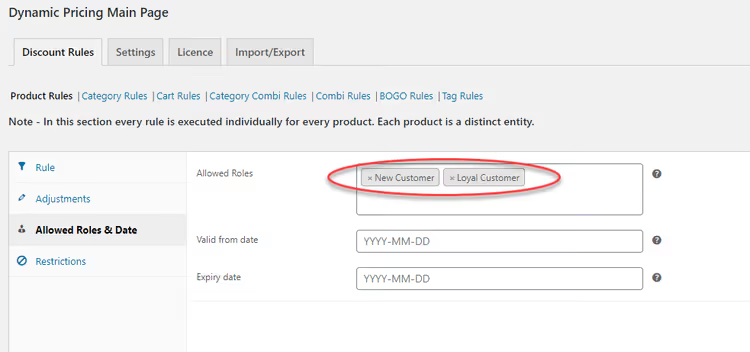
Role-based personalization: you select which user roles have access to the offer, and only those customers see the discount. Other visitors don't know about it, and margins on their orders are preserved in full.
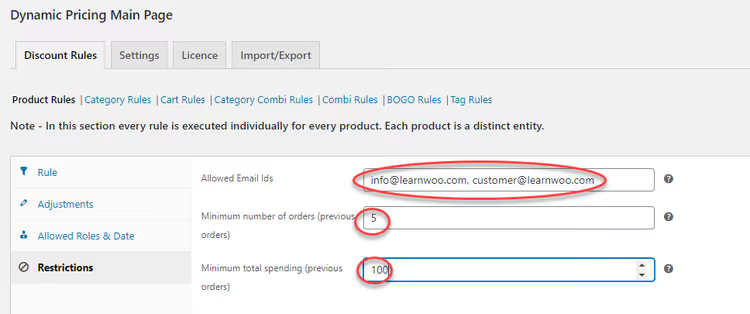
Even finer control comes from tying discounts to purchase history. Set a minimum number of completed orders or total previous purchase amount, and the discount opens only to loyal customers who've crossed the threshold. You can specify specific email addresses for fully individual offers.
A visual demonstration of creating cart discounts in WooCommerce, breaking down several approaches from simple threshold rules to combining conditions.
⁉️🤔 Frequently asked questions
Do cart discounts work with multi-currency stores?
Most dynamic pricing plugins, including Wisdm CSP and ELEX, are compatible with multi-currency solutions like WPML and Polylang. The trigger threshold is set in the store's base currency, and the plugin automatically converts it for users in other currencies. Before launching, check the documentation for your specific plugin: the conversion logic may differ between solutions.
Do cart discounts conflict with WooCommerce coupons?
By default, WooCommerce allows either a coupon or a dynamic discount to be applied, but not both simultaneously. Some plugins, including ELEX, offer a choice: prohibit combining, stack discounts, or give priority to one over the other. In practice, stacking is not recommended, as double discounts often eat up all order profitability.
How do cart discounts affect tax calculation?
Tax is calculated on the final order amount after the discount is applied. If the discount is subtracted from the product price, the tax base decreases accordingly. Check the tax class settings in WooCommerce: the dynamic pricing plugin should pass the recalculated price to the tax calculator before calculation, not after.
Can products already on sale be excluded from the discount?
Yes, both Wisdm CSP and ELEX allow you to set a list of excluded products and categories. This is standard practice: clearance items are already selling at a discount, and an additional cart discount would make them unprofitable. Configure exclusions once when creating the rule and forget about them.
Which plugin should I choose: Wisdm or ELEX?
Wisdm CSP is better suited when the main task is personal pricing tied to specific customers, roles, and cart value. Three setup steps, a clear interface, and customer notifications about the discount threshold. ELEX wins on rule flexibility: more discount types and broader options for combining conditions. For most stores, Wisdm is sufficient; choose ELEX if you need complex scenarios like "discount on product A when product B is present and order total exceeds $X."
Which solution fits your task

Cart discounts are a tool with proven effectiveness. They reduce cart abandonment rates, raise average order values, and do so without damaging your brand because they work precisely rather than dropping prices across the entire storefront.
To understand whether a rule is working, track three metrics in Google Analytics or Matomo: cart abandonment rate before and after launch, average order value for discounted orders versus non-discounted ones, and the percentage of customers who return for repeat purchases. An increase in average order value with a simultaneous drop in profitability is a bad trade. Calculate in dollars, not percentages.
The choice comes down to your scenario:
Personal pricing for different customer groups: choose the Wisdm CSP plugin. Three setup steps, a clear interface, built-in customer notifications about the discount threshold.
Maximum rule flexibility and complex trigger logic: your choice is ELEX Dynamic Pricing and Discounts. More discount types, purchase history integration, control over behavior when conflicting with coupons.
Regardless of the plugin, keep three rules in mind. First: always set an upper discount limit in dollars, since a percentage without a ceiling on a large order turns into a direct loss. Second: test every rule on staging before production, as one mistake in a condition can zero out margins on hundreds of orders in an hour. Third: don't offer a discount to those who are ready to buy without one; exclude from rules the loyal customers with high average order values who consistently place orders without incentives.

A professional team of writers and editors specializing in creating quality content.