














🔐 WP-Recall review: user dashboard, chat, forum and commerce for WordPress
The standard WordPress profile is a page with a nickname and gravatar. WP-Recall turned it into a full-featured dashboard with chat, forum, groups, and even internal commerce. The plugin evolved from a niche builder into an ecosystem of 30+ addons.
Now it's closed. As of June 1, 2025, WP-Recall was removed from the WordPress.org directory at the author's request, the developer's website is unresponsive, and critical vulnerabilities were found in the code. For those who already have the plugin deployed, it continues to work. For new projects, the picture is different.
Below is an honest breakdown: what WP-Recall can do, which techniques save existing installations, why starting with it in 2026 is risky, and what to use instead for specific tasks.
💡 Quick overview:
- What WP-Recall is: a dashboard builder with chat, forum, groups, and commerce through addons
- Current status: plugin closed in the WordPress.org directory, codeseller.ru site unavailable, source code on GitHub
- Useful techniques: auto-avatar on registration and site-wide chat via shortcode for existing installations
- Alternatives: Ultimate Member for membership, UsersWP for lightweight profiles, Profile Builder for custom forms
What is WP-Recall
WP-Recall is a user dashboard builder for WordPress. It replaces the standard profile with a multifunctional panel: private messages, interest groups, forum, frontend publishing, rating system, and internal commerce.
The base version is free. Out of the box you get custom profile fields with a drag-and-drop builder, user-uploaded avatar and cover image, member directory, and personal balance. Everything else (chat, forum, groups, achievements, commerce) connects through addons. The author released more than thirty extensions.
The architecture is open: dozens of actions and filters for developers, two built-in dashboard templates, and the ability to write your own. In practice, WP-Recall was chosen by those who found BuddyPress too heavy and Ultimate Member too simple.
The author recorded a series of video tutorials on setup. Here's an overview of the publication form page, one of the central modules:
Key features
The base build includes over a dozen modules ready to work immediately after activation. Let's break down the most popular ones.
User profile. A customizable set of fields with adjustable order: drag and drop in the admin panel to get a registration form or profile card with the structure you need. Supports text fields, file uploads, and dropdown lists.
Private messages and chat. The Rcl Chat module provides both private messaging and a site-wide chat. The latter is inserted with a single shortcode [rcl-chat chat_room="room-name"] into a widget area or any page location.
Rating system. Three modes: stars, "like/dislike," or just "like." Ratings can be attached to comments, posts, and arbitrary objects through the plugin API.
Frontend publishing. Users create and edit posts directly from their dashboard without accessing the WordPress admin. The editor supports uploading multiple photos to a single publication.
User balance. A built-in account with an internal ledger, the foundation for paid addons: Commerce (a free e-commerce addon) and Shop Service (service orders from providers).
Groups and forum. Groups Wp-Recall provides closed communities with content access control. PrimeForum is a lightweight forum overlay with human-readable URLs. Both modules are free.
Addons. An ecosystem of 30+ addons covers affiliate programs, achievement systems with rewards, the ADV System advertising platform, paid timed access, an investment system, and a dozen integrations from WooCommerce to All in One SEO Pack.
Current status and risks
As of June 1, 2025, WP-Recall was removed from the WordPress.org directory at the author's request. The reason was not disclosed, the closure is permanent, and installing the plugin through the standard admin search is no longer possible.
The developer's website codeseller.ru, which hosted documentation and sold Pro addons, is unavailable. The source code is mirrored on GitHub. A Russian-language description and addon list were maintained on wp-kama.ru, but this resource is also periodically unavailable.
For existing users, the plugin continues to work: it doesn't depend on any external API. If WP-Recall is already deployed on a live site, the techniques described below and documentation links through the web archive remain relevant.
Vulnerabilities. In versions up to and including 16.26.10, critical issues were discovered: SQL injection via the databeat parameter (CVE-2025-1323), stored XSS via the public-form shortcode (CVE-2025-1324), and reflected XSS (CVE-2025-52796). The latest version 16.26.14 probably patches these holes, but there's no official confirmation: the plugin is closed and the changelog isn't being updated. On WordPress.org, the plugin was tested up to version 6.7.5; compatibility with newer WordPress releases is not guaranteed.
For a new project, starting with WP-Recall is unjustifiably risky. The absence of official security updates, loss of access to addons, and unavailable documentation make this path acceptable only for a test site with nothing to lose.
Useful techniques for existing installations
Automatic profile photo assignment on registration
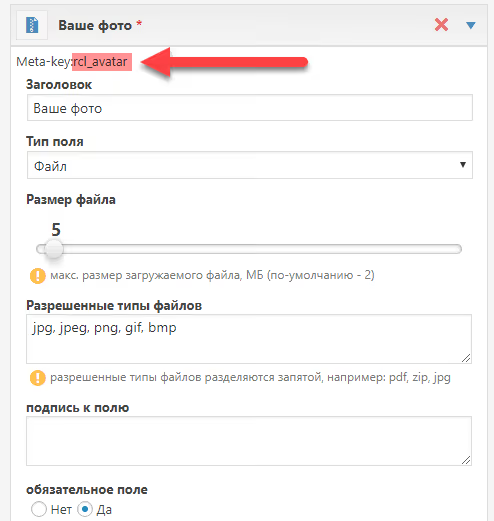
When a user uploads a photo during registration, it goes into a form meta field but doesn't automatically become the WordPress profile avatar. WP-Recall works around this limitation with a built-in field naming convention.
In the registration form builder, add a file upload field and enter rcl_avatar in the "meta field" parameter. On registration, the photo will be picked up both as the WordPress avatar and as the WP-Recall profile image:
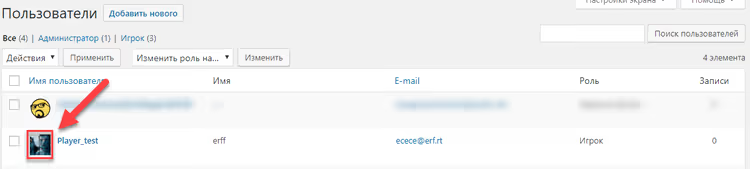
This technique saves the user an extra step of "going to the profile and setting an avatar separately," noticeably improving profile completion rates.
Site-wide chat
The built-in chat launches with a single shortcode. Place [rcl-chat chat_room="my-new-chat"] in a widget area or anywhere else via a shortcode block. The room is created automatically on first access and requires no separate admin configuration.
A detailed description of shortcode parameters is in the chat API documentation (archived copy via Wayback Machine).
Where to find documentation
Since the main documentation site is unavailable, current sources include:
- WP-Recall documentation, archived copy via Wayback Machine
- Plugin API, description of hooks and filters
- Snippet collection, ready-made solutions from the community
- GitHub mirror, plugin source code
⁉️🤔 Frequently asked questions
Does WP-Recall work on the current WordPress version? Yes, with caveats. The latest plugin version (16.26.14) was tested up to WordPress 6.7.5 and PHP 7.0+. On WordPress 6.8 and newer, basic functionality works; the plugin isn't tied to specific core versions through critical calls.
The plugin was tested up to WordPress 6.7.5 and showed full compatibility. For versions 6.8 and above, no direct conflicts have been identified, but the author didn't conduct a full QA cycle since the plugin is closed. On a live site, first deploy a copy in a test environment.
How does WP-Recall differ from BuddyPress? BuddyPress is an "out of the box" social network focused on communities. WP-Recall is a builder: you enable only the modules your specific project needs. BuddyPress is harder to configure for access rights; WP-Recall gives granular control through addons.
BuddyPress is great for forums and social networks: it immediately provides an activity feed, friends, and groups without extensions. WP-Recall wins where you need a dashboard with commerce: built-in user balance, orders, affiliate program. Choose BuddyPress for a community project; choose WP-Recall for a marketplace or service with a client portal.
Can I install WP-Recall on a new site today? Technically yes, via a ZIP archive from GitHub. Practically, we don't recommend it. The plugin is closed, official security updates aren't being released, and addons can't be purchased or updated centrally. Add to that the known vulnerabilities in versions before 16.26.10, and the risks for a commercial site become unacceptable.
Installation via ZIP works: download the archive from the GitHub repository, upload via "Plugins → Add New → Upload Plugin." The base version activates. But the only reasonable scenario for a new installation is a test site to evaluate whether it's worth migrating an existing project to this plugin.
What integrations are available for WP-Recall? The developer released free bridges to WooCommerce, WP-PostRatings, All in One SEO Pack, WP-PostViews, and Download Monitor. Each bridge is a separate addon that pulls data from the third-party plugin and displays it in the dashboard.
Integrations work through the APIs of both sides without code modification. The WooCommerce bridge adds an "Orders" tab to the dashboard and pulls purchase history using standard WooCommerce functions. Addons are unavailable for download after codeseller.ru closed; only copies you already have will work.
Is there a Russian localization? Full localization. WP-Recall was originally developed by a Russian-speaking author; the interface and admin panel are completely translated. The plugin also supports English, Italian, Japanese, Romanian, and Ukrainian through translate.wordpress.org.
Russian is the plugin's native language; the translation was done by the author, not by machine. The English localization is a community translation and incomplete; some addons aren't translated. For a Russian-language site, there are no interface language issues.
Should you install WP-Recall in 2026
WP-Recall remains a working tool for those who already have it deployed and configured. Closure in the WordPress.org directory doesn't break existing installations: the code continues to work, addons function, and the techniques described above solve common tasks without external dependencies.
For a new project, the answer is clear: don't. The absence of security updates, known CVEs in previous versions, and loss of access to addons outweigh any architectural advantages. Here's what to consider instead:
- Ultimate Member if you need membership with content restrictions and subscriptions. Free version in the WordPress.org directory, 200,000+ active installations, regular updates.
- UsersWP if you need a lightweight profile and user directory without overhead. Minimalist, doesn't overload the site, available on WordPress.org.
- Profile Builder if custom fields and registration forms are the priority. Convenient drag-and-drop builder, simpler than WP-Recall to configure, free version in the directory.
If you need a commercial dashboard with balance and orders, use a WooCommerce plus field manager combination. If you need a community with forum and groups, use BuddyPress. WP-Recall stays in the arsenal of those who've already invested time in its ecosystem and aren't ready to migrate.
Which dashboard plugin do you use? Share your experience in the comments; real cases are more valuable than any review.

A professional team of writers and editors specializing in creating quality content.