













🔄 Widget Importer & Exporter review: importing and exporting WordPress widgets
What Widget Importer & Exporter is for
Transferring widgets from one WordPress site to another is a task that comes up regularly. Moving to a new domain, changing hosting, cloning a project for development, deploying standard configurations for clients. WordPress has no built-in tools for widget migration. Copying settings manually is slow, tedious and error-prone: a text widget with HTML, navigation blocks, subscriptions, all of this gets lost during manual transfer.
Widget Importer & Exporter fills this gap. The plugin packages all active widgets into a single JSON file with the .wie extension and deploys them on the target site with smart conflict handling. No magic, just a working tool that does not try to be a Swiss army knife.
Since its release, the plugin has accumulated over 200,000 active installations and maintains a 4.7 out of 5 rating with 117 reviews. The developer, Steven Gliebe from ChurchThemes.com, keeps it up to date: the latest update came out in May 2026, and version 1.6.1 is tested up to WordPress 7.0.
💡 Quick overview:
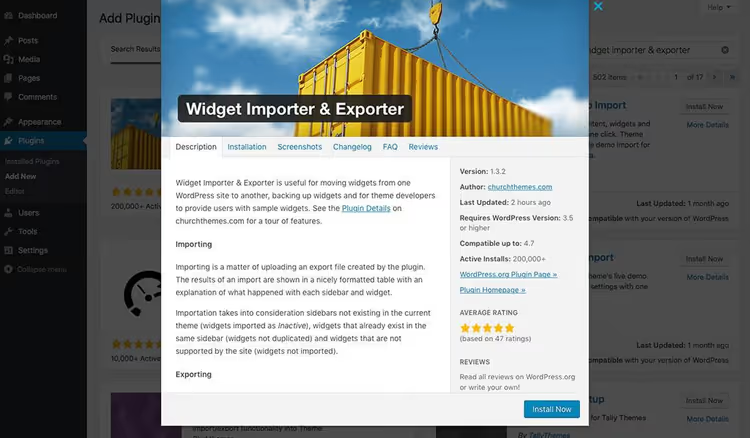
- Installation. Install Widget Importer & Exporter from the WordPress plugins directory.
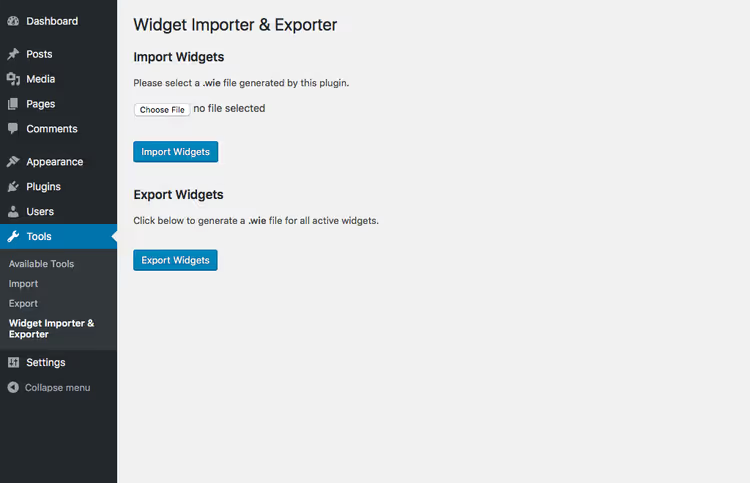
- Export. On the source site: Tools → Widget Importer & Exporter → click "Export Widgets" and download the
.wiefile. - Import. On the target site: same section → upload the
.wiefile → click "Import Widgets". - Result. Review the table: the plugin shows which widgets were imported, which were skipped and why.
How widget export works
Export in Widget Importer & Exporter is as simple as it gets. Go to Tools → Widget Importer & Exporter, click the single "Export Widgets" button, and the browser downloads a file with the .wie extension. Inside is a JSON structure containing all active widgets on the site: their types, settings, and assignments to areas (sidebar, footer, header).
The .wie format is a proprietary extension of the plugin, and this is the right decision. It prevents confusion with other JSON widget exports from third-party plugins. Technically it is plain JSON that you can open in a text editor to view the structure.
What gets exported:
- all active widgets with their settings;
- widget assignment to a specific theme area;
- widget position within the area;
- all widget types, both standard (text, search, categories) and those added by other plugins.
How widget import works
Import is the mirror operation. On the target site where Widget Importer & Exporter is already installed, go to the same Tools → Widget Importer & Exporter, upload the .wie file through the form and click "Import Widgets". The plugin parses the JSON, matches widget areas from the source site to areas in the current theme and places the widgets accordingly.
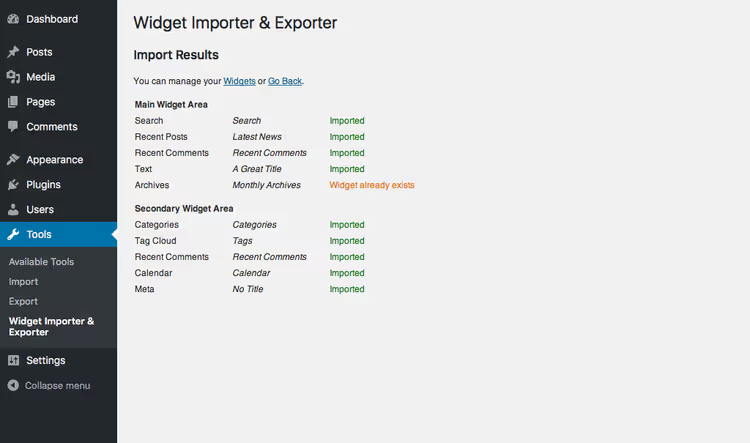
The result is displayed as a neat table. Each area and each widget gets its own row with a status. You immediately see whether a widget was imported or skipped, and if skipped, for what reason.
The results table is one of the plugin's strong points. Instead of blindly hoping "everything probably transferred," you get a transparent report. This is especially valuable when migrating large sites with dozens of widgets in different areas: footer, blog sidebar, shop sidebar, header.
Smart handling: what the plugin does under the hood
The most valuable aspect of Widget Importer & Exporter is not the data transfer itself, but the logic for handling mismatches. During import, the plugin runs three checks for each widget.
First check: area existence. If on the source site a widget was in the "Shop" sidebar, but the target theme has no such sidebar, the widget is not lost. It gets marked as "Inactive" and goes into the inactive widgets section in the admin panel. You can manually drag it to a suitable area.
Second check: duplicates. If the target area already has exactly the same widget with the same settings, the plugin does not duplicate it. Import skips the existing instance and moves on. No clones and no cluttered sidebars.
Third check: unsupported widgets. Sometimes a widget was added by a plugin that is not present on the target site. Widget Importer & Exporter does not try to create a broken block; it simply skips such a widget and reports this in the results table.
A separate scenario involves .wie files from theme developers. Many themes, especially premium ones, ship with a ready set of demo widgets. Widget Importer & Exporter is the standard way for theme authors to distribute such examples. Users get an exact copy of the demo site's widgets with a single click.
Hooks and filters for developers
Despite its outward simplicity, the plugin provides room for customization through three hooks. All of them are documented in the repository on GitHub.
The wie_before_import hook fires after file upload but before data processing. At this point you can: check the JSON structure, log the operation, add additional validation specific to your project.
The wie_after_import hook runs after data has been imported and widgets are in place. This is convenient for: clearing cache, sending a notification to the administrator, triggering CSS regeneration if you use widgets with dynamic styles.
The wie_import_data filter gives access to the data array before import. You can remove certain widgets, replace settings, adapt media file paths for a new domain. This is useful for automated deployments when import happens not manually through the admin panel but through scripts.
Additional hooks are accepted via pull request on GitHub. The developer is open to suggestions, the repository is active, and issues are addressed.
Limitations and when the plugin is not enough
Widget Importer & Exporter solves one task and solves it well. But it is important to understand its boundaries.
The plugin transfers only widget settings, not post content, not media files, not theme settings and not customizer options. It is not suitable for full site migration and is not positioned as a full migration tool. This is a narrow, focused tool for a single operation.
Widgets saved through Gutenberg blocks (in "blocks as widgets" mode) transfer correctly; this is confirmed by user reviews from 2023. But if a site has fully switched to an FSE theme (Full Site Editing) where sidebars are replaced by block templates, traditional widgets may not exist as a concept, and the plugin simply has nothing to export.
Also, the .wie file is tied to the area structure of a specific theme. If the source and target sites use radically different themes with different sets of sidebars, some widgets will end up as "Inactive". This is not a bug but expected behavior, though you should be prepared for it.
Video: widget import and export in practice
Watch a step-by-step demonstration: installing Widget Importer & Exporter, exporting widgets from a test site and importing them to a clean WordPress installation with an analysis of the results table.
⁉️🤔 Frequently asked questions
Is the .wie file just JSON?
Yes.
.wieis a plain JSON file with a proprietary extension introduced to avoid confusion with export files from other widget plugins. It opens in any text editor.
What happens if the target site already has the same widget in the same area?
The plugin does not create duplicates. A widget identical to an existing one is skipped; in the results table it will be marked as "Already exists" and will remain as a single instance.
Can you import widgets between themes with different sets of sidebars?
Yes, and this is a standard scenario. If a widget area from the source theme is absent in the target theme, the widget is marked as "Inactive" and goes into the corresponding section of the admin panel. You manually drag it to a suitable area.
Is the plugin needed on both sites for migration?
On the source site, to create the
.wieexport file. On the target site, to import that file. Installation takes less than a minute: standard search in the WordPress plugins directory → activation.
Does the plugin transfer widgets added by other plugins?
Yes, if the same source plugin for the widget is installed on the target site. If the plugin is not there, the widget will be skipped during import, and you will see this in the results table. No broken blocks or errors.
Is Widget Importer & Exporter free?
Completely. The plugin is distributed through the official WordPress directory under an open license. No Pro versions, subscriptions or premium features. Source code is in the GitHub repository.
Is Widget Importer & Exporter worth installing in 2026

After six years of existence and two hundred thousand active installations, the answer is clear: if you need to transfer widgets between WordPress sites or make a backup of widget settings, this is the right tool. It is free, lightweight, does not try to be "all in one" and does exactly what it promises.
For developers who regularly deploy standard configurations, the .wie file becomes a template: set up widgets once on a dev site, export them, and reuse them on every new project. The savings are substantial.
If the task is broader (full site migration with content, media files and theme settings) look toward All-in-One WP Migration, Duplicator or WP Migrate. Widget Importer & Exporter does not replace these tools but complements them: after a full migration you can separately bring over widget settings if the main migration plugin did not handle them.
🔗 Widget Importer & Exporter on WordPress.org🔗 Source code on GitHub

A professional team of writers and editors specializing in creating quality content.