













 AIIllustrative image: AI-generated
✅ 6 plugins for content restriction in WordPress 2026 (free and paid)
Restricting part of a website with a password, hiding pages from non-logged-in users, or launching a paid membership section with subscriptions are tasks that require the right tool. Not just "some membership plugin," but one specifically built for content restriction: roles, access levels, block hiding, personal user pages.
We tested 6 WordPress plugins that solve these problems without workarounds. Half of them have a free version on wordpress.org.
💡 Quick overview:
- We compare
Kadence Memberships(formerly Restrict Content), a full-featured membership engine with Stripe in the free version, andMembers, a lightweight role editor with granular block hiding Ultimate Memberprovides frontend profiles and community features,Paid Member Subscriptionshandles flexible subscription plans,Profile Buildercovers custom registrations with content restriction,PrivateContentsolves multi-level user categories- Choose based on your task: if you need recurring payments, go with
Kadence MembershipsorPaid Member Subscriptions, if you need to quickly hide a page by role, useMembers, if you're building a community with profiles,Ultimate Member
Comparison table
Plugin | Price (from) | Free version | WP rating | Best for |
|---|---|---|---|---|
Kadence Memberships | Free / Pro from $199/year | Yes | 4.3 | Full-featured membership site |
Ultimate Member | Free / Pro from $249/year | Yes | 4.0 | Community with profiles |
Paid Member Subscriptions | Free / Pro from €69/year | Yes | 4.5 | Paid subscriptions |
Profile Builder | Free / Pro from $69/year | Yes | 4.5 | Registration + restriction |
PrivateContent | $35/year | 7-day trial | 1.1 | Multi-level access |
Members | Free | Yes | 4.7 | Role-based restriction |
1. Kadence Memberships
A full-featured membership plugin that was called Restrict Content before its rebrand. Now developed under the Kadence WP and Nexcess umbrella. Covers the entire cycle: registration, access levels, payment processing through Stripe, subscriber management and content restriction at the page, post, custom post type and even block level.
Stripe works in the free version, without WooCommerce and third-party layers. A member registers, chooses a plan (free, trial, paid), gets access to their content and sees payment history in their account.
Pros:
- Stripe out of the box in the free version, without WooCommerce
- Prorated billing when switching plans (upgrade/downgrade)
- Auto-generated pages: registration, account, profile editing, card management
- REST API and WP-CLI for developers
Cons:
- Pro version significantly more expensive than basic, minimum $199/year
- PayPal, Authorize.net and Braintree only in Pro
- 34 add-ons, some needed functionality requires upgrade
Price: Free version on wordpress.org. Pro, from $199/year.
🔗 Kadence Memberships on WordPress.org🔗 Kadence WP website
2. Ultimate Member

A plugin that grew out of profiles and communities. Registration, login and profile editing, all on the frontend, with drag-and-drop form builder and conditional field logic. Built-in member directories, private messages, groups, followers, closer to a social network than a dry membership plugin.
Content restriction works at the role and login status level: you can lock pages entirely or fragments. But in practice the basic version has bugs: in 2026 reviews, there are complaints about failing cron tasks, avatar issues and weak tech support for free users.
Pros:
- Powerful frontend: profiles, registration, member directory
- Form builder with conditional logic
- Dozens of add-ons: Stripe, WooCommerce, bbPress, social login, Zapier
- Active on wordpress.org, 70K+ installs
Cons:
- Complaints about bugs in basic version (cron, avatars), relevant in 2026
- Pro $249/year, one of the most expensive in the roundup
- Private content, groups, messages, only through paid add-ons
Price: Free Lite version. Pro, from $249/year.
🔗 Ultimate Member on WordPress.org🔗 Ultimate Member website
3. Paid Member Subscriptions

A product from Cozmoslabs, the same developers who make Profile Builder. Built specifically for paid subscriptions: hierarchical plans (Free, Silver, Gold), upgrade and downgrade, recurring payments through Stripe and PayPal, promo codes.
Global content restriction (separate add-on) allows you to attach rules to post types and taxonomies without configuring each post manually. WooCommerce integration lets you hide the store or individual products from non-logged-in users.
Pros:
- Hierarchical subscription plans with free trial period
- Global restriction rules (add-on), by post types and taxonomies
- WooCommerce integration: Members-only store, subscription discounts
- Export members and payments to CSV
Cons:
- Some key features moved to add-ons (Content Dripping, Group Memberships, Invoices)
- Without Pro no multi-currency, Tax/VAT, subscription pausing
- Interface somewhat overwhelming for beginners
Price: Free Lite version. Pro, €69/year.
🔗 Paid Member Subscriptions on WordPress.org🔗 Cozmoslabs website
4. Profile Builder

Another plugin from Cozmoslabs. The core is registration forms with custom fields. On top of that: content restriction by role or login status, role editor, private site in one click.
The shortcode [wppb-restrict]...[/wppb-restrict] locks any page fragment. For WooCommerce, hiding products and the store page. Pro adds field repeaters, multi-step forms, conditional logic and member directory.
Pros:
- Custom registration forms with 20+ field types
- Content restriction via shortcode, granular and flexible
- Role editor and private site in basic version
- Simple integration with Paid Member Subscriptions through Bundle
Cons:
- Without Pro no frontend user listing and conditional fields
- Social login and WooCommerce Sync, only in paid add-ons
- Form design is basic, customization through CSS
Price: Free Lite version. Pro, from $69/year.
🔗 Profile Builder on WordPress.org🔗 Cozmoslabs website
5. PrivateContent
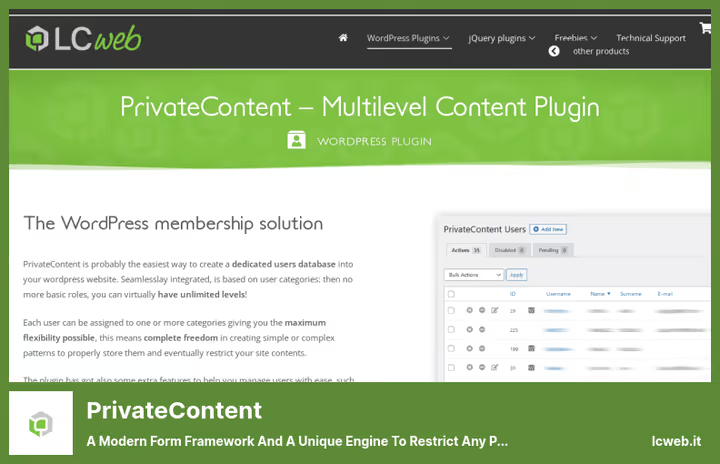
The most non-standard plugin in the roundup. Instead of roles, user categories: you can assign multiple categories to one member and build a complex access matrix based on them. Operating since 2012, current version 9.9.2.
Features: live restriction preview (view the page through the eyes of a user in a specific category), built-in lightbox engine for popups, Restrictions Wizard with a summary of all rules on the site. You can restrict menus, widgets, Gutenberg blocks, Elementor sections, WooCommerce prices.
Pros:
- User categories instead of roles, more flexible than the standard model
- Live preview: view site under selected category in one click
- Restrictions Wizard: summary of all restrictions on site
- Blocking Gutenberg and Elementor at individual element level
Cons:
- Rating 1.1/5 on wordpress.org, users complain about support
- Confusing interface for beginners
- Only 7-day trial, no permanent free version
Price: $35/year. 7-day free trial available.
🔗 PrivateContent on LCweb website
6. Members

Free plugin from Blair Williams of the MemberPress team. The lightest in the roundup: role editor, content restriction by role or status, multiple roles per user, private site.
200,000+ active installs, 4.7 rating on wordpress.org. Shortcodes for hiding content, Gutenberg block blocking by role, menu and widget protection. All add-ons now included in the basic version for free: Block Permissions, Admin Access, WooCommerce integration, ACF integration.
Ideal when you don't need payments and subscriptions, you just need to quickly and easily control content visibility.
Pros:
- Completely free, 200K+ installs, 4.7 rating
- Multiple roles per user
- Granular Gutenberg block, menu, widget hiding
- Magic Link for admin access recovery
Cons:
- No payments and subscriptions, for that use MemberPress
- No frontend registration and profiles
- Not suitable for complex membership schemes
Price: Free.
🔗 Members on WordPress.org🔗 MemberPress website
Short video from Cozmoslabs, visual demonstration of content restriction in WordPress: from setting up access rules to checking visibility under different roles.
⁉️🤔 Frequently asked questions
How does Kadence Memberships differ from Restrict Content?
Kadence Memberships is the new name for Restrict Content after rebranding. The plugin moved under the Kadence WP and Nexcess umbrella, received an updated interface and continues to develop. Functionally it's the same membership engine with Stripe in the basic version, but with more active development and new add-ons. The old slug
restrict-contenton wordpress.org redirects to Kadence Memberships. If you used Restrict Content before, migration is seamless: all settings, plans and subscribers are preserved.
Can you get by without paid plugins?
Yes, if you don't need recurring payments.
Membersand free versions ofUltimate MemberorProfile Buildercover basic scenarios: hiding pages by role, private site, registration forms. As soon as paid subscriptions appear, you need eitherKadence MembershipsorPaid Member Subscriptionswith Stripe. For an intermediate option (one-time payment for access),PrivateContentat $35/year works.
Which plugin works best with WooCommerce?
All plugins in the roundup integrate with WooCommerce, but differently.
Kadence MembershipsandPaid Member Subscriptionslet you hide the store and products from non-logged-in users, and also attach discounts to subscriptions.Profile Builderlocks products through shortcode.PrivateContentcan hide WooCommerce prices.Membersthrough a free add-on provides fine control over WooCommerce roles.
What to do if a plugin conflicts with the theme?
All plugins in the roundup are designed for standard WordPress themes. In practice, conflicts happen less often than you think. First step, switch to a standard theme (Twenty Twenty-Five) and check if the problem disappeared. If yes, the theme is to blame, contact its developer. If no, disable other plugins one by one to find the conflict. For
Ultimate MemberandPrivateContentthere are official themes from developers, with them there will be no conflicts.
Do you need a separate plugin for backup of members?
No.
Kadence Memberships,Paid Member SubscriptionsandPrivateContenthave built-in CSV export.Membersallows exporting roles and settings to JSON. For full site backup (including database with users) useUpdraftPlusor hosting backup, membership plugins don't replace general backup here.
How to migrate users between membership plugins?
There's no direct "one to another" migrator from anyone. Working scenario: export users to CSV from the old plugin, adjust columns to the new format if needed and import through
Import users from CSVor the built-in import of the new plugin. Passwords don't transfer, users will need to reset passwords. Subscriptions and payment history usually can't be transferred, plan migration at the junction of payment periods.
Which content restriction plugin to choose in 2026
If budget is limited and payments are not needed, Members is unmatched. Free, lightweight, 200K+ installs. Just works.
Need paid subscriptions with Stripe, look at Paid Member Subscriptions. Hierarchical plans, promo codes, global restriction rules. At Pro price from €69/year, one of the most affordable entries into a paid membership engine. And if budget allows and you need maximum capabilities out of the box, Kadence Memberships at $199/year provides Stripe already in the free version and 34 add-ons in Pro.
Building a community with profiles, directory and social features, Ultimate Member is your tool. But consider recent complaints about bugs in the basic version: test on staging before launch.
Need a fine access matrix without being tied to roles, take a look at PrivateContent. User categories instead of roles provide flexibility that competitors lack. But a 1.1/5 rating is a signal: tech support is weak, interface not for beginners.
Want custom registration forms and granular restriction with shortcode, Profile Builder from Cozmoslabs will handle the task cleanly. And paired with Paid Member Subscriptions through Ultimate Membership Bundle, you get registration plus paid subscriptions from one vendor.
Choose based on your task, not someone else's rating. Test the free version on staging, and only then connect payments.

A professional team of writers and editors specializing in creating quality content.