














🔐 Overview of the Paid Member Subscriptions plugin for WordPress
You're launching a site with paid access, courses, or a private community, and you immediately face a choice: which WordPress membership plugin won't break after a month and won't require a second mortgage for add-ons?
We tested Paid Member Subscriptions from Cozmoslabs on a real setup: a WooCommerce store with three subscription tiers, drip content, discount codes, and group accounts. The plugin has been in the WordPress.org repository since 2016, has 10,000+ active installations and a 4.4 ★ rating. It's a stable product with a predictable roadmap.
Below is a breakdown of key modules, pricing, and step-by-step setup. No fluff, just practical conclusions.
💡 Quick overview:
- We examine what Paid Member Subscriptions does and how it differs from MemberPress and Restrict Content Pro
- We look at which features are available in the free version and what requires Pro
- We walk through step-by-step setup: subscription plans, WooCommerce restriction, discount codes, registration form
- We compare Hobbyist and Pro tiers and help you choose based on your needs
What is Paid Member Subscriptions
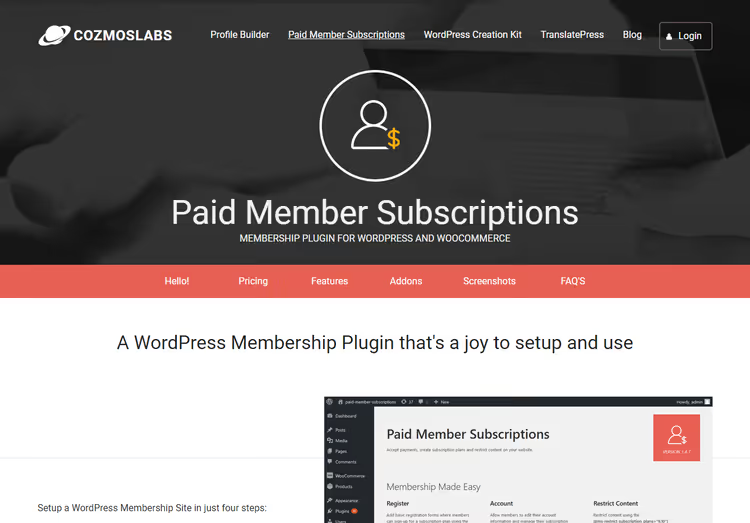
Paid Member Subscriptions is a WordPress membership plugin from the Romanian team at Cozmoslabs, also known for their Profile Builder plugin (100,000+ installations) and TranslatePress. The product handles the full content monetization cycle: from registration and payment processing to access restriction and subscription management.
The plugin core is free and available on wordpress.org. This is enough for a basic scenario: restricting some content behind a login and accepting one-time payments via standard PayPal. The Pro version extends the core with recurring payments, Stripe, drip content, free trial periods, and a group of add-ons (we'll cover these in the pricing section).
Out of the box, the plugin integrates with WooCommerce, Elementor, bbPress, and Profile Builder. The WooCommerce integration here is deeper than most competitors: you can restrict not just "the entire store for members" but specific products (one for the Gold tier, another for Silver, a third public). In practice, this covers the "members-only store + public storefront" scenario without workarounds.
Key features
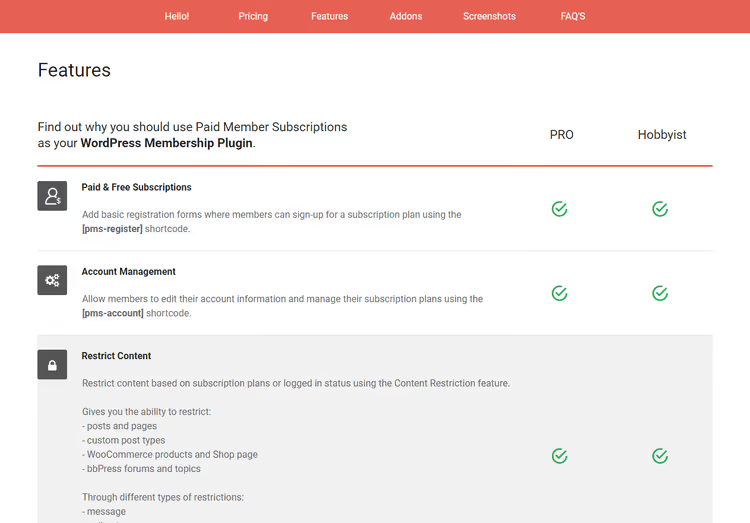
Paid Member Subscriptions advertises 20+ functional modules. We selected those that actually work in daily operation rather than just being a checkbox in a feature list.
Subscription and payment management
Unlimited subscription plans: free, one-time, recurring. The
[pms-register]shortcode renders a registration form with plan selection. Users see prices, period, and CTA button in one block.Upgrades and downgrades: members can switch from Silver to Gold in their account area; the plugin calculates prorated charges for the remaining period. The process is transparent with no manual recalculation.
Payment gateways: PayPal Standard, PayPal Express, and Stripe (Pro). Stripe accepts cards directly on-site without redirects, which improves payment conversion.
Free trial period and registration fee: configurable down to the second for each plan. 7-day trial → auto-charge if the user doesn't cancel. This works without additional plugins.
Multiple subscriptions per user: one account can have Gold access to a course and Silver access to an article library simultaneously.
Content restriction
Posts, pages, custom post types: restricted by subscription plan or login status. Not logged in → sees a placeholder with customizable text and a "Register" button.
WooCommerce restriction (Pro): product-level control lets you hide viewing and purchasing from non-members. Or conversely, make certain products public while keeping the premium line members-only. We cover this in detail in the setup section below.
Drip content (Pro): scheduled release where a post appears N days after subscription. Works for courses and phased programs.
Marketing and retention tools
Discount codes: fixed amount or percentage. Linked to specific subscription plans. Members enter codes during registration or in their account area.
Email reminders: triggered emails for "subscription expires in 3 days," "payment failed," "try Gold with a discount." Templates are editable from the admin without code.
Pay What You Want: users set their own price within a specified range. A niche tool, but it works for donation communities and crowdfunding.
Administration
- Members panel: table with filtering by plan and status. Bulk export to CSV.
- Account sharing protection: detects logins from different IPs; blocking strictness is configurable.
- Reports: graph of new registrations and revenue. Simple, without BI depth, but gives the overall picture.
- GDPR export and deletion: buttons in the member interface.
Installation and activation
After purchasing Pro, you'll receive an email with a download link and license key. The plugin is also available for download from your Cozmoslabs account.

Download the plugin zip archive to your computer. In the WordPress admin, go to Plugins → Add New.

Click Upload Plugin, select the archive with the main plugin, and click Install Now.

Wait for the installation to complete and click Activate Plugin.

Immediately after activation, the setup wizard launches.
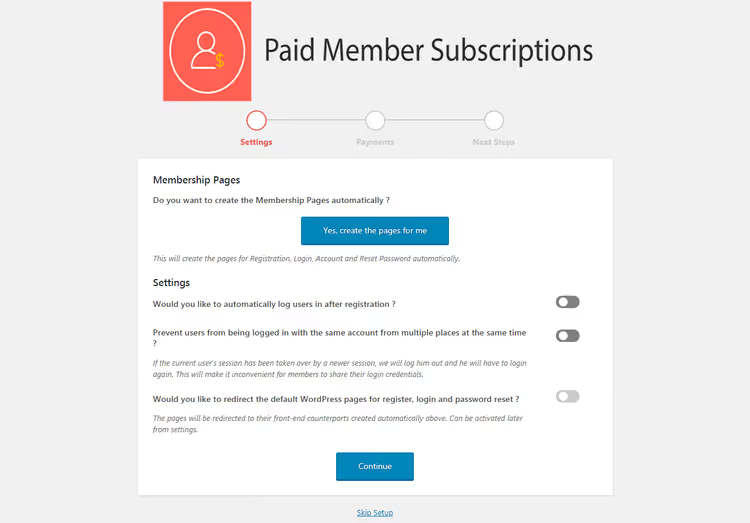
The wizard offers one-click options to: create membership pages (registration, login, account), enable auto-login after registration, prevent account sharing, choose a payment gateway, and set the currency. This saves 15-20 minutes of manual configuration.
Skipping the wizard and starting manually
You can skip the wizard and return to the admin, where a new Paid Member Subscriptions menu item appears in the sidebar.

Click the menu item to open the screen with basic information: license status, plugin version, and quick links to documentation.

Now activate your license: go to Paid Member Subscriptions → Add-ons.

Your license key is in your Cozmoslabs account. Copy it, paste it into the field, and click Save Changes. From this point, all Pro add-ons are available to you.
Plugin setup: from plans to WooCommerce restrictions
With the license active, let's go through all the key admin sections. We'll set up three subscription tiers (Gold / Silver / Free), link them to WooCommerce products, and add a discount code.
Subscription plans
Go to Paid Member Subscriptions → Subscription Plans and click Add New.

Fill out the plan card: name, description, price, period (days/weeks/months/years), status (active/inactive). For recurring payments, enable the recurring billing option.

After saving the plan, you can immediately add an upgrade or downgrade path. This is useful for free trial periods. For example, Free plan → upgrade to Silver after 14 days.

Managing members
All registered users are collected in the Paid Member Subscriptions → Members section. Here you can manually change a member's plan, pause a subscription, or view payment history.

Payments
The Paid Member Subscriptions → Payments section shows all transactions: successful, pending, declined. CSV export is available.

WooCommerce product restriction
This is one of the plugin's strongest features: restricting selected products rather than the entire store. We set up a test store with three subscription plans (Gold, Silver, and Free) and a couple of dummy products.

Here's the list of products in the test store.

Restricting viewing and purchasing
Open the edit screen for a specific product, for example, Fidget Spinner.

Scroll down the edit page to the Content Restriction meta box.

Here you select which subscription plans can view and purchase the product. Check Logged In Users and the required plans (for example, Gold). Non-members will see a placeholder instead of the product page.
Note: If you don't set individual settings, the plugin uses default restriction rules. Global parameters are set in Paid Member Subscriptions → Settings → Content Restriction.

Here you configure: placeholder text, output template, redirect for non-members, and post types under restriction. It's a flexible system where you can restrict posts, pages, and products independently.
Member discounts
To use discount codes, install the Discount Codes add-on from your Cozmoslabs account.
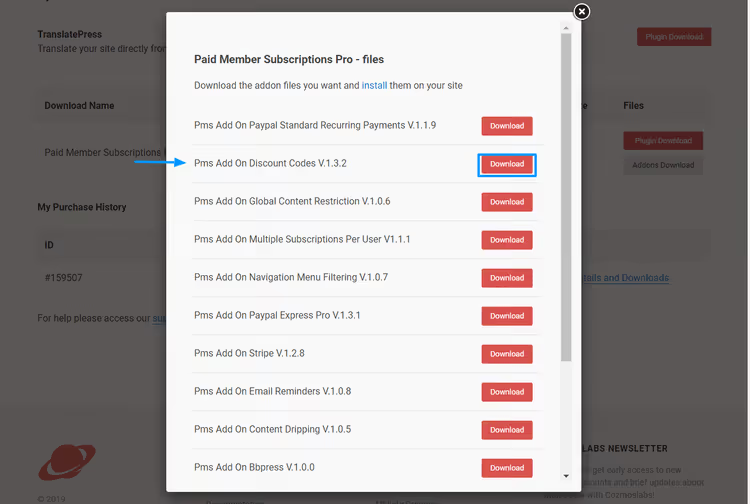
Download and activate the add-on the standard way: Plugins → Add New → Upload Plugin.

Click Activate Plugin after installation.

Now a Discount Codes item appears in the Paid Member Subscriptions menu.
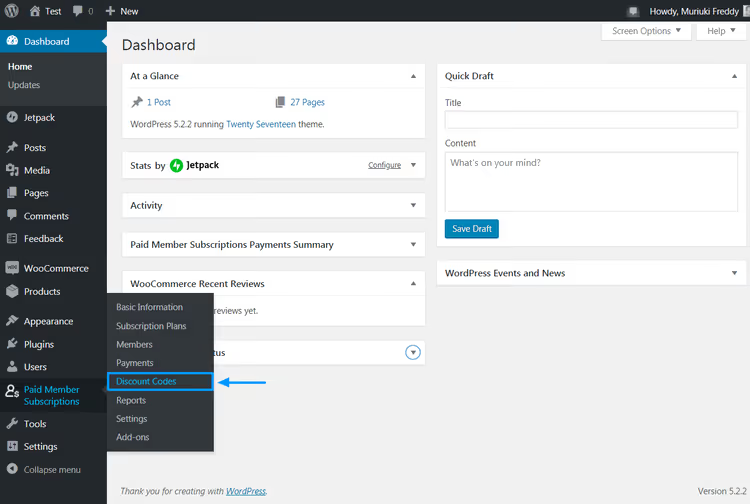
Go there, and you'll see the list of codes (empty for now).

Click Add New.

The new code editor opens.

Fill in: code name, discount amount or percentage, validity period, and subscription plan link. After saving, users can apply the code in the registration form or in their account area. The input field appears automatically.
Registration form
The [pms-register] shortcode renders a ready-made form with a list of plans, prices, and a discount code field. Go to Pages → Add New.

Name the page "Registration," paste [pms-register] into the editor, and click Publish.

Here's how the form looks on the frontend.
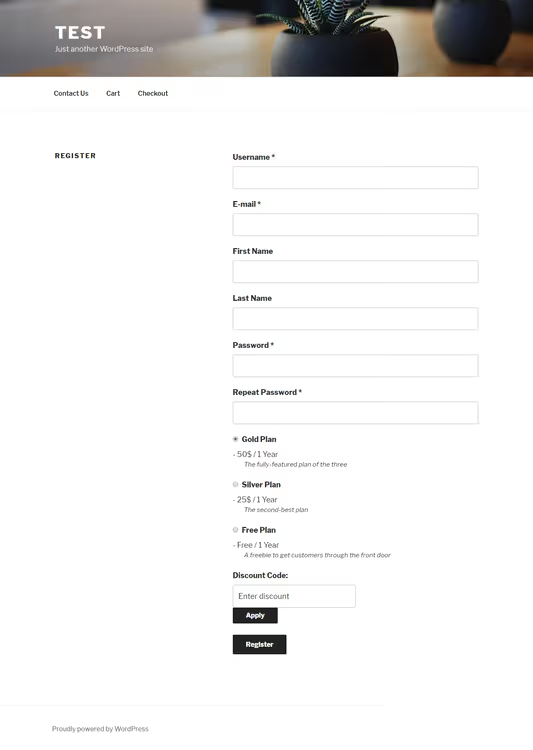
The form includes: plan names, prices, period selection, discount code field, and registration button. No code required, just one shortcode.
Reports
The Paid Member Subscriptions → Reports section shows registration dynamics and revenue as a graph.

General settings
Final section: Paid Member Subscriptions → Settings.

What's configured here:
- Plugin CSS for the frontend (enable/disable, useful for custom styling)
- Auto-login user after registration
- Membership pages: registration, login, account, successful registration, password reset
- Payment gateways (PayPal, Stripe)
- Default content restriction rules
- Email notification templates: subscription activation, cancellation, expiration, reminder
Setting up one screen takes 5-7 minutes and covers most typical scenarios.
Pricing: Hobbyist vs Pro
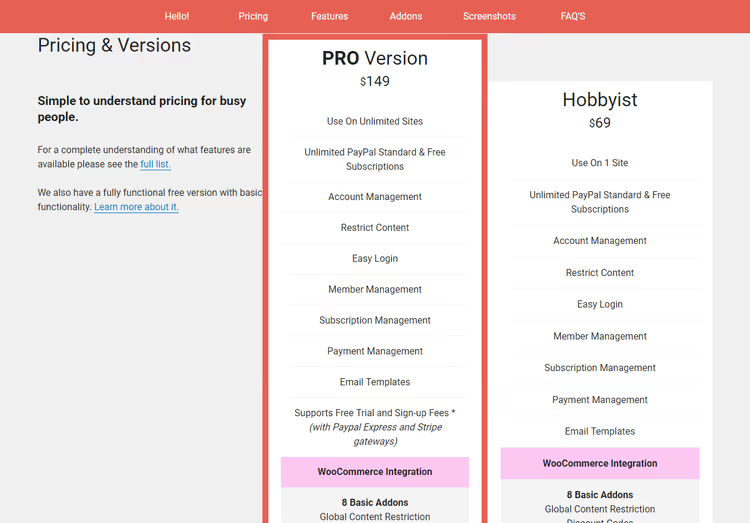
Cozmoslabs offers two premium tiers, both including one year of updates and support:
Feature | Hobbyist ($69/year) | Pro ($149/year) |
|---|---|---|
Basic membership features | ✅ | ✅ |
Free trial period | - | ✅ |
Registration fee | - | ✅ |
5 Pro add-ons | - | ✅ |
Unlimited sites | - | ✅ |
PayPal + Stripe | PayPal only | ✅ both |
Content dripping | - | ✅ |
Group subscriptions | - | ✅ |
Pro add-ons included only in the higher tier: Recurring Payments, PayPal Express, Stripe, Invoices, Content Dripping, Multiple Subscriptions per User.
Hobbyist is suitable for a blog with one paid access level and PayPal payments. Pro is the choice for courses, WooCommerce membership stores, and projects with recurring billing.
⁉️🤔 Frequently asked questions
Can I use Paid Member Subscriptions for free?
Yes. The free version in the WordPress directory lets you create subscription plans, accept one-time PayPal payments, and restrict content. Pro adds recurring payments, Stripe, drip content, and add-ons. The free core is enough for a test launch of a membership site.
How is Paid Member Subscriptions different from MemberPress?
MemberPress is a heavier all-in-one solution with a built-in LMS module, but the price is higher: the basic plan starts at $179/year. PMS is lighter, cheaper, and better integrated with WooCommerce at the individual product level. For courses with deep LMS functionality, MemberPress wins. For a membership store and content subscriptions, PMS is sufficient.
Does the plugin support VAT and European payment requirements?
Yes. VAT rates are manually configurable for each EU country. Stripe (Pro) supports SCA (Strong Customer Authentication). For full EU VAT compliance, a PMS + Stripe Tax combination is recommended.
Can I migrate from MemberPress to PMS?
There's no direct migration tool. Cozmoslabs offers manual member export/import via CSV. Subscription plans and content restrictions will need to be set up from scratch. Effort depends on user base size: up to 100 members takes about an hour, over 1,000 makes it worth writing a custom migration script.
How does the plugin work with caching?
PMS stores login status in session cookies and doesn't conflict with popular cache plugins (WP Rocket, W3 Total Cache). It's recommended to exclude registration, login, and account pages from the cache. This is standard practice for any membership plugin.
Verdict after testing. Paid Member Subscriptions is a membership plugin without bloated functionality that honestly delivers on both basic and advanced scenarios. Over two weeks of testing, we didn't encounter a single critical bug. The admin interface is intuitive: setting up plans, WooCommerce product restriction, and the registration form took us about 40 minutes from scratch.
Hobbyist at $69/year is a reasonable start if you need one paid tier and PayPal. Pro at $149/year pays for itself as soon as you add recurring billing or Stripe. One retained customer on an annual plan covers the difference.
If you're launching a WordPress membership site and don't want to overpay for features you won't use, Paid Member Subscriptions handles the job without compromising on stability.

A professional team of writers and editors specializing in creating quality content.