













 AIIllustrative image: AI-generated
🚀 How to create a social network on WordPress with BuddyPress: complete guide
Your community is scattered across Telegram chats, a Facebook group, and three WhatsApp threads. Members can't see each other's profiles, conversations get lost in endless scrolling, and tomorrow the platform changes its algorithms, and half the people won't see your posts.
BuddyPress brings all of this together in one place on your server. It's a free plugin for WordPress that Automattic calls "social networking in a box." Profiles, groups, activity feed, and private messages, everything like a big social network, only under your control.
Below, setup from installation to extending with plugins, with live screenshots of each step.
💡 Quick overview:
- Install BuddyPress from the WordPress catalog, half a minute if you have admin access.
- Enable components for your task: extended profiles, groups, private messages, and activity feed.
- Assign directory pages and configure member permissions in three tabs.
- Add plugins like BuddyBoss or Youzify if standard features aren't enough.
Why you need your own social network
When a company has 50+ people in three cities, mailing lists and shared folders stop working. People don't know what colleagues are working on. Tasks are discussed in private messages, and a month later no one remembers what was agreed. You need an environment where profiles are visible, discussions happen in groups by department, and correspondence doesn't disappear.
BuddyPress gives you exactly that. You get a social network on your own hosting: member profiles, friends lists, groups, activity feed. All data sits in your WordPress database, no third-party servers, no ads between posts, no surprises with reach.
And most importantly, modularity. Don't need public groups? Turn them off. Want only private messages? Leave only those. BuddyPress assembles like building blocks: each component turns on and off separately.
Installing BuddyPress
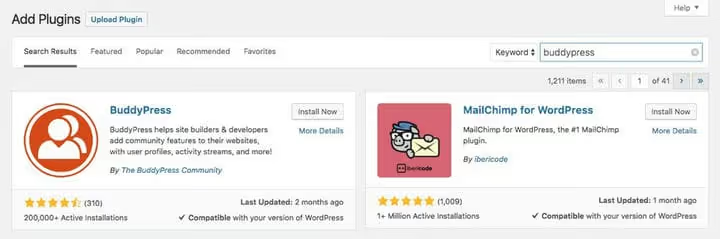
Go to WordPress admin, open Plugins → Add New, type "BuddyPress" in search. "Install Now" button, then "Activate," the plugin works.
After activation, a BuddyPress section appears in the sidebar menu, and in Settings → BuddyPress, three tabs: Components, Options, and Pages. Go through each one without skipping.
Components
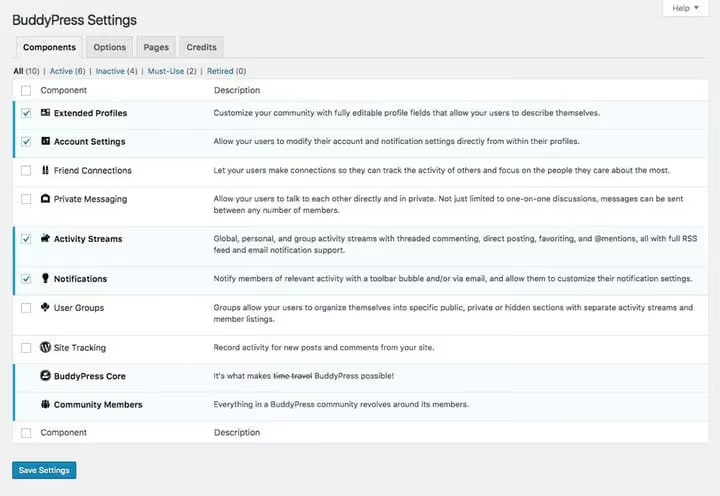
First thing you'll see is a list of components. Don't disable Extended Profiles and Account Settings: without them the social network loses its point.
Everything else is for your task. Notifications keep members informed about new messages. Private Messages are needed for one-on-one communication. User Groups are for segmentation by departments or interests. Activity Feed is the center of the social network, where members see updates from friends and groups.
Don't enable everything at once. Each extra component adds menu items and loads the interface. Start with three or four, add the rest later, it takes a minute.
Main options
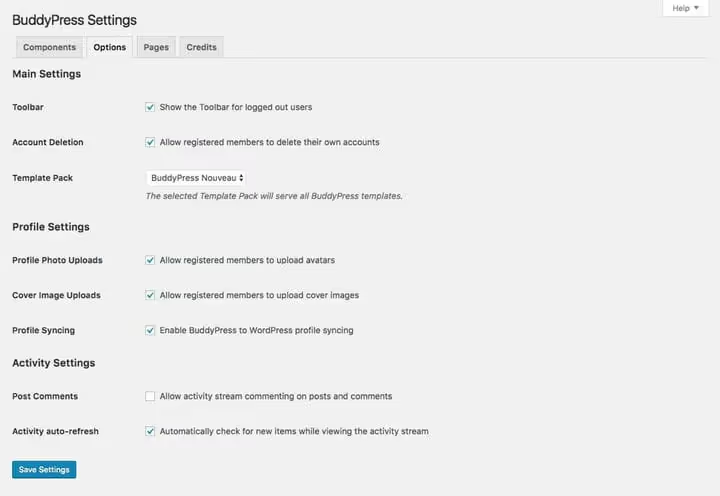
The Options tab manages member permissions. Here you decide whether users can upload avatars and profile covers, delete their account, and edit their activity in the feed.
The key toggle is template design. BuddyPress offers two options: Legacy (outdated) and Nouveau (modern). Choose Nouveau, it's responsive, plays nice with current WordPress themes, and looks decent without additional styling.
Pages
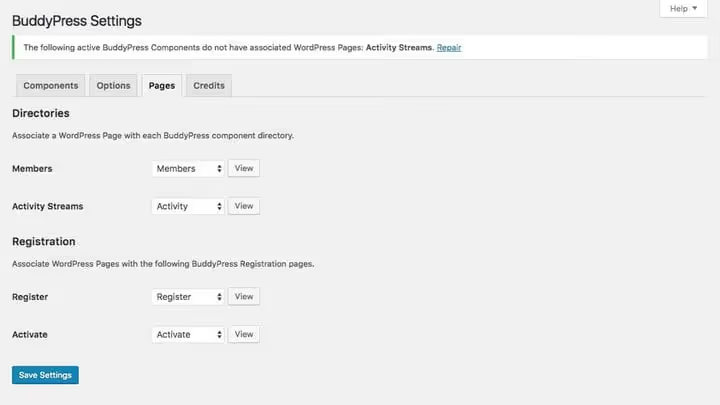
The Pages tab assigns standard WordPress pages to each component. Enabled groups, need a groups directory page. Enabled members, members directory page.
If the page isn't created yet, BuddyPress will show a notification with a "restore" button. One click, page is created and linked automatically.
After setting up pages, go to Settings → General → Membership and check "Anyone can register." Without it, the social network won't accept new members.
Menus and widgets
After setup, new tabs appear in the admin. Activity shows a feed of all site events with filtering by type: registrations, group creation, new friends. This is an administrator tool, regular members don't see it.
Groups lets you create and manage groups of three types:
- Public, visible to everyone, conversation open to any member.
- Private, visible in directory, but conversation inside only for members.
- Hidden, not visible to anyone, entry by administrator invitation.
The Email tab contains email templates: account activation, message notifications, group invitations. Text and formatting change through the built-in editor, without editing code. Email setup details are in the BuddyPress documentation.
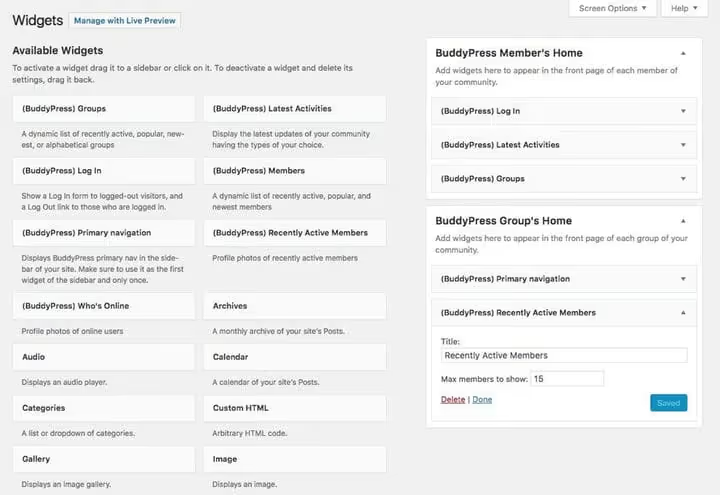
BuddyPress adds four useful widgets to the sidebar: Groups, Members, Recently Active, and Who's Online. Plus a login widget, members log in right from the sidebar, without going to the standard wp-login.php page.
Key BuddyPress features
Basic setup is ready, the social network works. Now, what exactly do your members get after logging in.
Activity feed
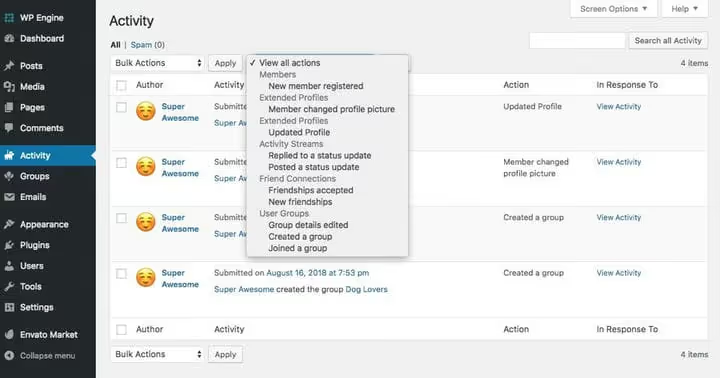
The activity feed is the heart of the social network. Members post updates, comment on each other's posts, and add favorites. Mentions through @username work like in X (Twitter): type the @ symbol and name, member gets a notification.
Each group gets its own feed. For public groups it's visible to everyone, for private ones, only to members. Subscription is available via RSS and email notifications, so members don't miss new posts even if they don't visit the site every day.
User groups
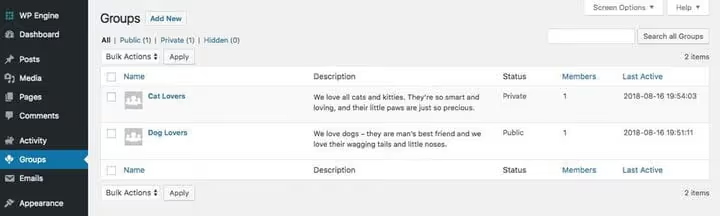
Groups are the main tool for segmenting communication. The marketing department discusses campaigns in their group, developers in theirs. Conversations don't mix, members see only what's relevant to their work.
In practice, groups cover three scenarios: work teams by department, interest clubs (runners, book club), and educational cohorts (students of one course). Privacy is configured for each scenario separately: one group is public for announcements, another is hidden for internal discussions.
Members and friends
BuddyPress extends WordPress's standard user system. Regular "users" become "members" with social connections: you can add as friends, subscribe to updates, and follow a specific person's activity.
Friends see each other's private updates if you allowed this in component settings. You get a second level of privacy inside the community: not everything for everyone, but something for your own.
Extended profiles
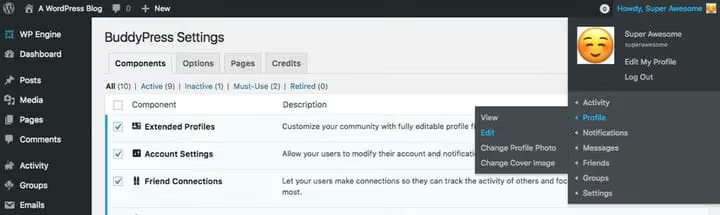
The standard WordPress profile is sparse: name, email, avatar. BuddyPress adds a profile cover, activity feed, friends list, groups, and notifications, all on one page.
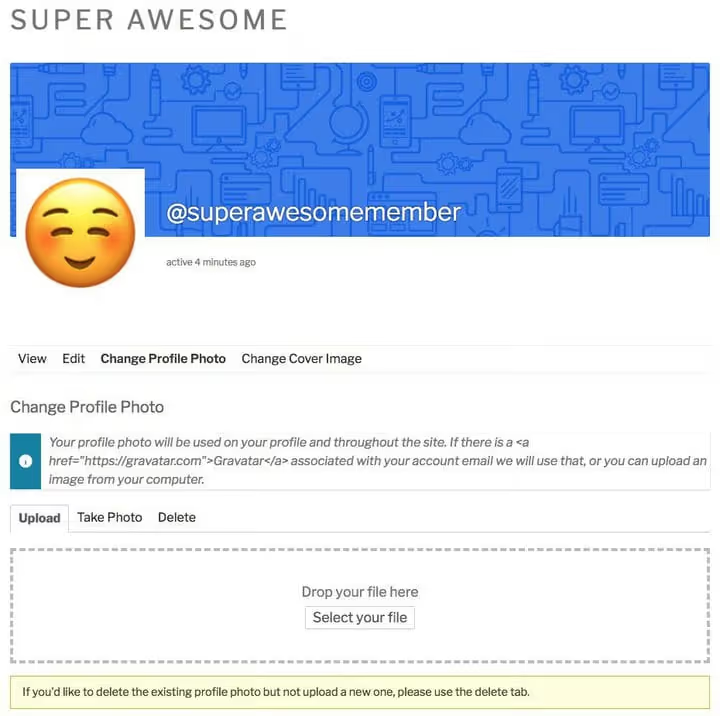
When editing a profile, the member changes not only name and password, but also uploads an avatar with a cover, exactly like in a big social network. The editing interface is assembled on separate tabs, you can figure it out without instructions.
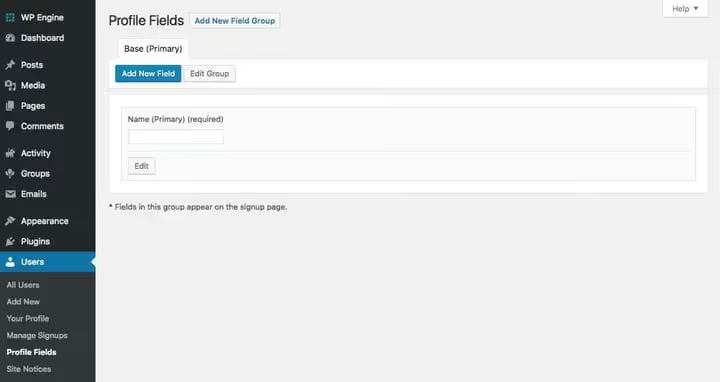
The main ace is custom fields. Add a "Position," "City," "Department," "Tech Stack" field, or anything specific to your community. Fields can be made required at registration or optional, up to you.
Extending BuddyPress: 6 useful plugins
Like WordPress itself, BuddyPress grows an ecosystem of plugins. Six tested additions cover different needs: from complete design overhaul to collaborative work with documents.

BuddyBoss
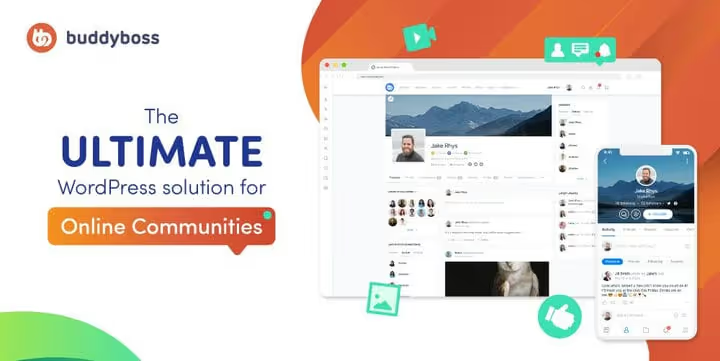
BuddyBoss is a powerful add-on that turns BuddyPress into a full-featured online community platform. Adds customizable profiles, social groups, member albums, events through integration with Events Calendar Pro, and courses through LearnDash.
If basic BuddyPress features aren't enough and you plan to sell memberships or launch training, BuddyBoss covers these tasks without assembling a dozen plugins one by one.
- Pros: unified solution instead of scattered plugins, ready mobile theme, built-in community monetization.
- Cons: paid, heavy for small communities (50-100 people).
- Price: from $299 per year (Pro tier) on BuddyBoss site.
- Download: 🔗 BuddyBoss
BuddyPress Groupblog

The plugin adds its own blog to each group. Group members automatically get roles in the blog, the group administrator manages permissions: who writes, who edits, who reads.
Works on WordPress Multisite. For communities where user content matters, not just chats and discussions, Groupblog adds a blogging dimension. One click when creating a group, and it has its own blog.
- Pros: tight integration with groups, automatic role synchronization, P2 theme support for frontend posting.
- Cons: only for Multisite, interface not updated.
- Price: free in WordPress.org catalog.
- Download: 🔗 BuddyPress Groupblog on WordPress.org
Invite Anyone
Plugin from the same developer as BuddyPress Docs and Groupblog, extends BuddyPress's standard invitation mechanics. Members send invitations to email to anyone, even someone who doesn't have an account on the site yet. The invitee receives an email with a registration link and automatically becomes friends with the sender after activation.
For closed communities with controlled growth, Invite Anyone is a must-have. In practice: launched a community for 20 employees, in a month there are 50, and each came by invitation from a colleague, not through open registration.
- Pros: email invitations without restrictions, customizable email text, integration with groups.
- Cons: minimalist interface, no batch import.
- Price: free in WordPress.org catalog.
- Download: 🔗 Invite Anyone on WordPress.org
Youzify (formerly Youzer)

Youzify is a premium plugin that completely reworks BuddyPress's look and functionality. Adds badges and achievements, social login, emoji reactions, mentions, customizable profile widgets, and 14 header styles.
The plugin is paid, but the free core version on WordPress.org lets you try basic features before buying. Suitable for those who find BuddyBoss excessive and standard BuddyPress design too simple.
- Pros: deep profile customization, 20+ widgets, achievement system.
- Cons: paid (CodeCanyon), dependency on developer updates.
- Price: from $39 on CodeCanyon (one-time payment).
- Download: 🔗 Youzify on WordPress.org | 🔗 Youzify on CodeCanyon
BuddyPress Docs

BuddyPress Docs adds collaborative workspaces to groups: part wiki engine, part document editor, part shared folder. Group members create documents, edit them on the frontend through TinyMCE, and track change history, like in Google Docs, but inside your site.
Built-in protection against edit conflicts: if one member is editing a document, another sees a warning. Auto-save triggers on inactivity. Documents are tied to groups or users with flexible privacy levels.
- Pros: frontend editor, complete edit history, tags and folders.
- Cons: sequential editing, not real-time like Google Docs.
- Price: free in WordPress.org catalog.
- Download: 🔗 BuddyPress Docs on WordPress.org
rtMedia

rtMedia adds a "Media" tab to member and group profiles. Upload photos, videos, and audio through drag-and-drop right into the activity feed. Supports albums, playlists, lightbox viewing, and privacy settings for each file.
In practice, rtMedia covers the scenario of "share photos from an event" or "upload a video tutorial for a group" without third-party services. Out of the box, responsive, mobile-first, and friendly with bbPress.
- Pros: media-first approach, albums and playlists, privacy settings.
- Cons: some features in premium add-ons, complex settings interface.
- Price: free in WordPress.org catalog, premium add-ons from $99 per year.
- Download: 🔗 rtMedia on WordPress.org
These are six tested plugins from the large BuddyPress ecosystem. See the full selection of 15+ tools in our review of best BuddyPress plugins, and the complete extension catalog on BuddyPress.org.
Is it worth building a social network on WordPress
In practice, BuddyPress covers all tasks of small and medium communities. You get profiles, groups, and activity feed in half an hour of setup, and all this on your server with full data control. For company employees, niche clubs, or closed educational cohorts, the solution is ideal.
For a large public community with thousands of members, BuddyPress also works but will require caching and database optimization. Here the BuddyPress + BuddyBoss combo wins: it's tuned for high load and gives monetization out of the box.
⁉️🤔 Frequently asked questions
Does BuddyPress need a separate server?
No, BuddyPress works on regular WordPress hosting with PHP 7.4+ and MySQL 5.7+. For small communities up to 500 members, regular shared hosting is enough. When growing to several thousand members, set up Redis object caching and CDN for static files, the load on the database will drop by 3-4 times.
How is Youzify different from BuddyBoss?
Youzify is a customization layer on top of BuddyPress: profiles, widgets, and design. BuddyBoss is a full-fledged BuddyPress replacement with its own theme, mobile app, and built-in monetization. Choose Youzify if you already have BuddyPress set up and need to refresh the design. Choose BuddyBoss if you're starting from scratch and plan to sell memberships.
Can I migrate an existing community from Facebook to BuddyPress?
Partially. Text posts and discussions transfer through CSV import with user migration plugins. Media files manually: Facebook doesn't release photos and videos through API in original quality. Groups, friends, and likes between members you'll rebuild from scratch, which is even a plus: member audit and community revival.
Does BuddyPress work with WooCommerce?
Yes, through the WooCommerce integration in BuddyPress profiles plugin. Members see order history, manage subscriptions and shipping addresses right in the community profile. BuddyBoss additionally adds selling memberships as a WooCommerce product.
What about performance with 1000+ members?
The bottleneck is the activity table in the database. Each action writes a row, and with several hundred thousand records, SELECT without indexes slows down. Install
WP Redisand move activity cache to memory, latency will drop to 50-80 ms per thread. For member search useRelevanssiorSearchWP, standard WordPress search doesn't handle large tables.
Your own social network or someone else's platform: what to choose
BuddyPress is a simple and flexible platform for launching a social network on WordPress. If you need a community where you control data, appearance, and rules of the game, install BuddyPress and don't look back.
For a quick start, the free core and a couple plugins from the list above are enough. For a serious community with monetization, BuddyBoss (Pro from $299 per year) fits. In any case, the best way to understand whether BuddyPress fits your task is to install it on a test site and invite a handful of colleagues to try it.
Building a community on BuddyPress or already working with it? What plugins helped, and what didn't work, write in comments.

A professional team of writers and editors specializing in creating quality content.