














🚀 How to create a social network with WordPress: plugins and themes 2026
Building your own social network without writing a single line of backend code sounds like a fantasy. But WordPress, which powers nearly half of the internet, handles this task without ugly workarounds. Profiles, groups, private messages, activity feeds: all of this installs as a regular plugin.
The problem is choosing: there are about a dozen social network engines and themes for WordPress, and half of them are either abandoned or conflict with each other. Below are only the tools we personally tested on a staging site in June 2026: four plugin engines, two themes, and a step-by-step assembly plan that saves you an evening of manual configuration.
💡 Quick overview:
- Install WordPress on hosting with HTTPS, minimum requirements: PHP 7.4+, MySQL 5.7+ or MariaDB 10.4+
- Choose a plugin engine: BuddyPress (free, open source, maximum extensions) or PeepSo/BuddyBoss (commercial, interface ready out of the box)
- Add Youzify on top of BuddyPress, it transforms standard profiles into a modern UI with drag-and-drop without a single line of CSS
- Pick a theme: KLEO for a universal community, Woffice for a corporate intranet, free BuddyX or Reign for a quick start
- Configure group privacy, user permissions and moderation; without this your social network turns into a spam dump within the first week
Plugin | Who it's for | Price | Key feature |
|---|---|---|---|
BuddyPress | Maximum flexibility, ecosystem | Free | Hundreds of compatible extensions |
BuddyPress + Youzify | Beautiful UI at no cost | Free / Pro from $49 | Profile customization through the customizer |
PeepSo | Quick launch, modern UI | Free / from $89/year | Interface ready immediately after installation |
BuddyBoss | Learning + membership + social network | Free / theme $299/year | Integration with LearnDash and monetization |
1. BuddyPress, a free social network engine

BuddyPress is an "out of the box" social network from the WordPress development team. It installs as a regular plugin and immediately adds to your site: extended member profiles, activity feed, groups (public, private, hidden), private messages and a friendship system.
According to WordPress.org data as of June 2026, the plugin has been downloaded more than 13.7 million times, version 14.4.0 works on WordPress 6.1+ and receives stable updates. Compatibility with most themes is handled through the built-in Theme Compatibility API, so you won't need to mess with templates.
What BuddyPress provides out of the box:
Extended profiles with customizable fields of any depth
Groups with forums through bbPress integration
Private messages: personal and group threads
Notifications, toolbar and email, full control in user settings
15 Gutenberg blocks: friends list, online members, activity feed, login form
✅ Pros: hundreds of free extensions in the WordPress.org directory, open source (GPL), not tied to a proprietary ecosystem, documentation available in Russian
❌ Cons: the standard interface looks dated, profiles and groups require Youzify or a similar overlay for a modern look; the "friends" module provides simple two-way connections rather than a graph like Facebook
Price: free, open source under GPL.
2. Youzify, a customization layer on top of BuddyPress

Youzify (formerly Youzer) is an overlay on BuddyPress that completely transforms the look of your community. BuddyPress provides functionality, while Youzify delivers design at the level of modern web applications. After activation, standard BuddyPress profiles turn into stylish pages with horizontal or vertical navigation, customizable widgets and animated transitions.
Everything is configured through the live WordPress customizer; no code required. You choose the profile layout, tab order, colors and fonts right from the admin panel.
Key features:
- Horizontal and vertical profile layouts, switchable with one click
- Customizable profile tabs with arbitrary content and shortcodes
- Reputation system, badges and achievements through GamiPress integration
- Responsive activity wall with media, emoji and GIFs
- Modal login and registration windows without page reload
- Dark mode, RTL support, compatibility with WPML and Polylang
Important: Youzify does not work on its own; it requires an activated BuddyPress. It is specifically a customization layer, not a replacement for the engine.
- ✅ Pros: radically changes the community UX in 15 minutes of setup, the basic version is free, does not conflict with most BuddyPress themes
- ❌ Cons: Pro features (stories, user posts, account verification) are only in the paid version; if BuddyPress goes down, Youzify stops working too
Price: the basic version on WordPress.org is free. The Pro version on CodeCanyon is a one-time payment with lifetime updates.
🔗 Youzify on WordPress.org | 🔗 Pro version on CodeCanyon
3. PeepSo, an alternative engine with modern UI
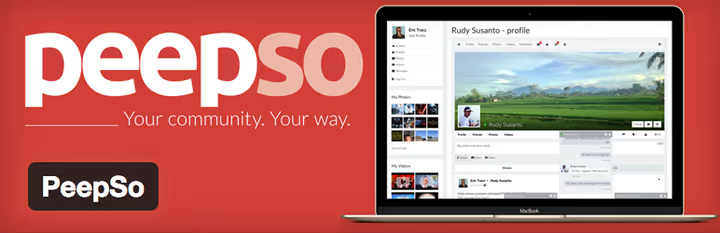
PeepSo took a different path: instead of building on top of BuddyPress, the team wrote their own engine from scratch. The focus is on speed, clean interface and a ready user experience "out of the box." Six pages (homepage, activity feed, members, profile, password recovery, registration) are created automatically upon activation.
In 2024-2025, PeepSo left the WordPress.org repository due to disagreements with moderation rules and is now distributed through their own website. The Foundation version remains free.
What sets PeepSo apart from competitors:
Built-in reaction system (not just likes, but emoji reactions like Facebook)
Groups with detailed privacy and role settings
Hashtag support in posts and search by hashtags
PeepSo Photos plugin for uploading albums and galleries
Option to order a white-label mobile app for your social network
✅ Pros: the interface looks modern without additional overlays, quick launch (6 pages in a minute), emoji reactions out of the box
❌ Cons: the extension ecosystem is several times smaller than BuddyPress, key features (photos, video, files, polls) are only in paid addons, no free path for LMS integration
Price: PeepSo Foundation is free. PeepSo Ultimate Bundle (all plugins + Gecko theme) is an annual subscription. Individual addons are purchased separately.
🔗 PeepSo Foundation (free) | 🔗 All PeepSo pricing plans
4. BuddyBoss Platform, when you need more than BuddyPress

BuddyBoss Platform is a fork of BuddyPress from a team that built a commercial ecosystem around it. Technically, the plugin installs the same way as BuddyPress, but it ships with a deeply reworked interface, built-in gamification and ready monetization tools.
If BuddyPress is a constructor for building your own setup, BuddyBoss Platform is a pre-assembled solution. You launch a community site today rather than configuring it for a week.
Key differences from BuddyPress:
Completely reworked frontend: activity feed like social networks, modern profiles, mobile-first responsive layout
Built-in gamification: achievements, points, levels, member rankings
Integration with LearnDash and LifterLMS for educational communities
Paid memberships through WooCommerce Subscriptions, MemberPress, Paid Memberships Pro
Zoom integration for webinars and online group meetings
Your own branded mobile app (separate service)
✅ Pros: everything for monetization and learning out of the box, interface doesn't require Youzify, rapid deployment
❌ Cons: the platform is heavier than BuddyPress (on weak hosting you'll need caching), premium features (gamification, Zoom, mobile app) require separate licenses
Price: BuddyBoss Platform is free (base engine). BuddyBoss Theme starts at $299/year. BuddyBoss App is individually priced.
🔗 BuddyBoss Platform | 🔗 BuddyBoss Theme
5. KLEO, a universal community theme

KLEO has held the top spot in BuddyPress theme rankings on ThemeForest for years. It's a multipurpose theme that works equally well for a social network, forum, educational portal or private club site. The developer, SeventhQueen, is an elite ThemeForest seller with thousands of sales and consistent updates.
As of June 2026, KLEO is compatible with WordPress 6.7+, BuddyPress 14.x and bbPress. Version 5.5.0 was released in October 2025.
What's inside:
WPBakery Page Builder included, visual page building without code
Unlimited color schemes, sidebars and fonts through the customizer
Built-in WooCommerce support for sales within the community
Masonry grid for blog, portfolio and galleries
Ajax filtering: search by title, date, categories, comments, views
One-click demo content, import an entire site for a quick start
✅ Pros: versatility (social network, forum, store, one theme), visual editor included, 18,000+ sales and active support
❌ Cons: WPBakery is included (if you're used to Gutenberg or Elementor you'll need to relearn), price is above average for ThemeForest themes
Price: $59 on ThemeForest, one-time payment, lifetime updates and 6 months of support.
6. Woffice, intranet and corporate social network
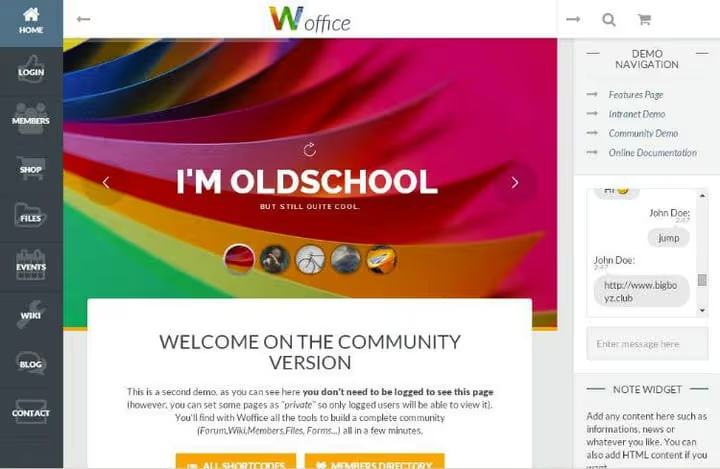
Woffice solves a task that regular social networks handle poorly: a private corporate space. The theme is designed for intranet portals, work groups and closed communities of organizations, schools, startups, government agencies and distributed teams.
Developer WofficeIO has supported the theme since 2015. As of June 2026, it's among the best BuddyPress themes with a buyer rating of 4.88 out of 5.
What's inside:
Full-featured wiki system for a company knowledge base
File manager with access control at the user and group level
Project and task management within the community
Event calendar with iCal synchronization
Trello integration for kanban boards
Page privacy: each page is accessible only to a specific role or group
WPML support for multilingual organizations
✅ Pros: the best choice for a WordPress intranet, granular access control, wiki and file manager out of the box
❌ Cons: overkill for a public social network (half the features won't be used), no WooCommerce support or monetization
Price: $79 on ThemeForest, one-time payment.
How to put it all together: step-by-step plan

You've chosen a plugin and theme; now you need to make them work together. Here's the sequence of actions from WordPress installation to community launch:
Install WordPress on hosting with HTTPS. Minimum requirements for BuddyPress: PHP 7.4+, MySQL 5.7+ or MariaDB 10.4+. If you're planning more than 500 concurrent users, go with VPS rather than shared hosting.
Install the plugin engine via "Plugins → Add New." BuddyPress can be searched directly in the admin panel. BuddyBoss is uploaded as a ZIP from buddyboss.com. PeepSo is the same from peepso.com.
Configure components: in BuddyPress this is done under "Settings → BuddyPress → Components." Enable extended profiles, groups, friends, private messages and notifications. Disable what you don't need for your scenario, as each extra module adds database load.
Create directory pages: "Members," "Groups," "Activity." BuddyPress will offer to create them automatically, but customize the names and URLs for your project. Go to "Settings → BuddyPress → Pages" and assign each function its own page.
Activate the theme and configure appearance. For KLEO, import demo content and replace it with your own. For Woffice, set up page privacy and create the wiki structure. For themes with a Page Builder, build the main community page visually.
Set up permissions and moderation. Under "Settings → BuddyPress → Settings," define who can create groups, who sees profiles, whether posts in the activity feed are moderated. Without this, the social network quickly descends into chaos.
Install Youzify (optional, only with BuddyPress), activate it and choose the profile layout in the customizer. This takes 15 minutes, but the community's appearance will change dramatically.
This video tutorial from Wbcom Designs shows the complete cycle: from WordPress installation to BuddyPress setup with the Reign theme. 45 minutes and you have a ready social network.
⁉️🤔 Frequently asked questions
Can I use a regular WordPress theme that isn't BuddyPress-compatible?
Yes. BuddyPress includes a Theme Compatibility API that adapts community pages to any template. But standard themes don't account for social network specifics: profiles look out of place, the activity feed breaks on mobile. A specialized theme saves days of manual customization. In practice: BuddyPress works stably with Astra or GeneratePress, but member and group pages look like regular blog posts. KLEO or BuddyX provide ready layouts for each type of community page; the UX difference is enormous.
How many users can WordPress with BuddyPress handle?
The number depends on hosting, not the engine. On a VPS with 4 GB RAM and properly configured caching (Redis + Nginx FastCGI), BuddyPress handles 5,000-10,000 active users without degradation. Large installations (for example the WPLMS educational platform) serve millions of monthly active users on clustered architecture. Key optimization points: object caching (Redis), CDN for static files and avatars, moving away from shared hosting when you exceed 500 concurrent users, periodic cleanup of activity tables via WP-CLI.
How does BuddyBoss Platform differ from BuddyPress + Youzify?
These are two different approaches. BuddyPress + Youzify is a free engine with a free customization layer; you only pay if you want Youzify's Pro widgets. BuddyBoss Platform is a fork that immediately includes a reworked interface and is geared toward monetization (membership, courses, paid content). If you're building an educational community or membership site with social features, BuddyBoss delivers more out of the box. If you need specifically a social network without ties to courses and payments, BuddyPress + Youzify is more flexible and cheaper in the long run.
Is it mandatory to buy a theme for a social network?
Not mandatory, but highly advisable. Free BuddyPress themes from WordPress.org (BuddyX, Reign) cover basic needs. However, if you plan to monetize the community or launch it as a business, $59 for KLEO or $79 for Woffice pays for itself through faster launch and less manual customization. A concrete example: setting up color scheme, fonts and profile layouts in KLEO takes 30 minutes through the customizer. Achieving the same result by editing CSS in a free theme requires 3-5 hours of developer work.
PeepSo or BuddyPress: which should you choose in 2026?
The choice comes down to three criteria. Budget: BuddyPress is free with its entire ecosystem, PeepSo requires payment for key addons (photos, video, files). Ecosystem: BuddyPress has hundreds of compatible plugins and themes, PeepSo has a few dozen. Interface: PeepSo looks more modern without additional overlays, BuddyPress requires Youzify for comparable UI. For a niche community or private club of 200-500 people, PeepSo may be faster to launch. For a project with growth potential and a need for integrations (LMS, forum, ecommerce), BuddyPress with its ecosystem is unmatched.
What to choose for your task: final summary
There's no universal answer; it all depends on your scenario. Go through the matrix:
Free, maximum flexibility: BuddyPress + Youzify (free version) + a free theme like BuddyX. Zero dollars to start, full control over architecture, but requires time to configure.
Launch over a weekend: BuddyBoss Platform + BuddyBoss Theme. Costs money, but the lion's share of design and user scenario work is already done.
Beautiful UI without customization hassle: PeepSo Foundation + PeepSo Gecko theme. The interface is ready immediately after installation; addons are purchased as needed.
Corporate portal / intranet: Woffice + BuddyPress. Wiki, files, task management, strict access control: everything for a work environment.
Educational community: BuddyBoss Platform + LearnDash. The combination of courses + social features + membership is a ready ecosystem for an edtech project.
Regardless of your choice, remember: a social network is not a plugin or a theme. It's people. The technical part is solved in an evening, but to get the first 100 active members in your community takes months of consistent work on content, moderation and platform value.
Start small: install BuddyPress, invite 10 friends and see how they interact. In a week you'll understand what your community specifically lacks, and the choice between BuddyBoss, PeepSo or additional extensions will become obvious.

A professional team of writers and editors specializing in creating quality content.