














⚙️ How to optimize your website menu for SEO: a complete guide
A visitor lands on your site, scans the header, and within 3 seconds decides whether to stay or leave. If the menu looks like a chaotic dump of 20 items with no logic, they leave. If the page they need is buried deep in submenus, they leave. If the mobile navigation collapses into an unreadable mess, they leave as well.
The problem runs deeper than it appears: menu structure affects not only user behavior but also how Google understands and ranks your site. A poorly designed menu robs pages of their chance to appear in sitelinks, dilutes link equity, and confuses crawlers. A well-designed menu, on the other hand, turns navigation into an SEO asset.
In this guide, no fluff: how exactly Google reads menus, what principles make navigation strong, and where JavaScript still creates risks for indexing in 2026.
💡 Quick overview:
- Plan your hierarchy: from broad categories to narrow subpages, with a maximum of 2-3 nesting levels; this is exactly how Google builds sitelinks and distributes link equity
- Pin key pages in both the main menu and footer; this sends a double priority signal to search engines
- Don't overload the menu: 5-7 items in the main navigation, everything else goes in the footer or structured submenus
- Avoid pure JavaScript menus without a static fallback: Google renders JS with a delay, and Bing still struggles with it
Why site menus matter for SEO
A menu is not just a list of links. For search engines, it functions as a priority map: top-level items receive the most weight, links from the main menu are interpreted as "the most important pages on the site," and the footer menu fills in the picture with secondary but still significant sections.
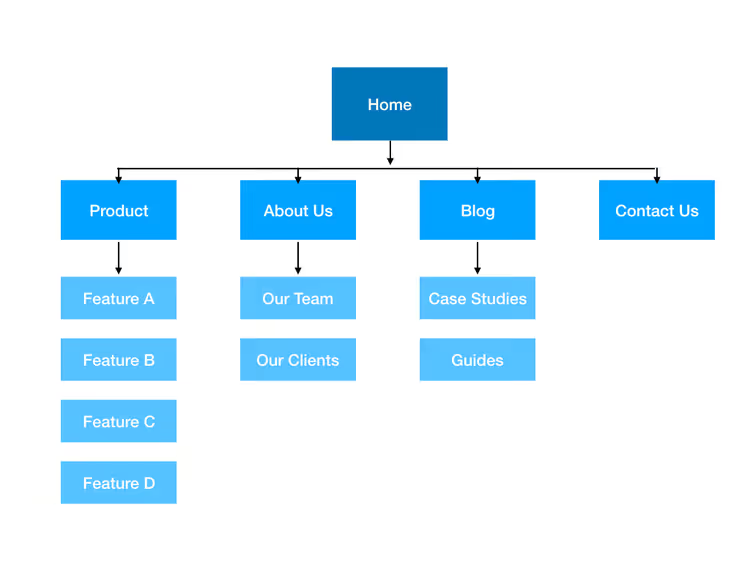
When Googlebot crawls a site, it follows menu links and builds a relationship graph. Based on this graph, sitelinks are formed: those additional links beneath the snippet in search results that increase click-through rates by 20-40%. Pages that don't appear in any menu look secondary to search engines, even if the content on them is excellent.
There's another layer: menus directly affect crawl budget. If navigation is bloated with hundreds of links, the crawler spends its quota traversing low-value URLs instead of fresh content. Google doesn't penalize you for having many links (the limit is around 250 per page), but it's wiser to direct its attention to what truly matters.
How Google reads menu structure
Search engines analyze menus on three levels:
Placement. Main menu items receive the strongest importance signal, the footer receives a medium signal, and the sidebar receives the weakest. That's why critically important pages (about, services, contact) are typically duplicated in the footer; this strengthens the signal without cluttering the main navigation.
Hierarchy. When a menu is organized logically ("Services → Development → WordPress") rather than as a flat list, Google builds a clear thematic structure of the site. This affects both sitelinks (subpages can appear beneath the main snippet) and topical ranking: the search engine better understands which sections belong to which topics.
Link text. Anchors in menus are extremely strong relevance signals. The item "SEO audit" is far more informative to Google than "Services" or "What we do." However, balance matters: anchors shouldn't turn into keyword spam.
The principles of how navigation works for SEO are explained in detail in this video:
A practical example: consider a cooking website. Its main menu has three items: "Recipes," "Equipment reviews," and "Contact." Through the menu structure, Google understands the site's thematic blocks. If "Recipes" contains subcategories like "Breakfasts" and "Desserts," when someone searches for "dessert recipes," there's a higher chance the snippet will display sitelinks with these subpages.
Key principles of menu optimization
Build a hierarchy, not a dump
The first and most important step is to honestly answer this question: does the current menu reflect the actual structure of the site? If sections were added as content appeared, without revisiting navigation, the answer is almost certainly "no."
Principles of a healthy hierarchy:
- Broad categories → narrow subpages. Maximum 2-3 nesting levels. Any deeper, and users get lost while search engines weaken the link weight.
- No more than 7 items in the main navigation. This isn't a strict rule but a cognitive limit: UX research shows that after 7 elements, a user's short-term memory becomes overloaded. Everything else goes in the footer, sidebar, or contextual blocks.
- Order matters. The first and last menu items receive the most attention from both users and crawlers. Most important pages go at the beginning; secondary but necessary items (such as "Privacy policy") go in the footer.
Moderate your internal links
Menus are a powerful interlinking tool, but it's easy to overdo it. Google handles up to 250 links per page without issue, and exceeding this number isn't penalized per se. However, there's a nuance: when every page has the same hundred-item menu, the search engine receives a diluted signal where all pages look equally important, and none stands out.
What to do:
- Don't duplicate the entire site tree in every menu. For main navigation, use key sections. For the footer, use secondary and service pages. For the sidebar, use contextual links relevant to the current section.
- Avoid infinite scrolling on archive pages and long lists in categories; they create "endless" link chains that crawlers traverse inefficiently.
- Every menu item should lead to a page with unique value. If two links lead to similar content, merge them or canonicalize.
JavaScript in menus: should you take the risk?

This topic has sparked countless debates. Here's the honest breakdown for 2026:
Google has learned to render JavaScript; that's a fact. But rendering happens in a second wave of indexing, with delays ranging from several hours to several days. During this entire period, links generated by JS code don't exist for the search engine. For a news site, this is catastrophic; for a static blog, it's more of an inconvenience.
Bing, Yahoo, and DuckDuckGo still handle JavaScript significantly worse. If your audience comes from sources other than Google, a JS menu without a static fallback will cost you traffic.
What to choose in practice:
- For WordPress sites, use standard PHP menus. They render on the server, and search engines see the links instantly. Problem solved.
- For React / Vue / Next.js, use server-side rendering (SSR) or static site generation (SSG). The header and menu should arrive in the HTML, not be assembled on the client. Next.js with App Router does this out of the box with
export const dynamic = 'force-static'or throughgenerateStaticParams. - For sites built with pure JS and client-side rendering, at minimum: duplicate navigation in a
<noscript>block or through a hidden static footer. It's not elegant, but it's better than links invisible to search engines.
If your site's menu is fully rendered on the client, you risk losing all the link equity it could have passed. The cost of error here is asymmetric: the web designer gets a beautiful animation, while the SEO specialist gets a rankings drop. A sensible compromise: a static HTML menu skeleton plus JS for visual enhancements (animations, mobile expansion). This way, search engines see the links and users see a smooth interface.
Mobile menus: a separate point of attention
On mobile devices, menus collapse into a hamburger icon, and this creates specific SEO risks. Since 2021, Google uses mobile-first indexing: the search engine primarily evaluates the mobile version of a page. If the menu is hidden behind a JavaScript handler without a static duplicate, links may not make it into the index.
Three rules for mobile navigation that work for both users and crawlers:
- The hamburger menu should expand via a CSS mechanism (checkbox hack or
:target), not only through JS events. This way, search engines see the links even without executing scripts. - Don't hide key sections exclusively in the hamburger. If budget allows, it's useful to duplicate 3-4 of the most important links in the visible part of the mobile header using icons or text labels.
- Touch target size: menu items on mobile should be at least 48×48 CSS pixels (Google's Core Web Vitals recommendation). Items that are too small increase accidental taps and worsen behavioral metrics, which indirectly affect rankings.
A separate case involves menus on AMP pages. The AMP framework uses its own amp-sidebar component, which is guaranteed to be indexed. If your site partially uses AMP, ensure the menu structure in the AMP version mirrors the main one rather than being a stripped-down stub with three links.
⁉️🤔 Frequently asked questions
How many items should be in the main menu?
Ideally, 5 to 7. This isn't a dogma but a guideline: UX research (NNGroup, 2023) confirms that after 7 elements, users stop distinguishing priorities. Everything beyond this limit is better moved to the footer or submenus with clear grouping logic.
What's more important for SEO: the main menu or the footer?
The main menu sends a stronger priority signal. But the footer is critical for coverage: it appears on every page and is appropriate for links that don't fit in the main navigation, from "Privacy policy" to the sitemap. The best strategy is to place main sections in the main menu and supporting and service pages in the footer.
Should you duplicate the same links in different menus?
Moderate duplication is beneficial. For example, a "Contact" link in both the main menu and footer is normal and even desirable: it receives a double importance signal. However, duplicating the entire main menu in the footer one-to-one isn't advisable; it dilutes the signal and looks like an attempt at manipulation.
Does Google ignore JavaScript menus in 2026?
Not entirely, but it renders them with a delay in a second wave of indexing. JS-generated links may be absent from the index for anywhere from several hours to several days. For most sites, this is acceptable. But if you have a news site or a frequently updated project, use server-side rendering or a static fallback.
How can I check if Google sees my menu?
Run a page inspection in Google Search Console → "View crawled page." Compare the rendered HTML with what the user sees. If the rendered version is missing menu links, Google isn't indexing them. A second method: search Google for
site:yoursite.comand check whether sitelinks appear beneath the main snippet.
Is it time to revisit your site menu?
Menu optimization isn't a one-time event before a redesign; it's a process worth repeating every six months to a year. Sites grow, new sections appear, old ones lose relevance, and navigation should reflect these changes.
Three signs that your menu needs revisiting right now: you have more than 10 items in the main menu, sitelinks haven't appeared in Google after 3+ months since launch, and in Google Search Console the menu links don't show up in the rendered HTML when inspecting a page. If even one point matches, start with a hierarchy audit and static fallback.
A practical checklist for a 20-minute menu audit:
- Open Google Search Console, go to the "View crawled page" tab for the homepage, and compare the rendered HTML with what you see in the browser. If menu items are missing from the rendered version, there's a JavaScript rendering problem.
- Check the number of items in the main menu. If there are more than 7, sort them by importance: keep the top 7 and move the rest to the footer or structure them into dropdown submenus.
- Find pages that don't appear in any menu. To do this, compare the list of URLs in menus with data from Google Search Console (the "Pages" tab): everything that's indexed but absent from navigation receives a lowered importance signal.
- On the mobile version, open the hamburger and verify that all links from the desktop menu are present. If some links disappear on mobile, Google won't see them during mobile-first indexing.
- Check your anchors: instead of "Services" or "Products," use informative phrases like "SEO audit" or "Website promotion." This improves topical ranking without keyword stuffing.
A well-organized menu doesn't guarantee the top spot, but without it, even strong content risks going unnoticed by both people and search engines. Make your navigation meaningful, and Google will reward you with sitelinks.

A professional team of writers and editors specializing in creating quality content.