














How to redirect all 404 pages to the homepage in WordPress: 3 methods
A visitor follows a link to your site and sees not content but a blank page with "404 Not Found." What do they do? They close the tab and leave, possibly to a competitor. Every broken link steals traffic you paid for with time, money, or reputation.
Worse still: search engines see hundreds of 404 errors and demote your site in rankings. The algorithm reasons simply: if the owner doesn't maintain pages, the site is abandoned. And abandoned sites shouldn't rank highly.
You can fix this in 10 minutes. You'll redirect all problematic URLs to the homepage or another relevant page, and no visitor will ever hit a dead end again. Below are three working methods: from a one-click plugin to manual code for those who don't want extra extensions.
💡 Quick overview:
- Install the All 404 Redirect to Homepage plugin and enable redirect in its settings.
- Add PHP code to your theme's 404.php file if you don't want to install extra extensions.
- Set up individual redirects through the Redirection plugin for granular control.
What is a 404 error and why you can't ignore it
A 404 error is an HTTP server response code that means the requested URL doesn't exist. There are two causes: either the user mistyped the address, or the page was deleted but links to it remain.

Google doesn't directly penalize for 404s (that's a myth), but the indirect damage is real. Behavioral metrics drop: a visitor arrives and immediately leaves, bounce rate climbs. Backlinks from other sites lead to nothing, and you lose domain authority you built over months. And if there are hundreds of broken URLs (after migration, structure changes, or deleting an old section), the problem becomes systemic.
Redirecting to the homepage isn't the ideal SEO solution (it's better to redirect each URL to a relevant replacement), but for mass cleanup it's the most practical option. Your site stops losing visitors immediately.
1. All 404 Redirect to Homepage plugin: mass redirect in one minute
The simplest method. The plugin of the same name does exactly what its title says: it intercepts all 404 requests and sends visitors to the homepage via 301 redirect. No manual URL configuration. Install, enable, done.

The plugin is free, installed on 200,000+ sites, updated to version 5.6, and tested with WordPress 6.9. Permanent 301 redirects preserve link equity, unlike temporary 302 redirects that "zero out" the SEO value of backlinks.
Additional features: the plugin logs all intercepted 404 URLs (you can see where broken clicks come from) and can replace broken images with a placeholder. Recent versions added statistics charts based on CanvasJS.
Installation and setup
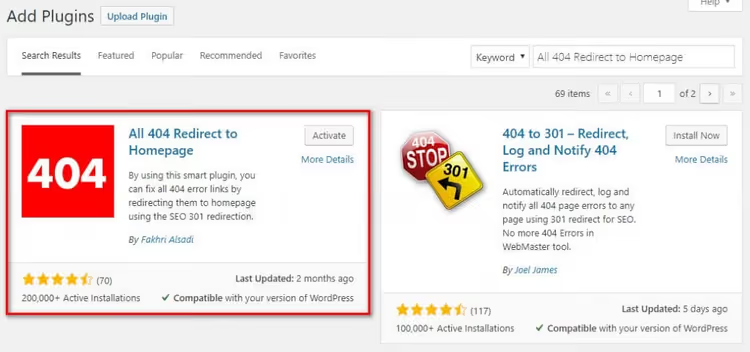
Go to your WordPress admin panel, open Plugins → Add New, and type "All 404 Redirect to Homepage" in the search. Click "Install," then "Activate."
After activation, go to Settings → All 404 Redirect to Homepage. You'll see a single text field for the URL to redirect to. By default, it contains your homepage address. Set the status toggle to "Enabled" and save your changes with the "Update Options" button.

If you have a caching plugin installed, clear the cache after activation. Test it: enter a deliberately nonexistent URL on your site (for example, /test-404-check) in the address bar. If you're redirected to the homepage, the plugin is configured correctly.
Important: don't enter a nonexistent page in the redirect field, as this will create a redirect loop. If this happens, simply deactivate the plugin and fix the URL.
2. Code in 404.php: redirect without a single plugin
If you don't want to install another extension for one function, the task is solved with three lines of PHP. This method is faster than a plugin: no extra database queries, pure server-level code.
Open the 404.php file in your theme folder (via Appearance → Theme Editor or FTP). If the file doesn't exist, create it. At the very top, before any HTML, insert:
1 <?php 2 header("HTTP/1.1 301 Moved Permanently"); 3 header("Location: " . get_bloginfo('url')); 4 exit(); 5 ?>
The three lines do the following: the first sends the browser and search engine a "301 Moved Permanently" header, signaling that the page has moved permanently. The second specifies the new address (get_bloginfo('url') returns your site's homepage URL). The third (exit()) stops further execution so WordPress doesn't render the 404 page.
If you don't want to edit theme files directly, use the free WPCode plugin. Its snippet library has a ready-made "Redirect 404 to Homepage" template. Insertion takes thirty seconds and survives theme updates.
Downsides of the manual method: when you change or update your theme, the 404.php file will be overwritten and your edit will disappear. The solution is a child theme or WPCode.
3. Redirection plugin: granular control over every broken URL
You don't always need to lump all 404s together. Sometimes it's better to redirect a specific deleted article to its successor rather than to the homepage. For this, there's the free Redirection plugin, the oldest and most popular redirect manager for WordPress with 2+ million active installations.
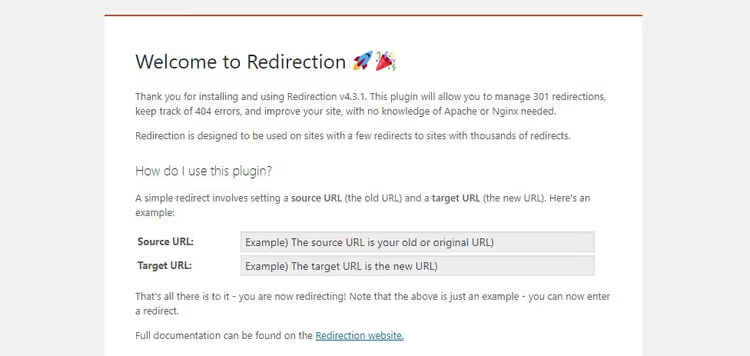
Redirection works differently from the first plugin. You don't redirect everything in bulk; you build a mapping table: "old URL → new URL." The plugin tracks all 404 errors in real time (log in Tools → Redirection → 404 Errors) and lets you create a redirect for each broken address right from the log.
Installation is standard: Plugins → Add New → search "Redirection". After activation, open Tools → Redirection. In the "Source URL" field, enter the broken link (for example, /old-post/); in "Target URL," enter the destination address (homepage or another article). Click "Add Redirect." The plugin supports 301, 302, 307, and other codes, browser filtering, regular expressions, and list import/export.
This method works well for smaller sites with dozens of broken links, not thousands. You preserve each URL's SEO potential precisely rather than funneling everything to the homepage.
Table: which method to choose
Situation | All 404 Redirect to Homepage | Code in 404.php | Redirection |
|---|---|---|---|
More than 50 broken URLs | ✅ Ideal | ✅ Suitable | ❌ Tedious manually |
Fewer than 10 broken URLs | ✅ Works | ✅ Works | ✅ Best option |
Need granular redirects | ❌ Can't do this | ❌ Can't do this | ✅ Core functionality |
Can't add plugins | ❌ Requires plugin | ✅ No plugin needed | ❌ Requires plugin |
Setup speed | ✅ 1 minute | ✅ 3 minutes | ❌ Manual entry |
404 error logging | ✅ Yes (since version 5.4) | ❌ No | ✅ Detailed |
Depends on theme updates | ✅ No | ❌ Will be overwritten | ✅ No |
⁉️🤔 Frequently asked questions
Does mass redirecting 404s to the homepage hurt SEO?
From Google's perspective, the ideal scenario is redirecting each page to its relevant replacement (for example, a deleted post about plugin A goes to a review of plugin A). But if there are hundreds of broken pages and no relevant replacements exist, redirecting to the homepage is an acceptable compromise. The search engine gets a 301 redirect instead of a 404 response, and link equity is partially preserved.
How many redirect plugins can you install at once?
Exactly one. Two plugins intercepting 404 requests will conflict: which one fires first is unpredictable. Choose one tool for your task and remove the rest.
Can you redirect 404s to a page other than the homepage?
Yes, all three methods support this. In the All 404 Redirect plugin, enter the desired URL in the settings field. In the
404.phpcode, replaceget_bloginfo('url')with a hardcoded address. In Redirection, enter the target URL when creating a rule.
The plugin created a redirect loop. What should I do?
Go to the WordPress admin panel (frontend redirects don't affect it) and deactivate the plugin via Plugins → Installed Plugins. Verify that the URL in the redirect settings points to an existing page, not another 404.
Does the redirect work with caching plugins?
Yes, but you must clear the cache after enabling the redirect. Otherwise, plugins like WP Rocket or LiteSpeed Cache may continue serving the cached 404 page, and visitors will still see the error instead of the homepage.
Should you redirect all 404s to the homepage?
For most sites, the answer is yes, if many broken links have accumulated. All 404 Redirect to Homepage will solve the problem in a minute. If you fundamentally don't want to add plugins, three lines of PHP in 404.php handle the task with no overhead. And when there are fewer than ten broken URLs and you want to preserve each one's SEO potential, use Redirection and fix them individually.
The main thing: don't leave 404s as they are. Every day of silence costs you rankings and real visitors who leave forever.

A professional team of writers and editors specializing in creating quality content.