













 AIIllustrative image: AI-generated
🔧 Tools and web resources for web development: 100+ solutions for 2026
In 2026, a web developer is drowning not in code complexity but in the sheer number of tools. Every week brings a new framework, yet another "Webpack killer," or an AI assistant that will "replace programmers." Separating signal from noise has become harder than writing working code.
The problem is not that there are too few tools. There are hundreds, each louder than the last. The real issue is that without a way to navigate this ocean, you waste hours choosing instead of building your product. Worse: pick the wrong tool, and you bury the project in technical debt before the first commit is even written.
We compiled 100+ solutions that developers actually use in 2026, from languages and frameworks to command-line utilities and sources of inspiration. No hype, no "best in the world," no marketing promises. Only what works, and honestly: what deserves your time and what belongs in the archive.
💡 Quick overview:
- Choose your stack for the task, not for trends: React/Vue for the frontend, Node.js/PHP for the backend, PostgreSQL for data. This coverage is enough for the vast majority of projects.
- Master VS Code and one package manager (npm) deeply. Jumping between tools costs more time than learning them.
- Don't postpone DevOps: Docker, GitHub Actions, and performance monitoring set up from day one save weeks of debugging under a deadline.
- Subscribe to 1-2 industry newsletters (Frontend Focus, JavaScript Weekly). Five minutes of reading per week keeps you better informed than any course.
- Every package added to a project is a potential vulnerability and a line in the update list. Write with native APIs and only pull in a library when the benefit is clear.
Languages and platforms: what the web is built with in 2026
The language defines the ecosystem: available frameworks, hosting options, talent pool, and hiring speed. A modern web developer rarely sticks to one language; a working combination of three or four has become the norm.
- JavaScript, the default language of the web. ES2024+ brought
Temporalfor proper date handling,Array.fromAsync, andPromise.withResolvers. A single syntax on the client (React/Vue/Angular) and server (Node.js) covers the entire stack. - TypeScript, a typed superset of JavaScript. According to the Stack Overflow 2025 survey, TypeScript surpassed JavaScript in usage share among professional developers. Typing catches bugs before production and makes refactoring predictable.
- PHP 8.4, lazy objects, property hooks, improved JIT. Under the hood of WordPress, Laravel, and Drupal. New versions ship every November. The language has long outgrown the stereotypes of the PHP 5 era.
- Python, Django and FastAPI for the web, plus dominance in AI/ML integrations. If your product interfaces with ML models, Python is virtually unavoidable.
- Node.js, server-side JavaScript. 22.x LTS: built-in WebSocket client, stable fetch, native
.env. Google's V8 engine squeezes the most out of the single-threaded event loop. - Go, high-load APIs, microservices, CLI tools. Simple syntax, goroutines, instant compilation. Docker, Kubernetes, Terraform, and Caddy are all written in Go.
- Rust, a systems language with memory safety guarantees and no garbage collector. Actively entering the web toolchain: SWC (compiler), Turbopack (bundler), Ruff (Python linter), all built in Rust.
- Ruby, Rails 8 with Propel (an importmap alternative) and a firm focus on "convention over configuration." Niche but alive: Shopify, GitHub, and GitLab keep the ecosystem afloat.
- Elixir, a functional language on the Erlang VM. Phoenix delivers WebSocket performance unmatched by most competitors. Great for real-time use cases: chat, notifications, collaborative editors.
- Scala, an object-functional hybrid on the JVM. Play Framework and Akka are in demand in enterprise. The niche is narrowing, but Scala holds its ground in fintech and Big Data.
- SQL, the query language without which no application with a relational database can function. Learning it is mandatory: an ORM saves you from routine but not from deadlocks and bad execution plans.
Frontend frameworks and libraries

A frontend framework determines project structure, interface performance, and the availability of ready-made components. The 2026 ecosystem has split into three camps: the React universe, the Vue ecosystem, and Angular enterprise. Plus newcomers gaining momentum.
- React, a UI library from Meta. Virtual DOM, component-based architecture, the largest npm package ecosystem. Next.js (built on React) handles server-side rendering, static generation, and routing out of the box.
- Vue.js, a progressive framework with a gentle learning curve. Composition API and
<script setup>simplified the architecture of large projects. Nuxt, a full-stack layer on top of Vue, competes confidently with Next.js. - Angular, a full-featured framework from Google. TypeScript out of the box, dependency injection, declarative templates. Signals in Angular 17+ replaced zone.js for change detection. The choice for large enterprise applications.
- Svelte, a compiler that disappears at build time. No virtual DOM: Svelte transforms components into imperative JavaScript. SvelteKit is the Next.js/Nuxt equivalent. Small bundles, high speed.
- Astro, a static site generator with a "zero JavaScript on the client by default" philosophy. Supports React, Vue, Svelte, and Solid components under one roof. Ideal for content sites and blogs.
- SolidJS, reactive primitives without a virtual DOM, near-native speed. The ecosystem is smaller than React's, but its "signals instead of re-renders" philosophy has influenced everyone, including Angular.
- Bootstrap, a CSS/JS framework for responsive interfaces. Version 5.3: no jQuery, dark theme, improved grid system. Good for rapid prototyping and admin panels.
- Tailwind CSS, a utility-first CSS framework. Atomic classes like
flex,pt-4, andtext-zinc-100compose designs directly in HTML. Tailwind v4 (2025): configuration via CSS, faster builds powered by a Rust engine. - shadcn/ui, not a library but a collection of copy-pasteable components built on Radix UI and Tailwind. The source code goes into your project and can be modified however you like. It became the de facto standard for React projects in 2025-2026.
- Foundation, the responsive framework pioneer from ZURB. The last stable version 6 was released several years ago, and active development has stalled. For new projects, Bootstrap or Tailwind is the wiser choice.
CSS tools: preprocessors, PostCSS, and modern CSS
Not long ago, no layout started without Sass or Less. Today, native CSS has caught up with preprocessors: variables, nesting, the :has() pseudo-class, container queries, all working directly in the browser without compilation.
- Sass, the most mature preprocessor. SCSS syntax is backward-compatible with CSS. Mixins, functions, and the
@usemodule system are still in demand for large projects. Dart Sass is the canonical implementation. - Less, a preprocessor pioneer. Many design systems (Ant Design, older Bootstrap versions) were historically built on Less. For new projects, Sass or PostCSS is preferable, but maintaining legacy Less code is still a reality.
- PostCSS, a platform for transforming CSS through plugins: Autoprefixer, cssnano, post-import. Paired with Tailwind (which runs on top of PostCSS), it forms the standard toolchain for modern frontend.
- Lightning CSS, an ultra-fast CSS parser, transformer, and minifier built in Rust. Supports nesting, color functions, the
@containerrule, and vendor prefixes. A drop-in replacement for Autoprefixer + cssnano with a 10-100x speed gain.
Native CSS today covers what Sass was originally created for: custom properties (--var), @layer for specificity ordering, color-mix() and light-dark() for color schemes. A preprocessor is now a matter of build convenience and team habit, not a strict necessity.
JavaScript libraries and utilities

Beyond large frameworks, a frontend developer uses dozens of utilities daily. A well-chosen library saves hours of reinventing the wheel.
- jQuery, the grandfather of frontend, still present on 75%+ of sites according to W3Techs statistics, 2025. Choosing jQuery for a new project is not advisable; the native DOM API and fetch cover its use cases. But maintaining legacy jQuery code will continue for a long time.
- D3.js, data visualization: data-driven DOM transformations. Custom dashboards, interactive charts, infographics.
- Lodash, utilities for arrays, objects, strings, and functions. Methods like debounce, throttle, cloneDeep, and merge still justify the install, although native flatMap, structuredClone, and Object.groupBy are gradually reducing the need.
- date-fns, a modular date library. Each function is a separate file; tree-shaking removes what is unused. It replaced Moment.js, which has been moved to maintenance mode.
- Day.js, a lightweight Moment.js alternative with a compatible API. Weighs 2 KB, supports chaining, plugin architecture. A good choice if the team is accustomed to Moment-style syntax.
- Zod, schema validation for TypeScript/JavaScript. Infers static types from schemas, validates data at runtime, parses
.env, query parameters, and API request bodies. The de facto standard in tRPC and Next.js projects. - Immer, immutable state updates through a mutable draft. You write
draft.x = 5, and Immer produces a new immutable tree. Indispensable alongside Redux Toolkit and Zustand. - Framer Motion, declarative animation for React. A motion.div component with animate, initial, exit, and whileHover props. Animations, gestures, and layout transitions without a single line of hand-written CSS.
Web application frameworks

A backend framework handles routing, database interaction, authentication, and validation. A modern framework is not just MVC but also API-first, WebSocket, and serverless modes.
- Laravel, a PHP framework with elegant syntax. Eloquent ORM, queues, event broadcasting, built-in authentication. Laravel 11 (2025): simplified application structure, minimal scaffolding by default.
- Django, a Python "batteries included" framework. Admin panel out of the box, ORM, template system, middleware authorization. Django 5.x: async views, improved form handling. The choice for projects involving ML and scientific computing.
- Ruby on Rails, the MVC framework that invented "convention over configuration." Rails 8 (2025): Propel, built-in authentication, SQLite for production, Kamal for deployment. Shopify processes millions of requests on Rails daily.
- Express, a minimalist web framework for Node.js. Routing, middleware, and HTTP utilities. It does not impose architecture, which is why an ecosystem grew around it: NestJS, Fastify, AdonisJS.
- NestJS, a progressive Node.js framework with Angular-inspired architecture. Modules, decorators, dependency injection, support for GraphQL, WebSocket, and microservices. TypeScript-first.
- Fastify, a high-performance web framework for Node.js. Plugin architecture, serialization via fast-json-stringify, 2-5x faster than Express.
- Symfony, a set of reusable PHP components and a framework. Doctrine ORM, Twig, form building, and validation. Symfony 7: strict typing, improved profiler.
- ASP.NET Core, a cross-platform framework from Microsoft built on C#. High performance (top of TechEmpower benchmarks), Entity Framework Core, gRPC, and SignalR for real-time. The enterprise choice on Windows infrastructure.
- Flask, a Python microframework. Routing, Jinja2 templates, minimal abstractions. For microservices and prototypes where Django's overhead is excessive.
- FastAPI, a Python framework for APIs with auto-documentation via OpenAPI. Async out of the box, validation through Pydantic, auto-generated Swagger UI. One of the fastest-growing Python frameworks according to Stack Overflow Trends, 2025.
Databases
Without a database, a web application is a static brochure. The choice of DBMS affects architecture, performance under load, and operational complexity.
- PostgreSQL, an open-source object-relational DBMS. Full-text search, geodata via PostGIS, JSONB columns, window functions, CTEs. PG 17 (2025): incremental backup, improved vacuum performance. The standard for new projects.
- MySQL, the most widely used relational database. MySQL 8.4 LTS and 9.x Innovation track (Oracle, 2025). Under the hood of WordPress, Joomla, and Magento.
- MariaDB, a MySQL fork by the original developers. Compatible at the protocol level but diverges in features: system-versioned tables, more storage engines (ColumnStore, Spider).
- SQLite, an embedded database in a single file. No server required, no configuration needed. SQLite 3.47: improved query planner. Used in browsers, mobile apps, and increasingly in production for small web applications (Litestream for replication).
- MongoDB, a document-oriented NoSQL database. JSON-like documents, flexible schema, horizontal scaling via sharding. MongoDB 8.0: improved aggregation performance, change streams with filtering.
- Redis, an in-memory data structure store. Cache, message queues, task broker (BullMQ), sessions, rate limiting, leaderboards via sorted sets. Redis 7.4: Redis Functions, improved zero-downtime replication.
- Valkey, a fork of Redis 7.2 created after the Redis Ltd. license change. Backed by the Linux Foundation, compatible with existing Redis clients. AWS, Google Cloud, and Ericsson switched to Valkey in 2025.
Bundlers, package managers, and toolchain

A modern JavaScript project is not written in a single file. Code is assembled from hundreds of modules, processed by the TypeScript compiler, minified, and bundled. Automation tools handle this on every save.
- Vite, a bundler from the creator of Vue.js (Evan You). Native ESM for development (instant HMR), Rollup for production builds. Vite 6 (2025): Environment API for different execution contexts. The standard for new React, Vue, and Svelte projects.
- Turbopack, an incremental bundler written in Rust by Vercel. Claims 10x the speed of Webpack for large codebases. A drop-in Webpack replacement in Next.js 14+. Currently in development mode; production support is in progress.
- Webpack, the veteran of module bundling. Webpack 5: tree-shaking, module federation (micro-frontends), lazy loading. Gradually giving way to Vite, but millions of existing projects will live on for years.
- esbuild, an ultra-fast bundler written in Go. TypeScript transpilation, JSX, tree-shaking, minification. Under the hood of Vite and many other tools.
- npm, the standard package manager for Node.js. npm v11 (2026): improved security auditing, auto-generated SBOM, native workspace protocols for monorepos.
- pnpm, an efficient package manager using hard links to a shared store. Saves gigabytes of disk space in monorepos. Strict: a module cannot see packages not listed in its
package.json. - Bun, an all-in-one JavaScript/TypeScript runtime, package manager, bundler, and test runner. Written in Zig. Package installation is several times faster than npm. Node.js compatibility is growing, but caution is warranted in production.
- Deno, a runtime from the creator of Node.js (Ryan Dahl). Native TypeScript support, built-in linter and formatter, web-standard APIs. Deno 2 (2025): backward compatibility with npm packages.
- Biome, a formatter and linter written in Rust. A drop-in replacement for ESLint + Prettier with a 10-100x speed gain. Supports JavaScript, TypeScript, JSX, and CSS. Winner of the Prettier Challenge (2024).
Text editors and IDEs
Your code editor is your primary tool for 8+ hours a day. Every minute saved on navigation and autocomplete pays for itself many times over.
- Visual Studio Code, the dominant editor according to Stack Overflow surveys from 2023 to 2025. Lightweight, extensible, a marketplace with thousands of extensions. GitHub Copilot is natively integrated, as is remote development via SSH/Docker/WSL.
- Cursor, an editor built on VS Code with deep AI integration. Context-aware autocomplete across the entire project, chat with a model that sees the codebase, inline code generation. For AI-first development, currently the best in its class.
- JetBrains WebStorm, a full-featured IDE for JavaScript/TypeScript. Smart refactoring, deep framework integration, built-in debugger and HTTP client. Paid, but for professional development it justifies every dollar.
- Sublime Text, a legendarily fast editor. Instant launch, multiple cursors, Python plugins. Sublime Text 4: GPU rendering, project-aware autocomplete, TypeScript support out of the box.
- Vim / Neovim, a modal editor for those who never want to lift their hands from the keyboard. Neovim 0.10: built-in LSP client, Treesitter for syntax parsing, Lua configuration. Steep learning curve, but those who get through it need no alternatives.
- Zed, a Rust-based editor with GPU rendering from the creators of Atom. Responsive (60+ FPS), collaborative editing with low latency, AI assistant. The plugin ecosystem is young but growing.
- Notepad++, a free editor for Windows. Dozens of languages, lightweight, reliable. For quick config edits and log viewing, it is still more convenient than heavyweight IDEs.
Atom (GitHub/Microsoft) was officially retired in December 2022. Brackets (Adobe) has not been updated since 2021. Both gave way to VS Code and Zed.
Markdown editors
Markdown is a markup language for documentation, README files, technical articles, and static sites. Its simple syntax converts to HTML on the fly.
- Obsidian, an editor built on local Markdown file storage. A graph of linked notes, plugin architecture, built-in Canvas for visual thinking. Popular as a developer's knowledge base.
- StackEdit, a free browser-based editor with Google Drive/Dropbox sync. WYSIWYG panel, instant preview.
- Dillinger, a cloud-based HTML5 Markdown editor. Export to HTML, PDF, and styled Markdown. Minimalist, no unnecessary dependencies.
- Typora, a desktop editor that removes the split between code and preview. You write Markdown and immediately see the formatted result. Paid ($14.99, one-time license).
Icons and visual resources
Icons, illustrations, and font sets form the visual language of any interface. The following resources cover virtually every frontend developer's needs.
- Font Awesome, the standard vector icon set (7,000+ in version 6). SVG + JS, Web Fonts, customization via CSS classes. Free and pro versions available.
- Lucide, a fork of Feather Icons with active development. Clean, consistent, SVG-first. The default icons in shadcn/ui.
- IconMonstr, a collection of simple monochrome icons. Free, no attribution required, wide variety.
- Icons8, a unified platform: icons, illustrations, 3D models, photos. Icons in multiple styles (iOS, Material, Windows), customizable through a web editor.
- Iconfinder, a marketplace for icons and illustrations. Search by style, license, and format. Many premium sets, with free collections available.
- Noun Project, a crowdsourced library of 5+ million icons. Free with attribution; a premium subscription removes the restriction.
- Fontello, a tool for building custom icon fonts. Pick the icons you need from popular sets and generate your own compact web font.
Git clients and code hosting platforms
Git is the version control standard. But the CLI is not always convenient for visual commit history, conflict resolution, and code review.
- GitHub Desktop, the official GUI client from GitHub. Simple, intuitive: commit, push, pull, pull request creation.
- GitKraken, a cross-platform Git client with an interactive history graph, drag-and-drop rebase, and a built-in merge conflict editor. Free for public repositories.
- Sourcetree, a free Git GUI from Atlassian. Rich branching visualization, Git and Mercurial support, deep Bitbucket integration.
- Tower, a premium Git client for macOS and Windows. A polished interface, undo for most operations, built-in tutorial tips. Paid ($99/year).
- GitHub, the largest code hosting platform: 100+ million developers. Copilot, Actions (CI/CD), Codespaces (cloud dev environments), Projects for task management.
- GitLab, a self-hosted and cloud platform covering the full cycle (DevSecOps). Built-in CI/CD, container registry, security scanning, wiki.
- Bitbucket, Git hosting from Atlassian with deep Jira and Trello integration. Built-in CI/CD via Pipelines.
Web servers
A web server accepts HTTP requests and returns responses: HTML pages, static files, or proxied connections to a backend application. The right server choice and configuration directly affect response time and fault tolerance.
- Nginx, a high-performance web server and reverse proxy. Asynchronous architecture, efficient static file serving, caching, load balancing, SSL termination. Nginx 1.27 (2025): HTTP/3, improved QUIC support.
- Apache HTTP Server, an internet veteran with a 30-year history. Modular architecture (mod_rewrite, mod_security),
.htaccessfor per-directory configuration. Apache 2.4.63: production-ready HTTP/2, improved TLS 1.3 integration. - Caddy, a web server with automatic HTTPS out of the box. Written in Go, configured via Caddyfile or JSON API. Caddy 2.9 (2025): improved reverse proxy, dynamic configuration without restarts.
- LiteSpeed, a commercial web server with event-driven architecture. Faster than Apache for static files and PHP (via LSAPI instead of PHP-FPM). Built-in WordPress cache through the LSCache plugin.
- IIS, a web server from Microsoft for Windows Server. Deep integration with Active Directory, web farms, and the.NET stack. Relevant in corporate environments on Windows infrastructure.
API tools
API development is not just writing endpoints but also testing, documenting, monitoring, and integrating with external services.
- Postman, a complete platform for working with APIs. Request collections, environment variables, JavaScript-based automated tests, mock servers, documentation generation. Postman v11: an AI assistant for generating tests from schemas, improved gRPC client.
- Insomnia, a lightweight Postman alternative focused on GraphQL and gRPC. Design documents as code (YAML/JSON), git-synced collections, offline mode with no cloud dependency.
- Hoppscotch, an open-source browser-based API client. Support for REST, GraphQL, WebSocket, SSE, and MQTT. No sign-up required; everything works directly in the browser.
- Zapier, a no-code platform for connecting APIs to each other. A trigger in one service leads to an action in another. 7,000+ integrations: Gmail, Slack, Trello, GitHub, Stripe, Salesforce, and more.
- SoapUI, a specialized tool for testing SOAP and REST APIs. Data-driven tests, service simulation through mock servers, load testing.
Local development environments

A local environment isolates a project from the production server. You can experiment, break things, and fix them without risking a live site going down.
- Laragon, a lightweight environment for Windows. Apache/Nginx, MySQL/PostgreSQL, PHP, Node.js, Composer, all in one. Quick start, isolated projects, automatic virtual host creation. Ideal for PHP/WordPress/Laravel development on Windows.
- XAMPP, a cross-platform LAMP stack (Apache + MariaDB + PHP + Perl). Simple installation, control panel. Good for learning and quick code checks, but for professional development it falls behind Laragon and Docker.
- MAMP, a local server for macOS and Windows. Multiple PHP, Apache, and Nginx versions to choose from. MAMP PRO adds virtual host management and SSL.
- Docker, containerization for identical environments across all team machines. Docker Compose spins up PHP/MySQL/Redis/Node.js with a single command. Docker 28 (2026): built-in WebAssembly container support, improved BuildKit with distributed cache.
- DevKinsta, a specialized WordPress development environment from Kinsta. Free, even if you are not a hosting customer. Local Nginx + MySQL + PHP + built-in email interceptor.
Code comparison tools (diff)
Comparing file versions is part of code review, debugging, and merge conflict resolution. CLI tools (git diff) are fast, but a GUI provides clarity.
- Meld, a free visual diff/merge tool for Linux and Windows. Three-way comparison, editing directly in the comparison window, integration with Git, Mercurial, and SVN.
- Beyond Compare, a powerful tool for comparing files, folders, and FTP directories. Three-way merge, binary file comparison, text and tabular formats. Paid ($35 standard, $70 pro).
- Diffchecker, browser-based comparison: two texts, two images, two PDFs. Convenient when no GUI is installed and you need a quick comparison.
Code sharing and demonstration
Quickly showing a colleague a code snippet, testing a hypothesis, or debugging an issue does not require creating a full project.
- CodePen, a social sandbox for frontend. HTML, CSS, JavaScript with preprocessors, live preview, a community with millions of examples. Collections, forks, a built-in educator mode.
- JSFiddle, a minimalist environment for testing HTML/CSS/JS. Support for React, Vue, and TypeScript through settings. Quick start, shareable link in seconds.
- CodeSandbox, a full-featured browser IDE for web applications. Supports React, Vue, Angular, Svelte, Node.js, Next.js, and Nuxt. Automatic preview deployment, real-time collaborative editing.
- StackBlitz, an instant browser-based development environment powered by WebContainers (Node.js running directly in the browser). Full npm, terminal, debugger. Ideal for bug reports: you share a link, and the developer immediately sees the issue in a running environment.
- JS Bin, a lightweight sandbox for HTML, CSS, JavaScript, and Markdown. Minimal interface, real-time rendering, JavaScript console. Good for a quick snippet.
Team collaboration tools
Development is a team sport. Chat, task trackers, wikis, and video calls form the digital office of a distributed team.
- Slack, the standard for corporate messaging. Topic-based channels, integrations (GitHub, Jira, Figma, CI/CD), webhooks for notifications, huddles for voice calls. Slack AI (2025): auto-summarization of channels and threads.
- Discord, originally for gaming, it has become the standard for many dev communities. Servers, role-based channels, voice rooms, screen sharing, bots for moderation and automation.
- Jira, a task tracker from Atlassian. Scrum/Kanban boards, sprints, roadmaps, reports, deep integration with Bitbucket and GitHub. Heavy, but indispensable for large teams.
- Linear, a minimalist task tracker for developers. Instant UI, keyboard navigation, cycles, roadmaps, automation. A startup favorite: pleasant, fast, without the clutter of Jira configurations.
- Trello, visual task management through kanban boards. Cards, checklists, deadlines, calendar. Low barrier to entry, works well for personal projects and small teams.
- Asana, project management focused on timelines, dependencies, and portfolios. Suited for cross-functional teams where developers interface with marketing and design.
- Notion, a hybrid of documents, databases, and a task tracker. Technical documentation, roadmaps, sprints, notes. Notion AI helps generate and structure content.
Inspiration sources and design communities

A frontend developer needs visual exposure: understanding trends, seeing best practices, and knowing what is technically and visually possible.
- Dribbble, the leading platform for showcasing design work. UI/UX, animation, branding, illustration. A source for visual ideas and insight into where the industry is heading.
- Behance, a portfolio platform from Adobe. More detailed case studies than Dribbble: the full process from brief to result.
- Awwwards, an awards program and gallery of the best websites. Each site is evaluated by a jury on design, creativity, usability, and content. An excellent source of inspiration and a quality benchmark.
- SiteInspire, a curated web design collection with filtering by style, type, and industry. Minimalist interface, screenshot-focused.
- Mobbin, the largest library of mobile and web application screenshots. UX pattern analysis: onboarding, navigation, forms, empty states. Useful for product designers and frontend developers.
Speed and performance testing

Site speed is a Google ranking factor and the number one reason users leave without waiting for the page to load. Regular testing is a web developer's hygiene.
- Google PageSpeed Insights, the primary tool for measuring Core Web Vitals (LCP, INP, CLS). Real-user data from the Chrome User Experience Report (CrUX) and Lighthouse lab for synthetic analysis.
- Lighthouse, an audit of performance, accessibility, SEO, and best practices. Built into Chrome DevTools (Lighthouse tab), available as a CLI and Node package for CI/CD.
- WebPageTest, speed testing from multiple locations, on real devices and different connection types. Request waterfall, visual comparison, filmstrip of page load.
- GTmetrix, a performance test with a detailed breakdown: waterfall, load time chart, optimization recommendations. Scheduled monitoring and regression alerts.
- Pingdom Website Speed Test, a quick test from 7 locations. Simple interface, A-to-F scoring, improvement tips. Good for a quick check-up, but for deep analysis WebPageTest is better.
- Chrome DevTools Performance Panel, performance profiling directly in the browser. Record and analyze main thread activity, function calls, re-renders, and memory consumption.
Communities where you ask questions and get answers
When documentation and searching are not enough, ask the community. A well-posed question saves hours, and a solid answer levels up both sides.
- Stack Overflow, the largest Q&A platform for developers. 20+ million questions, a reputation and voting system. Google indexes it instantly: 90% of error-related searches lead to SO.
- Reddit r/webdev, an active community about web development. Industry news, tool discussions, beginner questions, project showcases. Without the formality of SO.
- Reddit r/javascript, discussions about the language, frameworks, and the JavaScript ecosystem. Trend tracking and debates about the language's evolution.
- GitHub Discussions, a forum right inside the repository. For questions that do not warrant a full issue but need a response from a maintainer or the community.
- SitePoint Forums, long-standing forums on web development and design. HTML, CSS, JavaScript, PHP, Ruby, databases, WordPress, and more.
- WebDeveloper.com Forum, a forum for web developers of all levels. HTML, CSS, JavaScript, server-side languages, databases. Strict categorization helps you find answers quickly.
Newsletters for web developers
A weekly digest saves hours of scrolling through news. Five minutes of reading, and you are up to date on important releases, articles, and tools without the information noise.
- Frontend Focus, a weekly newsletter about frontend: HTML, CSS, JavaScript, Web APIs. Curated by Cooperpress. One of the highest-quality sources for frontend developers.
- JavaScript Weekly, a digest covering JavaScript and its ecosystem: frameworks, TypeScript, Node.js, tools. Also by Cooperpress, with consistently high curation quality.
- Bytes.dev, a JavaScript newsletter with a sharp, informal tone. Brief, to the point, with a touch of humor. A good complement to the more formal Frontend Focus and JavaScript Weekly.
- This Week in React, a weekly overview of the React ecosystem: releases, RFCs, articles, videos, conferences. Curated by Sébastien Lorber (a Meta engineer working on Docusaurus).
- Smashing Magazine Newsletter, twice a month: a selection of design and development articles, useful snippets, and conference information.
- wdrl.info, a short weekly link list on web development. Minimalism: just a title and a link, no descriptions. A 30-second scan.
- Front-end Front, an aggregator of trending articles from the frontend community. Users vote for the best pieces of the week, forming a natural editorial feed.
Transliteration services
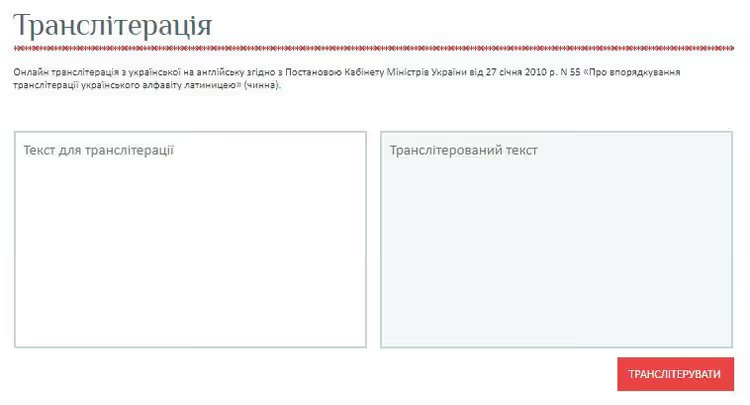
Transliteration is a common technical task: generating slugs from Cyrillic titles, formatting documents for international systems, converting filenames to ASCII.
- UkrLit.org, online transliteration from Ukrainian to English according to Cabinet of Ministers of Ukraine Resolution No. 55 dated January 27, 2010. The official CMU standard, recognized by government institutions and international systems.
- Translit.net, a multilingual transliteration service. Supports Ukrainian, Russian, Belarusian, Bulgarian, and other languages. Multiple standards to choose from, conversion history.
- Slovotvir, a platform for translating and transliterating terms into Ukrainian. Useful when you need not just to transliterate a brand name but to find an adequate Ukrainian equivalent of a technical term.
A visual overview of current web development tools in 2026, from AI coding assistants to deployment platforms, all in one video.
Which tools will actually be useful to you?
The honest answer: not all of them. Out of the 100+ solutions listed, each developer actually uses 15-25 in daily work. The rest are optional tools you will add to your arsenal when you face a specific task.
For beginners: start with the fundamentals. JavaScript/TypeScript, one framework (React or Vue), VS Code, Git, npm, PostgreSQL. Set up a linter and formatter. Learn to write tests. This is the foundation that will be enough for your first job, and it will not become obsolete in six months.
For experienced developers: pay attention to three directions that are changing the industry right now. AI coding assistants (Copilot, Cursor, Cody) are no longer a novelty but a daily tool that speeds up boilerplate code writing dramatically. The Rust toolchain (Biome, Turbopack, Lightning CSS) is rebuilding the toolchain at speeds unimaginable for Node.js counterparts. Serverless and edge runtimes (Cloudflare Workers, Vercel Edge, Deno Deploy) are reshaping where and how code runs: now the code flies to the user rather than the user waiting for a response from a data center across the ocean.
The golden rule for choosing tools in 2026 has not changed: do not add dependencies without a clear need. Write with native APIs wherever possible and pull in a library only when the benefit outweighs the cost. Every added package is a potential vulnerability, a point of failure, and a line in the list of things that need updating.

A professional team of writers and editors specializing in creating quality content.