














🔁 WordPress reset plugins for cleaning your site: what to use in 2026
You installed a dozen plugins for testing, created test posts, tweaked customizer settings, and now your admin panel is a mess. Cleaning it up manually takes hours. Yet WordPress has no built-in "reset to factory settings" button.
Meanwhile, a clean reset is useful for more than just developers. Regular site owners also accumulate clutter: three-year-old drafts, transient records from long-deleted plugins, orphan metadata in wp_postmeta. The database bloats, backups grow heavier, and the admin panel slows down. While reinstalling WordPress solves the problem radically, nobody wants to lose content, users, and settings.
Below are four reset plugins that give you a clean slate without reinstalling. We tested each on a test site with fake content: performed full database resets, cleaned selected tables, and rolled back customizer settings.

💡 Quick overview:
- WP Reset is the most feature-rich: full database reset, snapshots, and a Reactivation scenario so you don't have to reinstall plugins manually after cleanup.
- WP Database Reset is designed for surgical table operations: reset
wp_posts,wp_comments, or any custom table individually without touching the rest. - Advanced WordPress Reset is a minimalist option for quickly wiping all content and users while keeping the active theme and plugins.
- Customizer Reset is a narrow tool: it only resets customizer settings to theme defaults.
Plugin | Best for | Price | Key feature |
|---|---|---|---|
WP Reset | Developers and site owners | Free (+Pro from $39/year) | DB snapshots + Webhook integration |
WP Database Reset | Developers | Free | Selective reset of individual tables |
Advanced WordPress Reset | Site owners | Free | Content reset without deleting plugins |
Customizer Reset | Beginners | Free | One button in the customizer |
1. WP Reset

WP Reset is the de facto standard for resetting WordPress. It was originally built for developers who need to reload their site several times a day while testing code. But thanks to thoughtful safeguards against accidental deletion, the plugin has also become popular with regular users.
The main feature is the Reactivation scenario: before the reset, the plugin remembers which themes and plugins were active and automatically restores them to working state after the database is cleared. You don't need to go through setup again; the site returns to a "zero" version while keeping your active toolset.
What else WP Reset can do besides performing a full database reset to WordPress factory values:
- Selective cleanup: delete only transients, only uploads, only users, or only plugins with themes. Handy when you don't need a full reset but want to clean a specific segment.
- Database snapshots: create a snapshot of the current database state and roll back to it at any time. For developers, invaluable when testing migrations or conflicting updates. Snapshots are stored locally, and you can keep multiple versions.
- Collection data: the tool gathers demo content (posts, pages, WooCommerce products) for quickly populating a test site, saving time when you need to test a theme with realistic data volumes.
- Emergency Recovery: if your site crashes after an update, WP Reset can load a clean WordPress version while preserving your files.
The reset process takes three steps with explicit confirmation:
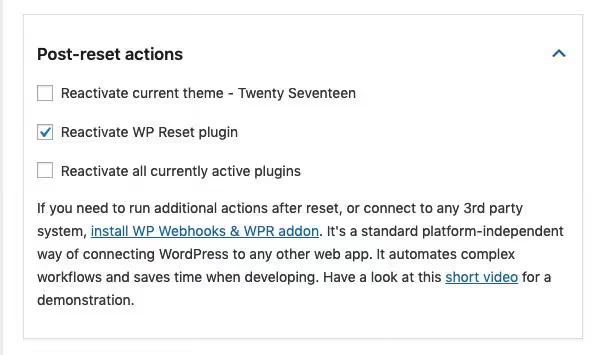
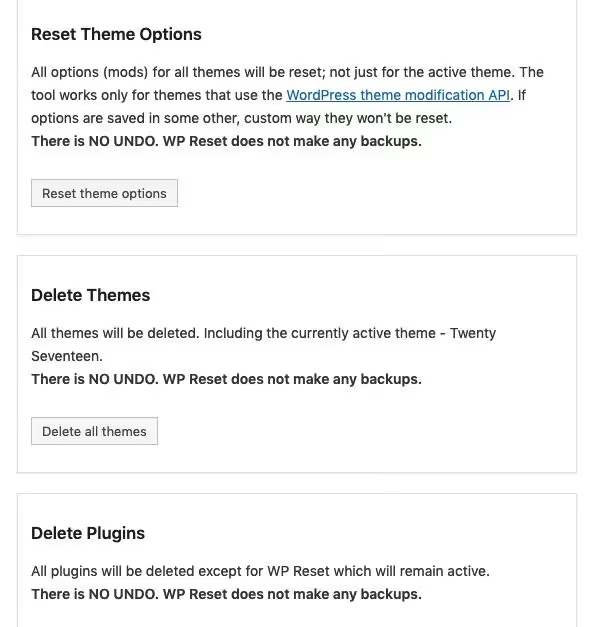
First, you check what to keep: active plugins, theme, media files. Then you choose what exactly to reset (the entire database or individual tables).
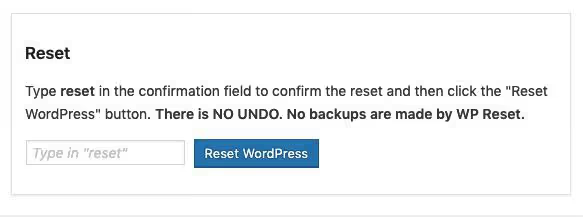
The final step: you type the word "reset" into the text field and click the button. Without this, an accidental reset is impossible.
There is a free version in the WordPress.org directory with full reset functionality. The Pro tier (from $39 per year) adds priority support, automatic scheduled snapshots, and WP-CLI integration for command-line resets. In practice, the free version is enough for most tasks.
- Pros: Reactivation scenario, database snapshots, Collection mode for populating test data, triple protection against accidental reset.
- Cons: Some Pro features (auto-snapshots, WP-CLI) are really only necessary for agency work with dozens of sites; for a single site they are overkill.
- Price: Free / Pro from $39/year.
- Download: 🔗 WP Reset on WordPress.org | 🔗 WP Reset website
Webhook integration for WP Reset
If you use WP Webhooks for automation (for example, triggering a test environment reset after each deploy via CI/CD), there is an addon called WPWH, WP Reset Webhook Integration. It adds endpoints for remotely triggering resets, clearing uploads, transients, and tables via webhook calls. The addon hasn't been updated since 2021 and hasn't been tested with recent WordPress versions; use it with caution and only if the webhook scenario is critical for you.
2. WP Database Reset
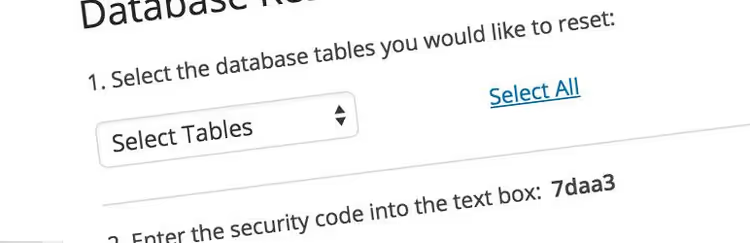
WP Database Reset is the solution for cases when you don't need a full reset but require surgical cleanup of specific tables. The plugin doesn't touch themes, media files, settings, or users; it works exclusively at the database level.
You select the table you need and reset it to an empty state in a second. Any tables are supported: standard wp_posts and wp_comments, as well as custom tables from plugins. All relationships between tables are preserved: clearing wp_posts doesn't break wp_postmeta, because an empty wp_posts is the normal state of a freshly installed WordPress. Resetting wp_comments on a live site with 5000+ comments takes a fraction of a second: the plugin uses TRUNCATE, not row-by-row deletion.
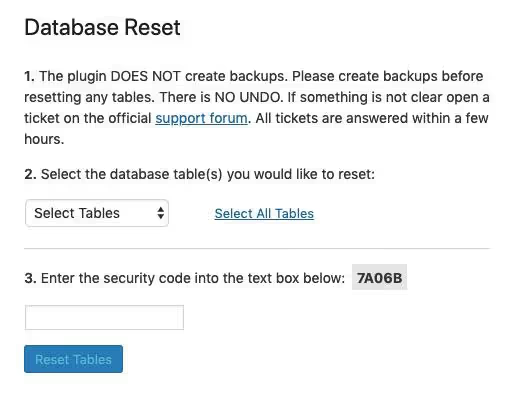
The confirmation mechanism is similar to WP Reset: you enter a generated security code, and only then does the reset button become active. You can't click it by accident.
The plugin is minimalist: no snapshots, no webhooks, no test data collections. Just a list of tables and a Truncate button. For a developer testing migrations or cleaning a staging environment before synchronization, this is exactly what you need.
- Pros: Precise reset of individual tables, TRUNCATE instead of DELETE (instant speed), protection via security code.
- Cons: Only table resets; it can't clean uploads, deactivate plugins, or reset customizer settings. For comprehensive cleanup, you need WP Reset.
- Price: Free.
- Download: 🔗 WP Database Reset on WordPress.org
3. Advanced WordPress Reset

Advanced WordPress Reset occupies a niche between WP Reset and WP Database Reset. It resets database content (posts, pages, comments, user settings created by plugins and themes) but leaves the plugins and themes themselves untouched. The active theme and all installed plugins survive the reset.
Scenario: you tested five themes, each left its settings in wp_options, and now the table weighs 50 MB instead of 2 MB. Advanced WordPress Reset clears out those leftovers, but you don't need to reinstall your favorite page builder and SEO plugin.
All users are deleted at once, but the administrator who initiated the reset is automatically identified, and their account with the same password remains active. After the reset, you land directly in the admin panel without having to recover your password.
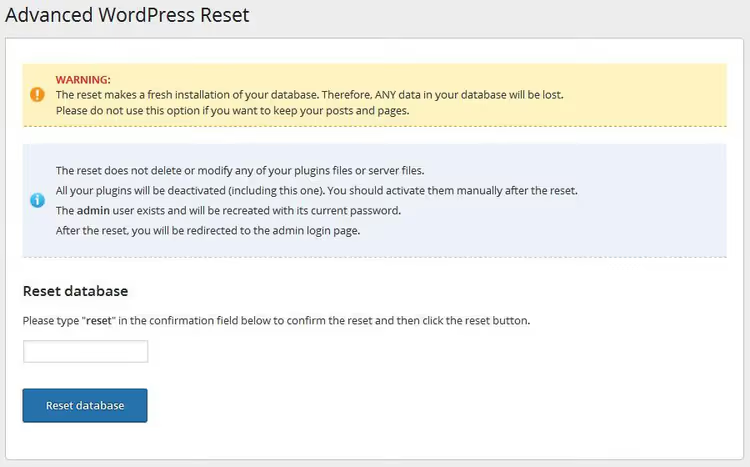
The process is elementary: type the word "reset" into the text field and click the button. No checkboxes, no multi-step wizards; one screen, one action.
Limitations: the plugin doesn't support multisite and can't clean media files (images remain in Uploads). If you need to wipe absolutely everything, use WP Reset. If you need to keep plugins and the theme but clear content and options, Advanced WordPress Reset is your tool.
- Pros: Ultra-simple interface (one button), preserves theme and plugins, automatically keeps the admin active.
- Cons: Doesn't clean media files, doesn't support multisite, no selective cleanup.
- Price: Free.
- Download: 🔗 Advanced WordPress Reset on WordPress.org
4. Customizer Reset

Customizer Reset is the narrowest plugin in this roundup, but it addresses a specific pain point: resetting customizer settings to the theme's default values. Nothing more, nothing less.
Why this matters. The live WordPress customizer is an intuitive builder where beginners often experiment blindly: changing colors, fonts, spacing, widget placement. After an hour or two, the site no longer looks like the theme demo, and remembering which setting broke what is impossible. There is no "undo everything" button in the customizer.
Customizer Reset adds exactly one "Reset" button to the customizer interface. Click it, and all theme_mod settings are reset to the defaults of the selected theme. The plugin works with any theme that uses the standard theme_mod mechanism for storing settings (which is the majority of themes in the WordPress.org directory).

The plugin doesn't touch content, plugins, media files, or anything else; only the appearance configured through the Customizer. It's the perfect tool for starting with a clean design without reinstalling the theme.
- Pros: One button, nothing extra, works with any theme_mod-based theme, doesn't touch content.
- Cons: Doesn't work with FSE (Full Site Editing) themes where settings are stored in
wp_posts; customizer only, doesn't reset Custom CSS added through other plugins. - Price: Free.
- Download: 🔗 Customizer Reset on WordPress.org
The video provides a visual demonstration of the full reset cycle using WP Reset: from installation to your first login on a clean site.
⁉️🤔 Frequently asked questions
Is it safe to reset a site with a plugin? Will it delete WordPress files?
The plugins in this roundup work only with the database and don't touch WordPress core files, themes, or plugins on disk. Physically, files remain in
wp-content; only information about them is removed from the database (records inwp_posts,wp_options, and similar tables). WP Reset in full reset mode additionally deactivates plugins and switches to the default theme, but it doesn't delete the files themselves. Nonetheless, make a full backup before any reset; in our testing, Wordfence and other security plugins don't restore automatically after a reset.
Can I reset only posts while keeping pages and media files?
Yes, WP Database Reset lets you select specific tables: reset
wp_posts, and all posts and pages are deleted (they're stored in the same table, so you can't separate them on the fly). Media files reside inwp-content/uploadsand aren't affected by a table reset. If you need to delete posts but keep pages, that's not a reset; it's manual cleanup viaWP Admin → Posts → Trashfollowed by emptying the trash.
What happens to users after a reset?
WP Reset deletes all users except the administrator who initiated the reset; they can log in immediately with the same password. Advanced WordPress Reset behaves the same way. WP Database Reset and Customizer Reset don't touch users; they operate at the level of tables and customizer settings respectively.
Which plugin should I choose if I'm not a developer and just want to clean up site clutter?
If your goal is general cleanup without reinstalling WordPress: WP Reset in the free version. Selective cleanup (transients, revisions, spam comments, orphan metadata) takes just a few clicks and doesn't require a full reset. After cleanup, compare admin panel speed before and after; on a cluttered site with 50,000+ transients, the difference is noticeable immediately.
Do I need to delete the plugin after a reset?
Not necessarily, but after a full site reset the plugin loses its purpose since the database is already clean. If you use WP Reset for snapshots and selective cleanup, keep it. Customizer Reset can stay permanently: it adds one button and doesn't burden the site.
💎 Conclusion: which reset plugin to choose
On a live production site, a full database reset is a radical measure needed once every few years, usually when relaunching a project. But selective cleanup via WP Reset (transients, revisions, spam) or a customizer reset via Customizer Reset are routine operations that are safe and fast.
- If you're a developer rebuilding test environments, WP Reset. Snapshots and Reactivation mode save hours each week.
- If you need to reset specific tables before syncing staging → production, WP Database Reset. You can't get faster.
- If you went overboard with theme settings and the design "drifted," Customizer Reset. One button, and you're back to the start.
- If you need a full site cleanup but don't want to reinstall the theme and plugins, Advanced WordPress Reset. Minimum effort.
Start with WP Reset; in practice, it covers everything. And make a full backup before, not after.

A professional team of writers and editors specializing in creating quality content.