














🎵 10 music plugins for WordPress in 2026
Music on a website isn't a whim. If you're a musician, DJ, podcaster or selling audio files, the built-in WordPress player won't cut it. You need a tool that handles playlists, continuous playback and doesn't scare off listeners with 2012 design.
Under the hood of WordPress, the MediaElement.js engine. It's decent on its own, but out of the box delivers only basic controls. Here are 10 plugins that turn those controls into a professional audio player. Six free, four premium. No dead or abandoned ones, only what actually works in 2026.
💡 Quick overview:
- Install Music Player for WooCommerce if you're selling audio through a store.
- Go with Audio Album for an album portfolio and style the player to match your release artwork.
- Choose HTML5 Audio Player or AudioIgniter for playlists, sticky mode and SoundCloud.
- Check out Modern Audio Player and ZoomSounds for track sales with statistics.
- Pick Compact WP Audio Player or MP3 Sticky Player for minimalism.
Plugin | For whom | Price | Main feature |
|---|---|---|---|
Audio Album | Artists, bands | Free | Album format |
Music Player for WooCommerce | Audio stores | Free | Woo integration |
HTML5 Audio Player | Podcasters, courses | Free / Pro $29 | Playlists and sticky |
Modern Audio Player | Pro musicians | Premium | Unlimited skins |
AudioIgniter | Everyone | Free | Auto ID3 metadata |
Compact WP Audio Player | Minimalists | Free | Can't get simpler |
1. Audio Album

A plugin created for guitarist Dave Draper's website, then released publicly. It builds something like a vinyl album on a page: cover art, tracklist, each track a separate clickable block.
Under the hood, the standard MediaElement.js from WordPress core. No conflicts with themes and plugins. Two shortcodes plus twenty-something parameters: you change colors, fonts, cover size, track order. The result is styled as if the album was designed by an artist for a specific release.
- Pros: minimalist album format out of the box, 4,000+ active installations, 5-star rating on WordPress.org, flexible customization through the customizer.
- Cons: narrow specialization, album presentation only; won't work for podcasts or single tracks in a sidebar.
- Price: free.
- Download: 🔗 Audio Album on WordPress.org | 🔗 Live demo
2. Music Player for WooCommerce

Selling music, podcasts or audiobooks through WooCommerce, this plugin adds an HTML5 player right on the product page. The buyer listens to a preview without leaving the storefront. No extra clicks or opening in a new tab.
Supports MP3, WAV, OGA and WMA. Compatible with Gutenberg, Elementor, Beaver Builder and SiteOrigin Page Builder. In secure mode it blocks direct file download from the page source code. Separate widget for sidebar and Google Drive integration, upload tracks to cloud, player streams from there.
- Pros: native WooCommerce integration, preview without reload, protection against unauthorized downloading, 1,000+ active installations.
- Cons: only for WooCommerce, without a store the plugin is useless; settings interface could be more modern.
- Price: free.
- Download: 🔗 Music Player for WooCommerce on WordPress.org
3. HTML5 Audio Player by bPlugins

The most feature-rich free player in this collection. Three player types: standard, sticky and playlist. Supports MP3, OGG, WAV, streaming radio stations and SoundCloud. Works through shortcodes, Gutenberg blocks and widgets.
In the free version, four skins (Default, Fusion, Stamp, Wave) and two skins for sticky mode. Pro for $29/year adds seven premium skins, skip and download buttons, color customization and position saving when navigating between pages. Separate plus, audio playback from Google Drive through built-in proxy (CORS is no longer a problem).
- Pros: 10,000+ active installations, regular updates (current version tested with WP 7.0), three player types in free version, Google Drive and SoundCloud out of the box.
- Cons: color customization locked in Pro; for simple "insert track on page", excessive.
- Price: Free, Pro from $29/year.
- Download: 🔗 HTML5 Audio Player on WordPress.org
4. Modern Audio Player
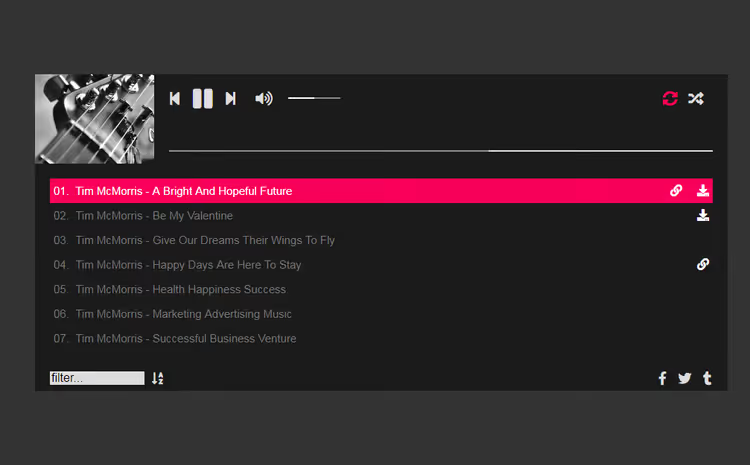
Premium solution from an elite CodeCanyon author. Creates unlimited players and playlists on one site. Mixes formats: MP3, podcasts, SoundCloud streams, all in one playlist.
Lots of features indeed: Font Awesome icons, continuous playback between pages, hotkeys, detailed playback statistics, cloud storage and flexible positioning, player can be pinned in a screen corner. Fully responsive, skins edited through CSS.
- Pros: rich set of skins, source mixing in one playlist, playback statistics, continuous playback.
- Cons: price, one-time purchase but not cheap; updates depend on one author.
- Price: premium (price on CodeCanyon).
- Download: 🔗 Modern Audio Player on CodeCanyon
5. Sticky HTML5 Music Player
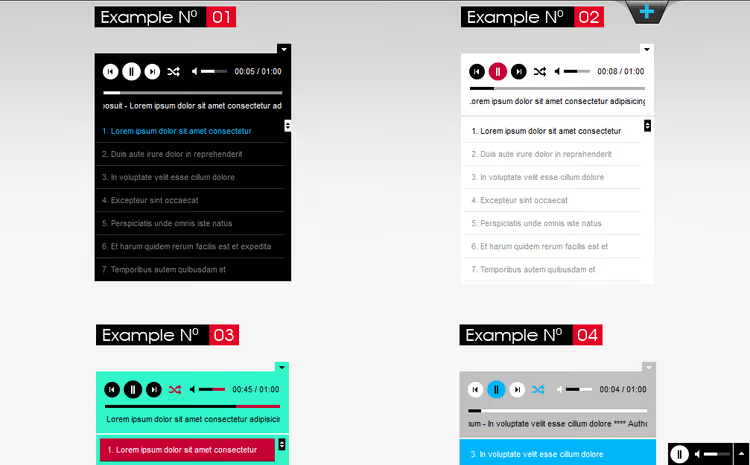
Solution for background music. The player pins to the bottom or corner of the screen and keeps playing when a visitor navigates between pages. In practice this means: a listener lands on the site, starts a track and then reads the blog or browses the catalog, music doesn't interrupt.
Thirty-something configuration parameters. Auto-load playlist from an MP3 folder on the server, drop files in, player picks them up. Responsive for both desktop and mobile. Regularly updated.
- Pros: continuous playback between pages, auto-load from folder, easy styling, responsiveness.
- Cons: only sticky mode, doesn't work for player embedded in text; background audio annoys some visitors.
- Price: premium (price on CodeCanyon).
- Download: 🔗 Sticky HTML5 Music Player on CodeCanyon
6. AudioIgniter

Plugin from the CSSIgniter team, known for their WordPress themes. Free, but with a premium product approach: player is fully responsive and retina-ready.
Main feature, automatic extraction of ID3 metadata from MP3 files. Track name, album, artist are pulled automatically without manually filling fields. Unlimited playlists, unlimited tracks in each. Supports internet radio: Icecast, Shoutcast and any streaming URLs.
Tested on the 150 most popular free WordPress themes. Layout conflicts or broken displays aren't about AudioIgniter.
- Pros: auto-extract ID3 metadata, 10,000+ active installations, compatibility with 150 themes, retina-ready, radio support.
- Cons: settings interface hasn't changed in years, functional but visually dated.
- Price: free.
- Download: 🔗 AudioIgniter on WordPress.org
7. Presto Player

Modern media player equally good for video and audio. 100,000+ active installations, 4.9 rating on WordPress.org. Originally created as a video player for online courses, but audio capabilities here are solid: playlists, podcasts, preview playback.
Supports YouTube, Vimeo, HTML5 video and audio files. Integration with Elementor, Gutenberg, Beaver Builder and other page builders. For course owners, a separate mode with download protection, player branding and subtitles. Free version covers basic needs, Pro unlocks advanced analytics and customization.
- Pros: 100,000+ active installations, video and audio support in one plugin, integration with page builders, regular updates (v4.2.3 tested with WP 7.0).
- Cons: audio features are secondary to video; some features locked in Pro.
- Price: Free, Pro from $79/year.
- Download: 🔗 Presto Player on WordPress.org
8. MP3 Sticky Player
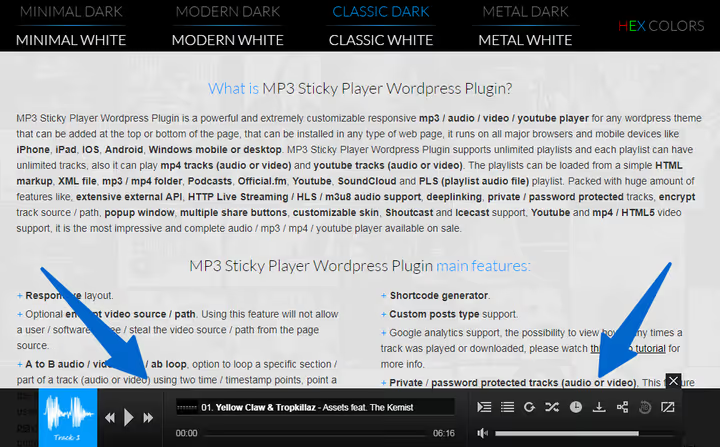
Pinned player with a feature most competitors lack, URL obfuscation for tracks. Direct path content/uploads/track.mp3 turns into meaningless hash, and downloading the file through "View page source" is impossible. Small thing, but for commercial audio files, significant.
Plays MP3, MP4, YouTube videos and podcasts. Builds playlists from XML, server folder, HTML, SoundCloud and Official.fm. Built-in analytics through Google Analytics, you see which tracks are played and for how long. Buy and download buttons in the player, you can sell music without WooCommerce.
- Pros: track URL encryption, Google Analytics analytics, popup player, YouTube support inside playlist, buy buttons.
- Cons: like any sticky player, not for all scenarios; on mobile the popup player may cover content.
- Price: premium (price on CodeCanyon).
- Download: 🔗 MP3 Sticky Player on CodeCanyon
9. Music Player for Elementor

If your site is built on Elementor, this is the most direct way to add music. The plugin adds a ready audio player widget to the editor, which is dragged onto the page like any other Elementor element. No shortcodes, no code.
Supports MP3, podcasts and playlists. Each track can have a cover and purchase link assigned. Flexible appearance settings: colors, element placement, cover sizes, all through standard Elementor panel. HTML5 player works correctly in all browsers and on mobile.
- Pros: drag-and-drop through Elementor, 10,000+ active installations, purchase links for each track, responsiveness.
- Cons: only for Elementor, doesn't work with Gutenberg or classic editor.
- Price: free.
- Download: 🔗 Music Player for Elementor on WordPress.org
10. Compact WP Audio Player

The simplest player in the collection, and that's its value. No skin settings, color palettes or playlist types. Upload MP3 or OGG, insert shortcode, a neat Play button with progress bar appears on the page. That's it.
Works in all browsers, including old ones. Fully responsive. 20,000+ active installations, the Tips and Tricks HQ team has supported the plugin for years. If a site needs one track on an "About" page or audio examples of work without complex structures, there's no better candidate.
- Pros: maximum simplicity, 20,000+ active installations, old browser support, responsiveness.
- Cons: only MP3 and OGG, no playlists, minimal customization.
- Price: free.
- Download: 🔗 Compact WP Audio Player on WordPress.org
In practice, choosing a WordPress audio player boils down to three scenarios. First: you're selling music, then Music Player for WooCommerce or ZoomSounds will cover storefront with preview and file protection. Second: showing a portfolio, Audio Album for album format, Music Player for Elementor for a site on a page builder. Third: you just need a track to play and not get in the way, Compact WP Audio Player installs in a minute and asks for nothing extra.
If none of the ten solves the task, you're likely looking not for a player but for a podcast hosting or streaming platform. A player only displays content. Right content and right player, then music on a site actually works.
⁉️🤔 Common questions
What audio file format is best for WordPress?
For maximum browser compatibility, MP3. All players from this collection support MP3 out of the box. OGG and WAV are optional, check the spec of a specific plugin before uploading.
Does an audio player hurt site load speed?
Most modern players use lazy loading for audio files: a track doesn't load until a visitor clicks Play. Player scripts themselves weigh little, but if a page contains a dozen playlists, cache audio files through CDN and enable preload="none" in player settings.
Do you need a premium player if the site is small?
For a personal blog or portfolio with 5-10 tracks, free Audio Album or Compact WP Audio Player is more than enough. Premium players (Modern Audio Player, ZoomSounds) pay off when commercial tasks appear: selling music, detailed statistics, player branding to match label style.
Can you stream internet radio through WordPress?
Yes, AudioIgniter and MP3 Sticky Player support Shoutcast and Icecast streams. Just insert the radio station URL in playlist settings. Broadcast quality depends on the radio station server, not the plugin.
What to do if the player conflicts with the theme?
First switch to the standard Twenty Twenty-Five theme and test the player there. Worked, problem is in the theme, contact the developer. Didn't work, disable other plugins and enable one by one to find the conflict. Plugins from this collection are tested with most popular themes, but exotic builds and custom themes can produce unexpected bugs.
What to install in 2026: final breakdown
In short: start with free. Compact WP Audio Player if there are few tracks and the scenario is simple. HTML5 Audio Player if you need playlists, sticky mode and SoundCloud support. Musicians with album thinking, Audio Album. WooCommerce stores, Music Player for WooCommerce.
Connect premium options when the free player stopped coping: you need statistics, file protection or waveform design. Then ZoomSounds and Modern Audio Player earn every dollar. Main thing, don't turn the site into a Christmas card with auto-play. Give the listener a Play button, don't force sound on page load.

A professional team of writers and editors specializing in creating quality content.