













 AIIllustrative image: AI-generated
🔍 12 best WordPress themes for job boards 2026
A job board site brings in money: companies pay for listings, job seekers find work, and you get a percentage of each transaction. But building a job board on WordPress from scratch means bundling a plugin, theme, payment gateway, and a week of debugging. It's much easier to grab a ready-made theme where all of this is already built in.
We selected 12 WordPress job board themes that cover the full cycle: job posting, payment, employer dashboard, and job seeker resumes. In practice, we tested live demos of each one, checking the job seeker's path from search to application and the employer's path from registration to posting. The list has been updated for 2026; we removed discontinued themes and added current alternatives.
💡 Quick overview:
- Choose a theme from the table below: we compared them by price, monetization type, and need for external plugins.
- Import the demo in one click and set up the payment gateway; this takes an hour, not a week.
- Decide who your audience is: a classic job board (JobRoller, JobEngine), a freelance marketplace (FreelanceEngine, HireBee), or a community around the WP Job Manager plugin (WorkScout, JobSeek).
Theme | Type | Price | Monetization | Plugins |
|---|---|---|---|---|
JobRoller | Universal board | from $89 | Built-in | Not needed |
JobEngine | Board + directory | from $89 | Built-in | Not needed |
Jobify | Board + community | from $69 | WP Job Manager | Required |
WorkScout | Board + freelance | from $89 | WP Job Manager | Required |
Cariera | Portal + WooCommerce | from $69 | WP Job Manager | Required |
Nokri | Portal with ATS | from $69 | Built-in | Not needed |
1. JobRoller
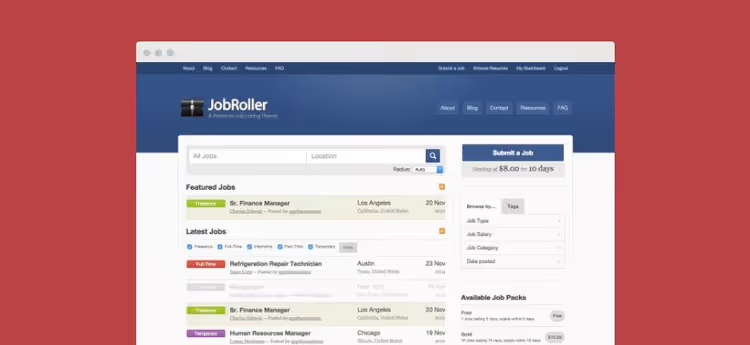
JobRoller from AppThemes is the theme that launched the WordPress job board market. It works on the "install and sell" principle: custom post types separate jobs from the blog, and the built-in payment gateway accepts payments right after activation.
The three-step job submission wizard guides employers from title to payment. After publishing, the client gets a dashboard where they can renew expired listings and purchase a "featured" option to reach the top of the homepage. You set the price for standard and premium listings separately, a flexibility that plugin-based solutions lack.
- Pros: full cycle without external plugins, 3-step submission wizard, separate taxonomy for jobs, payments out of the box.
- Cons: the admin interface design looks dated, price is above market average.
- Price: from $89 for a single-site license.
- Download: 🔗 JobRoller on AppThemes
2. JobEngine
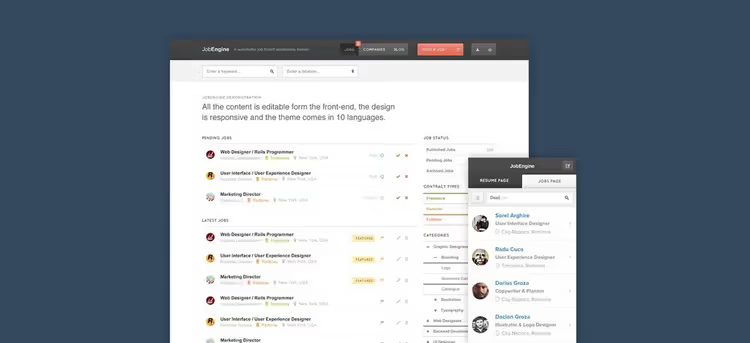
JobEngine from EngineThemes is a job board with frontend management. You edit jobs directly on the site without going into the WordPress admin. AJAX filters, infinite scroll, and a job map work without page reloads.
Out of the box, subscription plans for employers are available: free with limitations, standard, and premium. Gateways include Stripe and Paymill. Job seekers subscribe to notifications about new jobs through the JobAlert extension, bringing you repeat visits to the site.
- Pros: frontend editing of all content, AJAX search without reloads, built-in subscription plans, extensions for maps and alerts.
- Cons: some features are moved to paid extensions, no built-in freelance marketplace.
- Price: from $89 for a license; full package with extensions is $179.
- Download: 🔗 JobEngine on EngineThemes
3. Jobify

Jobify is a theme built around the WP Job Manager plugin. Unlike "monolithic" themes like JobRoller, here the job functionality lives in the plugin while the theme handles design and layout. This gives you flexibility: change the theme and your jobs stay in place.
Live search filters jobs as you type, and category pages group listings by industry. Monetization runs through the Simple Paid Listings extension: employers pay to publish, and you approve or reject the listing. The setup is simple and transparent, suitable for niche boards where quality matters more than quantity.
- Pros: live search, WP Job Manager integration, easy to migrate jobs to another theme, modern design.
- Cons: requires WP Job Manager plugin and its extensions, no built-in payment system.
- Price: from $69 on ThemeForest.
- Download: 🔗 Jobify on ThemeForest | 🔗 Live demo
4. WorkScout
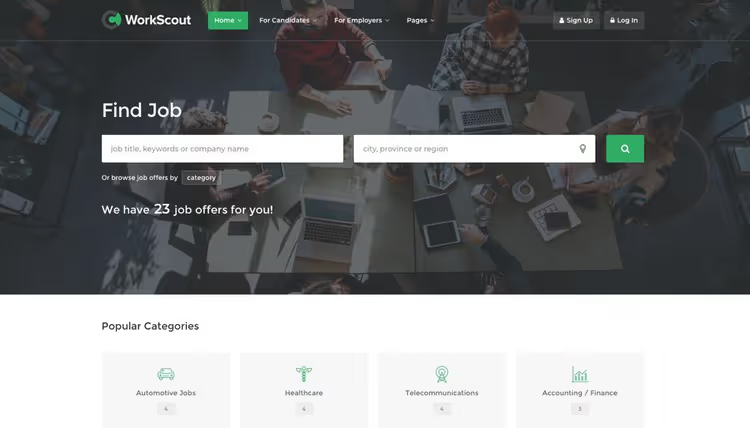
WorkScout is a theme designed specifically for WP Job Manager. Its trump card is advanced filters: job seekers can filter jobs by salary, employment type, and rate. For niches like IT or finance where the salary range decides everything, this is a must-have.
WP Job Manager extensions add application management, resumes, and alerts. In practice, this means employers see incoming applications in their dashboard, and job seekers receive an email when a matching job appears. A separate plus is the freelance marketplace mode: employers can hire contractors directly through the built-in bidding system.
- Pros: salary filter, deep WP Job Manager integration, freelance marketplace mode, clean job page layouts.
- Cons: narrow specialization (WP Job Manager only), no built-in monetization, extensions required.
- Price: from $89 on ThemeForest.
- Download: 🔗 WorkScout on ThemeForest | 🔗 Live demo
5. JobSeek
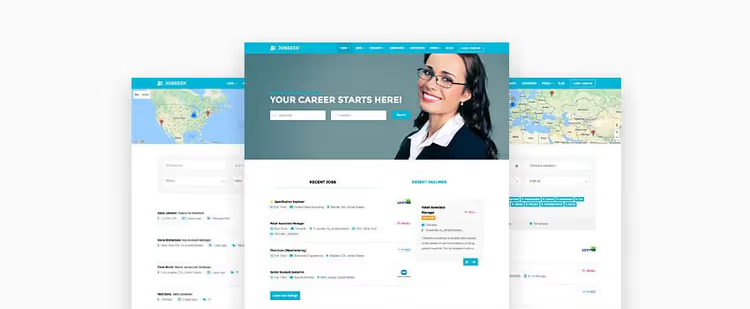
JobSeek is another theme based on WP Job Manager, but with a focus on map-based search. Jobs display on a map, and filters by category, type, and location narrow the results. For boards tied to geography (city jobs, regional marketplaces), the map is a significant plus.
Recruiters manage listings through the frontend, and job seekers fill out profiles and resumes. The theme is lightweight: just two WP Job Manager extensions cover the core functionality. The entry barrier is minimal.
- Pros: job search on a map, frontend management for employers, low entry barrier.
- Cons: fewer built-in features than Jobify and WorkScout, more modest design.
- Price: from $69 on ThemeForest.
- Download: 🔗 JobSeek on ThemeForest | 🔗 Live demo
6. Jobmonster
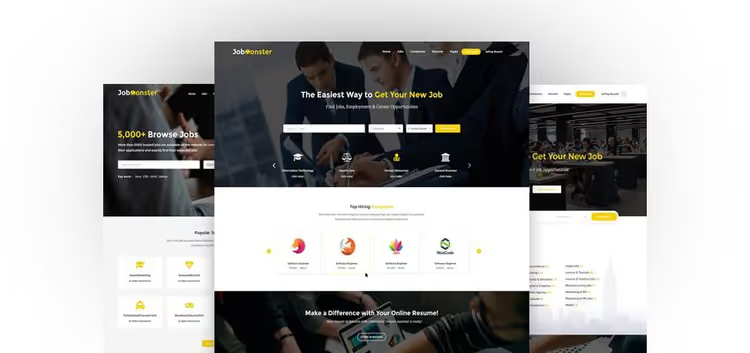
Jobmonster is a full-featured job portal without external plugins. Three dashboards out of the box: employers subscribe to listing packages, admins monitor payments, and candidates apply through an online resume or LinkedIn.
The theme targets the "all-inclusive" niche: even LinkedIn connection for profile import is built in. Publishing packages let you flexibly configure pricing, from single-job to monthly subscriptions with limits. Nine homepage variants to choose from.
- Pros: three built-in dashboards, LinkedIn integration, publishing packages, no plugins required.
- Cons: higher price compared to plugin-based solutions, above-average entry barrier.
- Price: from $69 on ThemeForest.
- Download: 🔗 Jobmonster on ThemeForest | 🔗 Live demo
7. FreelanceEngine

FreelanceEngine is a marketplace for freelancers, not a classic job board. The mechanics: a client posts a project, freelancers place bids, and the winner gets the contract. You take a percentage of each deal.
The theme is built on WPBakery Page Builder: drag and drop blocks to build layouts without code. Built in are user profiles, escrow payments for projects, and a review and rating system. Revolution Slider is included. Essentially, it's a ready-made platform in the spirit of Upwork, but under your brand and rules.
- Pros: full freelance marketplace cycle, drag-and-drop builder, built-in review system, escrow payments.
- Cons: tailored for freelance rather than classic jobs, price is higher than plugin alternatives.
- Price: from $89 for a license.
- Download: 🔗 FreelanceEngine on EngineThemes
8. Job Board (PremiumPress)
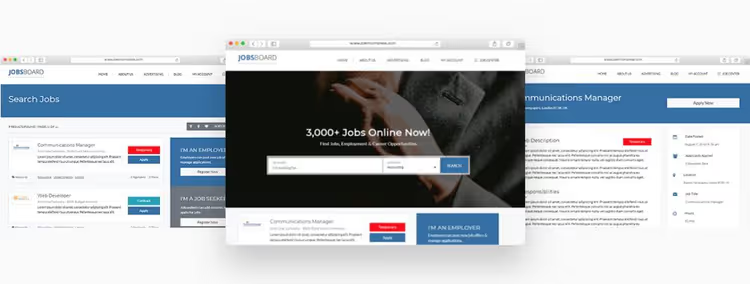
Job Board from PremiumPress is a theme for those who want to launch a job board using a subscription model. Employers buy monthly packages and publish jobs, job seekers create profiles with resumes and apply in one click.
Unlike AppThemes themes, PremiumPress emphasizes recurring payments rather than one-time fees. You get recurring revenue from every active employer. The built-in messaging system connects candidates and employers directly on the site. The theme is regularly updated: version 10 with Elementor support came out in 2026.
- Pros: recurring payment model, built-in messaging, Elementor support, more than 10 years on the market.
- Cons: subscription for the theme itself ($99/year for updates), less flexibility than WP Job Manager setups.
- Price: the theme is included in the PremiumPress All Access Pass.
- Download: 🔗 Job Board on PremiumPress
9. HireBee
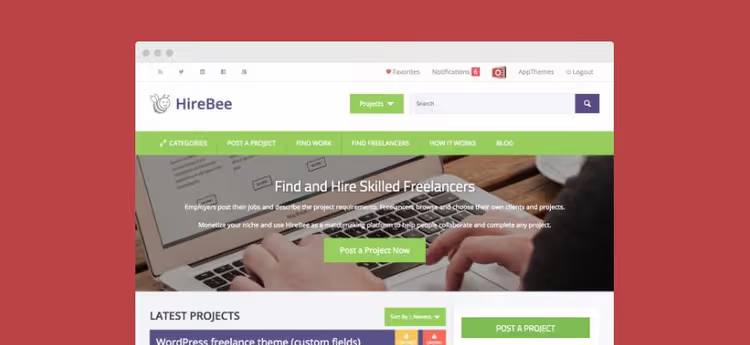
HireBee from AppThemes is a crowdsourcing marketplace in the spirit of Elance and 99designs. Clients post projects, contractors place bids. You set up pricing plans and take a percentage from each project.
The form builder lets you create custom application fields: specifications, budget, deadline. After assigning a contractor, a shared workspace opens for messaging and files. Projects are filtered by category, budget, and deadline.
- Pros: flexible project form builder, shared client-freelancer workspace, pricing plans.
- Cons: the crowdsourcing model doesn't suit classic jobs, requires active project moderation.
- Price: from $89 for a license.
- Download: 🔗 HireBee on AppThemes
10. Cariera
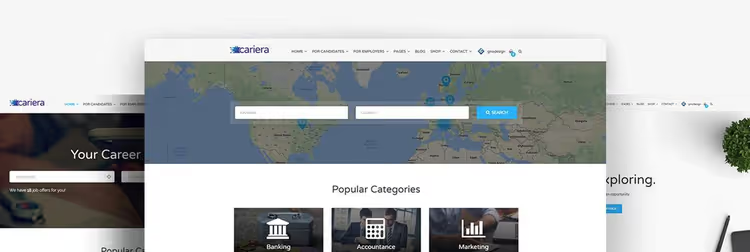
Cariera is the richest design option on this list. Six homepage variants, one-click demo import, WPBakery Page Builder with custom elements, Revolution Slider, and WooCommerce integration. If you plan to sell not only jobs but also related products (books, courses, resume templates), Cariera covers both directions through one theme.
Job search with live filters, resume submission through Contact Form 7, newsletters through Mailchimp. WPML compatibility out of the box: a bilingual site launches without any hassle.
- Pros: 6 homepages, WooCommerce for selling products, WPML-ready, live search.
- Cons: overloaded with plugins (WPBakery, Slider Revolution), higher hosting requirements.
- Price: from $69 on ThemeForest.
- Download: 🔗 Cariera on ThemeForest | 🔗 Live demo
11. Nokri

Nokri is a full-featured job portal with a built-in applicant tracking system (ATS). Unlike most themes on this list, Nokri doesn't require WP Job Manager: all functionality from posting to hiring lives inside the theme.
Employers purchase publishing packages through WooCommerce, job seekers upload resumes and subscribe to alerts. The built-in tagging and bookmarking system helps candidates track interesting jobs. In practice, we appreciated the filters: 15+ parameters including salary range, employment type, and qualifications. Account verification and invoice generation deserve a separate mention; these are things that other themes require paid extensions for.
- Pros: full cycle without WP Job Manager, built-in ATS, 15+ filters, account verification out of the box.
- Cons: admin interface is overloaded with settings, some documentation is only in English.
- Price: from $69 on ThemeForest.
- Download: 🔗 Nokri on ThemeForest
12. Careerfy

Careerfy is a theme for those who need a job board with a resume builder and advanced geosearch. Job seekers build resumes directly on the site through a step-by-step builder, and employers search for candidates by location, experience, and skills.
The theme relies on WooCommerce for monetization: paid subscriptions, featured jobs, and access to the resume database. Built-in geosearch with Google Maps filters jobs by radius from a specified point, useful for local boards. Additional features include application deadlines, job import from external sources, and CV uploads in multiple formats. The theme was updated in January 2026, version 10.2.9; the developer is responsive.
- Pros: built-in resume builder, geosearch with radius, job import from external sources, regular updates.
- Cons: tied to WooCommerce even for basic monetization, some bundled plugins require licenses.
- Price: from $89 on ThemeForest.
- Download: 🔗 Careerfy on ThemeForest
Watch the video above for a step-by-step tutorial on launching a WordPress job board with the WP Job Manager plugin. In 45 minutes, the author shows the full cycle: installation, payment setup, publishing test jobs, and testing search. Especially useful for themes on the list that work alongside WP Job Manager: Jobify, WorkScout, JobSeek, and Cariera.
⁉️🤔 Frequently asked questions
How is a job board theme different from the WP Job Manager plugin?
A theme provides ready-made design and layout for job pages, dashboards, and search. The WP Job Manager plugin adds functionality (the "job" post type, filters, submission form), but the design relies on your theme. Themes like JobRoller or JobEngine include everything at once. Themes like Jobify or WorkScout require installing WP Job Manager separately; however, you're not locked to one vendor and can switch themes later.
Which theme is better for a freelance marketplace rather than a classic job board?
FreelanceEngine and HireBee. Both are tailored for the model "client posts project → freelancers bid → system takes a percentage." FreelanceEngine is a classic marketplace with escrow and reviews. HireBee is crowdsourcing with a project form builder. JobRoller and JobEngine aren't suitable for this model: they expect employers to pay for listings, not for results.
Do I need to pay for each plugin separately with WP Job Manager themes?
WP Job Manager itself is free and available in the WordPress.org directory. Extensions (Simple Paid Listings, Applications, Resume Manager, Job Alerts) are paid: check the current list and pricing on the WP Job Manager add-ons page. To start, the free core plus one paid extension for accepting payments is enough. Getting the full extension bundle makes sense when your board has more than 200 active jobs.
What should I choose if I need a bilingual board?
Cariera is the only theme on the list with declared WPML compatibility out of the box. WorkScout and Jobify also work with WPML, but will require manual interface translation tweaking. JobRoller and JobEngine use EngineThemes' built-in translator, which handles the interface but you'll need WPML separately for multilingual jobs.
Can I launch a job board for free?
There's no completely free "out of the box" solution: all the themes listed are premium, and free WP Job Manager without paid extensions can't accept payments. The startup budget depends on the chosen theme and required extensions; check specific prices on the product pages in developer catalogs and on ThemeForest. Either way, it's significantly cheaper than custom development: a custom job board requires a much larger budget.
Nokri or Careerfy: which one to pick instead of discontinued themes?
Nokri if you need a standalone portal with built-in ATS and don't want to depend on WP Job Manager. Careerfy if a resume builder for job seekers and radius-based geosearch are critical. Both themes are actively updated in 2026 and don't require external plugins for basic functionality, unlike the discontinued Nine to Five and Jobera.
Which theme to choose for your task
We've covered 12 themes, from "install and start earning" to builders for specific marketplaces. The choice comes down to two axes: "proprietary ecosystem or WP Job Manager stack" and "classic jobs or freelance marketplace."
- If you're launching a job board for a specific industry and don't want to deal with plugins, take JobRoller or JobEngine. The first offers a 3-step submission wizard and minimal setup. The second provides AJAX search and subscription plans for employers.
- If you need flexibility and the ability to switch themes later without losing jobs, Jobify or WorkScout based on WP Job Manager. Choose WorkScout when salary filtering is critical.
- If you're building a freelance marketplace, FreelanceEngine for the bidding model, HireBee for project crowdsourcing.
- If you plan to sell products besides jobs (courses, templates, books), Cariera with WooCommerce out of the box.
- If you need a subscription model with recurring payments, Job Board from PremiumPress. Version ten on Elementor, 10+ years on the market.
- If you need a standalone portal with built-in ATS and 15+ filters, Nokri. Full hiring cycle without WP Job Manager.
- If a resume builder and radius-based geosearch are critical, Careerfy. Fresh January 2026 update, responsive developer.
Start with the live demo of the theme closest to your model. In our experience, an hour spent importing demo content and going through the job seeker and employer paths saves weeks of rework.

A professional team of writers and editors specializing in creating quality content.