













🔧 14 best WordPress themes for knowledge base and support in 2026
Customers don't return to where it's cheaper. They return to where they were helped.
You launched a product on WordPress, wrote documentation and set up email for tickets. A week later you realize: the same questions arrive ten times a day, answers get lost in correspondence, and negative reviews pile up from those who "couldn't find the button." Support eats the time you planned to spend on development.
The solution is not to hire five support engineers. The solution is to make it so customers find answers themselves. For this you need a knowledge base: structured, with search, with FAQ and forum. In this review are 14 WordPress themes that turn a site into a full-fledged support help center, without expensive helpdesk software and monthly subscriptions.
💡 Quick overview:
- Define the support format: knowledge base, Q&A portal, forum or documentation, there's a theme for each
- Install the theme, configure search and category structure in a couple hours
- Fill the base with answers to frequent questions and connect bbPress for a community forum
- Track search queries without results and refine content based on data, not guesses
Comparison table of themes
Theme | Format | bbPress | Analytics | Price |
|---|---|---|---|---|
KnowAll | Knowledge base | No | Yes | $149/year |
Discy | Q&A + community | No | Yes | $59 |
Docly | Documentation | Yes | No | $59 |
KnowHow | Knowledge base | No | No | $59 |
InfoCenter | Q&A + KB | No | Yes | $39 |
Wikb | KB + helpdesk | Yes | No | $75 |
Knowledge Base | Wiki + KB | Yes | No | $39 |
Knowledge Base Lite | KB + forum | Yes | No | Free |
KnowX | Knowledge base | No | No | Free |
Tessera | KB + forum | Yes | No | $59 |
TechDesk | FAQ + KB | No | No | $59 |
IKnowledgeBase | Wiki + KB | No | No | Free |
Hayden | Knowledge base | No | No | $59 |
Lore | Documentation | Yes | No | $59 |
1. KnowAll
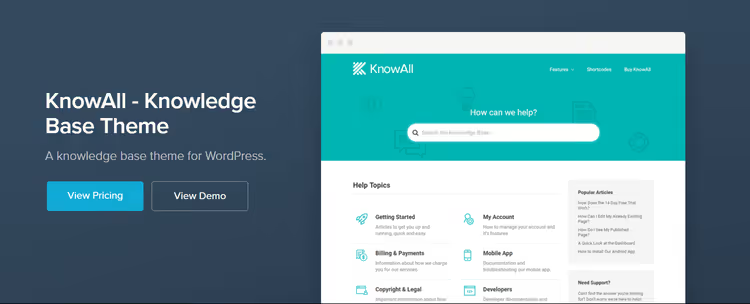
KnowAll from HeroThemes, one of the most thoughtful tools for a knowledge base on WordPress. This is not just a theme, but a complete package "theme + plugin Heroic KB" with search, analytics and feedback on articles. 32,000+ companies use Heroic KB, and KnowAll is its native theme.
The main feature is analytics. You see which search queries gave no results, which articles are read and which are ignored, and on which topics customers still open tickets. This allows you to act on data, not guess what to add to the base. In practice, such a bundle reduces repeat tickets by 20-30% in the first quarter after implementation.
- Pros: deep integration with Heroic KB (search, analytics, AJAX), analytics of empty search queries, responsive design
- Cons: subscription instead of one-time license, no built-in forum
- Price: from $149/year (Heroic KB Essential)
2. Discy

Discy, a social Q&A theme from 2codeThemes on ThemeForest. A user asks a question, other participants answer, best answers rise with votes. A ready Stack Overflow analogue, but for your product and on your domain.
The theme includes user profiles, reputation and badge system, voting for answers and marking a question as solved. Each entry on the category page shows the number of answers, views and status, the user immediately sees what's worth clicking. The Q&A format works well in niches where the product has many non-standard use cases: WordPress themes, plugins, SaaS services with API.
- Pros: full Q&A engine with reputation and points, ready "Ask a question" template, flexible customization of appearance
- Cons: no bbPress (only built-in Q&A), the platform needs to be filled with questions and answers at launch
- Price: $59 (ThemeForest, one-time)
3. Docly

Docly, a theme for documentation and knowledge base with full bbPress support. If your product requires instructions, user guides and a structured reference system, Docly gives a ready structure: documentation sections, FAQ, search and a built-in system for voting on article usefulness.
The key feature is the built-in bbPress forum. You launch a community in a couple clicks: users help each other, and the support team connects to complex questions. The theme also supports dark and light modes, RTL languages and Elementor for flexible layout of documentation pages without code.
- Pros: full integration with bbPress, day/night switcher, Elementor for page customization
- Cons: no built-in search analytics, visual builder adds page weight
- Price: $59 (ThemeForest, one-time)
4. KnowHow
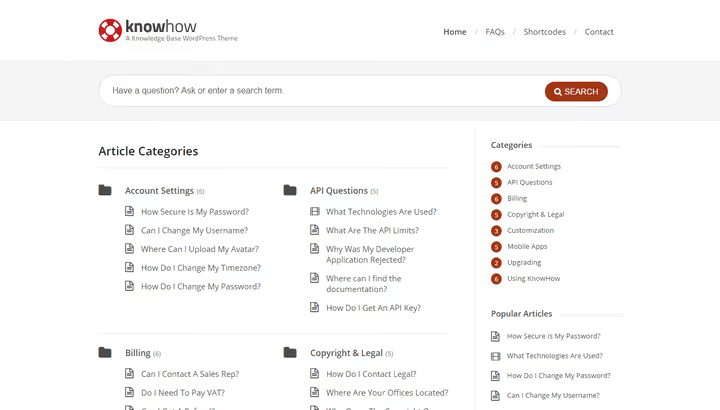
KnowHow, one of the best-selling knowledge base themes on ThemeForest. Live search with autocomplete, FAQ page, article rating system, everything so a customer finds an answer in seconds.
The theme is translated into several languages out of the box. If your audience is international, you can deploy a multilingual base without dancing with WPML. KnowHow is often chosen by SaaS companies: minimum setup, maximum benefit for the user.
- Pros: instant search with live suggestions, multilingual out of the box, thousands of sales and active community
- Cons: no bbPress, design is conservative relative to newer themes
- Price: $59 (ThemeForest, one-time)
5. InfoCenter

InfoCenter from Fluent-Themes, a hybrid of knowledge base and Q&A portal. Unlike purely question-answer themes, here there is both structured documentation and a question system with marking the best answer.
The theme includes 10+ custom widgets, built-in SEO optimization and FAQ page. Supports video in articles, you can insert tutorials directly into knowledge base content. Responsive layout works on any devices, and the options panel allows you to adjust colors and fonts to brand guidelines without editing code.
- Pros: combining KB and Q&A in one theme, built-in SEO optimization, video support in articles
- Cons: no bbPress forum, author's ecosystem and documentation are smaller than market leaders
- Price: $39 (ThemeForest, one-time)
6. Wikb

Wikb, a theme for knowledge base and helpdesk with bbPress and WooCommerce support. A good choice if you want not only to answer questions, but also sell support services or documentation as a product.
The theme has a built-in knowledge base system with categories, search and article ratings. There are ready templates for portfolio, reviews and contact forms. WPBakery included allows you to assemble pages visually. WPML compatibility means that a multilingual base is assembled without additional plugins.
- Pros: bbPress for forum, WooCommerce for selling support services, WPBakery included
- Cons: no search analytics, price above market average
- Price: $75 (ThemeForest, one-time)
7. Knowledge Base

Knowledge Base from SwiftIdeas, a wiki theme for structured documentation. Clean and neat design, bbPress support for forum and Bootstrap under the hood for responsive layout.
The theme includes several ready home pages, custom widgets and shortcodes for quick insertion of elements. AJAX search gives results instantly, without reload. Suitable for projects that need strict, structured material presentation with the possibility of expansion through a forum.
- Pros: bbPress out of the box, several ready main demos, AJAX search
- Cons: no search analytics, no Q&A functions
- Price: $39 (ThemeForest, one-time)
🔗 Knowledge Base on ThemeForest
8. Knowledge Base Lite

Knowledge Base Lite, a free theme from the WordPress.org catalog. Gives a forum, FAQ and knowledge base structure without a penny spent on license. A good start for small teams and projects with limited budget.
The theme supports bbPress for forum, custom post types for knowledge base articles and responsive layout. Customization through WordPress customizer: colors, logo, fonts, everything is standard and predictable. The downside is that there is no advanced analytics and search hints, but for a base of 30-50 articles this is not critical.
- Pros: completely free, bbPress support, simple setup through customizer
- Cons: no search analytics, fewer styling options than premium themes
- Price: free (WordPress.org)
🔗 Knowledge Base Lite on WordPress.org
9. KnowX

KnowX, another free theme from the WordPress.org catalog. Extremely light: installed in 10 minutes, uploaded 20 articles, base is ready. Without forum, without gamification, without subscriptions.
The minimalist approach means fast page loading and no extra dependencies. Suitable for projects where knowledge base is a supporting tool, not a central product. One-click demo data import allows you to immediately see the structure and start filling.
- Pros: free, fast loading, one-click demo import
- Cons: no forum and analytics, few customization options
- Price: free (WordPress.org)
10. Tessera

Tessera, a modern theme for knowledge base and support forum. The main advantage is the "KB + forum" bundle in one product: a user searches for an answer in the base, doesn't find it, goes to the forum and asks the community a question.
The theme includes FAQ page, live search and article rating system. Supports Elementor for page customization. Suitable for companies that want to launch a full-fledged help center with forum, but don't need advanced search analytics.
- Pros: KB + forum bundle out of the box, modern design, Elementor support
- Cons: no search analytics, author's community and documentation are more modest than KnowAll
- Price: $59 (ThemeForest, one-time)
11. TechDesk
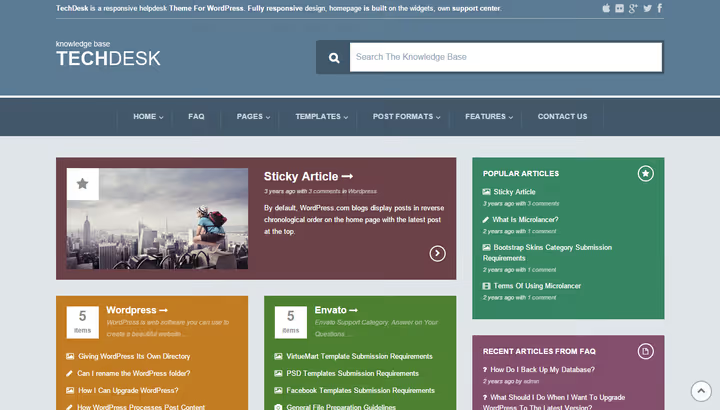
TechDesk, a colorful support theme with live AJAX search, FAQ system and a set of custom widgets and shortcodes. Well suited for companies that want to look friendly and modern, not like corporate documentation.
Many styling options allow you to adjust appearance to brand guidelines, and live search gives results instantly, without page reload. Shortcodes simplify insertion of FAQ blocks, article lists and search bar into any part of the site.
- Pros: live AJAX search with highlighting, custom widgets and shortcodes, flexible styling
- Cons: no bbPress and forum, no analytics
- Price: $59 (ThemeForest, one-time)
12. IKnowledgeBase

IKnowledgeBase, a free wiki theme from the WordPress.org catalog. Clean, minimalist design with emphasis on readability. Suitable for companies that have a lot of documentation and need strict, structured material presentation.
The theme supports breadcrumbs for navigation, custom widget for displaying categories and article nesting. Works with Gutenberg, articles can be laid out with blocks, adding screenshots and video directly into knowledge base content. Last update is April 2026, 1,000+ active installations.
- Pros: free, excellent typography for large texts, breadcrumbs for navigation
- Cons: no forum and Q&A, limited customization
- Price: free (WordPress.org)
🔗 IKnowledgeBase on WordPress.org
13. Hayden
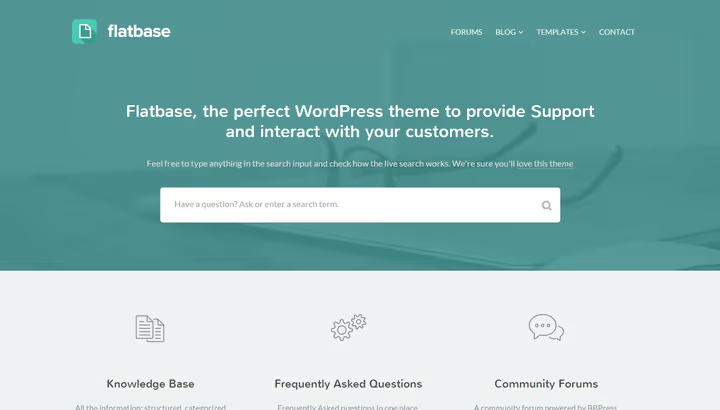
Hayden, a laconic knowledge base theme with emphasis on speed and simplicity. Nothing extra: search, categories, articles. Suitable for startups and small products that need to launch a help center in an evening.
The theme is optimized for fast loading and works correctly on mobile devices. If your audience often accesses the base from a phone, Hayden will be useful, article pages adapt to the screen without horizontal scrolling.
- Pros: fast loading and mobile optimization, minimalist interface, simple setup
- Cons: no forum and Q&A, minimal customization options
- Price: $59 (ThemeForest, one-time)
14. Lore
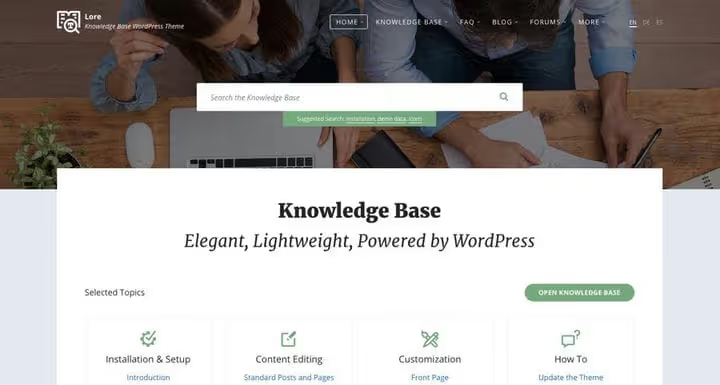
Lore, a modern theme for documentation and knowledge base with Elementor and WP Bakery support. If you're used to working in visual builders and want to customize pages without code, Lore gives full freedom.
The theme includes forum support, RTL languages and Gutenberg compatibility. Gutenberg compatibility means that articles can be laid out with blocks, adding tutorials, screenshots and video directly into knowledge base content.
- Pros: compatibility with Elementor and WP Bakery, forum and RTL support, Gutenberg optimization
- Cons: builders add page weight, no built-in search analytics
- Price: $59 (ThemeForest, one-time)
Video: how to choose a theme for knowledge base
Choosing a theme is not only about features, but also performance, SEO and compatibility with your stack. In this video, Elegant Themes breaks down 9 key factors for choosing a WordPress theme, applicable to knowledge base themes as well.
⁉️🤔 Frequently asked questions
How does a knowledge base theme differ from a regular WordPress theme?
A regular theme is tailored for a blog or showcase: post feed, product pages, portfolio. A knowledge base theme offers a help center structure: search with live hints, article categorization, FAQ templates, "helped/didn't help" rating system and often integration with bbPress forum. On a regular theme you can make a knowledge base through plugins, but a ready KB theme gives a "design + functionality" bundle out of the box.
Is a bbPress forum needed in a knowledge base theme?
If you have more than 100 active users, a forum pays off. Customers help each other, you spend less time on typical answers. bbPress is a free plugin, lightweight and native for WordPress. Of the 14 themes in this review, 7 support bbPress: Docly, Wikb, Knowledge Base, Knowledge Base Lite, Tessera, Lore and, optionally, KnowHow via plugin.
Can a KB theme be used for an internal team knowledge base?
Yes, most themes support access restriction: via password for the entire site, for individual categories or through integration with membership plugins. KnowAll, for example, allows you to close the base to unregistered users and differentiate article visibility by roles. For employee onboarding, regulations and instructions this is convenient: everything on one site.
What to choose: a knowledge base plugin or a ready theme?
A plugin (Heroic KB, BetterDocs) gives knowledge base functionality inside your current theme. This is a plus if you're satisfied with the site design. A ready theme gives a holistic UX: search, categories, FAQ and forum look and work as a single whole. If knowledge base is an important part of the product, take a theme. If you need a couple FAQ pages, a plugin is enough.
How to evaluate KB theme quality before purchase?
Look at the last update date: a theme without updates for 2+ years is a risk of incompatibility with new WordPress versions. Check the number and tone of reviews, what people write about speed and bugs. And definitely test the live demo, especially search and mobile version. For themes from the WordPress.org catalog, look at the number of active installations and rating.
Free theme or premium, which is better for knowledge base?
For a start and small base (30-50 articles), free KnowX or IKnowledgeBase is enough with margin. When the base grows to hundreds of articles, search analytics, indexing speed and customization become important, here premium themes like KnowAll or Docly pay off. The rule is simple: pay for features that actually saved support team time.
Which knowledge base theme to choose in 2026?
The final breakdown depends on your support model.
If you build support on data, your choice is KnowAll. This is the only theme in the selection that shows what users are searching for and where they don't find an answer. For SaaS and products with paid support, analytics pays for the subscription in the first month.
If you need a Q&A portal with community, look at Discy or InfoCenter. Discy is stronger in social mechanics (reputation, badges), InfoCenter wins in price and combining KB with Q&A in one interface.
If launching a base with forum, Docly or Wikb. Both themes work with bbPress, but Docly adds dark mode and Elementor, and Wikb adds WooCommerce for selling support services.
If budget is limited, start with free KnowX or IKnowledgeBase. They will cover the needs of a startup or small product without spending on license.
Knowledge base is not "set and forget." This is a living tool that requires regular content updates. But with the right theme you don't spend time on technical setup, but immediately start helping customers. Choose a theme for your support model and launch a base today.

A professional team of writers and editors specializing in creating quality content.