














🎨 15 free minimalist WordPress themes in 2026
When every other WordPress theme tries to pack in a page builder, slider, mega menu, booking system, and newsletter, finding a simple solution becomes a challenge.
The irony is that most projects don't need any of this. A blog needs typography and readability. A portfolio needs grid and whitespace. A magazine needs content hierarchy. Everything else is ballast: it slows down loading and complicates setup.
We've collected 15 minimalist WordPress themes that do exactly what they promise, they show your content. No extra code, no bloated builders, no dozens of confusing options in the customizer. All themes are free and available in the official WordPress.org catalog. Each entry was verified through the WordPress.org API: the list includes only themes with active updates. Six themes from the previous version of this collection had to be excluded, their last update was 5 to 10 years ago.
💡 Quick overview:
- Check the comparison table, it has key characteristics of all 15 themes on one screen: type, layout, Gutenberg support, rating
- Choose a theme for your task: blog, portfolio, magazine, or photo site. Each entry is broken down by scheme "screenshot → description → pros and cons → links"
- Install 2-3 candidates on a test subdomain and run them through PageSpeed Insights. Minimalism doesn't automatically guarantee speed, but all themes in the collection are lightweight by architecture
Comparison table
Theme | Type | Columns | Sidebar | Gutenberg | Rating |
|---|---|---|---|---|---|
| Blog | 1 | Yes | Yes | 5.0 |
| Magazine | 2 | Yes | Yes | 5.0 |
| Blog | 1 | No | Yes | 5.0 |
| Blog | 1 | Yes/No | Yes | 4.5 |
| Universal | 1 | Yes | Yes | 4.0 |
| Blog | 1 | Yes | Yes | 4.5 |
| Blog | 1 | No | Yes | 5.0 |
| Blog | 1 | No | Yes | 5.0 |
| Blog | 1 | Yes | Yes | 4.5 |
| Universal | 1 | Yes | Yes | 5.0 |
| Blog | 1 | No | Yes | 5.0 |
| Portfolio | 1 | Yes | Yes | 4.5 |
| Blog | 1 | Yes | Yes | 5.0 |
| Photo | Grid | No | Yes | 4.5 |
| Blog | 1 | Yes | Yes | 5.0 |
1. Colinear
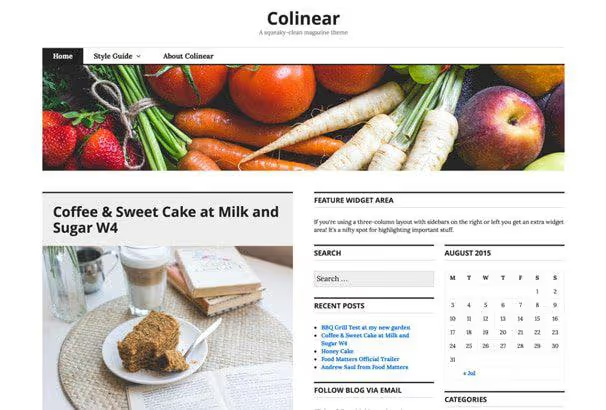
Colinear, an updated version of the once-popular Coraline. The layout is impeccably clean: customizable menu, background, and layout options through Customizer. Nothing extra, just a well-coded blog with support for all standard WordPress post formats.
Pros: time-tested architecture; background and header customization without code; post format support. Cons: design feels dated; grid customization is limited.
🔗 Colinear on WordPress.org | 🔗 Live demo
2. Shamrock
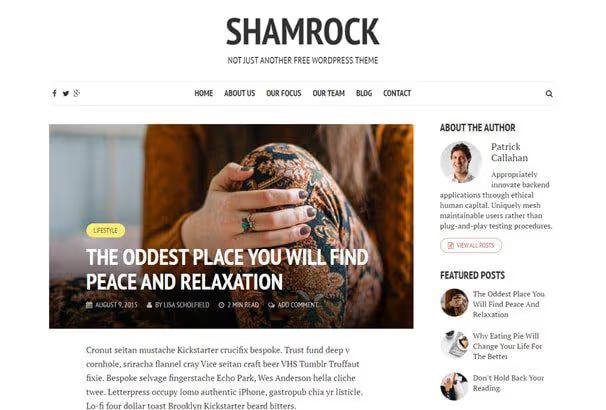
Shamrock puts typography first. Large headings, calibrated font sizes and line spacing, text reads comfortably on any screen. Responsive layout maintains magazine style on mobile too.
Pros: outstanding typography; responsiveness without compromise; engaging magazine style. Cons: no built-in WooCommerce support; some settings are buried deep in Customizer.
🔗 Shamrock on WordPress.org | 🔗 Live demo
3. Libretto
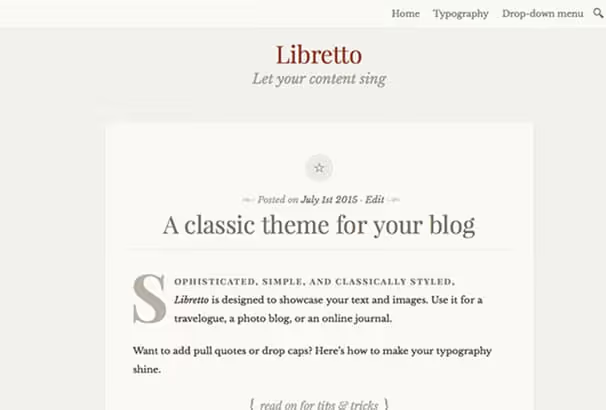
Libretto (Italian for "little book") lives up to its name: a theme with genuine book-like layout. A child theme of Twenty Fourteen, it preserves all the advantages of standard architecture but adds typeface and elegance. One of the best solutions for a text blog with long articles.
Pros: book aesthetics for long reading; support for images, video, and text; excellent mobile optimization. Cons: limited layout settings; no dark mode.
🔗 Libretto on WordPress.org | 🔗 Live demo
4. Plain Blog
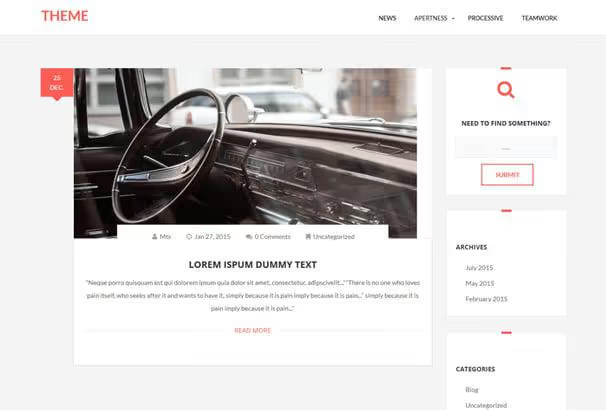
Plain Blog by NavThemes doesn't pretend to be anything more. A simple but tidy blog with a choice: with or without sidebar. Built-in social sharing buttons eliminate the need for a separate plugin.
Pros: maximally simple setup; templates with and without sidebar; built-in sharing. Cons: sparse color palette; custom post types not supported.
5. Azeria
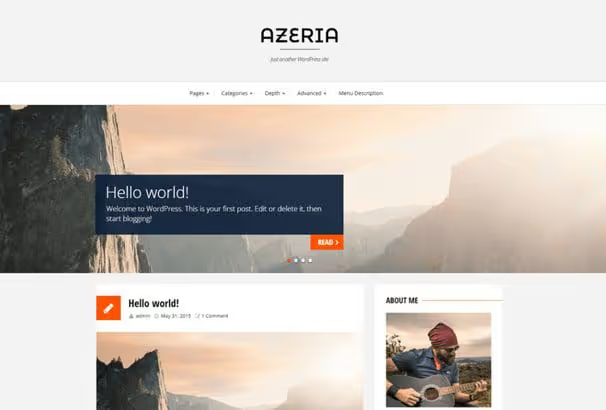
Azeria brings a corporate touch to the world of minimalist themes. Large hero block on the homepage, clean lines, and responsive layout. The theme suits both a business site and personal brand. Fully translation-ready, supports RTL languages.
Pros: expressive hero block; business style without overload; RTL compatibility. Cons: too dry for non-business projects; no integration with popular page builders.
6. BadJohnny
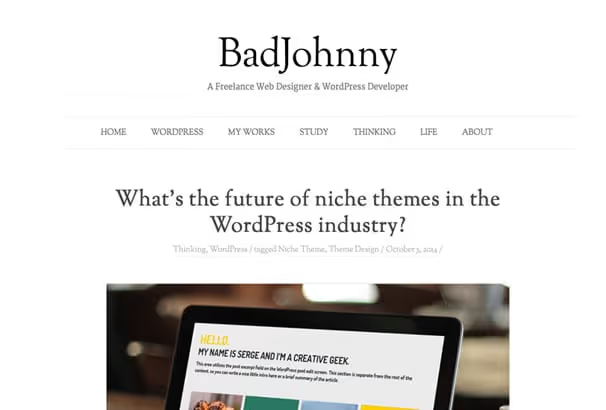
BadJohnny, a reworked version of the classic Twenty Twelve by the WordPress team itself. If you like the structure of default themes but want a bit more character, this is a direct candidate. Minimalist design with clean lines, neat typography, and lightweight.
Pros: familiar architecture; improved typography; lightweight. Cons: might seem too similar to default for some; customization is limited.
7. Write

Write, a theme designed specifically for authors and bloggers. No distracting elements: single-column layout focused on typography, support for multiple post formats, and several custom widgets. Sets up quickly, looks decent.
Pros: built for readability; post format support; light and fast. Cons: no sidebar; insufficient capabilities for visually-rich projects.
🔗 Write on WordPress.org | 🔗 Live demo
8. Koji

Koji, a clean and lightweight option for bloggers who care about accessibility. Full compatibility with Gutenberg, ample whitespace around text, and support for all modern WordPress standards. A good choice for those who want to launch a blog without fiddling with settings but with a modern codebase.
Pros: accessibility-ready; Gutenberg compatibility; lots of air around content. Cons: minimal customization; not designed for complex layouts.
🔗 Koji on WordPress.org | 🔗 Live demo
9. Twenty Sixteen
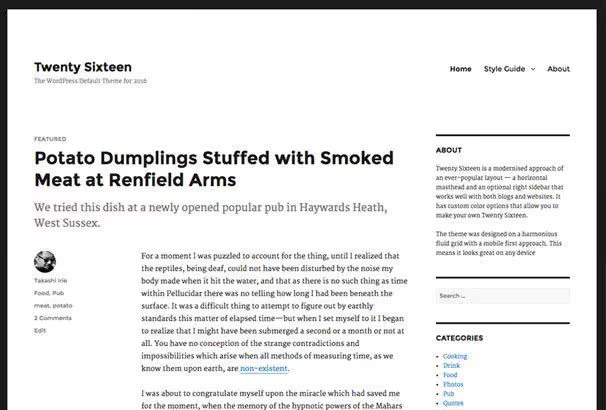
Twenty Sixteen, the default WordPress theme of 2016, still remains one of the best minimalist solutions for a blog. Horizontal top bar, optional right sidebar, and classic content structure. The theme has stood the test of time: architecture is stable, code is clean, community support is among the best.
Pros: proven stability; excellent support; perfect for a classic blog. Cons: 2016 design feels dated; no FSE support.
🔗 Twenty Sixteen on WordPress.org | 🔗 Live demo
10. Apex
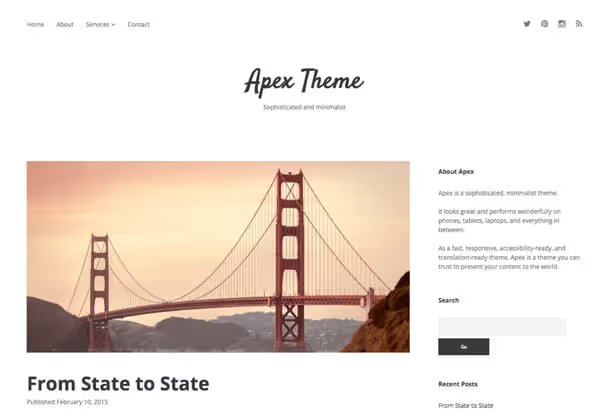
Apex by Compete Themes, a flagship minimalist theme. Behind the outward simplicity lies thoughtful architecture: full accessibility support (WCAG), fast loading, and compatibility with hundreds of languages through Google Fonts. Quality documentation included.
Pros: excellent performance; accessibility-ready; multilingual via Noto Sans. Cons: free version is stripped compared to premium; not all demo layouts available.
🔗 Apex on WordPress.org | 🔗 Live demo
11. Arke

Arke, an embodiment of radical minimalism. No widgets, sidebars, or settings, just content centered on the screen. Single-column layout, instant loading, and zero distractions. Perfect choice if the only requirement for a theme is to not interfere with the reader.
Pros: ultra-fast; absolute focus on text; nothing to configure, works out of the box. Cons: no customization; not suitable for projects more complex than a blog.
🔗 Arke on WordPress.org | 🔗 Live demo
12. Daniela
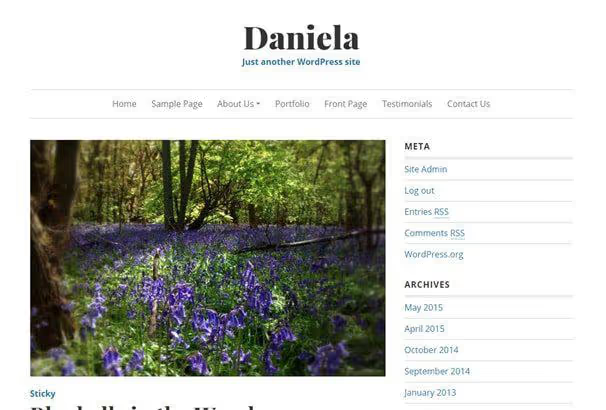
Daniela is tailored for creative freelancers and small business. Built-in support for Jetpack Testimonial and Portfolio, you can showcase client reviews and work samples without additional plugins. Homepage template customizes to your task: portfolio, services, or blog.
Pros: built-in Testimonial and Portfolio via Jetpack; elegant mobile design; flexible homepage template. Cons: requires Jetpack for full functionality; customization limited to template framework.
🔗 Daniela on WordPress.org | 🔗 Live demo
13. Vito
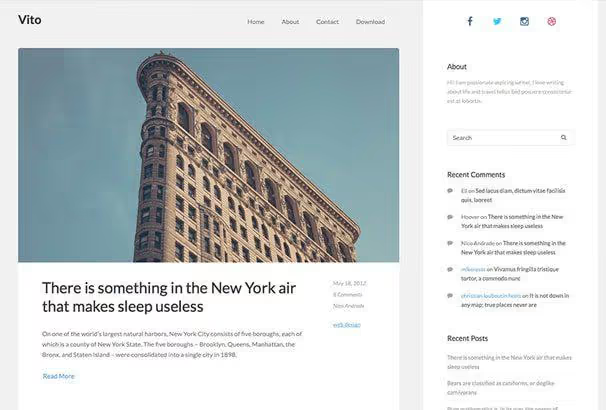
Vito by Quema Labs, a beautiful free theme for blogs with modern grid and clean typography. Looks equally good with photos and purely text content. Supports all standard WordPress features.
Pros: balanced design; suitable for different content types. Cons: fewer options in Customizer than competitors; no built-in WooCommerce support.
14. Patio
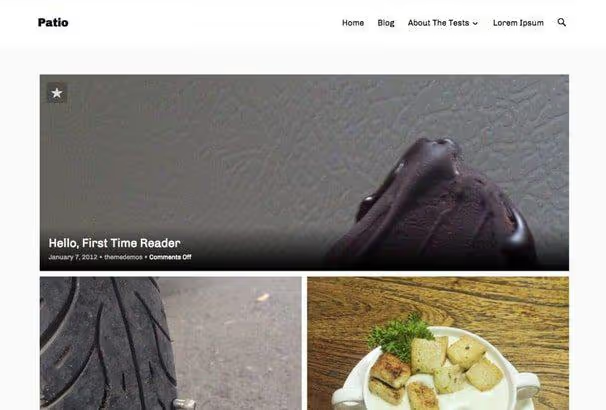
Patio is built to showcase photos and stories. The homepage is constructed from featured images of your posts, each publication gets its own visual anchor. Minimalist design doesn't compete with photos, it frames them.
Pros: ideal for photoblogs; striking homepage with featured images; focus on visual content. Cons: only for visual content; inconvenient for text blogs.
15. Founder
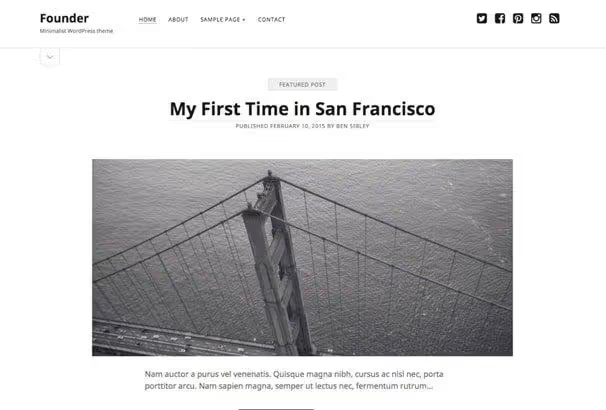
Founder, another theme by Compete Themes, this time with emphasis on professional presentation. Bold minimalist style: content looks like a confident statement. Responsive layout without compromise: on phones, tablets, and desktops the theme looks equally cohesive. Google Font Noto Sans, compatibility with hundreds of languages including Cyrillic.
Pros: professional appearance; full responsiveness; multilingual; excellent speed. Cons: layout doesn't change without child theme; built-in customization is limited without additional CSS.
🔗 Founder on WordPress.org | 🔗 Live demo
Detailed video breakdown: testing and comparing the best free WordPress themes with real examples of installing and configuring each one.
⁉️🤔 Frequently asked questions
Do I need a minimalist theme for an online store?
For WooCommerce it's better to look at specialized themes: Storefront, Astra with WooCommerce integration, Kadence. Themes from this collection are for content projects: blogs, portfolios, magazines, business cards. You can build a minimalist store theme on GeneratePress with a child theme, but out of the box none of the 15 entries are tailored for e-commerce.
What's more important: theme design or speed?
Speed. According to Google PageSpeed Insights data, a 1-second delay on mobile reduces conversion by 20%. All themes in the collection are lightweight, without heavy frameworks and builders. If choosing between a beautiful heavy theme and a simple fast one, take the fast one: design can be refined with CSS, speed cannot.
Are these themes suitable for Gutenberg?
All themes in the collection are compatible with Gutenberg, WordPress's default block editor. Few have full out-of-the-box Full Site Editing (FSE) support, but with WordPress 6.x release most themes received basic compatibility. If FSE is critical, look for themes marked "Full Site Editing" in the WordPress.org catalog.
How do I check that a theme won't slow down my site?
Install the theme on a test subdomain or local server and run it through PageSpeed Insights or GTmetrix. Compare metrics with your current theme. Additionally check via Query Monitor (free plugin), it shows load time, number of database queries, and PHP errors for the specific theme.
Can I use these themes on a commercial project?
Yes, all themes from the official WordPress.org catalog are distributed under GPL v2 or compatible license. This means you can use them on client sites, modify them, and even resell with changes, provided you maintain the same license on derivative work.
Why did you exclude themes that are no longer updated?
A theme without updates for more than 2 years is a risk: vulnerabilities aren't patched, new PHP and WordPress versions aren't supported, compatibility with modern plugins drops. We verified each theme through WordPress.org API and kept only those that are active and maintained. From the previous version of the collection we excluded six themes: their last update was 3 to 10 years ago. Two more disappeared completely from the WordPress.org catalog.
Which minimalist theme to choose in 2026
The choice comes down to three scenarios:
- Text blog without extras: Write, Arke, Plain Blog. Minimum settings, maximum readability.
- Portfolio or photoblog: Daniela, Patio. Grid, whitespace, focus on visuals.
- Magazine or professional site: Shamrock, Apex, Founder. Thoughtful architecture, flexibility, and presentable appearance.
All 15 themes are free, tested for compatibility with current WordPress versions, and available for download from the official WordPress.org catalog. Install several on a test subdomain, run them through PageSpeed Insights, and keep the one that best fits your content. A good minimalist theme shouldn't get in the way, its job is to be invisible.
If you need even higher performance or specific plugin integration, write in the comments which theme you chose and why. We periodically update this collection based on readers' real experience.

A professional team of writers and editors specializing in creating quality content.