














🔌 26 Contact Form 7 extensions: complete 2026 overview
Contact Form 7, five million active installations. Free, flexible, bulletproof. That's why it's still at the core of the WordPress ecosystem when dozens of competitors have faded into obscurity.
A basic installation gives you a text field and a "Submit" button. That's it. No submissions database, no anti-spam, no payment processing. But the CF7 ecosystem has grown over a decade and a half into a market of extensions: from tiny free utilities to premium combines that turn a form into a CRM gateway or payment terminal.
We tested 26 add-ons on live sites in July 2026. We selected those that actually work, don't conflict, and don't require jumping through hoops.
💡 Quick overview:
- Decide on a category: spam protection, payment processing, CRM integrations, design or automation, each group has 3-4 extensions
- Free extensions install from the WordPress.org repository with one button, premium ones through CodeCanyon or the developer's site
- Premium add-ons are justified when you need integration with external services (Dropbox, Salesforce, Zoho) or document generation
- After installing any extension, run a test form submission: CF7 add-ons rarely conflict, but checking doesn't hurt
Comparison table: all 26 extensions at a glance
№ | Extension | Type | Free? | Key feature |
|---|---|---|---|---|
1 | Drag and Drop File Upload | File upload | Yes / Pro | AJAX upload with progress bar |
2 | Honeypot | Anti-spam | Yes | Invisible trap for bots |
3 | WPBruiser CF7 | Anti-spam | Premium | Algorithmic anti-spam without captcha |
4 | PayPal & Stripe | Payments | Yes | Accept payments directly from form |
5 | Moana Builder | Builder | Premium | Drag-and-drop through WPBakery |
6 | Mailchimp Extension | Email marketing | Yes | Auto-subscribe to Mailchimp lists |
7 | Popup Message | UX | Premium | Stylish popup notifications |
8 | Cost Calculator | Calculations | Premium | Service cost estimation in form |
9 | Multi-Step Forms | UX | Yes | Split long forms into steps |
10 | Advanced CF7 DB | Storage | Yes | Database of submitted forms |
11 | CRM Integration | CRM | Yes | Integration with Zoho and other CRMs |
12 | Send PDF | Documents | Premium | Auto-generate PDF from submission |
13 | Style | Design | Premium | Visual customization without CSS |
14 | Schedule Report | Automation | Premium | Scheduled reports via email |
15 | Redirection | Navigation | Yes | Redirect after submission |
16 | Style CF7 | Design | Yes | Visual customization in block editor |
17 | Conditional Fields | Logic | Yes | Conditional "if-then" fields |
18 | Salesforce CRM | CRM | Premium | Salesforce integration |
19 | Dynamic Text | Auto-fill | Yes | Pre-fill fields from URL/post |
20 | Controls | Analytics | Yes | Tracking in Google Analytics |
21 | CF7 Captcha | Anti-spam | Yes | reCAPTCHA v2/v3, hCaptcha and Turnstile |
22 | Digital Signature | Documents | Yes | Electronic signature with mouse or finger |
23 | Repeatable Fields | UX | Yes | Repeating field groups |
24 | WP Contact Slider | UX | Yes | Slide-out form slider |
25 | Contact Form Entries | Storage | Yes | Save entries in database |
26 | Cost Calculator | Calculations | Yes | Dynamic price recalculation on the fly |
1. Drag and Drop File Upload, file upload with AJAX progress

Resume for a vacancy, photo for a contest, error logs for support, all of this needs a file upload field. Standard CF7 can't do this. Drag and Drop File Upload replaces the dull default field with a modern drag area with a progress bar.
Files upload via AJAX immediately after dragging, without waiting for form submission. No timeouts on large files. Configuration through the standard CF7 tag generator: file count limit, allowed extensions, maximum size in megabytes. Uploaded files automatically attach to email notifications.
The plugin is actively maintained: last update in June 2026, compatibility with WordPress 7.0 confirmed. The Pro version adds image previews before submission, multiple upload areas on one form, and automatic file renaming.
- Pros: AJAX upload without blocking submission, progress bar, automatic cleanup of temporary files every 24 hours, lightweight scripts
- Cons: free version, one upload area per form, 80+ active installations (young plugin)
- Price: Free / Pro from $19
- Download: 🔗 Drag and Drop File Upload on WordPress.org
2. Contact Form 7 Honeypot, free spam protection

Spam bots are dumb. They fill in all form fields in sequence, both visible and hidden. Honeypot exploits this: it adds an invisible field that a human doesn't see and doesn't fill, but a bot definitely does. A form with a filled honeypot field simply doesn't submit.
No captchas. No "select all traffic lights." No friction for the user. Install it, activate it, and forget it. The plugin does exactly one thing and does it flawlessly.
In practice, Honeypot closes the vast majority of spam attacks on its own. For persistent bots that bypass the invisible trap, there's WPBruiser (next item).
3. WPBruiser Contact Form 7, premium anti-spam without captcha

WPBruiser (formerly Goodbye Captcha), an anti-spam plugin based on algorithms, not captchas. It identifies bots by behavioral patterns before form submission. Install it, spam drops to zero without a single captcha for visitors.
The CF7 extension brings the same technology to contact forms. Requires installed WPBruiser: the bundle works as a unified protection circuit. Spam comments, brute-force attacks and form spam are blocked by one tool.
In our experience, on high-traffic sites WPBruiser + Honeypot provide virtually complete protection from spam in CF7 forms.
4. PayPal & Stripe Add-on, accept payments directly from form

A contact form can be not just a lead collector, but also a checkout page. Selling an ebook, a WordPress theme or a consultation, PayPal Add-on turns a CF7 form into a simple payment page.
Setup is elementary: product name, price, SKU/ID. Support for all 25 PayPal currencies, 18 interface languages, automatic redirect after payment. There's a Pro version with extended features.
But: for accepting payments through Stripe you'll need a separate solution. This extension is tailored specifically for PayPal and does it well.
5. Moana, visual CF7 form builder
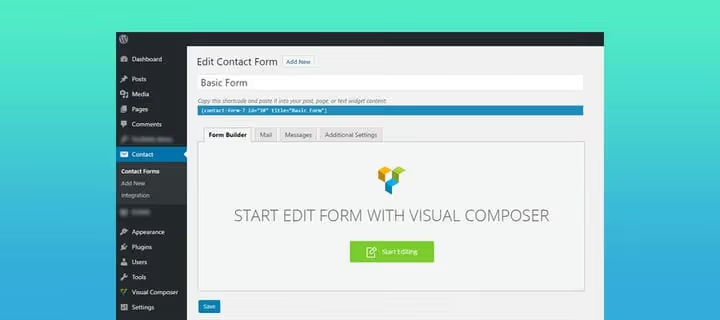
The standard CF7 editor, a text field with shortcodes. Not the friendliest interface, especially for beginners. Moana changes this: you get visual drag-and-drop based on WPBakery Page Builder.
Columns, new fields, layout changes, all with the mouse, without a single line of code. If you already work with WPBakery on your site, Moana will fit into your familiar workflow without training. Requires WPBakery.
6. Mailchimp Extension, auto-subscribe to mailing list

Collect a contact and not add them to the mailing list, a missed opportunity. The Mailchimp extension adds a subscription checkbox at the end of the CF7 form. The visitor sends a message and automatically lands in the right Mailchimp list.
Supports multiple mailing lists, customizable field matching, single and double opt-in. Installs in two minutes, regularly updated. The author, Renzo Johnson, is one of the active contributors to the CF7 ecosystem.
7. CF7 Popup Message, popup notifications about form status

Standard CF7 messages after submission, text lines below the form. Easy to miss. Popup Message replaces them with stylish popup windows: separate popups for successful submission, validation errors and unfilled required fields.
Ten preset color schemes, responsive design, smooth animations. The user immediately sees that the form went through or what exactly needs fixing. A detail that noticeably improves interaction experience.
8. Cost Calculator, cost calculator, Premium

Custom web design? Architectural project? Custom tailoring? When price depends on a set of options, a calculator in the form closes the "how much does it cost" question without unnecessary correspondence.
Checkboxes with price, radio buttons, dropdown lists, cost sliders, each element adds its number. Field for tax or VAT calculation. The total field sums up the selection. The client sees approximate cost immediately, and you receive a request with an already clear budget.
Premium solution, distributed through CodeCanyon. For a free alternative, see item 26, Cost Calculator for Contact Form 7.
9. Multi-Step Forms, multi-step forms

A long form equals lost leads. But sometimes you need to collect a lot of data: customer survey, questionnaire, detailed brief. The solution, split it into steps.
Multi-Step Module divides a CF7 form into sequential screens with "Back" and "Next" buttons. The user sees progress and isn't scared by the volume. Psychologically, three steps of three fields each are perceived easier than nine fields on one screen. Integration through a native tab in the CF7 form editor.
10. Advanced CF7 DB, database of submitted forms

Standard CF7 doesn't save submitted forms in the database, it only sends them to email. Delete the email, lose the request. Advanced CF7 DB closes this gap: all submissions are stored in the WordPress database.
View, search by any field, filter by date, export to CSV. You can mark a record as read or important, add an internal note. For sites with high request flow, a must-have. Free, in the official repository.
11. CRM Integration, CF7 connection with Zoho CRM

Form submission creates a contact in CRM automatically, without manual transfer, without losing a lead. The extension connects CF7 with Zoho CRM and Zoho Bigin: form fields are mapped to CRM fields through visual mapping.
For sales departments this means: a lead from a site form enters the funnel the same minute. No delays. No "manager will call back in three days when they sort through email." The free version covers basic scenarios, for complex logic there's a premium tier.
12. Send PDF, auto-generate PDF from submission

Submitted a form, received a PDF. Automatically. Invoice, contract, order confirmation, filled form, Send PDF generates a document from form data and attaches it to email notification.
Configure the PDF template: logo, fields, tables, styles. The user receives a ready document, you don't need to create it manually. Premium extension, distributed through the developer's site.
13. Style for Contact Form 7, visual customization without CSS

CF7 out of the box looks... like nothing. Simple fields on a white background. Style changes this: customization through a settings panel without a single line of CSS. Field colors, borders, shadows, fonts, roundings, all with the mouse and with live preview.
Ready presets, responsiveness, support for all standard CF7 fields. The result, forms that look like part of the brand, not like a technical element. Premium, through CodeCanyon.
14. Schedule Report, CF7 reports on schedule

Addition to Advanced CF7 DB. Set up daily, weekly or monthly reports, and receive submission summaries to email automatically.
Choose form, trigger event, data columns, filters, and the report comes by itself. Export formats: CSV, XLS, Excel. For GDPR, auto-delete old records on schedule. Saves hours of manual data collection for management or client.
15. Redirection, redirect after submission

Submitted a form, saw "Thank you, your message has been sent." Boring. Redirection allows you to send the user to a custom page: "Thank you" with a subscription offer, sales page, popular post, next step calculator.
Setup through URL selection in the plugin interface. Supports external links and internal pages. A simple way to turn form submission into the next funnel step.
16. Style Contact Form 7, visual customization in block editor

Free alternative to premium stylizers. Style Contact Form 7 allows you to customize form appearance directly in the WordPress block editor with live preview. Field colors, borders, shadows, fonts, roundings, all with the mouse.
The plugin uses the native Block Editor API, no external builders. Actively updated, compatible with the latest CF7 version. If you don't want to pay for Style (#13), this is your option.
17. Conditional Fields, conditional logic for CF7
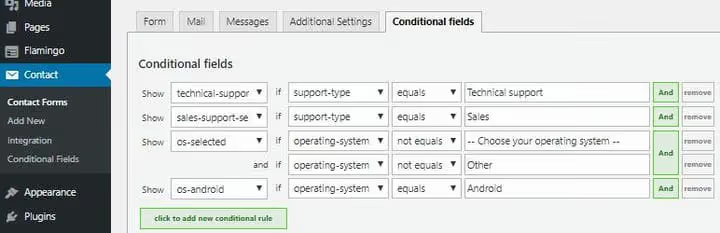
"If category A is selected, show fields X, Y. If category B, fields Z, W." Conditional logic turns a static form into an interactive dialogue. The user sees only relevant fields, the form stays short and not overwhelming.
Conditions: equals, not equals, greater, less, contains, empty/filled. Field grouping for joint show or hide. Works on pure JavaScript, no delays when switching.
18. Salesforce CRM Integration, integration with Salesforce

Salesforce, one of the CRM market flagships. If your sales department lives in Salesforce, this extension closes the loop: CF7 form submission creates a contact, case or lead directly in the Salesforce funnel.
Field mapping through the plugin interface. The lead isn't lost, doesn't wait for manual entry, lands in CRM immediately. For B2B sites and companies with an established sales process, indispensable. Premium solution, distributed through the developer's site.
19. Dynamic Text Extension, auto-fill fields

Pre-filled fields, less work for the user, higher conversion. Dynamic Text Extension inserts into form fields values from URL, current post, user profile or custom shortcode.
Examples: page URL (to know where the request came from), post ID, product name, logged-in user name. New tag types are added: dynamic text field and dynamic hidden field. Configuration through the standard CF7 tag generator.
20. Controls for Contact Form 7, submission analytics

How many forms submitted? Which fields cause errors? At what step do they leave? Controls adds CF7 form event tracking to Google Analytics, Matomo, Global Site Tag or Facebook Pixel.
Each submission, each validation error and each field fill is recorded as an event, you see the funnel in your familiar analytics dashboard. Plus: redirect after submission, disable default CF7 styles and choose reCAPTCHA language.
21. Contact Form 7 Captcha, reCAPTCHA, hCaptcha and Turnstile

Want to protect forms with captcha but don't know which to choose? Contact Form 7 Captcha supports several providers at once: Google reCAPTCHA v2 ("I'm not a robot" checkbox), reCAPTCHA v3 (invisible, no interaction), hCaptcha and Cloudflare Turnstile.
Install one plugin, choose a provider in settings, all CF7 forms are protected. No drag-and-drop puzzles, simple and reliable solutions from market leaders. Free, in the official WordPress.org repository.
22. Digital Signature, digital signature in form

Service agreement, acceptance certificate, consent to data processing, Digital Signature adds an electronic signature field to CF7 form. The user draws a signature with mouse or finger (on touch screens), it attaches to the request as an image.
The plugin is actively maintained: last update in 2025, unlike the abandoned predecessor Signature Addon. Setup is elementary: required or optional field, block width and height.
23. Repeatable Fields, repeating field groups

"Add another participant," "add another item," "add another address." A "+" button that clones a field group in the form. The user decides how many data blocks to send.
A field group is wrapped in the [field_group] shortcode, inside can be any number of standard CF7 fields. Add and remove buttons are customizable. Free, in the WordPress.org repository.
24. WP Contact Slider, slide-out form slider

A form doesn't have to take up a whole page. WP Contact Slider turns any CF7 form into a slide-out panel from the screen edge, like a chat widget.
Settings: choose edge (left or right), label text, color scheme. You can insert not just CF7 shortcode in the panel, but also HTML, images and text. The visitor sees a compact label and opens the form only when needed.
25. Contact Form Entries, form entries in database

Free alternative to Advanced CF7 DB (#10). Contact Form Entries saves all submissions in the WordPress database and shows them in a convenient table.
Search by any field, filter by date, "read," "important" marks, notes to entry. Compatibility with CF7, CRM Perks Forms and WP Forms. Export to CSV.
26. Cost Calculator for Contact Form 7, dynamic price calculation

Free calculator for CF7 of new generation. Calculation based on text fields, checkboxes, radio buttons, dropdown lists and range sliders. Loan calculator, hourly work estimate, delivery, everything is configured with formulas directly in the CF7 editor.
Dynamic fields recalculate on the fly when any parameter changes. Pro version adds conditional operators for complex calculation logic. Formatting of final sum, basic PayPal integration.
⁉️🤔 Frequently asked questions
Do I need to update Contact Form 7 for extensions to work?
Yes, and this is critical. Most extensions are tested on the latest CF7 version. As of July 2026, the current version is CF7 6.0+. Extensions from the official WordPress.org repository update automatically. Premium extensions from CodeCanyon and third-party sites require manual updates, check compatibility before installing.
Can I use multiple extensions simultaneously?
Yes, and that's the point of the ecosystem. Honeypot + Multi-Step + Redirection + Mailchimp, a perfectly workable combination. The only rule: don't install two extensions with the same function (for example, two anti-spam solutions), they may conflict. WPBruiser and Honeypot work together because they use different blocking mechanisms.
How do I check that an extension doesn't slow down the site?
Most CF7 extensions are lightweight and load their scripts only on pages with the form. For checking, use PageSpeed Insights or Query Monitor. If an extension pulls scripts on all site pages, that's a red flag. Of the 26 items on the list, this behavior is noticed only in Material Design (loads styles globally, which is justified, forms are on many pages).
Do free extensions fall short of premium versions?
Not always. Honeypot (free) for most sites closes almost all spam, premium WPBruiser is needed only under high loads. Multi-Step Module (free) does exactly the same as premium analogs. Worth paying for integrations with external services (Dropbox, Salesforce, Zoho) and for visual builders (Moana, Style).
What to do if an extension stopped updating?
Check the last update date on the plugin page on WordPress.org. If the plugin hasn't updated for more than two years, look for an alternative. For premium extensions from CodeCanyon, check the last update date in the product card. All items from the list with WordPress.org links were checked for activity in July 2026 and are actively maintained.
What set of CF7 extensions to assemble for your task
Let's assemble an optimal stack. For a typical WordPress site we recommend this set:
- Base: Honeypot (#2), spam protection without captcha. Free, installs in a second.
- Funnel: Redirection (#15) + Mailchimp (#6), after submission we lead to landing page and add to mailing list.
- Experience: Multi-Step (#9) or Conditional Fields (#17), if form is long, cut into steps or show fields conditionally.
- Safety: Contact Form Entries (#25), all requests in database, even if email is lost.
For an online store on WooCommerce add PayPal Add-on (#4) and Cost Calculator (#26). For an agency with a sales department, CRM Integration (#11) or Salesforce (#18). For a site with high request flow, Advanced CF7 DB (#10) + Schedule Report (#14).
Don't install all 26 extensions at once. Choose 4-5 for your task, install, test form submission. CF7 and its ecosystem, it's a constructor: take only the parts your site needs.
Video below, a quick overview of five best free CF7 extensions in action. From installation to working form in 10 minutes.

A professional team of writers and editors specializing in creating quality content.