













 AIIllustrative image: AI-generated
⏳ 4 best progress bar plugins for WordPress 2026 (free and paid)
A reader opens a page, sees an endless wall of text, and leaves. Not because the content is bad. The brain needs a visible reference: how much more to read, where am I in the process. A progress bar solves this problem through pure perception psychology.
But choosing a plugin for the task is a separate story. One is designed for skill bars in portfolios, another for a full-screen preloader, a third masquerades as a Gutenberg block. Make a mistake, and you get a bloated site-builder for a tiny strip.
Below are four proven WordPress progress bar plugins for 2026. Free and paid, shortcode-based and block-based, each for its own scenario.
💡 Quick overview:
- Determine where you need a progress bar: reading indicator, skill bar, preloader or Gutenberg block, the choice of plugin depends on this.
- For skill bars and portfolios, grab Progress Bar & Skill Bar: free, lightweight, 34 designs in Pro.
- If you need a visual builder with circular, linear and vertical bars without shortcode dependency, StichyX Bar with live preview and SVG graphics.
- For Gutenberg users, Ultimate Blocks: progress bar as a native editor block plus 35 more blocks in the package.
- For a preloader with an animated splash screen, PageLoader, one-time payment $26.
Plugin comparison table
Criterion | Progress Bar & Skill Bar | StichyX Bar | Ultimate Blocks | PageLoader |
|---|---|---|---|---|
Type | Shortcode | Shortcode + visual builder | Gutenberg block | Preloader + editor |
Free version | ✅ WP.org | ✅ WP.org | ✅ WP.org | ❌ |
Paid from | $8 | Free | Pro version | $26 |
Circular bars | ✅ Pro | ✅ (SVG) | ✅ | ❌ |
Linear bars | ✅ | ✅ | ✅ | ✅ |
Vertical bars | ❌ | ✅ | ❌ | ❌ |
Responsive | ✅ | ✅ | ✅ | ✅ |
Animation | ✅ | ✅ | ✅ | ✅ |
Color customization | ✅ | ✅ | ✅ | ✅ |
Visual builder | ✅ Pro | ✅ (live preview) | ❌ | ✅ |
Grouped skill grids | ❌ | ✅ | ❌ | ❌ |
1. Progress Bar & Skill Bar
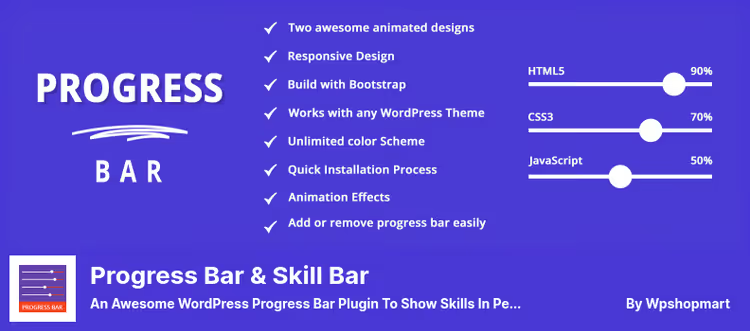
A plugin from WpShopMart for those who need to "show skills in percentages" without extra dependencies. Install, activate, generate a shortcode, and the bar is already on the page. No block editor, no construct interface: go in, set up colors and percentages, copy [PROGRESSBAR_WP id=xx].
The free version has two designs: circular and linear. Both are animated, the bar fills with color from 0 to the specified value on scroll. Under the hood is a Bootstrap grid, so responsiveness on mobile, tablets and desktops works without additional setup.
The Pro version for $8 (Personal, 1 site) or $24 (Business, unlimited) expands the library to 34 templates and adds drag-and-drop sorting of elements. There's a half-pie chart, semi-circular graph, sectional backgrounds, fine-tuned fonts and unlimited skill bars per page.
Pros:
- Free version is fully functional, no crippleware.
- Shortcode inserts anywhere: in a post, widget, theme.
- 52 reviews on WordPress.org with an average rating of 4.5.
- Bootstrap-based, doesn't conflict with most themes.
Cons:
- Not updated for the latest major WordPress releases (v1.5.0 tested up to 6.7.5).
- Free version limited to two designs.
- Settings interface is visually outdated.
💵 Free / Pro from $8.
🔗 Download on WordPress.org | 🔗 Pro version
2. StichyX Bar

If standard designs don't work and you have no time to code custom bars manually, StichyX Bar gives you a visual builder with live preview right in the admin panel. Horizontal, vertical, circular SVG: geometry is set in a minute, without a single line of CSS.
Under the hood is pure JavaScript, no jQuery, no third-party libraries (except Chart.js for graphs). SVG rendering keeps sharpness on retina screens, and animation settings, from 500 to 5000 ms, allow you to match the behavior to the page rhythm. Triggers: scroll, hover or click.
The Group Builder deserves special mention: several bars are assembled into a 1-3 column grid and animated in cascade. For a portfolio or "About the team" page, a ready-made skill grid without a page builder plugin. Emojis and icons inside the bar are supported out of the box.
The plugin is actively developed: v1.2.3 from June 2026, integration with Elementor and Gutenberg, ACF support for dynamic data. Free, without Pro complications.
Pros:
- Visual builder with live preview in admin panel.
- Three geometries (horizontal, vertical, circular SVG) in one plugin.
- Group Builder for skill grids with cascade animation.
- Vanilla JS, doesn't load jQuery.
Cons:
- Only 10 active installations on WordPress.org, the plugin is very new.
- One developer, no guarantee of long-term support.
- No preloader and reading indicator (content bars only).
💵 Free.
3. Ultimate Blocks
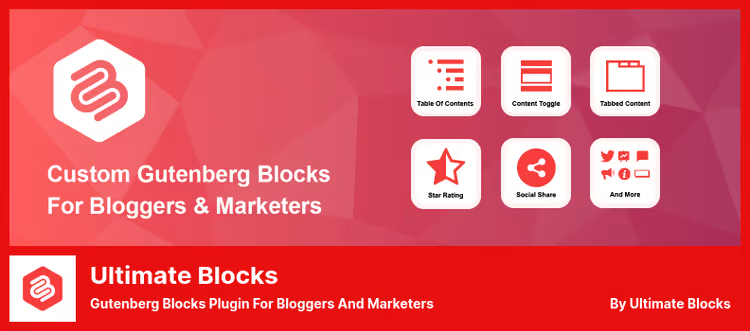
Not just a progress bar plugin, but a full set of 36 Gutenberg blocks, one of which is Progress Bar. Installed as a regular block in the editor: select circle or line, set color, thickness, percentages, and the bar animates on scroll.
The main advantage of Ultimate Blocks is context. The progress bar here is not an isolated tool, but part of an ecosystem: in the same post you can add Content Toggle (accordion), Table of Contents, Call to Action, Review block with schema markup. No shortcodes, everything is native in Gutenberg.
The plugin is actively developed: v3.5.7 from June 2026, 50,000+ active installations, 728 reviews with an average rating of 5 stars. The free version is generous: Progress Bar, Content Filter, Star Rating and a couple dozen more blocks without payment.
Pros:
- Full Gutenberg integration, no need to learn a new interface.
- 36 blocks in one plugin, the progress bar is just one of them.
- Active development (update June 2026).
- Schema markup in Review and HowTo blocks.
Cons:
- Progress bar is not the main focus, but one of 36 functions.
- Not suitable for non-Gutenberg themes.
- Some blocks (Coupon, Timeline) only in Pro.
💵 Free / Pro version.
4. PageLoader
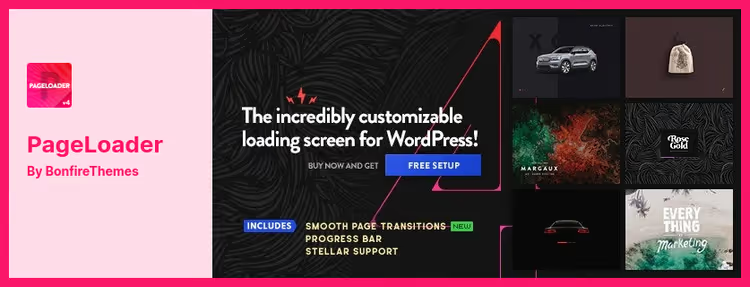
PageLoader solves an adjacent task: not a reading indicator or skill bar, but a full-screen preloader with a progress bar. A visitor comes to the site, sees a splash screen with animated loading. When the page is ready, the preloader smoothly disappears.
In the settings you set a timeout or real loading percentage, background image (your own or from the library), icon, text. The progress bar can be placed anywhere on the screen, adjust color and thickness. The built-in live editor shows changes in real time, no need to switch between admin panel and site.
The plugin is compatible with all themes and devices. Sold on CodeCanyon without a free version: one-time payment, not a subscription.
Pros:
- The only full-screen preloader in the selection.
- Live editor with instant preview.
- Fine-tuned loading timing.
- Smooth appearance and disappearance animations.
Cons:
- Paid version only ($26).
- Not suitable for skill bars and reading indicators.
- Not updated through the WordPress.org repository.
💵 $26 one-time (12 months support).
🔗 Page on CodeCanyon | 🔗 Live demo
Progress bars are a micro-feature, and there's no point in overpaying for it with a site-builder with 50 blocks. Here are three selection rules.
If the site is on the classic editor and you need skill bars, grab Progress Bar & Skill Bar. The [PROGRESSBAR_WP id=xx] shortcode inserts into any text block, widget or theme. The free version covers 80% of tasks, Pro for $8 expands the design.
If you need a visual builder and several geometries without being tied to a specific editor, StichyX Bar with live preview and SVG graphics. Horizontal, circular and vertical bars are set up in the admin panel in a minute.
If the site is on Gutenberg and the progress bar is just one of the needs, install Ultimate Blocks. The progress bar comes with table of contents, accordion, CTA and Review block. One plugin instead of five.
If you need a full-screen preloader, PageLoader. The only tool in the selection for loading splash screen, with a one-time payment without subscriptions.
In the video above, a step-by-step process of installing and setting up a progress bar in WordPress: from choosing a plugin to publishing on a page.
⁉️🤔 Frequently asked questions
How does a progress bar differ from a preloader?
A progress bar shows a percentage inside content: skill, funnel stage, reading indicator. A preloader is a splash screen before the site loads: a visitor sees a bar or animation while the page renders. PageLoader is a preloader; Progress Bar & Skill Bar and StichyX Bar are content bars.
Can I install a progress bar without a plugin?
Technically yes, through HTML
<progress>, CSS animations and JavaScript. But without a plugin you lose: visual editor, out-of-the-box responsiveness, easy insertion via shortcode or block. For a non-technical user, a plugin saves 2-3 hours of manual coding on each bar.
Which plugin is better for Gutenberg?
Ultimate Blocks, the only one in the selection with a native Gutenberg block. The progress bar is inserted as a block, settings in the editor sidebar. No need to leave the interface, copy shortcodes or switch to the admin panel. StichyX Bar also supports a Gutenberg block, but its focus is a visual builder, not a block ecosystem.
Does a progress bar affect site speed?
A quality plugin (Progress Bar & Skill Bar, StichyX Bar) adds 2-5 KB CSS and 1-3 KB JS, this doesn't affect LCP. Ultimate Blocks loads more because of 36 blocks, but asynchronously and only those used. Preloaders (PageLoader) load first and can add 200-500 ms to FCP, which is worth considering. All four plugins in the selection asynchronously load styles and don't block rendering.
Is a Pro version needed for circular bars?
Depends on the plugin. Progress Bar & Skill Bar: circular bars only in Pro ($8). StichyX Bar: circular SVG bars free in visual builder. Ultimate Blocks: circular and linear free in Gutenberg block.
💎 What to install in 2026: final breakdown
There's no universal answer, the scenario dictates the choice.
- If the site is on the classic editor and you need skill bars, Progress Bar & Skill Bar. 34 designs in Pro, shortcode without editor dependency, Bootstrap-based.
- If you need several geometries with live preview, StichyX Bar. Visual builder, SVG circles, skill grids and not a line of CSS.
- If the site lives on Gutenberg, Ultimate Blocks. Progress bar as a native block plus table of contents, accordion and CTA in one plugin.
- If you need a loading splash screen, PageLoader. The only option among the four covering specifically a preloader, not content bars.
Start with the free Progress Bar & Skill Bar: in 5 minutes you'll install the first bar and understand whether two designs are enough for you. And which progress bar plugin do you use, write in the comments.

A professional team of writers and editors specializing in creating quality content.