













 AIIllustrative image: AI-generated
🚀 5 best free WordPress maintenance mode plugins in 2026
You're launching a new WordPress site. The design is still rough, half the pages are empty, the other half throw errors. Or you're moving a working project to a new hosting provider, changing the theme, overhauling the structure. The worst thing you can do at this moment is leave the site open. A random visitor sees chaos, loses trust and leaves. A search engine indexes broken pages and drops your rankings.
WordPress maintenance mode solves this problem in five minutes. You install a plugin, pick a placeholder template, and instead of a disaster the visitor sees a clean page with a "we'll be back soon" message. Meanwhile, you work in peace.
We tested five free plugins that handle this task in 2026. All are open source, with no credit card required and proper Cyrillic compatibility.
💡 Quick overview:
- Install any plugin from the list and activate maintenance mode with one click, visitors will see a beautiful placeholder instead of your site draft.
- Customize the page appearance: logo, text, background, social media links, without code or a designer.
- Choose between "Coming Soon" and "Maintenance" modes, the first doesn't interfere with indexing, the second pauses your site for search engines.
- Connect email collection via Mailchimp or a built-in form, you won't lose your audience while the site is closed.
Plugin comparison table
Plugin | Active installs | Rating | Page builder | Email collection | Whitelist | Free templates |
|---|---|---|---|---|---|---|
Elementor | 16M+ | 4.6 | Yes, full drag-and-drop | No | Yes | 9+ |
SeedProd | 1M+ | 4.9 | Yes, full drag-and-drop | Yes, Mailchimp + 20+ services | Yes | 20+ |
Coming Soon wpdevart | 200K+ | 4.5 | No (Pro) | No (Pro) | Yes (IP) | 1 |
Minimal Coming Soon | 100K+ | 4.4 | No | Yes, Mailchimp | Yes (roles + users) | 0 (Pro) |
Under Construction | 600K+ | 4.6 | No (Pro) | Yes, Mailchimp + autoresponder | Yes (roles + users) | 30+ |
1. Elementor, maintenance mode as part of the page builder

Elementor on WordPress.org is the most popular page builder for WordPress. The maintenance mode feature here is not primary but built-in: it comes as part of the plugin core, without separate extensions or Pro subscriptions.
In our experience, the main advantage of Elementor is that you don't install "yet another plugin for a placeholder." If you already use Elementor for page layout, maintenance mode activates in a couple of clicks: Dashboard → Elementor → Tools → Maintenance Mode.
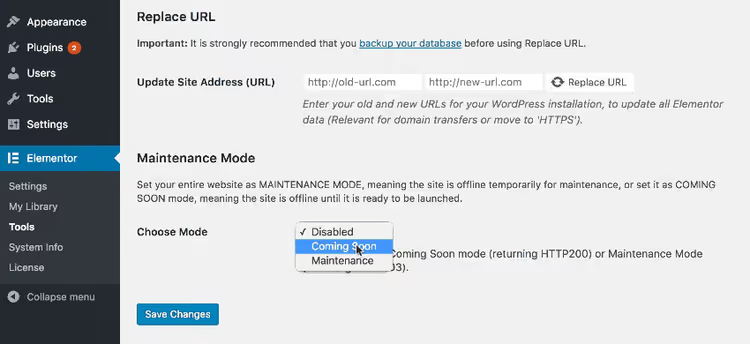
The plugin offers a choice between two states. "Maintenance Mode" returns HTTP header 503 to search engines, Google understands the site is temporarily unavailable and doesn't drop rankings, but also doesn't index new pages. "Coming Soon" doesn't touch indexing: search engines see the site as usual, while visitors only see the placeholder. In practice, the second mode is convenient when launching a new project where the SEO framework is ready but the content is not.

Access configuration is flexible: you can allow site access to administrators, editors, authors, or specific users by role. Meanwhile, you work through the builder interface with live preview and drag-and-drop.
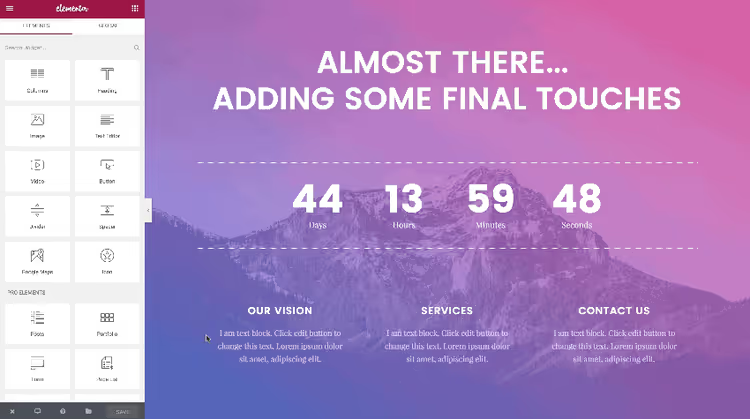
The free version includes nine ready-made maintenance page templates. This is enough to avoid creating a placeholder from scratch. But if you need a countdown timer, subscription form or animation, these aren't available in Elementor's built-in mode.
Pros: no separate plugin needed if Elementor is already installed, flexible access configuration, separation of Coming Soon and Maintenance modes.
Cons: no email collection or timer without third-party extensions, simple templates, custom design requires skills.
Price: free (maintenance mode is part of Elementor Free core). There's a paid Elementor Pro version with extended builder features.
2. SeedProd, page builder with maintenance mode and lead collection

SeedProd on WordPress.org started in 2011 as a plugin specifically for "Coming Soon" pages and maintenance mode. Today it's a full-fledged theme and landing page builder, but the placeholder function remains and is polished to perfection.
In our experience, SeedProd offers the best balance between simplicity and functionality among free solutions. You get a drag-and-drop builder no worse than Elementor, but focused specifically on landing pages and placeholders.
The free version includes over twenty templates for Coming Soon and Maintenance Mode. Each can be customized: replace the logo, change colors and fonts, add a subscription form with integration to Mailchimp, ActiveCampaign, ConvertKit and two dozen other email services. This is a key difference: SeedProd doesn't just hide the site, it builds your audience while you work.
The mode separation is the same as Elementor: Coming Soon doesn't touch indexing, Maintenance Mode returns 503. Whitelist by user roles.
Pros: full-featured builder in the free version, 20+ placeholder templates, built-in email collection with integrations, active updates (2026).
Cons: some blocks and all premium templates are Pro-only, may be excessive for simple "set and forget" use.
Price: free. SeedProd Pro version adds 200+ templates, 80+ blocks and White Label.
3. Coming Soon and Maintenance Mode by wpdevart, simplicity and countdown
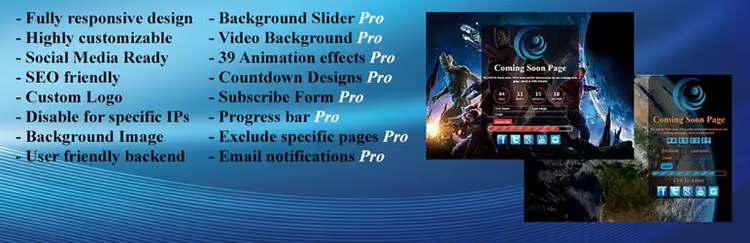
Coming Soon and Maintenance Mode on WordPress.org is a minimalist plugin from the wpdevart team. The free version does exactly what it promises: sets up a placeholder with logo, text, social media links and favicon.
Its strength is SEO settings right out of the box. You can specify the meta title and meta description for the maintenance page, and separately allow or prohibit indexing by search engine robots. With competitors, this is often buried deeper or requires Pro.
In practice, the plugin is good when you need to quickly close the site and not get distracted by design. The single free template, a light card in the center of the screen, looks neat but not unique.
Countdown timer, progress indicator, subscription form and animation are Pro-only. That's also where YouTube background support and image slider appear.
Pros: instant setup, SEO meta right in the free version, IP exception support.
Cons: sparse free design, almost all interesting features are in Pro.
Price: free. Pro version wpdevart adds timer, subscription form and animation.
🔗 Coming Soon on WordPress.org
4. Minimal Coming Soon by WebFactory, lightweight with Mailchimp

Minimal Coming Soon on WordPress.org is another plugin from WebFactory. The name makes it clear: it's minimalist. The free version provides white background, text, logo and a subscription form via Mailchimp API.
In our experience, the plugin's main feature is proper handling of custom login URLs. If you use plugins like Stealth Login Page or WPS Hide Login and have a non-standard /wp-admin address, Minimal Coming Soon handles this correctly: you simply specify your URL during setup and don't lock yourself out.
The free version has no ready-made templates, just a blank slate with basic customization. Colors, fonts, element positioning are configurable, but the design remains spartan. Pro unlocks 450+ templates, 47 animations and integration with 26 services.
The plugin is regularly updated: the latest version 2.44 was released in May 2026.
Pros: compatibility with custom login URLs, built-in Mailchimp in free version, Google Analytics support.
Cons: zero free templates, looks poor without Pro, recent user reviews are mixed.
Price: free. WebFactory Pro version expands the library to 450+ templates and 26 integrations.
🔗 Minimal Coming Soon on WordPress.org
5. Under Construction Page by WebFactory, maximum free templates

Under Construction Page on WordPress.org is WebFactory's third plugin in our list and, in our experience, the best choice if you need many ready-made templates without spending a penny.
The free version contains over thirty themes: from strict "Plain Text" to fun illustrated ones, bulldozer, rocket, light bulb, robot. Each looks like a separate mini-page, not a variation of one template. For comparison: Elementor has 9, SeedProd just over twenty, wpdevart has one.
Under the hood: CSS customization, logo and background upload, SEO title and description configuration. Social icons are added for Facebook, X, LinkedIn, YouTube, Instagram, Vimeo, Pinterest, Behance, WhatsApp, Telegram, Skype, VK and email, one of the broadest sets.
Whitelist is configurable by both roles and specific users. There's automatic deactivation by date and time: set a deadline, the plugin will open the site itself.
Pros: 30+ free templates, auto-deactivation by timer, compatibility with popular caching plugins (W3 Total Cache, WP Super Cache, WP Rocket, etc.).
Cons: builder is in Pro, free version doesn't collect email, intrusive upsells in admin.
Price: free. WebFactory Pro version adds drag-and-drop builder and lead collection.
🔗 Under Construction Page on WordPress.org
How to lock in results: after configuring the plugin, open the site in incognito mode and navigate through the main pages. The placeholder should display everywhere. Verify the admin panel is accessible via your login URL, especially if you use a custom one. Enable Google Analytics on the maintenance page (SeedProd and Minimal can do this out of the box) to understand how much traffic is passing by while the site is closed.
⁉️🤔 Common questions
Does maintenance mode hurt SEO?
It depends on the plugin and settings. If "Maintenance" mode is selected, the plugin returns HTTP header 503 (temporarily unavailable) to search engines. Google won't drop rankings immediately, but during prolonged downtime (weeks) pages may fall out of the index. "Coming Soon" mode doesn't touch indexing: search engines see the site as usual, while visitors see the placeholder. Choose "Coming Soon" when launching a new site with ready SEO structure, turn on "Maintenance Mode" when repairing a working site for 1-2 days.
Can you get by without a plugin, via functions.php code?
Technically yes. A couple of PHP lines in the active theme's
functions.phpwill create a basic placeholder. But this approach has three downsides: no visual customization without layout work, no separation of Coming Soon / Maintenance modes, and the code is lost when changing themes. The manual method viawp_die()ortemplate_redirecthook works for one-time situations lasting an hour or two. For regular use, a plugin saves hours with ready templates, SEO settings and user whitelist.
Which plugin to choose if the site is on Elementor?
Elementor's built-in maintenance mode. You don't install an extra plugin, and the functionality covers most typical scenarios. The only gap is email collection on the placeholder page. If this is critical, supplement Elementor with a form via HTML block or look at SeedProd. The Elementor + SeedProd combo is excessive: choose one.
What to do if after enabling maintenance mode I can't access the admin panel myself?
A typical situation with plugins that change the login URL (WPS Hide Login, Stealth Login Page). Before activating the placeholder, go into the maintenance plugin settings and explicitly specify your custom admin URL. Minimal Coming Soon and Under Construction Page have a special field for this. If you're already locked out, access the site via FTP, temporarily rename the maintenance plugin folder in
/wp-content/plugins/, log into the admin via the standard URL and configure the whitelist.
Can you use maintenance mode for A/B testing?
Formally no. Maintenance mode shows one page to all visitors without variations. But SeedProd's Pro version can display different landing pages depending on UTM tags and traffic source. For basic split testing in the free version, you can manually change text and design every few days and compare subscription conversion through Google Analytics.
Which maintenance plugin to install in 2026?
There's no "one-size-fits-all" right answer, the five plugins above cover five different scenarios. If you already have Elementor installed, don't complicate things, enable its built-in mode. If the site is bare and you want to collect visitor email addresses at the same time, get SeedProd. Need a simple placeholder for a couple of hours with minimal effort, wpdevart. Custom admin URL, Minimal Coming Soon. Want thirty templates to choose from and auto-deactivation by timer, Under Construction Page.
The main rule we derived from dozens of tests: don't leave the site open during work. Five minutes installing any of these plugins is worth dozens of lost visitors and damaged SEO.

A professional team of writers and editors specializing in creating quality content.