













💬 6 best WordPress comment plugins 2026 (free and paid)
A plugin update broke the comment form. Or spam bots flooded the admin panel with dozens of notifications. Everyone who administers WordPress has lost control over site discussions at least once.
The built-in WordPress comments system does the bare minimum: it allows writing and replying. Everything else, spam protection, reply subscriptions, attachments, custom fields, notifications, is handled by plugins.
Below are six tools that solve specific tasks: from replacing Disqus with live AJAX commenting to fine-tuning email notifications. No fluff, with prices and honest downsides of each.
💡 Quick overview:
- AJAX commenting and Disqus replacement, wpDiscuz (free, 100,000+ installs)
- Quick comment closing for any posts, One Click Close Comments
- Fine-tuned email notifications and redirects, Yoast Comment Hacks
- Complete comment disabling across the entire site, Disable Comments
- Subscription to comment replies, Comment Reply Email Notification
- Powerful builder for all WordPress email notifications, Better Notifications for WP
Comparison table
Plugin | Main task | Price | Active installs |
|---|---|---|---|
wpDiscuz | Comment system replacement | Free | 100,000+ |
Comment Reply Email Notification | Reply subscription | Free | 3,000+ |
Disable Comments | Comment disabling | Free | 1,000,000+ |
Yoast Comment Hacks | Comment management | Free | 9,000+ |
Better Notifications for WP | Email notification customization | Free / Pro $129 |
|
1. wpDiscuz

wpDiscuz is a replacement for the standard WordPress comment system with a fast, AJAX version packed with engaging features. If you're looking at Disqus or Jetpack Comments but want to store comments in your own database, this is a direct candidate.
The plugin works without page reloads: comments publish instantly, discussion threads update on the fly. Comments load lazily, only when the reader scrolls to the block.
Version 7 added built-in voting (up/down, like Reddit), inline commenting on specific text fragments, and three layout choices. Social login through Facebook, Twitter, and other networks, out of the box.
In practice, the free core is enough for a blog or news site. Add-ons (Media Uploader, ReCaptcha, Subscription Manager) are purchased as a bundle from the developer, gVectors Team. Add-on prices start at $29 per year for the bundle.
- Pros: AJAX without reloads, lazy loading, 100,000+ installs and 4.6 rating on WordPress.org, active support forums
- Cons: updates sometimes break theme styles, needs testing on a staging site; some features (media attachments, ReCaptcha) only in paid add-ons
- Price: Free; add-ons, from $29/year for bundle
🔗 wpDiscuz on WordPress.org🔗 Live demo
2. One Click Close Comments
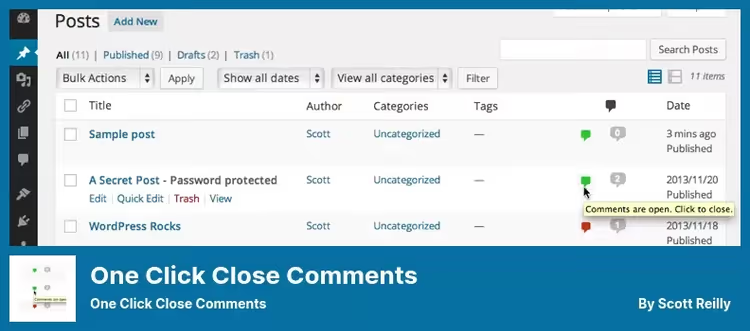
A narrow but useful tool for those who selectively close discussions. One Click Close Comments adds a color indicator to the post list: green, comments open, red, closed. A click switches the status without entering the post editor.
Works via AJAX, the page doesn't reload. Switching rights belong to administrators and post authors. Indicator colors change through CSS if the defaults don't match your admin panel.
The plugin doesn't touch the frontend: it has no effect on the site's appearance. Install and forget.
- Pros: elementary installation, instant AJAX toggle, doesn't load the frontend
- Cons: narrow niche, not needed by every site; last update April 2025, developer not very active
- Price: Free
🔗 One Click Close Comments on WordPress.org
3. Yoast Comment Hacks

The Yoast team created a minimalist set of "hacks" for standard WordPress comments. Yoast Comment Hacks doesn't change the frontend, it tweaks the admin panel and system behavior from within.
What it does: cleans comment email notifications (removes technical junk), redirects first-time commenters to a "thank you" page, changes comment parent ID directly from the admin panel. Administrators can send an email to a specific commenter or broadcast a notification to all participants in a single post discussion.
Another useful detail: the plugin can cut off comments shorter or longer than a set length, filtering spam bots that pour link walls.
- Pros: from Yoast (proven team), clean email notifications, first commenter redirect, length filter
- Cons: not updated since November 2025, support has slowed; no block interface, only classic admin panel
- Price: Free
🔗 Yoast Comment Hacks on WordPress.org
4. Disable Comments
The most popular plugin for disabling comments, over a million active installs. Disable Comments allows you to turn off discussions globally (entire site) or selectively: only on posts, only on pages, only on media files.
What it provides: completely removes the "Comments" section from the admin menu and admin bar, hides the "Discussion" page in settings, disables RSS/Atom comment feeds, removes the X-Pingback header. Physical comments can be deleted by post types with one button.
The plugin works through WP-CLI, XML-RPC, and REST API, full coverage. Supports multisite. Recently updated (May 2026).
- Pros: 1,000,000+ installs and 4.8 rating, full control over comment visibility, multisite and WP-CLI support
- Cons: radical solution, if you need comments on part of the site, better look at other tools
- Price: Free
🔗 Disable Comments on WordPress.org
5. Comment Reply Email Notification

A replacement for the discontinued Subscribe To Comments Reloaded plugin. Comment Reply Email Notification adds a "Notify me of reply" checkbox under the comment form, visitor subscribes to email notifications about new replies in the thread.
Developer Arno Welzel actively maintains the plugin: version 1.40.0 is tested up to WordPress 7.0, code is regularly updated for fresh PHP versions. For GDPR compliance, the plugin can display a separate consent checkbox for data processing.
The email template is customizable: copy the templates folder to a child theme and change the layout. Checkbox labels also change through filters, no need to dig into source code.
- Pros: actively maintained (June 2026), WP 7.0 compatibility, 34 reviews with 4.7 rating, customization without code editing
- Cons: only basic reply subscription, no subscription manager with personal cabinet like the old Subscribe To Comments Reloaded
- Price: Free
🔗 Comment Reply Email Notification on WordPress.org
6. Better Notifications for WP
Better Notifications for WP (bnfw) is a builder for all email notifications sent by WordPress. Through a WYSIWYG editor and shortcodes, you assemble emails for dozens of events: new post, comment in moderation, password change, user registration, and so on.
Notifications are sent to specific users, roles, or role combinations. Email format, HTML or plain text, your choice. The plugin works through standard wp_mail but plays nicely with SMTP plugins for improved deliverability.
The Pro version adds: digest notifications (event grouping), conditional notifications by categories and tags, ACF fields, reminders about "forgotten" posts, multisite support. Pro plans start at $129 per year.
- Pros: full coverage of WordPress email events, flexible recipient settings, WYSIWYG + shortcodes, digest email sending in Pro
- Cons: free version doesn't include digests and conditional logic; Pro subscription from $129/year, overkill for small sites
- Price: Free (Lite); Pro, from $129/year
🔗 Better Notifications for WP (Lite)🔗 Pro version on developer site
⁉️🤔 Common questions
Do I even need a comment plugin if I have a standard WordPress theme?
The standard WordPress comment system works. But it doesn't provide: spam protection besides Akismet, email subscriptions to replies, attachments, custom fields, comment voting, social login. If traffic is dozens of readers per day, the standard is enough. If discussions are active, a plugin from the collection will solve a specific task.
How is wpDiscuz better than Disqus?
Comments are stored in your database, not on a third-party server. You don't depend on someone else's API, Disqus ad network, and don't lose comments when the service shuts down. Plus wpDiscuz AJAX commenting is faster than standard Disqus loading.
Can I disable comments only on old posts and keep them on new ones?
Yes, through Disable Comments: it allows you to select post types for which comments are disabled. And Yoast Comment Hacks can automatically close comments on posts older than a set number of days, that's exactly your scenario.
Which plugin will add photo uploading to comments?
There's no direct replacement for DCO Comment Attachment in the WordPress.org catalog right now. If you need file uploading in comments, consider switching to wpDiscuz with the Media Uploader add-on. For simple sites, you can use the standard comment form with Comment Reply Email Notification plugin, reply subscription works without attachments.
Can I use Better Notifications for WP ONLY for comments and not touch other notifications?
Yes. BNFW allows you to create a notification only for the "New comment" or "Comment in moderation" event, and that's it. Other WordPress email notifications continue to go out in standard form.
So which comment plugin to install in 2026
Six plugins cover different scenarios, and the choice comes down to the task.
- If you need to replace Disqus and get live AJAX commenting, wpDiscuz. Free, fast, 100,000+ installs.
- If you want to give readers reply subscriptions, Comment Reply Email Notification. Fresh, tested up to WP 7.0, not overloaded with extras.
- If you don't need comments at all, Disable Comments removes everything with one click.
- If you need to build your own email notifications for dozens of events, Better Notifications for WP.
Start with one plugin for a specific task. Install on staging, check compatibility with your theme and other plugins, and only then on production. What tool do you use? Write in the comments.

A professional team of writers and editors specializing in creating quality content.