













 AIIllustrative image: AI-generated
🚀 6 best WordPress plugins for contests and giveaways in 2026
Running a contest on a WordPress site and simply waiting for participants is a path to nowhere. Without the right plugin you either drown in manual moderation, lose half your audience to a clunky entry form, or, worse, hand the prize to a cheater with ten fake email addresses.
A good contest plugin does three things at once: collects registrations without friction, filters out bots and multi-accounts, and, most importantly, turns every participant into a free promoter. One social post, one referral, one repost, and the audience grows on its own.
I tested six current solutions for WordPress, from lightweight free plugins to feature-packed suites with gamified entry actions. Each scenario has its own tool.
💡 Quick overview:
- Launch RafflePress for WordPress-native contests with drag-and-drop and fraud protection
- Use Simple Giveaways for quick free giveaways in 5 minutes
- Choose Rafflecopter as a proven SaaS with unlimited contests on the free tier
- Try KingSumo for referral virality; it is now completely free
- Pick Woorise when the giveaway is part of a funnel with forms, surveys, and landing pages
- Activate WooCommerce Lottery for WooCommerce stores with paid lotteries
Comparison table
Plugin | Type | Free version | Paid starting at | Lifetime license | Best feature |
|---|---|---|---|---|---|
RafflePress | WordPress plugin | ✅ Lite | $299 one-time | ✅ | Drag-and-drop + fraud protection |
Simple Giveaways | WordPress plugin | ✅ | ~$49/year | ❌ | 5-minute launch simplicity |
Rafflecopter | SaaS + embed | ✅ | ~$13/month | ❌ | Unlimited contests on the free tier |
KingSumo | SaaS / WP plugin | ✅ | Free | ✅ (AppSumo $49) | Built-in referral virality |
Woorise | SaaS + WP plugin | ✅ (500 entries/month) | $23/month | ❌ | Forms + surveys + landing pages in one |
WooCommerce Lottery | WP plugin (WooCommerce) | ❌ | $23 one-time | ✅ | Native WooCommerce integration |
1. RafflePress

RafflePress is the flagship contest plugin from the WPBeginner team (the same people behind WPForms and MonsterInsights). The idea is simple: a participant completes actions (subscribes to a newsletter, retweets on Twitter, visits a YouTube channel) and earns entry points for each. The more actions, the higher the chance of winning.
The main advantage of RafflePress is its drag-and-drop contest builder with ready-made templates. You choose a goal (subscribers / social growth / viral reach) and the plugin suggests relevant entry actions. Over 30 action types are available, from email subscription to video views, photo uploads, and answering questions.
Fraud protection deserves special mention. RafflePress verifies actions through social-network APIs (where technically possible), validates emails, and filters out duplicates. The prize goes to a real person, not a bot behind a proxy.
Integrations: 15+ email services (Mailchimp, ConvertKit, ActiveCampaign, Brevo), Zapier, Webhooks, plus native connections to WPForms, SeedProd, and the rest of the Awesome Motive product suite.
Pros:
- Powerful visual builder with no code required
- 30+ entry actions, including a referral program
- Built-in fraud protection and email verification
- Lifetime license: pay once and forget about subscriptions
Cons:
- Price stings for a one-off contest
- Free Lite version lacks key integrations
- Heavy for low-powered hosting
Price: free Lite version on WordPress.org. Pro: $299 one-time for 1 site (lifetime updates), $499 for 5 sites, $699 for 30 sites.
🔗 RafflePress on WordPress.org | 🔗 RafflePress website
2. Simple Giveaways

Simple Giveaways lives up to its name: it is the easiest way to launch a giveaway on WordPress. Install, set start and end dates, define the prize, and the entry widget is already live on a dedicated page or in a sidebar via shortcode.
The free version delivers a fully functional giveaway: email collection, winner selection (random or by specified criteria), countdown timer, and appearance customization. For a simple "subscribe and win" contest, that is more than enough.
The Pro version adds email-service integrations (Mailchimp, MailerLite, ConvertKit), extended entry actions (reposts, social follows), scheduled automatic winner selection, and detailed participant statistics.
The plugin is actively maintained (version 2.49.0, January 2026), and the author promptly patches vulnerabilities. In the free segment there is no serious competitor with a comparable simplicity-to-feature ratio.
Pros:
- Contest launch in 5 minutes with no learning curve
- Full free functionality for basic giveaways
- Flexible appearance customization
- Lightweight, does not slow down the site
Cons:
- Email-service integrations are Pro-only
- No visual builder (unlike RafflePress)
- Limited set of entry actions
Price: base version free on WordPress.org. Pro: from $49/year for one site (see pricing on the website).
🔗 Simple Giveaways on WordPress.org
3. Rafflecopter
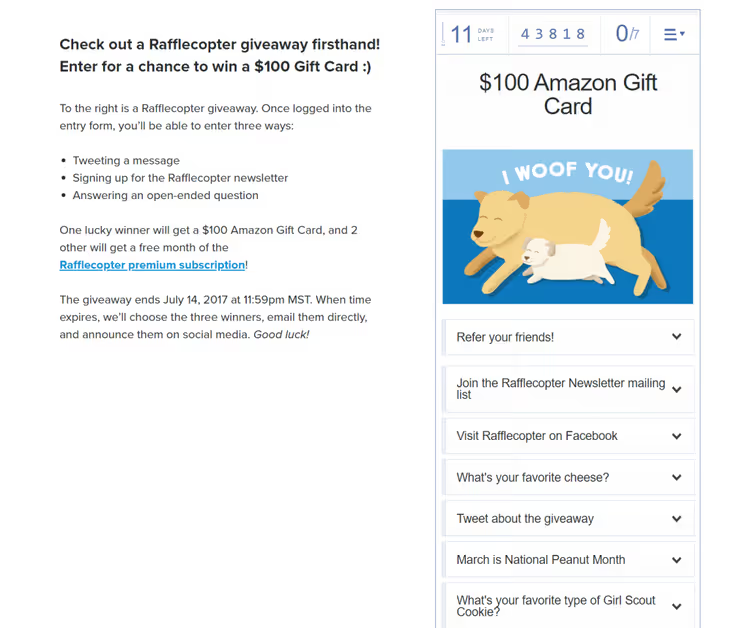
Rafflecopter is a market veteran that appeared before "contest plugin" became its own category. Technically it is a SaaS: the contest lives on Rafflecopter's servers, and you embed it on a WordPress site with an embed code. Downside: participant data is stored off your server. Upside: zero load on your hosting.
The mechanics are the same: a participant enters an email, then earns points for likes, reposts, and survey answers. You can assign a weight to each action. For example, subscribing to a newsletter grants +5 entries while a tweet grants +2. When the contest ends, the winner is selected randomly based on those weights.
The free tier includes unlimited contests and participants plus a basic set of entry actions (email + social). That is enough for regular giveaways on a mid-sized blog. Pro unlocks advanced actions, one-click CRM integrations, and detailed statistics.
An interesting bonus: Rafflecopter has a separate free app for picking winners on Instagram, TikTok, and YouTube with animation and SHA-256 fairness proof.
Pros:
- Free tier with no limits on contests or participants
- Time-tested mechanics with predictable results
- Zero load on the WordPress server
- Separate tool for social platforms (Instagram/TikTok/YouTube)
Cons:
- Participant data is on a third-party server, not your asset
- Interface looks dated
- Fewer entry actions than RafflePress
Price: free tier with basic actions. Pro: affordable monthly subscription (advanced integrations and analytics).
4. KingSumo

KingSumo is a product from the AppSumo team that became completely free in 2024. Yes, the same tool that once cost $198 for a WordPress plugin or $49 for the web version is now free of charge.
KingSumo's key feature is its referral mechanic. A participant receives a unique link and extra points for every friend they bring in. One referral equals one additional entry. This creates a viral loop: the winner has not been chosen yet, but the audience is already growing.
The platform exists in two forms: a WordPress plugin (installed on your site) and a web app (contest on KingSumo's servers, embedded on your site). In practice the web version is more convenient because you do not have to track plugin updates, and the AppSumo deal ($49 lifetime) is still available for those who want premium integrations.
Drawbacks include a limited set of entry actions compared to RafflePress and minimal design customization. KingSumo wins on virality, not flexibility.
Pros:
- Free with no strings attached (since 2024)
- Built-in referral system for viral growth out of the box
- Simple interface with a low barrier to entry
- 20+ languages, including Russian
Cons:
- Few entry actions (focus is on referrals)
- Almost no design customization
- Data on the service's servers (web version)
Price: free. AppSumo lifetime license ($49) adds extended integrations.
🔗 KingSumo (web app) | 🔗 AppSumo deal ($49)
5. Woorise

Woorise goes beyond "yet another contest plugin." It is a full-fledged marketing platform: contests, contact forms, surveys, quizzes, landing pages, and pop-ups, all in one interface. It integrates with WordPress through an official plugin.
For giveaways, Woorise provides the standard set: email registration, social actions (follow, share, comment), photo uploads, referrals. The real power, though, lies in combining modules. You launch a contest → the participant lands in a survey form → they receive a personalized landing page with an offer. An end-to-end funnel without leaving the ecosystem.
The free tier allows 500 entries per month, enough to get started. Paid plans remove the limit and unlock integrations with Mailchimp, HubSpot, Zapier, and other tools.
The plugin on WordPress.org was last updated in November 2025 (version 1.5.0), less frequently than ideal, but the product is alive and evolving.
Pros:
- Forms + surveys + landing pages, no plugin zoo needed
- Drag-and-drop builder for everything (not just contests)
- Free tier for getting started
- Build an end-to-end funnel in a single tool
Cons:
- Expensive if you only need contests
- Plugin updates less often than competitors
- 500-entry limit on the free version
Price: free tier up to 500 entries/month. Paid plans: from $23/month.
🔗 Woorise on WordPress.org | 🔗 Woorise website
6. WooCommerce Lottery
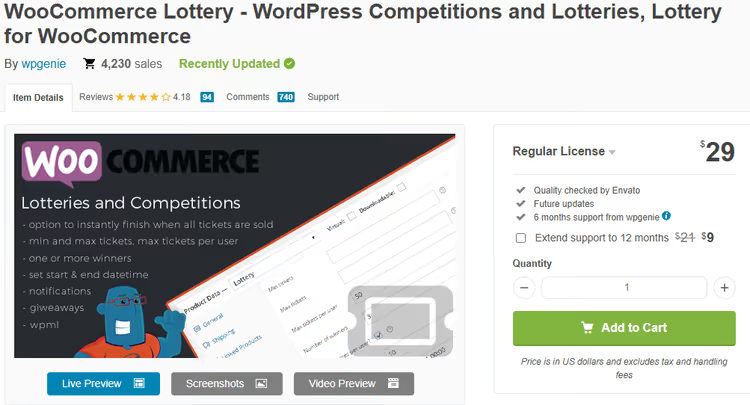
WooCommerce Lottery is a niche tool for WooCommerce stores. Unlike the other plugins on this list, it is not about "like and repost" but about a classic lottery: a lottery product with tickets, paid or free entry, a fixed end date, and automatic winner selection.
After installation, a new product type called "Lottery" appears in WooCommerce. You set the minimum and maximum number of participants, ticket price (or make entry free), and draw date. The system counts participants, closes entries when the timer runs out, and randomly picks a winner. All participants receive an email notification about the result.
Important note: paid lottery entry may qualify as gambling in some jurisdictions. Check local regulations before launching a paid version.
Pros:
- Native WooCommerce integration: orders and lotteries in one admin panel
- Full cycle: tickets → accepting bets → winner selection → email notifications
- One prize or several, flexibly configurable
- One-time purchase with lifetime updates
Cons:
- WooCommerce only; useless without a store
- No social entry actions
- Legal risks with paid lotteries
Price: $23 one-time (CodeCanyon purchase, lifetime updates).
🔗 WooCommerce Lottery on CodeCanyon
⁉️🤔 Frequently asked questions
How does RafflePress differ from Rafflecopter?
RafflePress is a WordPress plugin (data on your server, one-time payment of $299). Rafflecopter is a SaaS (data on their server, subscription). RafflePress offers more entry actions and integrations; Rafflecopter is simpler and cheaper to start.
Is KingSumo really free?
Yes, since 2024 KingSumo is completely free. The AppSumo lifetime deal for $49 is still available and adds a few premium integrations, but the free version is enough for a basic giveaway.
Can I run a contest with zero budget?
Yes. The free versions of RafflePress Lite, Simple Giveaways, and Rafflecopter are sufficient for a contest with email registration and basic social actions. If you are okay with storing data on a third-party server, KingSumo offers referral mechanics for free.
Which plugin puts the least load on the site?
Rafflecopter (SaaS embed, zero hosting load), followed by Simple Giveaways (lightweight plugin without a builder). RafflePress with its drag-and-drop builder is the heaviest and can be noticeable on low-powered hosting.
How do I protect a contest from fraud?
RafflePress verifies actions through social-network APIs and email validation. Rafflecopter and KingSumo lack such protection; their winner selection is simply random with no anti-fraud logic. For valuable prizes, RafflePress is the only option with serious protection.
How does WooCommerce Lottery differ from a regular giveaway?
WooCommerce Lottery is a lottery product inside a store: the buyer purchases a ticket (or gets a free one), and the system picks a winner on a timer. The other plugins are external contests with actions for points. These are fundamentally different mechanics.
What to choose: the final breakdown

Six tools cover virtually any scenario
If you need a WordPress-native plugin with maximum flexibility and data on your own server, go with RafflePress. Yes, a one-time investment of $299 for a lifetime license, but you get fraud protection and 30+ entry actions without monthly subscriptions.
If your budget is zero and you need a contest yesterday, launch Simple Giveaways (for simple giveaways) or KingSumo (if you want referral virality). Both are free and cover the needs of the vast majority of mid-sized blogs.
If you have a WooCommerce store and want to monetize entry, WooCommerce Lottery for $23 does exactly that. Just consult a lawyer about paid-lottery regulations in your country.
Test the free version of the plugin that fits your scenario; they are all available without a credit card. And drop a comment to share which tool you chose and how many participants your first contest attracted.

A professional team of writers and editors specializing in creating quality content.