













🔍 ACDSee Photo Studio Ultimate 2026: a review of an all-in-one photo editing suite
When a photo archive surpasses tens of thousands of images, the question "where's that sunset shot from Porto" stops being rhetorical. Adobe with its Lightroom + Photoshop bundle has dominated the market for decades, but their subscription model and the constant need to jump between two programs is a real headache. Most importantly, cataloging has always been their weak spot: folders, collections, manual sorting, and no sense that the software actually "sees" your entire archive.
ACD Systems took a different path. Instead of churning out yet another lightweight editor, the Canadian developers bet on a full-fledged all-in-one solution: organization + browsing + editing in a single window, without subscriptions and with a one-time payment. By 2026, ACDSee Photo Studio Ultimate has grown into a version with a dozen AI tools, local processing (no clouds), and digital asset management that Adobe can only envy.
💡 Quick overview:
- Understand how ACDSee differs from the classic Lightroom + Photoshop bundle and why it's not a "simplified substitute" but a standalone all-in-one solution
- Evaluate the AI features of the 2026 version: noise reduction, hair selection, develop presets, and sky replacement, all on a local engine without sending photos to third-party servers
- Look at archive organization: People mode, metadata search, Activity Manager with background processing, and Mobile Sync for wireless transfer from your phone
- Compare pricing: one-time payment versus Adobe's endless subscription, and no mandatory annual upgrades at half price if you don't want to update
What is ACDSee Photo Studio Ultimate 2026
ACDSee Photo Studio Ultimate is an all-in-one Windows application for photographers that handles three tasks simultaneously: importing and cataloging photos, non-destructive RAW editing and layer work, plus export in any format from JPEG to JPEG XL. The 2026 version, released in fall 2025, added AI Denoise (smart noise reduction without losing detail), AI Hair Masking (one-click hair selection), AI Develop Presets (intelligent develop presets that analyze each photo individually), and improved AI Face Edit with hair color correction and blemish removal.
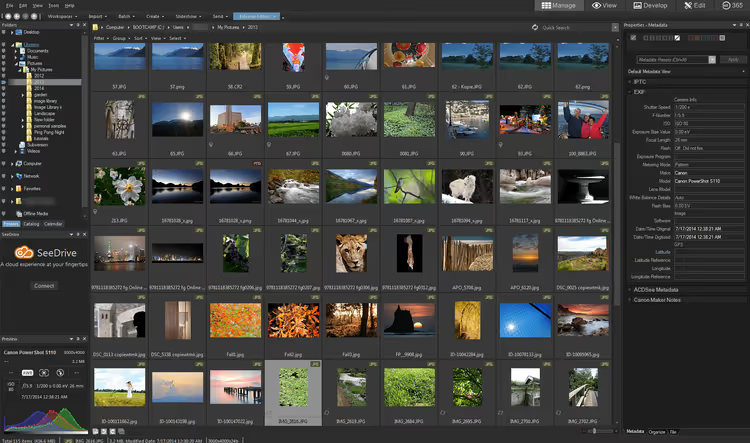
The key difference from competitors: AI works locally. ACDSee doesn't send your RAW files to cloud servers; all neural network functions run directly on your computer. For photographers who value privacy (wedding shoots, corporate clients, NDA projects), this is fundamental. No leaks, no "your photos help train our model." Just software that does its job and stays quiet about it.
AI tools that actually save hours
ACDSee's AI features don't try to replace the photographer; they eliminate tedium. Here's what works right now:
AI Denoise. Removing noise from high ISO shots without turning them into plastic mush is a task that takes dozens of minutes in manual mode. AI Denoise identifies where in the frame there's noise versus texture and applies suppression selectively. The result: clean sky, sharp hair, natural skin. Works on batches too; you can run an entire concert or event series through in one pass.
AI Hair Masking. Hair selection has always been editors' Achilles heel. ACDSee 2026 does it with one click: the mask follows the hairline, allowing you to change hair color, brightness, and saturation separately from the background and skin. For portrait photographers, this saves 5-10 minutes on every shot that previously required manual brush cutouts.
AI Develop Presets. Unlike regular presets that blindly apply the same values to all photos, AI presets analyze each frame and adjust develop parameters for the specific scene. Shot 300 frames in changing light? Apply one preset and get a consistent series without manual adjustments to each file.
AI Sky Replacement. Sky replacement without masks or manual selection: choose a preset (sunset, clear sky, fireworks), and the AI automatically detects the horizon line, masks the sky, and blends in the new one with proper lighting. The tool isn't perfect on complex silhouettes (tree branches, wires), but for most landscape shots it works on the first click.
Cataloging: why ACDSee beats Lightroom
Archive organization is every photographer's main pain point. Lightroom Classic forces you to import photos into a catalog and sync folders manually. ACDSee works differently: it sees your file system as-is. No library import; you simply open a folder and start working. Files stay where you store them, and ACDSee builds its metadata database on top.
People mode is AI face detection with grouping by person. ACDSee finds faces in frames, suggests naming them, and groups them by individual. Unlike Lightroom, recognition works locally and doesn't require uploading photos to Adobe's cloud.
Activity Manager in the 2026 version deserves special mention: background tasks now run multithreaded. You can simultaneously import a memory card, convert JPEG XL, run AI Denoise on a batch, and search for duplicates while calmly editing your current frame. Lightroom is far from this: any heavy operation pauses the interface.
Editing: layers, RAW, and Pixel Targeting
ACDSee's built-in editor runs on GPU and allows pixel-level processing without lag, even on 50-megapixel RAWs from modern cameras. Frequency separation for portrait retouching is built-in out of the box, with no plugin or action installation required.
Adjustment layers work like Photoshop: you can add a brightness/contrast, curves, or color balance layer and apply a mask. The Pixel Targeting tool lets you build masks by luminosity and color; for example, select all dark blue areas in a frame and shift their hue without affecting the rest.
ACDSee's RAW converter supports formats from all current cameras: Canon CR3, Nikon NEF, Sony ARW, Fujifilm RAF. Non-destructive editing means you can always roll back settings to the original; the source file is never modified.
Mobile Sync and cross-platform support
ACDSee Mobile Sync is a free app for iPhone and Android that transfers photos and videos from your phone to your computer over Wi-Fi. The app tracks which files have already been sent, so duplicates don't appear. Customizable file names and subfolder structures let you fit mobile content into your main archive without manual sorting.
The downside: there's still no full version for macOS. ACDSee Photo Studio for Mac exists, but it's a lighter version (without Ultimate features like layers and AI Hair Masking). So if you're on Mac, you'll either have to accept the limitations or run the Windows version through Parallels.
The price: $149.99, once and forever
Adobe Photography Plan (Lightroom + Photoshop + 20 GB cloud) costs about ten dollars per month. Over three years, that adds up to a sum comparable to a good lens. And it continues indefinitely: stop paying, lose access to your tools.
ACDSee Photo Studio Ultimate 2026 costs $149.99 one-time. Buy it, use it. Updates aren't mandatory: version 2024 still works, and nobody will lock you out of your catalog. There's also an alternative ACDSee 365 plan at $8 per month; then you get not only Ultimate but also Luxea Pro Video Editor, 200 GB cloud storage, and all updates as they're released. Essentially it's their answer to Adobe: same money, but twice the cloud, plus a video editor included.
For hobbyist photographers who don't want endless software rental, the one-time payment looks more attractive. For commercial photographers with accounting departments, it works too: one receipt, one asset on the balance sheet, no monthly reporting.
A short video overview of ACDSee Photo Studio Ultimate from the developers, for those who want to see the interface and key features before installing.
⁉️🤔 Frequently asked questions
Can ACDSee fully replace the Lightroom + Photoshop bundle?
It depends on your tasks. ACDSee covers the vast majority of photographer needs: RAW developing, layers with masks, retouching, batch processing, cataloging. But if you work heavily with vector graphics, typography, 3D, or complex composites, you still need Photoshop. For conveyor-style portrait and event photography, ACDSee replaces the bundle entirely and saves time switching between programs.
What about camera and lens support in ACDSee?
Lens profiles and RAW support are updated with each minor release (roughly once per quarter). The current list of supported cameras is published on ACDSee's official website. Before purchasing, check your model, especially if your camera is new (2025-2026 releases).
How is ACDSee better than free alternatives like Darktable or RawTherapee?
Darktable and RawTherapee are powerful open-source RAW converters, but they don't offer integrated DAM with AI sorting, don't have layers, and can't sync with mobile devices. ACDSee wins on seamlessness: you don't jump between three programs for organization, developing, and retouching. Free alternatives are fine for occasional processing, but on high-volume work the speed difference becomes critical.
Can I migrate my catalog from Lightroom to ACDSee?
Yes, ACDSee can import metadata from Lightroom catalogs. Keywords, ratings, color labels, and flags are picked up. But develop edits don't transfer; ACDSee has its own RAW conversion engine. Practical scenario: migrate your archive to ACDSee for organization and search, and start editing fresh from RAW.
Is ACDSee Photo Studio Ultimate worth buying in 2026

If you're tired of Adobe's monthly charges and want one tool instead of a zoo of three programs, ACDSee Photo Studio Ultimate 2026 is worth the money. The AI features aren't marketing fluff: AI Denoise, Hair Masking, and Develop Presets genuinely save hours on batch processing. Cataloging here is best-in-class (Lightroom with its mandatory import is left in the dust), and local AI without clouds isn't just about speed, it's about privacy.
But if you're a professional retoucher who spends most of your time in Photoshop with a graphics tablet, cranking out composites and working with typography, ACDSee won't replace Photoshop for you. It's a different tool for a different workflow. For everyone else, try the trial (30 days free at acdsee.com), and if after a week you stop opening Lightroom, it was worth it.

A professional team of writers and editors specializing in creating quality content.