













👥 How to add multiple instructors in LearnDash and scale your training business
You've created a course on LearnDash, recorded videos, and launched sales. Everything goes smoothly at first. But after a couple of months, the registration graph plateaus: students sign up, yet their numbers stop growing, and you hit the ceiling of your own time.
A familiar picture for any learning site owner. You haven't hit a wall with course quality or marketing. You've hit a wall with your catalog: a single instructor can only create a limited number of subjects. A narrow catalog doesn't retain an audience.
The solution isn't becoming an expert on ten topics at once. The solution is adding other instructors to your site and giving them a tool to create courses without access to the WordPress admin panel. This post provides a step-by-step breakdown of how the multi-instructor model works in LearnDash and what mechanisms you need for it.
💡 Quick overview:
- Assess the ceiling of a single instructor and how multiple instructors change the site's economics
- Set up a front-end interface for course authors without WordPress admin access
- Implement a course builder with WooCommerce and transparent commissions
- Maintain full control over moderation and payouts
When one instructor is no longer enough
The classic scenario: you're a WordPress developer launching a course on building sites with LearnDash. Sales are going well at first, reviews are positive. But the WordPress course market is saturated: students have plenty to choose from. You won't get far on a single course.
What do successful learning projects do at this stage? They expand their catalog with related topics. Next to the development course appear layout, SEO, and mockup design. A student who signed up for one subject sees value in the adjacent ones. Registration numbers for the main course also pick up.
But you're not a layout expert. And you're not an SEO specialist. Creating quality content in an unfamiliar discipline from scratch is a path to superficial materials and bad reviews. This is where other instructors come in.
The main problem: the WordPress backend and outside people
When you add an instructor to your site, the question of access arises. LearnDash itself is straightforward: the course structure is intuitive, and the hierarchy of "course → lesson → topic → quiz" comes together without confusion. Even a beginner can create a course in a couple of hours.
But this requires access to the WordPress admin panel. And here are two scenarios, both bad:
- The instructor is unfamiliar with WordPress. The backend intimidates them: settings, menus, tabs. The learning curve consumes time and motivation.
- The instructor is familiar with WordPress. Then a different problem appears: giving an outsider access to the admin panel is a security risk for the site. One wrong move in settings can take down the entire project.
In both cases, the admin faces a choice: either spend time training each author or risk the site. The proper solution is eliminating the need to enter the backend altogether.
How front-end course creation works
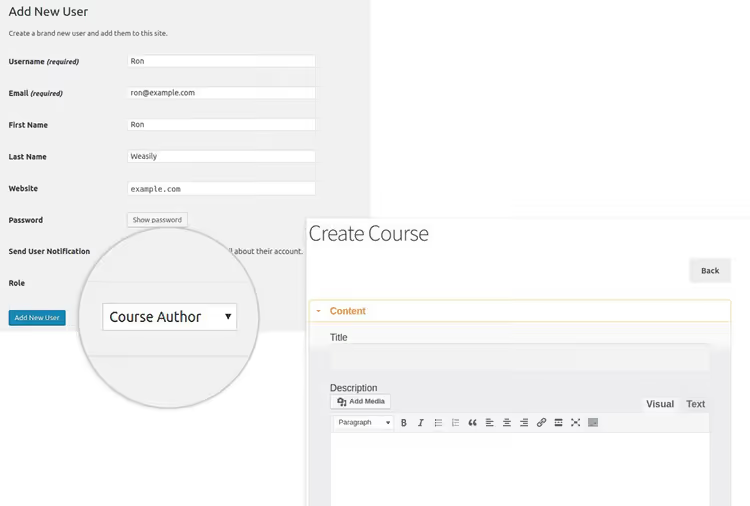
The idea is simple: the instructor logs into the site as a regular user and creates a course directly from the front-end interface. No admin panel. No access to WordPress settings.
This exact mechanism was implemented by the Front End Course Creation plugin from WisdmLabs. It allowed a LearnDash administrator to create a "Course Author" role: a user who sees only their course builder and nothing else. The author would go to their profile (for example, via BuddyPress) and assemble a course on a single screen using drag and drop.
The plugin itself is no longer sold separately, but its architecture is a good illustration of how a multi-instructor tool should work. Below we'll examine which functions are critical in such a plugin.
Watch a short video about Instructor Role for LearnDash. It's in English and clearly shows how role separation looks in the actual interface.
Access restriction: minimum permissions, maximum results
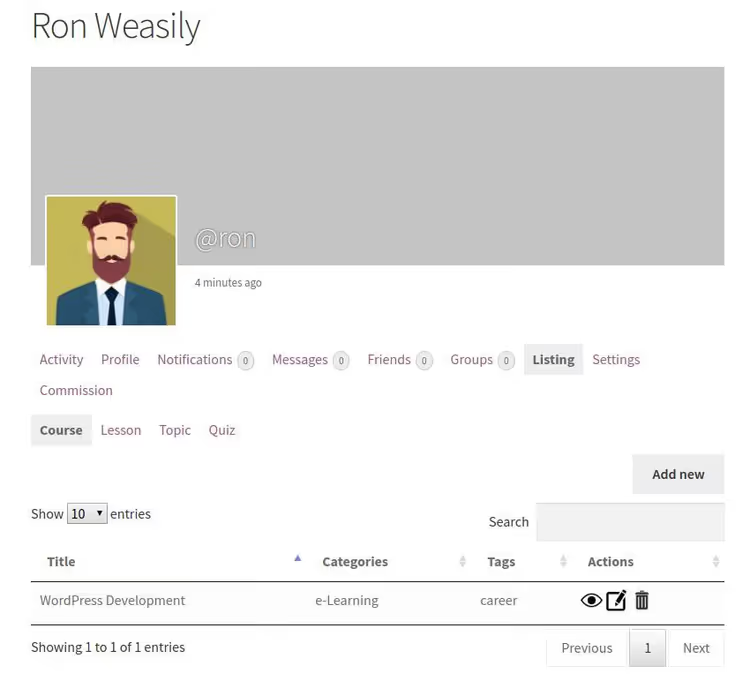
The first and main rule of a multi-instructor site: a course author should see nothing except their course builder. No "Settings → General," no plugin lists, no other people's courses.
In a well-designed implementation, the instructor has:
- their own profile with a "Create Course" button;
- a builder interface (lessons, topics, quizzes, all on one screen);
- drafts and the option for auto-publishing.
That's it. Everything else is locked. The site administrator sees the full picture: who is creating what, what's published, and what's awaiting moderation.
A simple builder with no learning curve
The instructor you invited to the site may have never seen WordPress. And that's fine. The course creation interface should be no more complex than filling out a form.
What matters here: adding lessons and topics in one click, drag and drop for rearranging sections, auto-saving drafts, and preview before publishing. The author shouldn't have to think about LearnDash structure; the plugin handles that.
Sales and WooCommerce
Courses created by guest instructors appear in the general catalog. The admin can sell them as regular WooCommerce products: flexible payment methods, coupons, and bundle offers. One author's courses can be combined into a bundle and sold as a single product if needed.
An important nuance: the administrator sets prices and payments. The instructor creates content, and the admin manages monetization. This way you maintain control over pricing.
Commissions and reporting
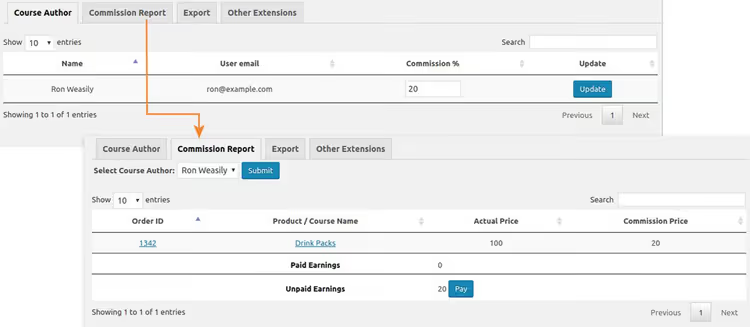
A commission percentage is set for each course author. The plugin automatically calculates how much each instructor earned during a period. The report can be exported, which is convenient for accounting and payouts.
Without a transparent commission system, instructors lose motivation. With one, each author sees how many of their courses were sold and how much they earned. This transforms a one-time collaboration into a long-term partnership.
Full control stays with the administrator
Instructors have no access to the WordPress backend. None at all. The administrator decides who can publish courses automatically and whose materials go through moderation before publication. For newcomers, manual review; for experienced authors, auto-publication.
You also manage course visibility: any material can be unpublished in one click. The final word always belongs to the site owner.
How to build the process: a step-by-step plan
Set up the "Course Author" role. Define what exactly the instructor sees: only the course builder or also statistics on their sales. No unnecessary menu items.
Prepare a course template. Create a standard structure (introduction → module 1..N → final quiz) and give it to authors as a starting point. This saves time and keeps quality within standards.
Set up commissions. Define a percentage for each author category. For starters, a model with a predominant author share works well: for example, two-thirds to the author and one-third to the platform. Adjust the ratio as you accumulate sales statistics.
Enable moderation for newcomers. The first 2-3 courses from a new author go through your review. Look at structure, material quality, and presentation. If everything is good, switch to auto-publication.
Set up WooCommerce bundles. Combine courses from different authors into themed packages. For example, "WordPress development from scratch" might include courses on PHP, layout, and security from three different instructors.
Launch a dashboard for authors. Each instructor sees their metrics: number of students, completion rate, and revenue. Transparent numbers keep authors on the platform.
⁉️🤔 Frequently asked questions
Do I need a multi-instructor site if I'm a solo instructor?
If you create courses on one topic and don't plan to expand, no. A single instructor is enough. But as soon as you decide to add a second subject where you're not an expert, look for a co-author and a tool for secure collaboration.
Can I do without a separate plugin?
Technically yes, through standard WordPress roles: assign instructors the Editor or Author role and give them access to LearnDash. But this means the author enters the admin panel with all the risks from the section above. The plugin doesn't add a course creation feature (that already exists in LearnDash). It removes the WordPress backend from the equation.
How should I pay instructors: fixed rate or percentage?
Experience from educational projects shows that a percentage of sales works better than fixed payment. The instructor is invested in course quality because their income depends on it. A fixed rate only makes sense for one-time orders when the author isn't involved in sales.
What if an instructor leaves the platform?
Specify the terms in the contract in advance. The standard approach: courses remain on the platform, the author receives commissions for another 6-12 months, then the content becomes the site's full property. Or it's bought out immediately; it depends on the agreement.
How many instructors can one site realistically handle?
There are no technical limitations. But from a management perspective: up to 5 authors, an admin can handle solo. From 5 to 15, you need an instructor relations manager. More than 15, and it's a full-fledged platform with a support and moderation team.
Is it worth scaling an educational project through other instructors
In short: yes, but with the right tool. Attempts to assemble a pool of instructors and let them into the WordPress admin end the same way: security problems, lost settings, and disappointed authors who never figured out the backend.
A well-designed multi-instructor model eliminates these problems at the architecture level. The instructor logs into the site and works in a simple builder. The administrator manages permissions, moderation, and payouts from a single interface. Commissions are calculated automatically.
Look for a solution that covers three key needs: a front-end builder for authors, WooCommerce integration for sales, and a transparent commission system. With this foundation, an educational site stops hitting the ceiling of a single instructor and starts growing through its catalog.

A professional team of writers and editors specializing in creating quality content.