














🔧 How to change the default WordPress category (2 methods)
Every fresh WordPress site greets its owner with the same label in the admin panel: "Uncategorized." This default category automatically collects all posts if the author does not select another one. At first, it seems trivial. Six months later, this label contains three dozen posts, and the /uncategorized page sits in the index, honestly telling search engines: "this is our junk drawer."
The problem runs deeper than aesthetics. An archive with a meaningless name does not retain visitors, does not help with navigation, and accumulates poor behavioral metrics. The good news: this can be fixed in a couple of minutes using built-in WordPress tools, without plugins and without a single line of code.
Below we will cover both methods. The first suits sites with history and search traffic. The second works well for fresh projects that have not yet been indexed.
💡 Quick overview:
- Assign a new default category via "Settings → Writing": the system category stays in place, but every new post automatically receives a meaningful category. Old posts are moved manually through bulk editing.
- Rename "Uncategorized" directly via "Posts → Categories": a quick path for new sites. The name and slug of the existing category change without creating an additional one, and all posts move automatically.
- Set up a 301 redirect from the old slug to the new one via an SEO plugin: if the site is already indexed and you changed the slug, this prevents 404 errors for visitors from search.
1. Assign a new default category
This method is recommended by both WordPress developers and the official documentation. You do not touch the system category; you simply reassign the fallback. You tell the engine: "if I did not select a category for a post, put it here."
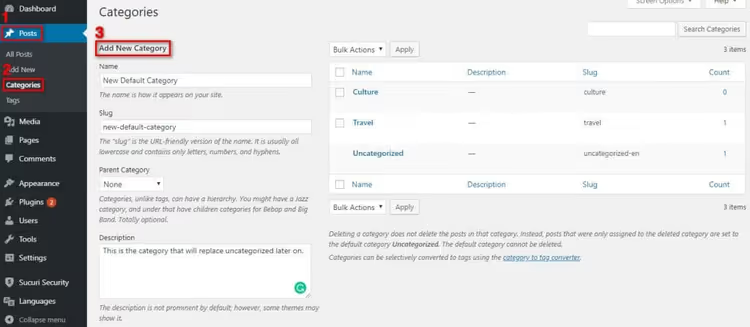
First, create a receiving category. In the admin panel: "Posts → Categories," fill in the "Name" and "Slug" fields (for example, "News" (news) or "Blog" (blog)), and click "Add New Category."
Now the key step. In the sidebar menu, open "Settings → Writing." The very first option is "Default Post Category." In the dropdown list, select the category you just created instead of "Uncategorized" and click "Save Changes."
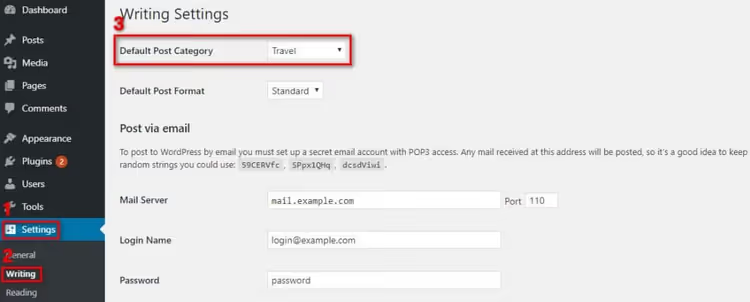
From this moment on, every new post without an explicitly specified category will automatically receive the selected category. Existing posts are NOT moved; they will remain in "Uncategorized." To move them: "Posts → All Posts," filter by the "Uncategorized" category, select the needed posts, and change the category through bulk editing. For hundreds of posts, it is more convenient to use the Term Management Tools plugin or Bulk Move; both are free and allow you to transfer posts between categories in a single operation.
After reassigning the default category, the "Delete" button for "Uncategorized" will become active; the system no longer holds a fallback binding. You can delete the category entirely or keep it as a technical one: if no published posts are assigned to it, readers will not see it.
2. Rename "Uncategorized"
If your site structure is simple and you only have a few categories, the short path is to rename the default category. It will remain the same in the database (the same term_id) but will look meaningful to both readers and search engines.
Go to "Posts → Categories," find the "Uncategorized" row, and click "Edit."
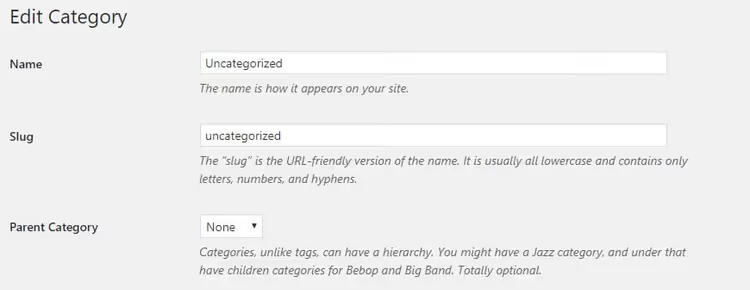
Change the name to something human-readable: "Blog," "Articles," "General." The slug is also worth fixing; /uncategorized in the address bar looks out of place for any project.
Critical point: if the site is already indexed and there are transitions from search or external links pointing to the /uncategorized page, changing the slug will break these URLs, and visitors will see a 404. There are two options here. Either do not touch the slug (change only the name; this is safe for SEO). Or set up a 301 redirect from the old address to the new one via any SEO plugin: Rank Math or Yoast SEO; both provide an interface for redirects without manually editing .htaccess.
After saving, all posts that were previously listed in "Uncategorized" will automatically end up in the renamed category; no manual transfer is needed. This is the main difference from the first method: there you create a new category and switch the default binding, while here you reuse the existing one along with all its content.
A short video on the topic, both methods in action on the current version of WordPress:
⁉️🤔 Frequently asked questions
Can I completely delete "Uncategorized"?
Yes, after you assign another default category via "Settings → Writing" (method 1). As long as "Uncategorized" is the fallback category, the "Delete" button for it is inactive; WordPress will not let you break the category assignment mechanism. After reassignment, the restriction is removed automatically.
What should I do if "Uncategorized" already contains several dozen posts?
Bulk editing. Go to "Posts → All Posts," filter by the "Uncategorized" category, select all posts on the page (usually 20), choose "Edit" → "Apply" from the "Actions" dropdown menu, and change the category in the panel that opens. Repeat for the remaining pages. For hundreds of posts, use the Term Management Tools plugin for merging terms or Bulk Move for mass transfer; both handle it in a single operation.
Does changing the default category affect SEO?
There is no direct ranking factor called "default category name" in search algorithms. But there is an indirect effect: an archive at
/uncategorizedwith an empty name carries no semantic value, users leave it quickly, and the search engine records poor behavioral metrics. A meaningful category with a human-readable slug improves internal linking and retention on the archive page, and these are signals that search engines do take into account.
Can I set up different default categories for different post types?
By default, no. The "Default Post Category" setting applies globally to all posts of the
posttype. For custom post types (CPT), you will need a custom taxonomy registered when creating the CPT, or code infunctions.phpthat sets a default value for a specific type. This is not difficult but requires basic knowledge of the WordPress API.
Which method should I choose if the site has been running for several years?
Only the first one. On a site with indexing and external links, renaming the slug of the default category guarantees 404 errors for everyone who arrives via the old address. Assign a new default category via "Settings → Writing," move old posts manually or in bulk, and close the
/uncategorizedslug with a 301 redirect to the new category if there were transitions to it.
Which method suits your site?
The choice comes down to one question: is the site indexed? If you are just launching a project, feel free to rename "Uncategorized" (method 2): it is three clicks faster and does not leave a junk category in the system. If the site has been live for more than a month, proceed through settings (method 1): reassign the default category, and move old posts gradually.
Five minutes in the admin panel will free you from the eternal "Uncategorized" label and make your site structure cleaner. If you still have questions about your specific case after this guide, write in the comments; we will figure it out.

A professional team of writers and editors specializing in creating quality content.