














🚫 How to stop spam from Contact Form 7 in WordPress
Feedback form drowning in spam? Dozens of empty submissions a day clogging your inbox while real customer inquiries get lost in the garbage.
Contact Form 7, the most popular free contact form plugin for WordPress, has over 5 million active installations. This popularity has made it target number one for spam bots: they find WordPress sites, identify the standard form URL, and flood it with thousands of automated submissions.

You don't have to disable the form or add a clunky CAPTCHA. Below are five working methods, from built-in CF7 features to specialized plugins. None require code: everything is configured through the admin panel in 10-15 minutes.
💡 Quick overview:
- Enable the built-in CF7 quiz (bots can't answer questions)
- Set a minimum message length to block one-word spam
- Connect Akismet for smart filtering based on a global spammer database
- Install CF7 Apps with a honeypot trap (a hidden field only bots can see)
- Last resort: Really Simple CAPTCHA (simple but dated protection)
1. Built-in Contact Form 7 quiz
The most underrated yet effective method. CF7 lets you add a [quiz] tag to your form: a simple question any human can answer but a bot cannot.
Here's how it works: you ask a question like "What is three plus four?" or "What year is it now?" and specify the correct answer after a vertical bar. If the visitor answers incorrectly, the form won't submit.
1 [quiz math-test "Сколько будет три плюс четыре?|7"]
Bots don't parse the context of a question; they just fill in fields and click "Submit." The quiz breaks this logic entirely.
Pros: free, works out of the box, doesn't slow down the site, adds no plugins. There's only one downside: theoretically, a targeted bot built for a specific site could be trained to answer. But for the vast majority of sites this scenario is overkill: spammers don't spend time manually bypassing a single blog.
2. Minimum and maximum message length
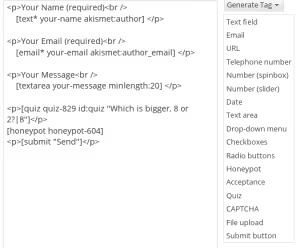
A significant portion of automated spam consists of short messages of two or three words, or even a single number. The spammers' logic is simple: flood as many forms as possible in minimal time. Nobody is going to spend resources generating coherent text.
CF7 supports minlength and maxlength parameters directly in the field shortcode:
1 [textarea your-message minlength:20 maxlength:500]
Twenty characters is a safe minimum: a real customer writes "Hello, I'm interested in shipping costs," while a bot sends "12345" or "Buy now cheap." Anything shorter than 20 characters gets rejected before submission.
The maxlength parameter also protects against another vector: extremely long messages where bots insert thousands of keywords for SEO spam. Five hundred characters cover any normal inquiry but cut off the walls of text.
There are no downsides here; this method should always be enabled, regardless of other measures.
3. Akismet: smart spam filtering

Akismet is a cloud-based anti-spam service from Automattic (the WordPress team). It analyzes submission content, cross-references it with a global database of known spammers, and makes a decision within milliseconds. According to the service itself, Akismet blocks 99.8% of spam on WordPress sites.
Not everyone knows that Akismet works with more than just comments; it also works with Contact Form 7. After installing the plugin and activating the API key (free for non-commercial sites), you add a small integration, and Akismet automatically checks CF7 form fields for spam patterns.
In real-world tests on a high-traffic site, Akismet alone reduced spam volume by roughly two-thirds. The remaining third is handled by combining it with the quiz and minimum length, resulting in virtually zero junk submissions without a single CAPTCHA.
4. CF7 Apps: honeypot and hCaptcha in one plugin

The classic Contact Form 7 Honeypot has grown into CF7 Apps, a modular plugin that adds several features to CF7 at once. Two of them are relevant here.
Honeypot is a hidden trap field. An invisible input is added to the form, styled via CSS so real visitors cannot see or fill it. A bot, however, parses the HTML code, finds the field, and fills it in, and that's how it gets caught. The plugin sees the filled honeypot and blocks the submission.
It's added with a single shortcode:
1 [honeypot honeypot-837]
You can change the numbers in the name; this makes life harder for bots that learn to bypass standard field names.
hCaptcha is a modern alternative to reCAPTCHA that doesn't collect user data. After obtaining keys from the hCaptcha website, it's enabled with a single checkbox in CF7 Apps settings, and a widget appears on the form that most real visitors don't even notice.
Both features work independently: you can enable only the honeypot, only hCaptcha, or both. The plugin is actively maintained (latest version: 2026), unlike many competitors.
5. Really Simple CAPTCHA: a fallback option

Really Simple CAPTCHA was created by the same developer as Contact Form 7, so the two plugins work together without conflicts. It generates a simple image with a code that must be entered to submit the form.
Setup is straightforward: install the plugin, add the [captchac] tag to your CF7 form, and it works.
However, this method has some caveats. First, the plugin hasn't received major updates in a long time and hasn't been officially tested with the latest WordPress versions, although users confirm it works up to WP 6.9. Second, it requires the GD + FreeType library on the server, which may be missing on budget hosting. Third, a text-based CAPTCHA noticeably annoys users, and some real visitors simply leave without filling out the form.
We recommend trying Really Simple CAPTCHA only if the first four methods didn't deliver results. In most cases, a combination of the quiz, minimum length, and Akismet is enough.
🔗 Really Simple CAPTCHA on WordPress.org
What worked in our case
One client came to us with a problem: the Contact Form 7 on a site with around 10,000 unique visitors per month was receiving dozens of spam submissions daily. We proceeded step by step:
- We installed Akismet, and spam dropped from several dozen to 5-10 messages a day.
- We added a
[quiz]with the question "What is two plus two?" and only occasional spam slipped through. - We enabled
minlength:20for the message field, and spam disappeared completely.
The combination of three methods without a single CAPTCHA solved the problem in half an hour of work. Not a single real customer complained about inconvenience: they didn't even notice the changes because the quiz looks natural and a 20-character limit is invisible during normal communication.
If you're just starting to fight spam, install Akismet as your first line of defense. It's the most powerful standalone solution that doesn't need a honeypot or CAPTCHA for basic protection. Then add layers as needed, through trial and error, tracking spam statistics after each change.
⁉️🤔 Frequently asked questions
Why not use Google reCAPTCHA?
reCAPTCHA v2 with its traffic lights and bridges does block bots, but at the cost of user experience. According to usability lab research, one in five visitors leaves a form upon seeing a CAPTCHA. reCAPTCHA v3 works invisibly but requires integration through an additional plugin for CF7 and has issues with false positives. The built-in CF7 quiz solves the same problem without external services. We don't use reCAPTCHA where a CF7 quiz and honeypot suffice: the quiz doesn't burden the site with external requests to Google and doesn't collect visitor data. For projects where Google anti-spam is essential, there are separate bridge plugins in the WordPress directory.
Can I get by with just one method?
It depends on the spam volume. A low-traffic site often gets by with Akismet alone or just the quiz. A site with thousands of daily visitors will almost certainly require a combination of 2-3 methods: spammers use cloud bot farms, and what stopped one will be bypassed by another.
In practice, we start with Akismet. If spam drops to an acceptable level, we stop there. If not, we add the quiz. If that's still not enough, we add a honeypot via CF7 Apps. Gradual layering is better than installing five plugins at once; each new layer only makes sense when the previous one isn't enough.
How is CF7 Apps better than the old Contact Form 7 Honeypot?
The old Contact Form 7 Honeypot plugin did exactly one thing: it added a hidden field. CF7 Apps is its modern successor from active developer Saad Iqbal. Besides the honeypot, it handles hCaptcha, saves submissions to the database, post-submission redirects, webhooks, and ACF integration, all in one plugin.
All modules are independent: if you only enable the honeypot, that's all that runs, with no extra code. The plugin is updated in 2026 and compatible with current WordPress versions, unlike the old single-function Honeypot, which is no longer maintained.
Should I install all five methods at once?
No, and we don't recommend it. Each extra plugin slows down the site and adds a potential point of failure. Start with one or two methods, track the results for a week, then decide whether to add another layer.
The minimum stack for most sites: Akismet + minimum message length. This is enough in the vast majority of cases. Add the quiz when spam keeps coming despite Akismet. Add the honeypot if bots learn to bypass the quiz (a rare scenario). Add a CAPTCHA only when nothing else has helped.
What if spam continues despite everything?
Check whether the spam is bypassing CF7: some themes and plugins add their own contact forms that CF7 doesn't control. Also rule out manual spam: if the messages are coherent and on-topic but promotional, those are real people, against whom technical methods are powerless.
As a last resort, consider switching form plugins. Gravity Forms and WPForms have more aggressive built-in anti-spam mechanisms and official out-of-the-box Google reCAPTCHA support without additional plugins.
Which spam protection method to choose
The choice depends on one parameter: the volume of junk traffic on a specific site. There's no universal "silver bullet": a three-page brochure site and a forum with a thousand users require different levels of protection.
If you're just starting out, enable Akismet and set a minimum message length (minlength:20). These two steps take ten minutes and block the bulk of automated spam without a single CAPTCHA and without user complaints.
If spam continues after Akismet, add a [quiz]. Bots don't answer questions; people answer without thinking. The third line of defense is CF7 Apps with a honeypot trap: a hidden field the real visitor knows nothing about.
And remember: each new plugin is a trade-off between security and site speed. Build up protection gradually, cutting spam layer by layer. The ideal configuration is one where spam is zero and the visitor doesn't even realize the form has any protection at all.

A professional team of writers and editors specializing in creating quality content.