













 AIIllustrative image: AI-generated
💼 Job board on WordPress with WP Job Manager: setup from A to Z (2026)
A job board on a website is not just a page listing positions. It is a tool that generates revenue: companies pay to post, job seekers find work, and you get traffic and commissions.
But when it comes to implementation, many WordPress site owners hit a wall. Premium job board themes cost from $69, change the entire design, and require weeks of setup. Standalone plugins are often overloaded with features, half of which you do not need.

WP Job Manager solves this problem differently. The free core provides the foundation: job posting, submission form, and search. When the basics are no longer enough, you purchase only the add-ons you actually need. The plugin runs on 90,000+ sites, maintains a 4.4/5 rating, and is supported by the Automattic team, the same people behind WordPress.com and WooCommerce.
In this guide, you will find the complete setup cycle: from installation to accepting payments for listings.
💡 Quick overview:
- Install the plugin and complete basic configuration
- Create job categories and types for your niche
- Publish your first job manually through the admin panel
- Set up the submission form for third-party employers
- Display the job list with shortcodes on any page
- Evaluate premium add-ons for accepting applications and monetization
What WP Job Manager can do in the free version
The plugin adds a "Jobs" custom post type to WordPress along with three shortcodes. [jobs] displays the job list, [submit_job_form] creates a submission form, and [job_dashboard] provides an employer panel. No coding required: shortcodes can be inserted into any page or post.
The free core gives you:
- a frontend form for job submission (employers post themselves without admin access);
- AJAX search by keywords, location, and categories without page reload;
- RSS feed for jobs (search engines index it);
- custom templates that can be overridden in your theme via hooks and filters (100+ action hooks, 80+ filter hooks);
- full compatibility with WPML and Polylang for multilingual boards.
The plugin is lightweight and does not conflict with popular themes and SEO plugins (Yoast SEO, Rank Math). After installation, it does not add its styles to every page of the site, only to those where jobs are actually displayed.
What the free version lacks: on-site application forms (only email or external link), resume database, payment processing, job alerts, and candidate tracking. All of this can be purchased as add-ons, covered in the final section.
1. Installation and basic setup
Install the plugin the standard way: Plugins → Add New → enter WP Job Manager → Install → Activate. After activation, a "Job Listings" section appears in the admin with submenus: All Jobs, Add New, Job Categories, and Job Types.
First, go to the plugin settings. They are minimalistic and divided into two tabs: Job Listings and Job Submission.
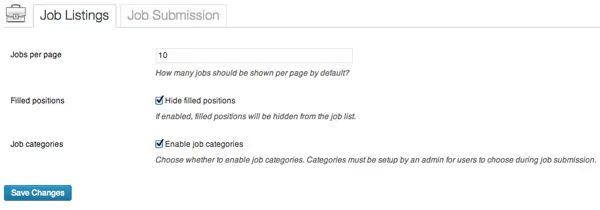
The "Job Listings" tab controls how jobs appear on the site: number per page, hiding filled positions, sorting (by date or title).
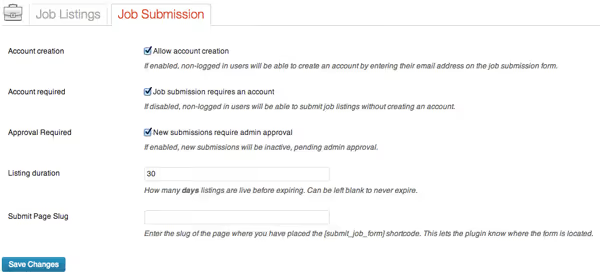
The "Job Submission" tab determines who can post jobs. There are only two key parameters: whether a site account is required and whether email confirmation is needed for new accounts. If you plan to charge for listings, it makes sense to require registration to link payment to the employer's account.
2. Job categories and types
Job structure is built on two taxonomies: categories and types. This is not a formality; properly configured taxonomy determines how job seekers will filter jobs on the site.
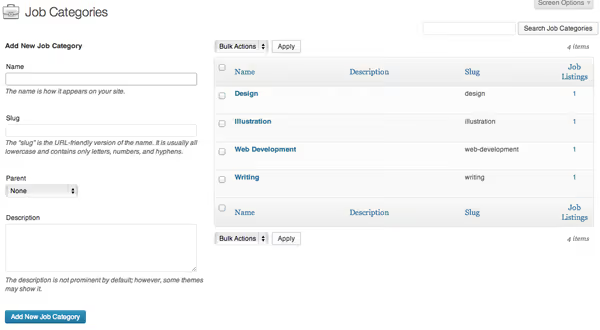
Categories are created in "Job Listings → Job Categories." The mechanics are the same as for post categories: name, URL slug, description. For an IT board, typical categories include Frontend, Backend, DevOps, QA, Design, Product Management. For a niche board (construction, for example): engineers, foremen, general laborers, estimators, architects. The number of categories is unlimited.
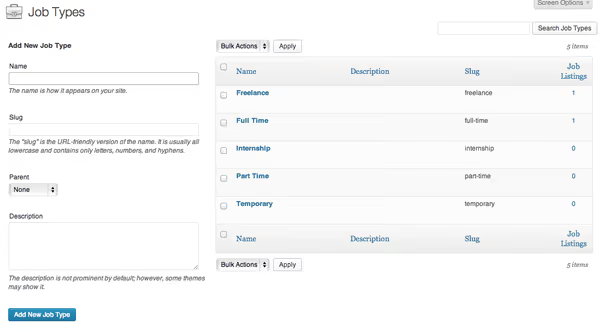
Job types represent employment format. After installation, the plugin automatically creates four types: Full Time, Part Time, Internship, Freelance. You can add your own: Contract, Temporary, Remote, Volunteer. Types participate in search alongside categories, so it makes sense to reflect the actual hiring formats in your niche.
3. Publishing a job through the admin panel
Once the structure is ready, you can create your first job. The process is similar to creating a regular post: title (position), description (requirements and responsibilities), categories, and employment type.
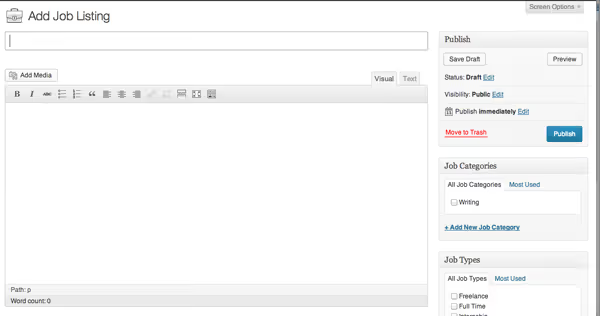
The difference from a regular post is an additional "Job Data" meta panel below the editor.
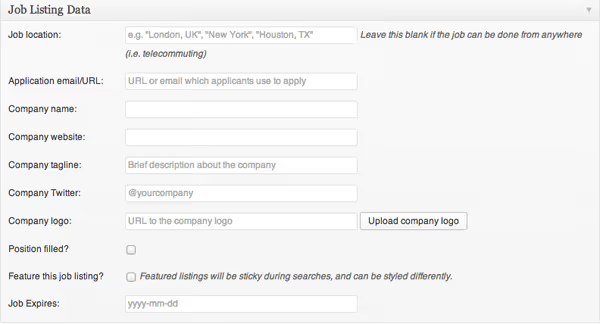
In this panel you fill in:
- Location: city, address, or "Remote." The field participates in search and filtering.
- Company name: displayed in the job card and list.
- Company website: URL that turns the company name into a link. The link opens in a new tab.
- Application email: where responses are sent; if left empty, responses go to the site's admin email.
- Expiration date: the date after which the job is automatically unpublished.
- Position filled flag: the job remains in the database but is not shown in the public list.
If you purchase the Applications plugin (more on this below), the Email field is replaced by an application form builder with custom fields.
4. Job submission form for users
Posting all jobs manually is realistic if the board is part of your HR process. But if you want third-party employers to post jobs, you need a public submission form.
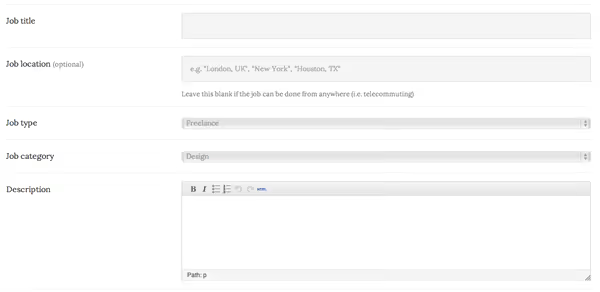
Create a new page (for example, "Post a Job") and insert the shortcode:
1 [submit_job_form]
On the frontend, this becomes a form with fields: job title, description (WYSIWYG editor), category, employment type, location, company details, and email. If the user is not logged in, the form first shows a login/registration screen (when the "Require account" setting is enabled).
An important nuance: through the submission form, you cannot set the job expiration date. This is done only through the admin panel. If the deadline is critical, go to the admin panel after submission and adjust the date manually.
A completed form goes to moderation. In the admin, the job appears with "Pending Approval" status; you review and publish it.
5. Displaying the job list on the site
The job list is displayed on any page with the second shortcode:
1 [jobs]
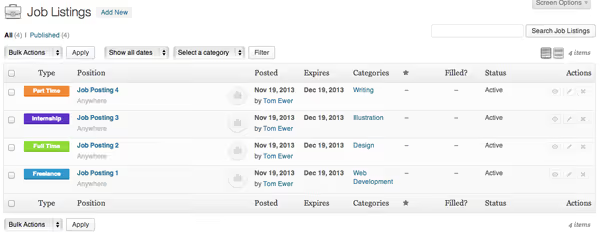
The shortcode renders an interactive table: a search bar for keywords and location, dropdown filters for categories and types, and job cards with company name and publication date. Everything works via AJAX; filters apply instantly without page reload.
The shortcode supports filtering parameters. Here are examples for different scenarios:
1 [jobs categories="frontend" types="full-time,contract"] 2 [jobs per_page="20" orderby="date" order="DESC"] 3 [jobs show_filters="true" show_pagination="true"]
The full list of parameters and combination examples is available in the WP Job Manager documentation. Using these parameters, you can create multiple pages on the site, each for a specific category or employment type.
6. Dashboard and employer account
The third basic shortcode is [job_dashboard]. It creates an account page where an authorized employer sees all their jobs:
1 [job_dashboard]
In the panel, the employer can edit the job description, mark the position as filled, extend, or delete the listing. If the Applications add-on is active, the number of responses for each job is also displayed here.
7. Premium add-ons: what to buy and why
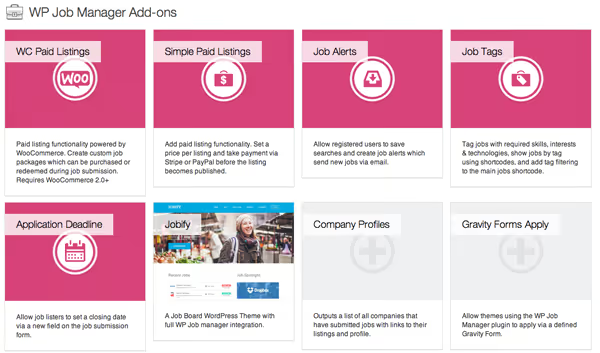
The free WP Job Manager core is a framework. According to WPNova testing, the vast majority of job boards eventually hit its limitations, and here are the add-ons that address specific needs.
Accepting applications: Applications ($49/year)
In the free version, job responses go to email or an external URL. No forms, no candidate database, no statuses. Applications adds: a form builder with custom fields, accepting applications directly on the site, a dashboard showing response counts for employers, CSV export, and email notifications about new applications. Without this add-on, a job board is just a catalog of links to external ATS systems.
Resume database: Resume Manager ($49/year)
Candidates fill out resumes and upload them to a shared database. Employers search the database without waiting for responses to their postings. You gain an additional traffic source: people come to post resumes "just in case" and browse jobs at the same time. The resume database is also a paid feature: you can charge employers for access to candidate search.
Paid listings: WC Paid Listings ($49/year)
Requires WooCommerce installed (free). Allows you to create job packages as products: the employer selects a package (for example, 1 job for $29, 5 jobs for $99, unlimited for $199/month), pays through standard WooCommerce checkout, and gains access to posting. For recurring payments, you need WooCommerce Subscriptions ($199/year), which enables subscription-based packages with auto-renewal. Prices are current as of 2026.
There is a third-party alternative, Simple Paid Listings ($29/year), which accepts payments via Stripe/PayPal without WooCommerce. Choose based on whether you need the bulky WooCommerce for just one function.
Job alerts: Job Alerts ($49/year)
Candidates save search queries and receive email notifications when new jobs matching their criteria appear. Frequency is configurable: daily, weekly, bi-weekly, or monthly. Alerts dramatically increase return traffic: a job seeker may not find work immediately, but a week later receives an email with a new suitable job and returns to the site.
Bundles and actual costs
Individually, the four key add-ons cost $196/year. The Pro Bundle combines them for $159/year (saving $37). The All-Access Bundle at $249/year adds more add-ons plus priority support. Current prices on the WP Job Manager site.
Scenario | Add-ons | Year 1 |
|---|---|---|
Simple listing (links to external ATS) | Core only (free) | $0 |
Accepting applications on site | Applications | $49 |
Earning from listings | Applications + WC Paid Listings + WooCommerce | $98 |
Full-featured board | Pro Bundle ($159) + WooCommerce Subscriptions ($199) | $358 |
Maximum features | All-Access Bundle + third-party add-ons | $500+ |
The Pro Bundle covers the needs of most niche boards. All-Access makes sense only if you are building a board at the scale of Indeed or HeadHunter on WordPress; in that case, you should already be looking at specialized software rather than plugins.
Third-party add-ons
The WP Job Manager ecosystem includes dozens of third-party extensions: advanced search, job geolocation, social login for employers, job import/export. Quality varies, so check the rating and last update date before purchasing. The same rule applies as with any WP plugin: if the last update is older than 12 months, move on.
Video setup guide
If you prefer watching to reading, here is a step-by-step WP Job Manager setup from installation to launching a ready job board:
⁉️🤔 Frequently asked questions
Is WP Job Manager free or paid?
The plugin core is completely free and remains so. You can create a job board with basic functionality without paying a cent. Paid add-ons cost $29-99 each per year and cover advanced scenarios: accepting applications on site, resume database, payment processing, alerts. An important nuance: the free version does not include an application form; responses go to email or an external URL. For accepting applications on site, you need the Applications add-on ($49/year).
Can you make money from a job board with WP Job Manager?
Yes, the model is proven. You create paid listing packages through WC Paid Listings ($49/year + free WooCommerce): for example, 1 job for $29, 5 for $99, unlimited for $199/month. The employer purchases a package like a regular product and gains the right to post jobs. An additional revenue source is paid employer access to the resume database through Resume Manager. With 20 paid listings per month at $29, you recoup all add-ons in the first week.
Is WP Job Manager suitable for a Russian-language job board?
Yes. The plugin is fully translatable through standard.po/.mo files and is compatible with WPML and Polylang. A Russian translation is provided by the community. Job fields (location, company name, email) are multilingual, and shortcodes are language-independent. The only nuance: if you accept payments through WooCommerce, make sure your payment gateway works with your currency (Robokassa, CloudPayments, Stripe).
Why is WP Job Manager better than a ready-made job board theme?
The plugin does not tie you to a specific design. You stay with your theme and gain job board functionality without migration. If you decide to close the board in the future, you simply deactivate the plugin, and the site remains unchanged. Themes like Jobify or JobEngine sell from $69 and change the entire frontend: you have a board site rather than a site with a board. These are fundamentally different approaches.
Do I need programming skills to set it up?
No. Everything described in this guide (installation, creating categories, shortcodes, configuring add-ons) is done through the WordPress admin without a single line of code. If you want to customize job display templates, the plugin structure allows you to override them through a child theme, but this is optional and not required to get started.
What if the plugin conflicts with my theme?
WP Job Manager rarely conflicts with themes because it renders content through its own templates rather than injecting into the main WordPress loop. If job card styles do not fit your design, copy the
/wp-job-manager/templates/folder to your child theme and adjust the HTML/CSS as needed. The plugin's hooks and filters (over 180 in total) allow you to make targeted behavior changes without editing the core.
Is WP Job Manager worth installing in 2026
WP Job Manager is not the only way to build a job board on WordPress. Competitors like WPNova (one-time $99 payment versus annual $159+) are gaining audience with built-in ATS, AI matching, and resume parsing out of the box. But WP Job Manager has a fundamental advantage that outweighs these: ecosystem. 90,000+ active installations mean any bug is found and fixed quickly, any hosting provider knows this plugin, and any developer will take on customization if needed.
If you need a simple board on an existing site without changing themes and overhauling design, install WP Job Manager. The free core is enough for a job catalog with manual posting. If you plan to monetize, the Pro Bundle for $159/year covers most monetization scenarios. When the board grows to hundreds of paid listings per month, then look at specialized solutions.

A professional team of writers and editors specializing in creating quality content.