














🛠 WPBakery Page Builder: complete guide 2026
Building a WordPress site without code is entirely achievable. But the standard editor greets you with emptiness: a heading, a paragraph, and that's it. And you need columns, buttons, galleries, drag-and-drop. WPBakery Page Builder is built precisely for this demand, the most widespread page builder for WordPress with a lifetime license.
The plugin runs on millions of sites and isn't going anywhere. It transforms the WordPress admin into a visual constructor: you drag elements, configure colors and spacing, see the result in real time. Not a line of code. Unlike builders with annual subscriptions, you buy WPBakery once and forget about renewals.
Below, a complete breakdown of WPBakery as of 2026: installation, configuration, editors, elements, AI tools, pricing and compatibility. No fluff, tied to practice.
💡 Quick overview:
- Installation through direct purchase on CodeCanyon (€69, lifetime license) or bundled with a premium theme
- First launch: General Settings, Role Manager, license activation
- 50+ built-in elements: text, media, charts, grids, widgets
- Two build modes: backend editor for framework, frontend for visual refinement
- Rows and columns: drag-and-drop, cloning, flexible background and spacing configuration
- WPBakery AI generates text and code directly in the editor interface
- Compatibility with WooCommerce, WPML, Yoast SEO, Slider Revolution, Contact Form 7
What WPBakery is and how it differs from the old Visual Composer
Until 2017, the plugin was called Visual Composer. Then the developer split the product: WPBakery Page Builder remained a page builder for WordPress, while Visual Composer Website Builder became a separate standalone product with a different interface. If you see "Visual Composer guide" in old articles, they're talking about WPBakery. The interface, logic, element set, everything's the same, only the name and branding changed.
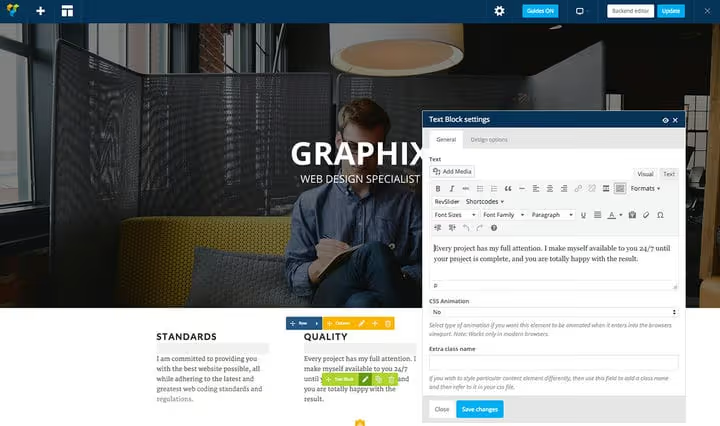
The plugin works with any properly coded WordPress theme. Whether it's free from the repository or a premium template from ThemeForest doesn't matter. WPBakery adapts to the theme structure and doesn't break the layout. In practice, this means you're not locked to a specific template: moved to another theme, pages remain functional.
Out of the box, more than 50 content elements are available. Plus WooCommerce integration adds another 17 elements, and third-party extensions, hundreds more. Official compatibility with Contact Form 7, Slider Revolution, LayerSlider, WPML, Polylang and Yoast SEO covers practically any scenario.
Installing WPBakery: two paths
Path 1: purchasing your own license
A license for 1 site costs €69 according to the official pricing plan. This is a lifetime model: pay once, use indefinitely. The price includes one year of support, access to the template library, WPBakery AI and auto-updates.
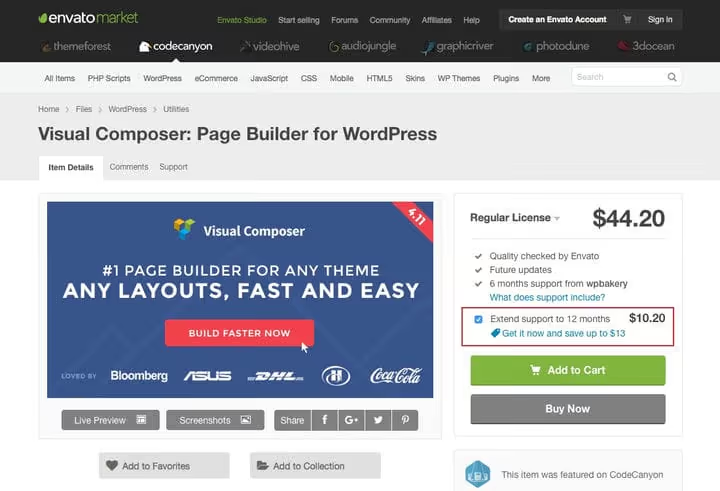
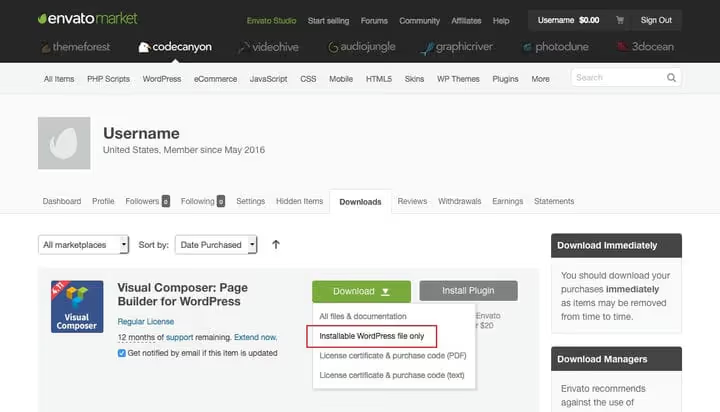
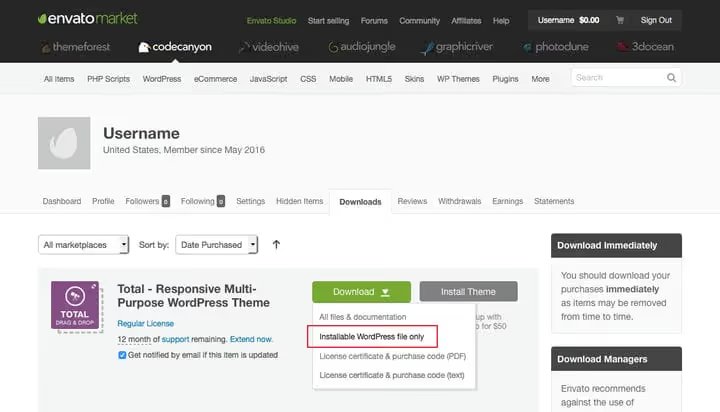
You purchase on CodeCanyon. After payment, go to the Downloads section, click the green Download button and choose "Installable WordPress file only."
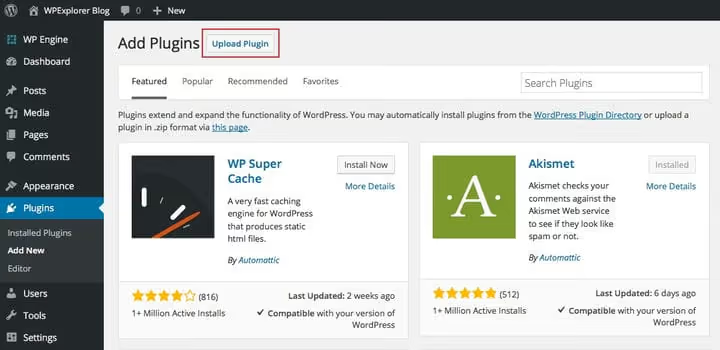
Upload the downloaded zip file through "Plugins → Add New → Upload Plugin" in the WordPress admin.
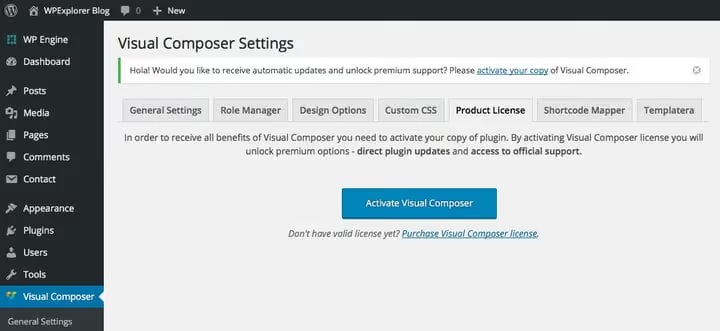
After activation, the system will offer to link the license. Click the link at the top of the screen and then the large blue activation button.
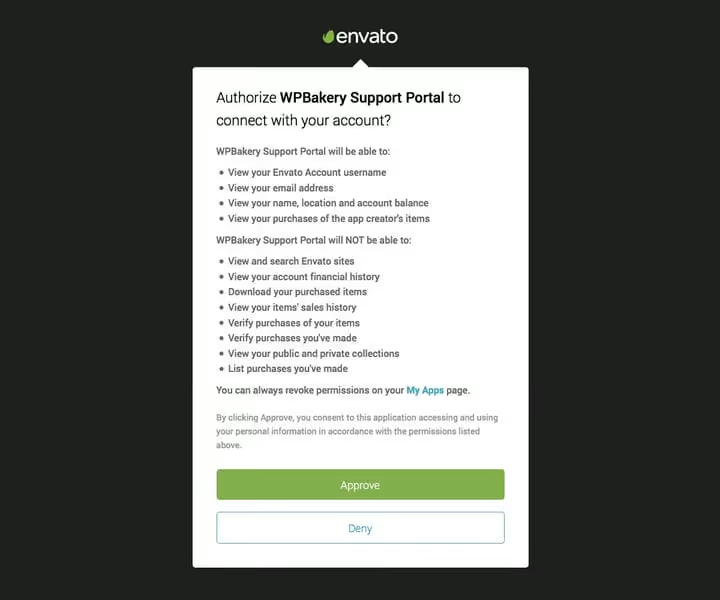
The WPBakery portal will open to confirm purchase through your Envato account. Click the green Approve, the plugin verifies that the email is actually linked to the purchased license.
Done. WPBakery is activated and ready to work. Now any page and post editor will have a button to switch to WPBakery mode.
Path 2: plugin bundled with premium theme
Many premium themes include WPBakery in the package. It's the same plugin, but without direct access to auto-updates, updates come through the theme author.
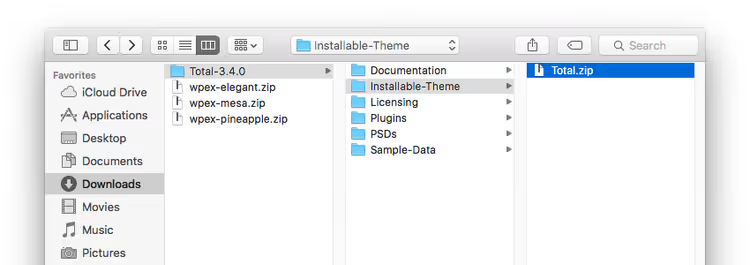
Install the theme through "Appearance → Themes → Add New → Upload Theme." Bundled with the theme is a zip archive, inside which lies the theme installation file.
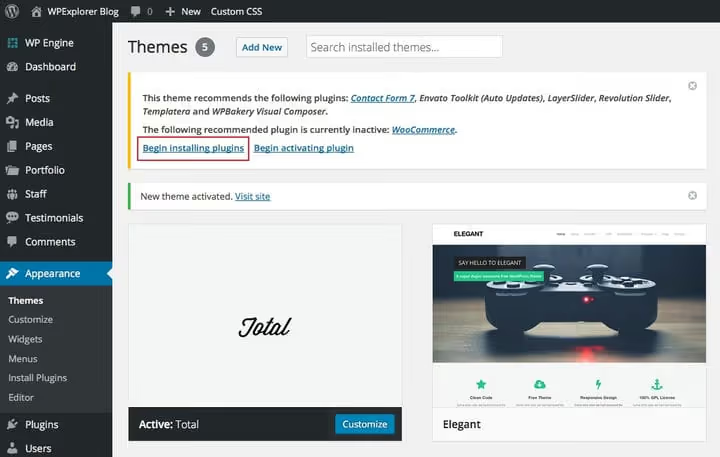
After activation, the theme offers to install recommended plugins, among them will be WPBakery Page Builder.
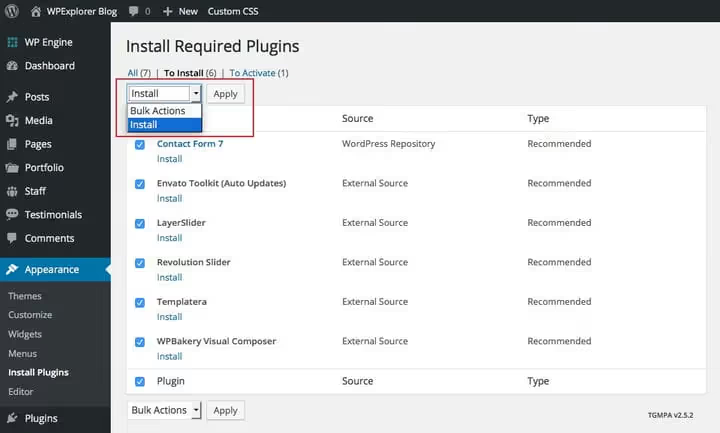
Choose "Install" in the dropdown, check the needed plugins and click Apply.
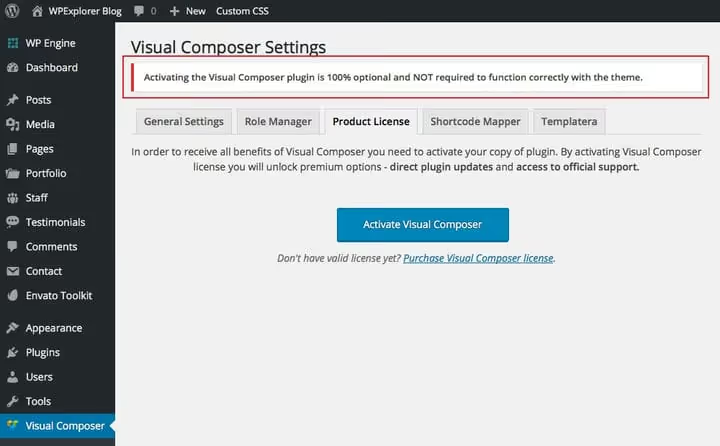
Activating the license through Envato isn't needed in this case, you don't have your own license code. The plugin's functionality is complete, but you'll have to wait for updates from the theme author.
First launch and settings
After installation, a "WPBakery Page Builder" item appears in the admin sidebar menu. Open settings.
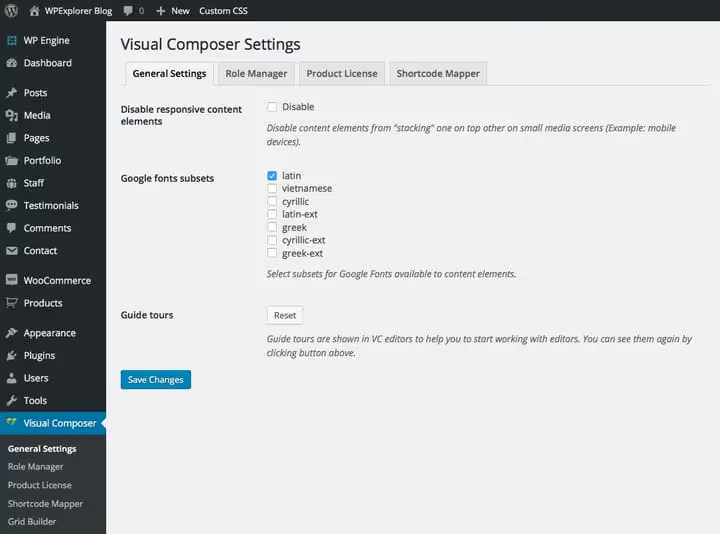
General Settings, basic options. Here you enable and disable responsive column collapse on mobile: three columns turn into three vertical rows, not squeeze into unreadable strips. Here you also choose a subset of Google Fonts and reset the plugin's tutorial tours.
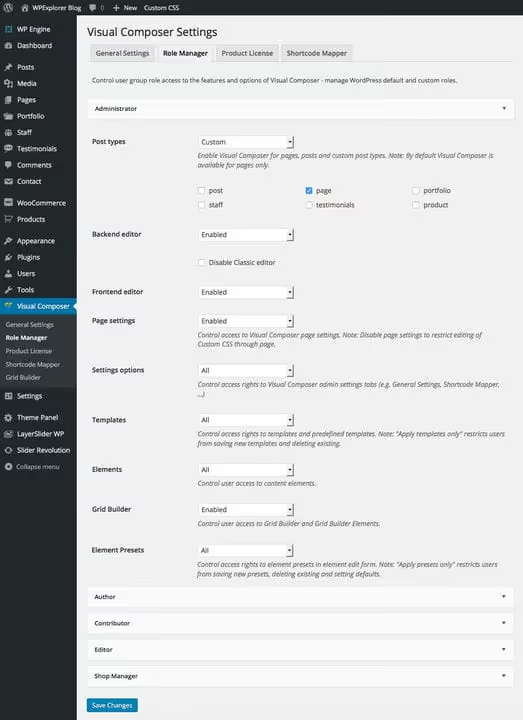
Role Manager controls access to WPBakery functions by user roles. Administrator, everything, editor, only pages and posts, contributor, nothing. In practice, this saves you from situations where a client or junior staff member accidentally changes a row's design settings and breaks the layout on the entire page. Access configuration, insurance against human error.
Product License, tab for direct license owners. If the plugin came bundled with a theme, you can skip this section.
50+ built-in content elements
WPBakery out of the box provides more than 50 elements. Here's a complete map of what's available right after installation.
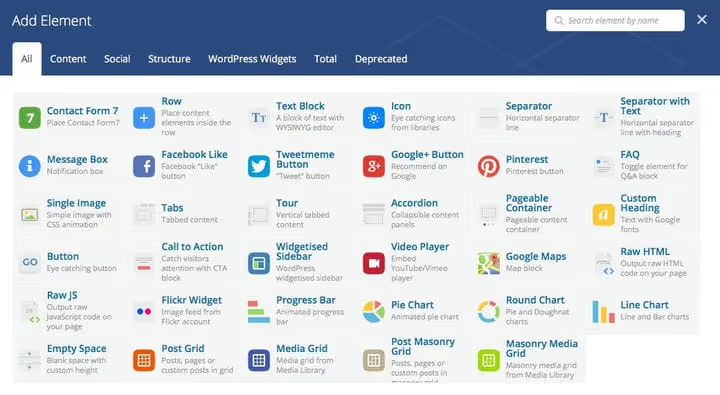
Category | Elements | What for |
|---|---|---|
Basic | Text Block, Single Image, Custom Heading, Button, Separator | Text, images, headings, buttons, separators |
Media | Video Player, Image Gallery, Google Maps | Video, galleries, maps |
Social | Facebook Like, Tweet, Pinterest, Google+ | Social network buttons |
Structure | Row, Column, Empty Space | Containers for other elements |
Interactive | Tabs, Tour, Accordion, FAQ, Pageable Container | Tabs, accordions, switchable content |
Widgets | Widgetised Sidebar, 8 widget elements | Sidebar insertion and building your own sidebar |
Charts | Progress Bar, Pie Chart, Round Chart, Line Chart | Data and skills visualization |
Grids | Post Grid, Media Grid, Post Masonry Grid, Media Masonry Grid | Grids of posts and media files |
Each element has two tabs: general settings (General) and design options (Design Options). You can set color, border, spacing, animation, custom CSS. This set is enough for most typical pages: landing, portfolio, corporate site are assembled from standard elements without a single addon. Specific scenarios like dynamic tables or custom grids are covered by extensions, more on those later.
Extensions: built-in and third-party
Basic elements are enough for a typical site. But when you need specifics, extensions come into play.
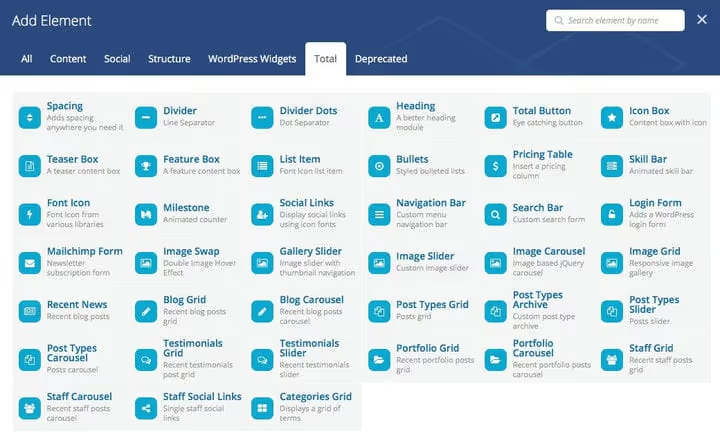
Extensions through theme. Some themes add their own elements. For example, the Total theme adds 39 elements: custom post types (testimonials, staff, portfolio), galleries, sliders. Work only with the Total theme active.
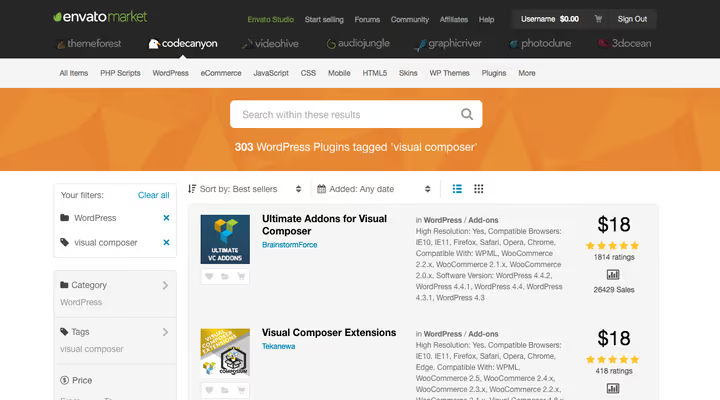
Third-party extension plugins. On CodeCanyon, hundreds of addons. Ultimate Addons for WPBakery, one of the flagships: adds dozens of elements, from pricing tables to advanced buttons. Templatera (official addon, €12), template manager. Easy Tables (€12), table builder.
Official list of compatible addons, in the Addons section on WPBakery site.
In practice, don't enable all extensions simultaneously. Each addon pulls its own code. Two or three extension plugins already create functionality overlaps and slow down the site. Choose one that covers your tasks and work with it.
Backend editor vs frontend editor
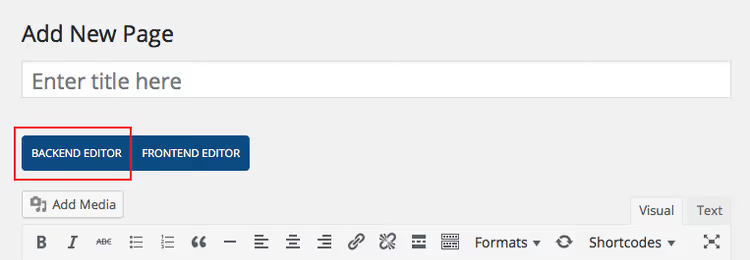
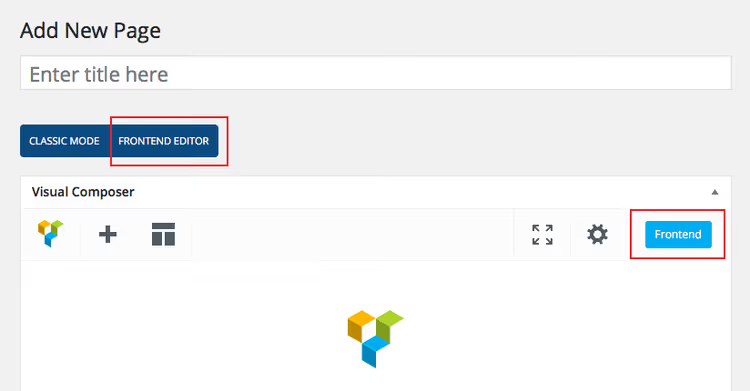
WPBakery provides two page building modes. You can switch between them on the fly, with one button in the top bar. No export-import, no data loss, just two different views of the same content.
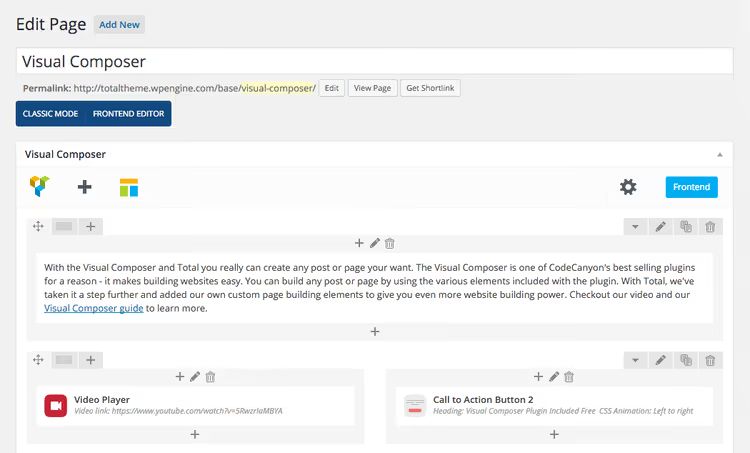
Backend editor shows elements as rectangular blocks with labels. Faster on weak hosting: no preview rendering. Convenient for building a wireframe: threw down rows, columns, placeholders, and visual refinement later.
Click the turquoise "+ Add Element" button and choose the needed element from the popup window.
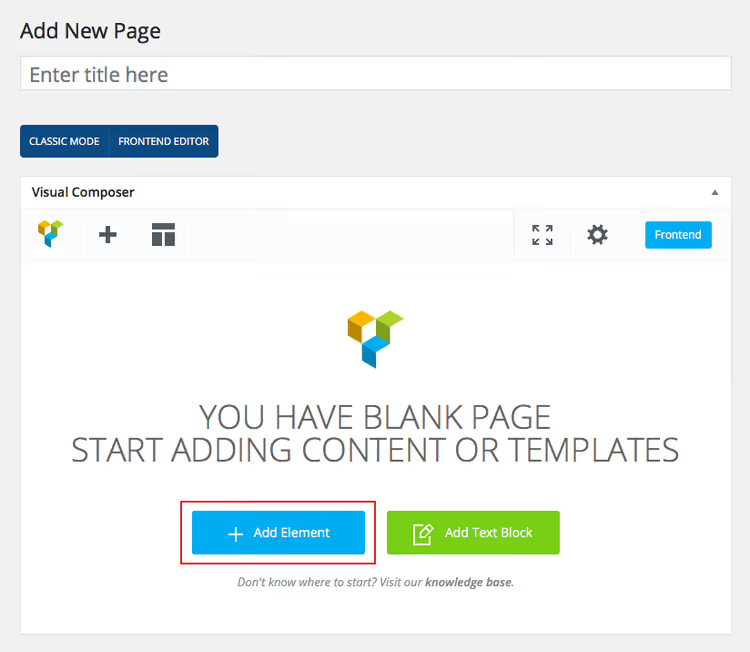
Elements are inserted one after another, order changes by dragging.
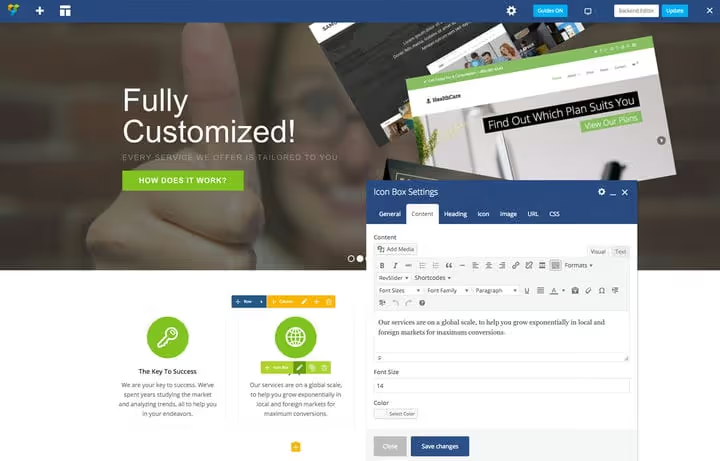
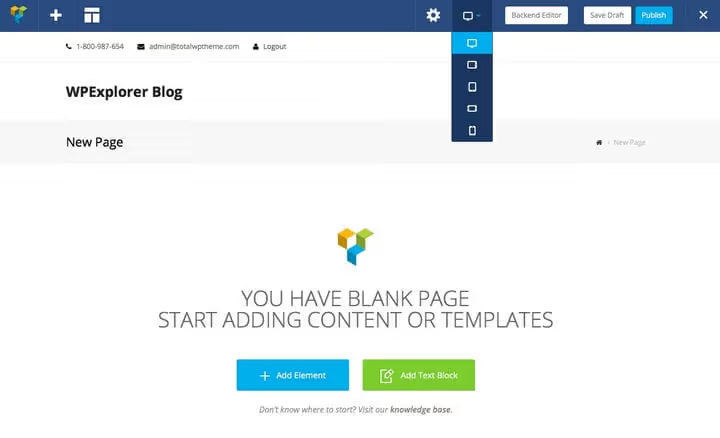
Frontend editor, full visual mode. The page looks like it does to visitors: real image sizes and exact button colors.
In the top bar, preview for desktop, tablet and phone. With one click you see how the page looks on each device.
In practice, both modes are combined: the page skeleton is built in backend, visual refinement is done in frontend. This approach saves time: dragging rows and columns in backend happens instantly, without waiting for rendering, and final font and color configuration in frontend eliminates surprises upon publishing.
Working with rows, columns and elements
Rows
Row, the basic unit of layout in WPBakery. Without a row you can't insert any element. On hover, blue control icons appear.
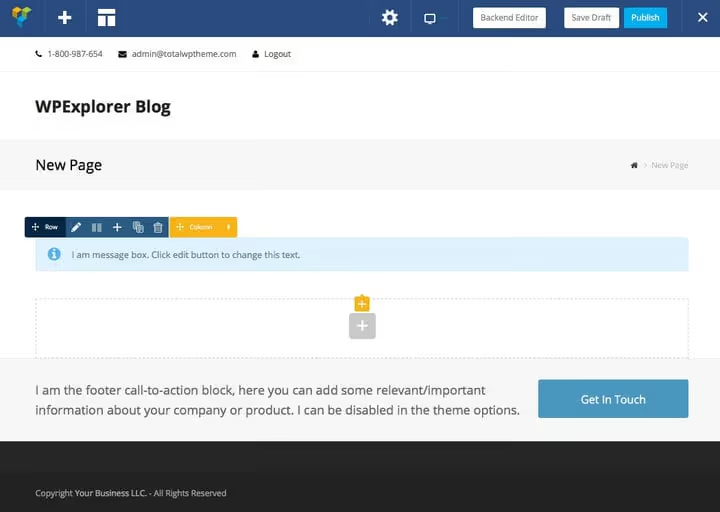
- Row icon, drag to change position on page
- Pencil, row settings: ID for local scroll, stretch to full width, full-screen height, background (color, image, video, parallax), animation, typography, spacing
- Columns, choose quantity (up to 6 standard, can set custom)
- Plus, add new row below
- Duplicate, clones row with all content
- Trash, deletes entire row
Columns
Yellow icons control columns inside a row.
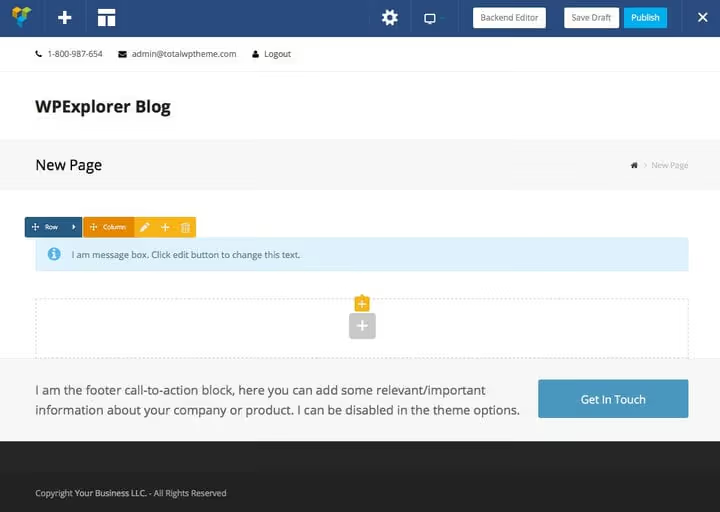
- Pencil of column, visibility on mobile, animation, minimum height, background, spacing, responsive settings (width, spacing, hiding by devices)
- Plus inside column, adds element to top of column
- Trash, deletes column with content. After deletion, remaining column widths aren't recalculated automatically, check and correct manually.
Page elements
Elements are placed inside columns. On hovering over an inserted element, orange icons appear.
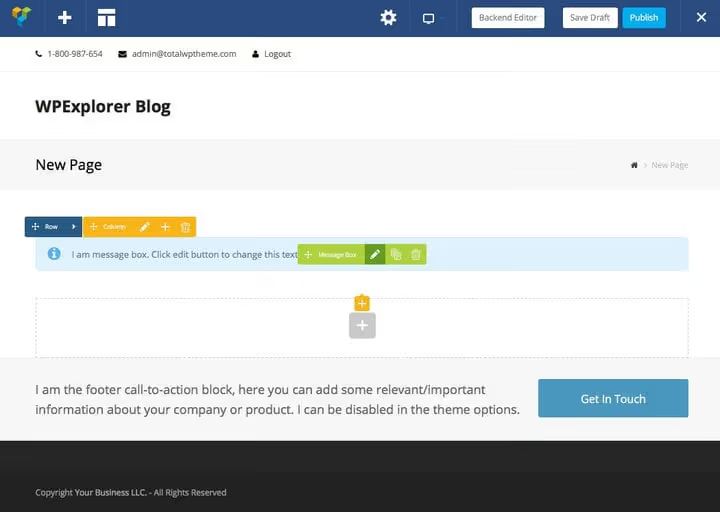
- Pencil, opens element settings
- Duplicate, clones element with all parameters
- Trash, deletes only this element
Design options: background, borders, spacing
The Design Options tab is present for every element, row and column. This is the heart of WPBakery's visual customization.
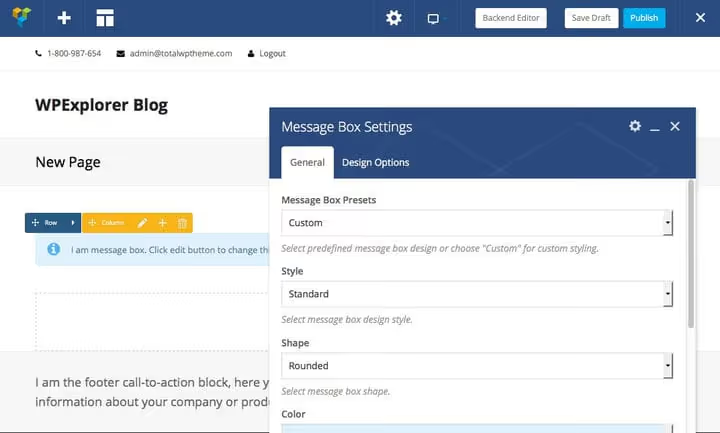
General tab, unique settings of the specific element. For Message Box: style, shape, color, icon, text, animation. For Button: text, URL, style, shape, color, size, alignment, icon. The set of options differs from element to element.
The gear icon in the upper right corner saves settings as a preset for reuse or as default values.
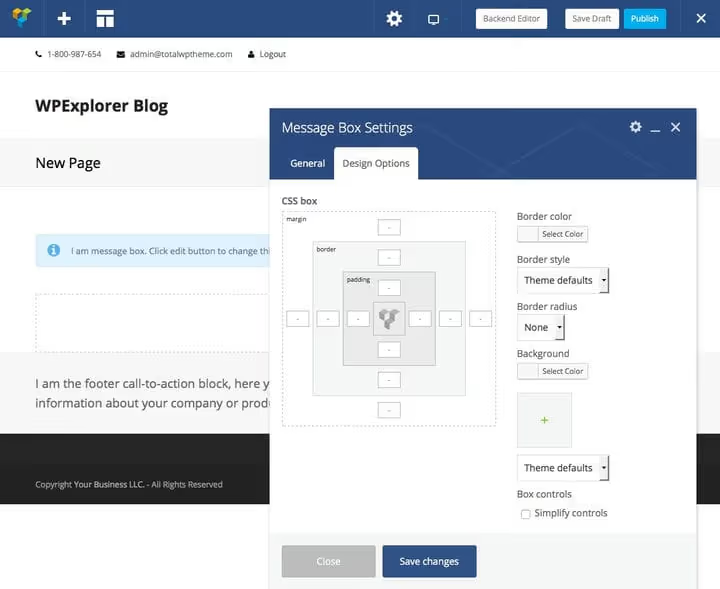
Design Options tab, universal appearance settings:
- Background: color or image
- Border: style, color, thickness, rounding
- Spacing: margin (outer) and padding (inner)
- Simplify Controls collapses four fields (top/right/bottom/left) into one universal
Nuance: background is limited by the border. Increase padding, expand visible background. Increase margin, add empty space around through which the row or page background is visible. In practice, this gives fine control: a white card on a gray page background is created by adding background to the element plus padding 30px, and spacing between cards, margin-bottom 20px on the upper one.
For some elements (for example, Post Grid) there are additional tabs: Data Settings and Item Design. Data Settings sets the data source (which post type, how many, sorting, category filter), and Item Design configures the appearance of each card in the grid: whether to show featured image, excerpt, date, author. Theme extensions (such as Total Staff Grid) add even more options: query parameters, custom image cropping, meta fields, social networks, excerpts. This is especially valuable for custom post types: you assemble a "Our Team" or "Portfolio" page visually, without a single line of PHP.
Compatible plugins
WPBakery works in conjunction with dozens of plugins. Here are the key ones.
WooCommerce, the standard for online stores on WordPress. Activate WooCommerce, and WPBakery gets 17 new elements for product pages, cart, checkout. Free. WooCommerce elements are embedded through the standard add interface, no additional settings required, just installed both plugins and working.
Slider Revolution, premium slider with drag-and-drop inside the slide. Text, buttons, video, animations. Ideal for the home page. WPBakery adds a special "Slider Revolution" element to the general panel, the slider inserts with one click.
LayerSlider, Slider Revolution competitor with its own transition builder. Also premium, also friendly with WPBakery out of the box. The choice between them comes down to interface preference: Slider Revolution provides more ready templates, LayerSlider, a more flexible animation builder.
Contact Form 7, free form builder. WPBakery adds a special element for inserting a form on any page.

Yoast SEO, the main WordPress SEO plugin. Full compatibility: WPBakery pages index without problems.

WPML, premium translation for multilingual sites. Translates each WPBakery page element separately.
Polylang, free WPML alternative. Full compatibility with WPBakery.

The complete list of compatible plugins is regularly updated in the official WordPress catalog.
WPBakery AI and new features 2024-2026
Since 2024, WPBakery has been actively integrating AI tools. The AI assistant generates text and code directly in the editor interface: you set a specification in natural language, you get ready content. Saves hours on writing text for typical pages. Works inside the familiar editor window, no need to switch between tabs or copy text from external services.
SEO Toolkit, built-in optimization kit: control of headings, meta descriptions, Open Graph tags. Works inside WPBakery, without additional plugins. Checks readability, keyword density and meta tag length directly on the edit page.
Grid Builder (updated in 2024), post and media grid builder with 40+ preset styles. You assemble post cards, portfolio, custom post types visually, without code. Column, spacing, typography and card animation configuration, all through drag-and-drop interface.
Template Library is being filled with new layouts. As of June 2026, more than 80 ready page and section templates are available, from landings to portfolios. Each template can be imported in a couple of clicks and adapted to your colors and fonts.
WPBakery pricing in 2026
All WPBakery licenses are lifetime. Pay once, use indefinitely. The price includes one year of Support Plus (support, auto-updates, template library, AI).
Plan | Price | Sites |
|---|---|---|
Regular | €69 | 1 |
5 Sites | €256 | up to 5 |
10 Sites | €499 | up to 10 |
Theme Integration | €69 | for theme |
Support Plus renews for €22.99 per year. The loyalty program gives a 5% discount for each year of auto-renewal, with a 50% limit. According to the official pricing plan, Support Plus subscribers additionally get Templatera and Easy Tables free (each addon costs €12).
There's an Agency Program for bulk licenses (from 20 sites). A free demo sandbox is available on the WPBakery site, you can test without registration. 15-day money back with direct purchase. For those who build sites on commission, a Regular license for each project pays for itself with the first client and doesn't require annual renewals, this is a key advantage over subscription competitors.
Video: WPBakery from scratch in 20 minutes
Official WPBakery video tutorial for beginners: installation, interface, basic elements in 18 minutes. In English, but the interface is intuitively clear.
⁉️🤔 Frequently asked questions
Is WPBakery Visual Composer or not?
Until 2017, WPBakery was called Visual Composer. Then the developer split the brand:
WPBakery Page Builderremained a page builder for WordPress, andVisual Composer Website Builderbecame a separate product. If an old article writes "Visual Composer guide," they're talking about WPBakery. From a practical standpoint there's no difference: interface, work logic, element set, everything's the same. Only the name and branding changed.
Can you use WPBakery with any theme?
WPBakery works with any properly coded WordPress theme. The plugin adapts to the theme structure.
But the appearance of pages depends on theme styles: colors, fonts, content area width are inherited from the active theme. In practice, best compatibility is with themes that explicitly declare WPBakery support: Total, Jupiter, The7, Bridge. On such themes you get additional elements and preset layouts.
How does WPBakery differ from Elementor?
Both are visual page builders. Key differences: WPBakery provides a backend editor (modular view), Elementor doesn't have one. WPBakery is sold by lifetime license from €69, Elementor Pro, by annual subscription (from $59/year for 1 site according to elementor.com). WPBakery has wider compatibility with themes and plugins due to age (on the market since 2011). Elementor has a more modern interface and more free elements.
The choice comes down to priorities: need a lifetime license and backend editor, WPBakery. Need a more modern interface and regular updates by subscription, Elementor.
Do you need to know code to work with WPBakery?
No. Basic pages are assembled completely visually, drag-and-drop. But for fine customization (your own CSS, custom queries in Post Grid), basic knowledge will come in handy. The Custom CSS tab is present for each element, row and column.
In practice, most tasks are solved without a line of code. Custom styles and specific grids require basic CSS, but that's more the exception than the rule.
What about site performance on WPBakery?
WPBakery generates HTML code that's saved to the database as page content. After publishing, the plugin doesn't participate in output, there's no rendering overhead. But the layout itself can be redundant: nested wrappers, inline styles.
Optimization: cache pages through
WP Rocketor hosting cache, minimize the number of enabled addons, compress images. In practice, a properly configured WPBakery site loads in 1.5-2 seconds on good hosting.
How to update WPBakery after the year of support expires?
The license is lifetime, updates are always available. But auto-updates only work with active Support Plus. Without it, download the new version from your CodeCanyon account manually and upload via FTP or "Plugins → Add New → Upload Plugin."
Many buy a Regular license, configure the site and don't update the plugin for years. This works, but it's risky: old versions may have vulnerabilities. We recommend renewing Support Plus at least once every two years.
What to install in 2026: final breakdown
WPBakery, the right choice when you need a reliable, predictable page builder without annual payments. A lifetime license from €69 pays for itself on the very first project.
Get WPBakery if: you budget a one-time purchase, not a subscription; you're building a site on a premium theme with a bundled version; you need a backend editor for quick skeleton building; you work with WooCommerce and multilingualism.
Look toward alternatives if: you need a maximally modern interface "out of the box"; the volume of free elements without extra payments is critical; you prefer a subscription model with constant updates.
Try the free demo sandbox on wpbakery.com. In 20 minutes you'll build a test page and understand whether this is your tool or not. A 15-day money-back guarantee with direct purchase gives additional space for testing without financial risk. If you're already working with WPBakery, write in the comments which extensions you use, real cases are always more useful than others' ratings.

A professional team of writers and editors specializing in creating quality content.