













📈 10 best stock market plugins for WordPress (2026)
Retail investors don't open terminals on Wall Street, they open them in browsers. Sites for personal finance, trading blogs and news aggregators are growing faster than the market. WordPress is the number one platform here: flexible, with thousands of ready-made integrations.
But bare WordPress doesn't show quotes, charts, heat maps and stock market news. All of this comes from plugins, from free Stockdio widgets to advanced packages with WebSocket real-time price updates. The task isn't to find just anything, but to assemble a focused stack of two or three tools without turning your site into a Christmas tree of fifty iframes.
Below are 10 tools for a WordPress site with a stock market focus. We tested each one: output format, update frequency, price and documentation. Organized by category so you don't have to dig through the repository blindly.
💡 Quick overview:
- Decide on the presentation format: ticker tape, candlestick chart, quote table, heat map, news feed or everything at once in one plugin.
- Choose a data source: free Stockdio widgets (65+ exchanges, requires App Key), Vunelix Financial Widgets (20+ widget types, WebSocket, no key needed) or premium packages like Financial Pack Pro.
- For each format, its own plugin: for charts take Stockdio Historical Chart, for multi-format, Massive Stock Widgets, for a visual market picture, Heat Maps.
- Install, activate API key (if needed), insert shortcode on the page and check update frequency, even 15 minutes are critical for trading scenarios.
Plugin | Type | Free? | Price (from) | Exchanges | Output format |
|---|---|---|---|---|---|
Financial Pack Pro | Universal package | With Publisher theme | $59 | 1000+ markets | Widgets, charts, tables, converter |
Stock Market Overview | Categorized list | Yes | Free | 65+ | List, interactive chart |
Vunelix Financial Widgets | Multi-widget (WebSocket) | Yes | Free | 50+ markets | Ticker, screener, heat map, technical analysis |
Stock Market Ticker | Ticker tape | Yes | Free | 65+ | Ticker |
Stockdio Historical Chart | Charts | Yes | Free | 65+ | 5 chart types, historical data |
Stock Ticker | Ticker tape | Yes | Free | Depends on source | Ticker |
Stock Market News | News feed | Yes | Free | 65+ | News with source filtering |
Massive Stock Market & Forex Widgets | Multi-widget | No | $50 | 1000+ | Charts, tables, list, ticker, news |
Stock Quotes List | Quote list | Yes | Free | 65+ | List + optional chart |
Stock & Forex Heat Maps | Heat map | No | N/A | All major | Color map by country |
1. Financial Pack Pro

The most advanced package for financial WordPress. BetterStudio (developers of the Publisher theme) packed 110+ widget styles, currency converter, tables, charts and RTL support into one plugin. A multilingual portal can be deployed without localization headaches.
Coverage: 1500+ digital currencies and 1000+ stock markets. In the admin panel, shortcodes and widgets, no code needed.
Pros: maximum tool coverage in one package; currency converter out of the box; RTL and interface translation without third-party plugins.
Cons: price is steep for a small project; some advanced styles require Publisher Theme templates.
Price: from $59 (one-time). Owners of Publisher Theme Pro Club, Agency Club and Lifetime Access tiers get the plugin free.
2. Stock Market Overview

Free plugin from Stockdio, categorized quote list: stocks, indices, currencies and commodities. 65+ exchanges, interactive price chart enabled with one checkbox.
Basic shortcode, copy, paste, configure palette and exchange:
1 [stock-market-overview stockExchange="NYSENasdaq" width="100%" palette="financial-light"]
Under the hood, Gutenberg block in the Stockdio Financial Visualizations category, so it works on FSE themes without shortcodes.
Pros: instant start without API key; built-in categorization by asset types; live price updates.
Cons: only one output format (list); CSS tweaks needed for appearance customization.
Price: free.
🔗 Stockdio Market Overview on WordPress.org
3. Vunelix Financial Widgets

Free multi-widget plugin with real-time data via WebSocket. 20+ widget types: tickers, stock and cryptocurrency screeners, heat maps, currency converter, technical analysis with RSI and MACD indicators. No other free plugin offers such a set in one interface.
Difference from Stockdio: WebSocket price updates without page reload and without API key. Works on domain verification: register your domain on vunelix.com and widgets activate automatically. Shadow DOM isolates widget CSS from theme, style conflicts are eliminated.
Pros: 20+ widget types in free version; real-time via WebSocket; auto-detect light/dark theme; 30+ languages with RTL.
Cons: for high-traffic domains the free plan is limited by symbol count; documentation is still basic, project is young (2025 release).
Price: free. Premium tiers add branding removal and increased limits.
🔗 Vunelix Financial Widgets on WordPress.org
4. Stock Market Ticker

Another Stockdio product, this time a ticker tape. 65+ exchanges, symbols defined by semicolon-separated list. Supports combinations like NYSE + Nasdaq + LSE in one ticker.
Shortcode for insertion:
1 [stock-market-ticker symbols="AAPL;MSFT;GOOG;HPQ;^SPX;^DJI;LSE:BAG" stockExchange="NYSENasdaq" width="100%" palette="financial-light"]
The culture parameter sets the country-language pair and outputs local formats for numbers, dates and text. In practice, sufficient for all non-English projects.
Pros: lightweight, doesn't load unnecessary scripts; culture parameter solves number and date localization; configured in a minute.
Cons: only ticker, no charts and tables; requires Stockdio App Key (free registration on stockdio.com).
Price: free.
🔗 Stockdio Market Ticker on WordPress.org
5. Stockdio Historical Chart

Free historical and intraday chart plugin from Stockdio. Five display styles: Line, Candlestick, Area, OHLC, HLC. 65+ exchanges, comparison of multiple symbols on one chart, optional volume display.
Intraday data available for major US exchanges, period from 1 to 5 days. For long historical perspective, up to several years. The allowPeriodChange parameter transfers period control to the visitor: the user switches scale themselves without touching the admin panel.
1 [stockdio-historical-chart symbol="AAPL" stockExchange="USA" width="100%" height="380" motif="financial" palette="financial-light" intraday="true" days="5"]
Pros: 5 chart styles cover trading and analytical scenarios; intraday data for major exchanges; Gutenberg block in Stockdio Financial Visualizations category.
Cons: like all Stockdio products, requires App Key; intraday data is not tick data, standard delay for free APIs.
Price: free.
🔗 Stockdio Historical Chart on WordPress.org
6. Stock Ticker

Free minimalist ticker with 5000+ active installations. Data supplied by a third-party service, accuracy not guaranteed, stated directly in the plugin description. For educational and informational sites it works, for trading recommendations, no.
Colors, background, logo, company name configured with shortcodes. Neither API key nor registration needed.
Pros: 5000+ installations, active community, bugs get fixed; zero-config for basic scenario; lightweight, almost no PageSpeed impact.
Cons: data not verified for trading decisions; third-party source can go offline at any moment.
Price: free.
🔗 Stock Ticker on WordPress.org
7. Stock Market News

Third Stockdio product in the roundup, news feed for a specific symbol and exchange. Source filtering (filterSources) cuts out junk reprints and leaves original sources.
Shortcode:
1 [stock-market-news symbol="AAPL" stockExchange="NYSENasdaq" width="100%"]
includeImage controls image display, includeDescription handles text snippet. Minimalist output, no excess graphics.
Pros: source filtering, rare for free news plugins; compact output saves space; images optional.
Cons: only for one symbol per shortcode; for multi-symbol feed you'll need multiple insertions.
Price: free.
🔗 Stockdio Market News on WordPress.org
8. Massive Stock Market & Forex Widgets
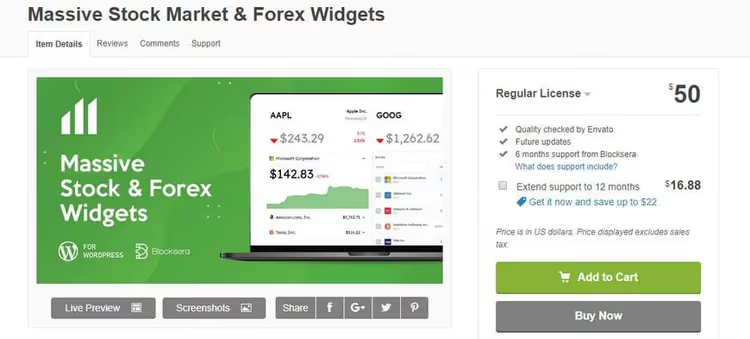
The most universal of the premium ones: charts, tables, lists, ticker, news, everything in one plugin. 1000+ instruments (stocks, ETFs, currencies, commodities), support for all major browsers.
Six output formats, each customizable separately. Essentially a replacement for three to four separate plugins from one interface.
Pros: 6 formats in one plugin reduces number of active extensions; coverage of 1000+ instruments; cross-browser compatibility.
Cons: price tag is high for a non-commercial blog; updates come infrequently, check changelog before purchase.
Price: from $50.
🔗 Massive Stock Widgets on CodeCanyon
9. Stock Quotes List

Fourth Stockdio plugin, quote list with optional interactive chart. 65+ exchanges, appearance configuration via shortcode parameters.
Basic shortcode:
1 [stock-quotes-list symbols="AAPL;MSFT;GOOG;HPQ;^SPX;^DJI;LSE:BAG" stockExchange="NYSENasdaq" width="100%" height="380" motif="financial" palette="financial-light"]
includeChart enables or disables chart next to the list, chartHeight sets height (default 320 px). logoMaxHeight and includeLogo control company logo, useful for brand recognition.
Pros: chart and list in one shortcode; fine-tuned logo settings; allowPeriodChange lets users switch periods.
Cons: like all Stockdio products, requires App Key; free version limited by number of symbols per shortcode.
Price: free.
🔗 Stockdio Quotes List on WordPress.org
10. Stock & Forex Heat Maps
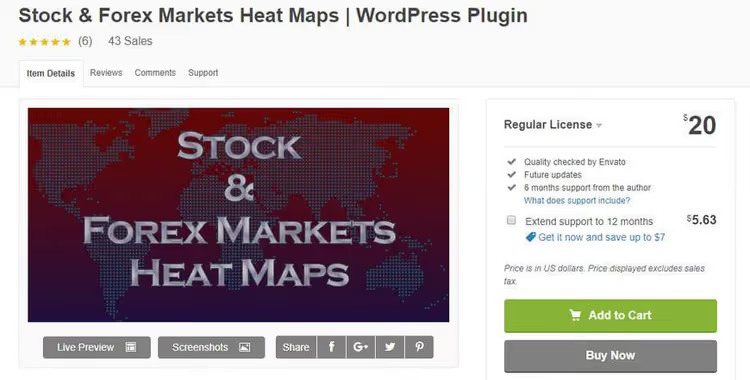
Heat map, the most visual format for comparing markets in one picture. Each country is colored based on the dynamics of its stock indicator or currency rate to the US dollar.
The plugin supports Chrome, Firefox, Safari and Opera. On a financial portal's homepage, a visitor reads the global picture in a second.
Pros: visualization that tables and tickers don't provide; instant market situation reading; striking element for the homepage.
Cons: niche tool, not every site will find an application; little data on active installations and update frequency.
Price: premium (exact cost on product page).
🔗 Stock & Forex Heat Maps on CodeCanyon
🎬 Video: how to build a financial dashboard on WordPress
Practical guide to installing and configuring financial widgets: from connecting API key to inserting shortcode in a post.
⁉️🤔 Frequently asked questions
Is an API key needed for WordPress financial plugins?
Depends on the plugin. Stockdio products (Market Overview, Ticker, News, Quotes List, Historical Chart) require a free App Key, register on stockdio.com, copy the key, paste in settings. Vunelix Financial Widgets works on domain verification, no key needed, only domain confirmation. Free Stock Ticker uses its own data source without a key. Premium ones (Financial Pack Pro, Massive Stock Widgets) either embed a connector to exchange APIs or configure the key separately.
How often are quotes updated on a WordPress site?
From 15 minutes for simple plugins to real-time via WebSocket for Vunelix Financial Widgets. Free Stockdio widgets update several times a day, sufficient for an informational site but not for intraday trading. Important: a WordPress site is not a replacement for an exchange terminal, and no plugin provides Bloomberg Terminal tick accuracy.
Can multiple plugins be used simultaneously?
Technically yes, practically, carefully. Five to six financial widgets on one page create dozens of iframe and canvas elements, each pulling data from its endpoint. Result: TTFB increases, PageSpeed drops. If you need multiple formats (ticker + chart + news), take one universal plugin (Financial Pack Pro, Massive Stock Widgets or Vunelix Financial Widgets), not a collection of three to four separate ones.
Do financial plugins work on mobile?
All plugins in the roundup declare responsiveness. In practice, charts (especially candlestick) look cramped on a 375px screen, check each plugin's demo on a real smartphone before installation. Tickers, quote lists and Vunelix widgets adapt without issues.
Will data disappear if the developer stops support?
For plugins on third-party APIs (Stockdio, free Stock Ticker) the risk is real: service provider shuts down, data disappears. For plugins with their own connectors (Financial Pack Pro) data will continue to flow as long as the exchange API is alive. Recommendation: before buying a premium solution check the last update date in the changelog, if the plugin hasn't been updated for more than a year, look for an alternative.
Conclusions: what to install on a WordPress stock market site in 2026
Plugin choice comes down to three questions: what data format does the audience need, how much are you willing to pay and how critical is the quote update frequency.
If the site earns from traffic and content (articles, analytics, news), take free products. A combination of three to four Stockdio widgets (Market Overview for homepage, News in sidebar, Ticker in header, Historical Chart for analytical breakdowns) will cover most needs. As an alternative, Vunelix Financial Widgets: 20+ formats in one plugin, data via WebSocket, no API key.
If the site is a tool for traders with paid access, look toward Financial Pack Pro. 110+ styles, currency converter, RTL languages, 1000+ markets. This is no longer a plugin but a framework for a financial portal.
Short matrix:
- You need one universal tool, take Financial Pack Pro or Vunelix Financial Widgets (if budget is limited).
- Budget is minimal, need maximum formats for free, Vunelix will give 20+ widgets in one plugin, or assemble a stack from Stockdio (Overview + Ticker + News + Historical Chart + Quotes List).
- Charts matter, not numbers, Stockdio Historical Chart (free, 5 styles, intraday data).
- Need a visual "market picture" for homepage, Heat Maps.
- Educational blog without trading recommendations, free Stock Ticker (no API key, 5000+ installations).
Start with one free Stockdio Market Overview: it will show whether quotes resonate with your audience. And if you've already assembled a financial dashboard, share your plugin combination in the comments, we'll add the best configurations to the roundup update.

A professional team of writers and editors specializing in creating quality content.