













 AIIllustrative image: AI-generated
⭐ 10 best WordPress review plugins: 2026 overview
A visitor opens the service page, reads the description, looks at the price, and leaves. Everything seems to be in place: arguments, case studies, call to action. One thing is missing: social proof. 93% of buyers confirm that online reviews influence their purchase decision, and sites with live testimonials get noticeably higher conversions compared to pages without social proof.
Standard WordPress doesn't provide tools for collecting and displaying reviews nicely. The "Quote" block doesn't turn client text into a testimonial section with stars, a slider, and schema markup. You need a plugin. And not an abstract "best" one, but one that solves your specific task: some need a slider for the homepage, some need a frontend form for collection, some need auto-import from Google and Facebook.
We tested a dozen and a half plugins on a test bench and selected 10 working solutions for 2026, from free bases to premium combines with auto-collection. All positions are active and were updated in 2025-2026. Closed and abandoned ones (Easy Testimonials, Testimonials Widget, Testimonial Rotator, Testimonial Builder, and a few more, deleted from the repository or not updated for years) were removed, replaced with active alternatives.
💡 Quick overview:
- Choose a plugin for your task: 10 verified options, broken down by scenarios below
- Install and configure in 10-20 minutes: each one from the list works out of the box with default templates
- Add a testimonial section via shortcode, Gutenberg block, or widget, all plugins support at least two insertion methods
- Launch review collection: built-in form, auto-import from social networks, or manual addition in the admin panel
Comparison table: all 10 plugins
Plugin | Free version | Slider | Grid | Collection via form | Social media import | Schema markup | Pro price |
|---|---|---|---|---|---|---|---|
Strong Testimonials | Yes | Yes | Yes | Yes | Yes (Pro) | Yes | $14/year |
Real Testimonials | Yes | Yes | Yes | No | No | Yes | $39 one-time |
Site Reviews | Yes | No | Yes | Yes | No | Yes | $8.25/month |
WP Testimonials | Yes | Yes | Yes | No | No | Yes | Free |
Jetpack | Yes | No | No | No | No | No | Free |
WiserReview | Yes | Yes | Yes | Yes | Yes | Yes | $9/month |
Quick and Easy Testimonials | Yes | No | No | No | No | No | Free |
Testimonials Slider | No | Yes | No | No | No | Yes | $22 one-time |
Thrive Ovation | No | Yes | Yes | Yes | Yes | Yes | $47/year |
WP Customer Reviews | Yes | No | No | Yes | No | Yes | Free |
1. Strong Testimonials

Strong Testimonials on WordPress.org
A veteran with a 4.8 rating and over 100,000 active installations. Covers the full cycle: collection through a customizable form, moderation in the admin panel, and output in several layouts, slider, masonry grid, list. Colors and fonts are configurable without code.
The Pro version adds what the plugin is often taken for: import of reviews from Facebook, Google My Business, Yelp, Zomato, and WooCommerce. Plus spam protection and unlimited forms.
In practice, the view builder is a delight: you assemble a testimonial template visually, not through code. Categories allow you to separate testimonials by products and display different selections on different pages. It doesn't support video testimonials, you need a third-party player for that.
Price: free; Pro, from $14 per year for a single-site license.
🔗 Strong Testimonials on WordPress.org | 🔗 Live demo
2. Real Testimonials
Real Testimonials on WordPress.org
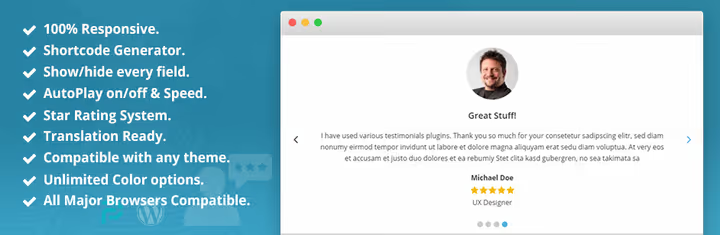
Formerly Testimonial Slider, renamed to Real Testimonials, one of the most downloaded free plugins in the category with 70,000+ active installations. Specializes specifically in sliders: infinite loop, dot and arrow navigation, responsive layout out of the box.
Each review gets the client's name, photo, and star rating. The shortcode is inserted into a post, page, or sidebar widget. Pro adds 7 slider layouts, an isotope grid, and advanced animation settings.
Minus: there's no built-in collection through a frontend form in the free version. Reviews are added manually through the admin panel. For a small site with 10-15 testimonials, this isn't a problem, for active collection you need Pro or a combination with a form plugin.
Price: free; Pro, $39 one-time for a single-site license.
🔗 Real Testimonials on WordPress.org | 🔗 Live demo
3. Site Reviews

Discovery of 2025-2026: Site Reviews, a mini-TripAdvisor inside WordPress. Visitors leave a star rating and text review, you moderate the stream. The free version includes a full-fledged star system, spam protection (honeypot, Akismet, blacklists), and schema markup for displaying stars in Google snippets.
The plugin attaches reviews to specific posts, pages, or custom post types. On a WooCommerce site, each product gets its own ratings block. Built-in Gutenberg block and shortcode for all cases.
Schema in the free version, a rare occurrence. Most competitors hide it behind a paywall. Pro adds image uploads to reviews, filters, and Slack notifications.
Price: free; Pro, from $8.25 per month.
🔗 Site Reviews on WordPress.org | 🔗 Live demo
4. WP Testimonials

WP Testimonials on WordPress.org
A product from the Trustindex team, a completely free plugin without a Pro tier. Included: 21+ widget layouts, 25+ preset styles, unlimited reviews and widgets. Schema.org markup out of the box.
The plugin works with Gutenberg, Elementor, WPBakery, Divi, Beaver Builder, and the classic editor. Testimonial categorization, dark theme support, shortcodes, and, a rarity, translation into 50+ languages, including Russian.
Assets are loaded from CDN, zero impact on page load speed. Minus: no import from social networks and no automatic collection, all reviews are added manually. But for a completely free solution, the set is impressive.
Price: free.
🔗 WP Testimonials on WordPress.org | 🔗 Live demo
5. Jetpack

The trump card option if Jetpack is already installed on the site. No need to install a separate plugin: you enable the Testimonials custom post type, add the client's name, review text, and photo as a featured image. That's it.
The plugin doesn't provide sliders, grids, or star ratings. Output depends on the theme: some, including Automattic themes, have built-in support for the testimonial type and render it stylishly. Others will show a bare list.
The module is completely free, even on the free Jetpack plan. Ideal as a zero-footprint solution: don't multiply plugins, use what's already there.
Price: free (the Testimonials module is included in any Jetpack plan).
🔗 Jetpack on WordPress.org | 🔗 Live demo
6. WiserReview

The most "all-in-one" option in the selection. WiserReview doesn't just display reviews, it automatically collects them. Email, SMS, and WhatsApp sequences request testimonials after purchase without manual labor. Import from Google, Shopify, Judge.me, Yotpo, and Stamped, in a few clicks.
AI moderation filters out spam and fakes, sentiment analysis sorts reviews by tone, and the auto-suggestion engine generates draft responses. Text, photo, and video reviews with buyer verification are supported. The platform is also available as a plugin on WordPress.org for WooCommerce.
Output: slider, grid, carousel, masonry, and testimonial wall. Each layout is customizable. The free plan is generous (up to 100 requests per month), but key features, AI, WhatsApp, and auto-collection, are behind a paywall.
Price: free plan; Starter, from $9 per month; Pro $19/month; Pro+AI $31/month.
🔗 WiserReview official website
7. Quick and Easy Testimonials

Quick and Easy Testimonials on WordPress.org
An ascetic plugin for those who just need to "display reviews". Custom Testimonials post type, shortcode output with center alignment. No design settings, styles are taken from the active WordPress theme.
Translated into dozens of languages, supports RTL layout. An excellent choice for multilingual sites where you need a minimalist testimonial section without JavaScript sliders and heavy styles.
What's missing: slider, grid, star rating, collection form. Only manual addition through the admin panel and shortcode output. For a landing page with five reviews, it's enough; for active UGC, take Site Reviews or WiserReview.
Price: free.
🔗 Quick and Easy Testimonials on WordPress.org | 🔗 Live demo
8. Testimonials Slider

Testimonials Slider on CodeCanyon
A premium plugin from CodeCanyon with a 4.5 rating and 2,500+ sales. Full Gutenberg support, GDPR compliance, and several slider layouts with customizable transitions.
Each testimonial has a name, photo, position, company, and optionally a link to the author's Facebook profile. Works as a widget and as a shortcode on any page.
Sold on a "one-time payment" model: buy and use. Updates and support, 6 months, then renewed separately. Single-site license, a network needs an expanded license.
Price: $22 one-time for a single-site license.
🔗 Testimonials Slider on CodeCanyon | 🔗 Live preview
9. Thrive Ovation

Thrive Ovation, official website
The flagship testimonial plugin from Thrive Themes. Main feature: turns a positive comment from a blog, Facebook, Twitter, or email into a formatted testimonial with one click. No need to ask the client to fill out a form, you capture organic praise that already exists.
A built-in submission form is also available: a reader fills in name, text, and photo, lands in the admin panel for moderation. Statuses: "pending", "approved", "rejected". Tags allow filtering reviews by products or topics.
Output through shortcodes with several templates. Tight integration with Thrive Architect: drag-and-drop testimonial element right in the builder. Available standalone or as part of Thrive Suite.
Price: $47 per year standalone; $299 per year as part of Thrive Suite.
🔗 Thrive Ovation on Thrive Themes website
10. WP Customer Reviews

WP Customer Reviews on WordPress.org
Don't let the name mislead you: this is a testimonial plugin, not a product review system. Visitors leave a review through a form on a separate page, the admin moderates and publishes. Schema.org microformat provides search-engine-readable output.
Spam protection is multi-layered: honeypot, external stylesheet, and manual moderation. The administrator can edit the content and date of the review, and also publicly respond under each testimonial, forming a mini-dialogue.
Completely free, no Pro version. The engine isn't the most modern visually, but it's stable and covers the basic cycle of "form, moderation, schema output". A good starting point for a site without a budget for plugins.
Price: free.
🔗 WP Customer Reviews on WordPress.org | 🔗 Live demo
Visual supplement to the review: a 5-minute tutorial on installing and basic configuration of Strong Testimonials. Shows the full path from an empty page to a working testimonial slider.
⁉️🤔 Frequently asked questions
Do I need a separate plugin for reviews if I use WooCommerce?
WooCommerce can collect product reviews, but this is a review system: stars, pros and cons, verdict. For reviews about the company as a whole, not about a specific product, WooCommerce isn't suitable. Take Site Reviews or Strong Testimonials: both are friendly with WooCommerce and add testimonial logic on top of product reviews.
Which plugin to choose if the budget is zero?
Site Reviews, Strong Testimonials (free version), WP Testimonials from Trustindex, and WP Customer Reviews, completely free, all on wordpress.org. Site Reviews leads in functionality: schema markup and stars in Google results without spending a dime. If Jetpack is already installed on the site, enable the Testimonials module without adding a single new plugin.
Can I display reviews from Google and Facebook automatically?
Yes, but only in Pro versions: Strong Testimonials Pro, WiserReview. Thrive Ovation imports from Facebook and Twitter with a native capture mechanism, one click on a post, and the testimonial is in the admin panel. Free plugins don't provide this function: manual input everywhere.
Is schema markup needed for testimonials?
Desirable. Without it, Google doesn't show stars in snippets. From our list, schema is available in Site Reviews (free), Strong Testimonials, WiserReview, Thrive Ovation, WP Testimonials, WP Customer Reviews, and Testimonials Slider. Jetpack and Quick and Easy Testimonials don't have markup.
What to do if the plugin conflicts with the theme?
Most conflicts are resolved by choosing a plugin that inherits theme styles: Quick and Easy Testimonials, WP Customer Reviews. They don't impose their own CSS and render in the style of the active theme. If the conflict persists, custom CSS in the plugin settings (Strong Testimonials) or additional CSS in the WordPress customizer.
What to install in 2026: final breakdown
The choice comes down to three scenarios, not an abstract "best plugin".
If you need maximum functionality without a budget, install Site Reviews. Schema markup, collection through a form, star rating, and spam protection in one box. A rare case where the free version covers the lion's share of business site needs.
If you're ready to pay and want collection automation, take WiserReview or Thrive Ovation. The first is strong in auto-collection through email and WhatsApp, the second, in capture mechanism from social networks. Both save hours of manual labor monthly.
If Jetpack is already installed on the site, just enable the Testimonials module. Don't multiply plugins for the sake of plugins. A review is content, not functionality; a custom post type with a couple of CSS lines often gives results no worse than a specialized plugin.
Try the free versions of two or three candidates that fit your scenario. They're all on wordpress.org, install in a minute, and don't conflict with each other. Find your tool and start collecting social proof today.

A professional team of writers and editors specializing in creating quality content.