













 AIIllustrative image: AI-generated
⭐ 6 best testimonial plugins for WordPress in 2026
A visitor opens your site, sees your product, and leaves. Without the slightest hint of a purchase. They head to a competitor where three dozen reviews from real people with photos and stars await, and they stay there. Social proof works unfailingly: according to BigCommerce data, reviews rank in the top 3 factors influencing purchase decisions, and WikiJob increased conversions by 34% simply by adding testimonials to their homepage.
Collecting and beautifully displaying reviews on WordPress without a plugin is painful. Coding layouts manually, adding structured data for Google, protecting forms from spam. There are about a hundred ready-made solutions. Half of them are either abandoned or closed due to vulnerabilities.
We combed through the WordPress.org catalog and filtered out everything that hadn't been updated in years or received a "closed for security reasons" status. Six living plugins remained: from free lightweight options to full-featured tools with import from Google and Facebook.
We tested all six plugins on a test site with WordPress 6.7 and PHP 8.3; installation, compatibility, and desktop performance raised no concerns.
💡 Quick overview:
- Step 1: Choose a plugin from the table below based on your needs and budget.
- Step 2: Install via "Plugins → Add New" or upload the ZIP file.
- Step 3: Create a collection form, import existing reviews from social media, place the shortcode on your page.
- Step 4: Verify structured data through Google Rich Results Test; stars will appear in search results.
Plugin | Who it's for | Price | Key feature |
|---|---|---|---|
Strong Testimonials | 90% of sites: blogs, stores, services | Free / Pro add-ons from $19 | View builder + form out of the box |
Site Reviews | Minimalists: clean, no frills | Free | Star ratings in comments + schema |
Real Testimonials | Need a beautiful slider in 5 minutes | Free | 9 ready-made themes and effects |
Thrive Ovation | Marketers: collection, moderation, email | Thrive Suite ($299/year) | Import WP comments into testimonials |
Reviews Feed Pro | Already have reviews on Google/Facebook/Yelp | From $49/year | Auto-pull reviews from social platforms |
1. Strong Testimonials: best free option for most sites
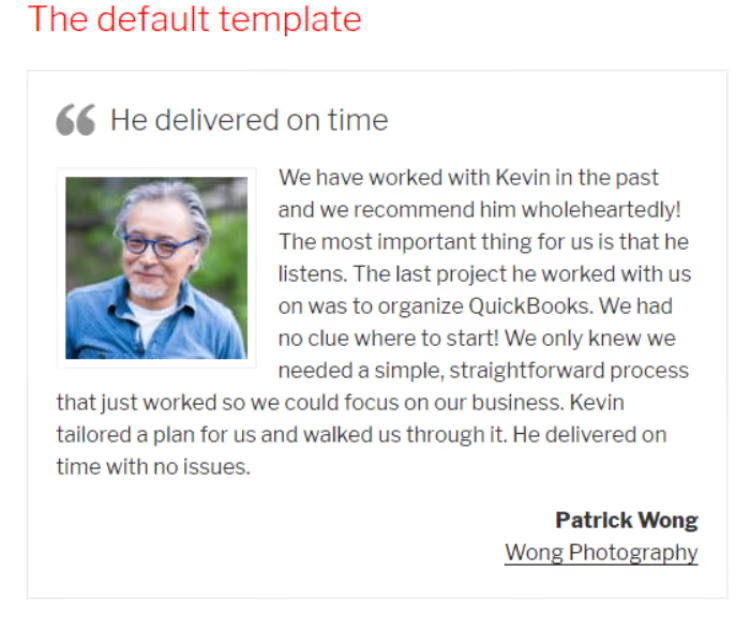
Strong Testimonials is the most popular free plugin for testimonials in the WordPress.org catalog: 200,000+ active installations and a 4.5-star rating. Developer WP Chill actively maintains it, with the latest update released in 2026.
The main advantage is the Views builder. Instead of a dozen shortcodes with parameters, you work in a single editor: choose the mode (slideshow, grid, form), fields, template, and get ready output. No need to touch CSS.
The free version has everything to get started: a collection form with customizable fields, three display modes (list, grid, slider), star ratings, categories, and pagination. The form submits via Ajax and is compatible with Popup Maker and other popup plugins.
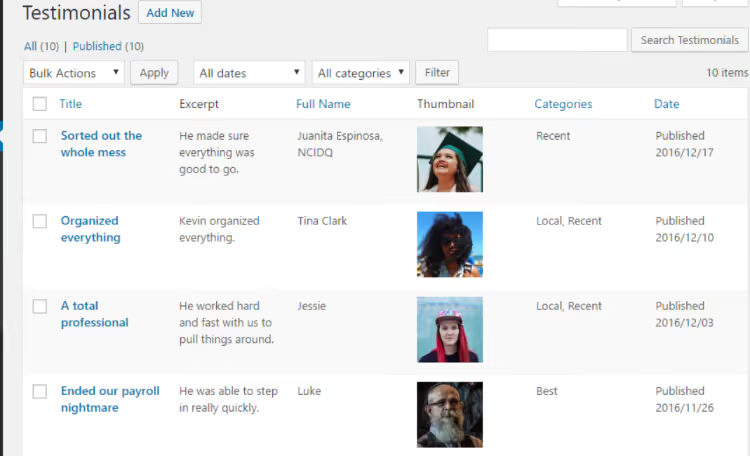
- Pros: View builder instead of complex shortcodes, collection form in the free version, drag-and-drop field sorting, active support and documentation.
- Cons: Limited free templates, fine-tuning styles requires CSS. Import from Google and Facebook only in Pro add-ons.
- Price: Free on WordPress.org. Pro add-ons: from $19 for individual extensions, $39 for the bundle. Pro unlocks import from Google, Facebook, Yelp, Trustpilot, multiple forms, custom fields, and Captcha.
- Download: 🔗 Strong Testimonials on WordPress.org
2. Site Reviews: minimalist collection with structured data

Site Reviews solves one task and does it without extras: adds a star rating block to any post or page and collects reviews through a built-in form. No builders, templates, or carousels, just clean functionality.
The plugin creates its own Reviews post type and integrates with native WordPress comments: the rating form can be attached to the theme's standard comment block. Schema markup is added automatically; stars appear in Google without manual JSON-LD.
Site Reviews supports multisite, is compatible with WPML and Polylang, and has spam protection via honeypot plus six CAPTCHA options, including Cloudflare Turnstile and reCAPTCHA. Premium add-ons from Gemini Labs provide custom fields and customer notifications.
- Pros: Extremely simple interface, schema out of the box, integration with theme comments, 6 CAPTCHA options, multisite and translations.
- Cons: No slider or carousel, templates only through CSS, free version lacks custom fields.
- Price: Free on WordPress.org. Premium add-ons available on the developer's website.
- Download: 🔗 Site Reviews on WordPress.org
3. Real Testimonials: slider and grid in a couple of clicks

Real Testimonials (in the catalog as Testimonial Free) from ShapedPlugin focuses on visuals. If you need to quickly launch a beautiful slider or grid of testimonials without fussing with styles, this is your option. The plugin has 70,000+ active installations.
The package includes nine ready-made themes and a dozen transition effects: fade, slide, cube, coverflow. Each theme can be tweaked by color through the visual customizer, without CSS. The shortcode is generated through a wizard: choose theme, effect, number of testimonials per row, autoplay, and the ready [sp_testimonial id="1"] can be inserted anywhere.
The collection form features flexible field configuration and redirect after submission. reCAPTCHA v2 and v3 are supported. Unexpectedly: the plugin can display testimonials in a popup window and has Elementor integration through a native widget.
- Pros: 9 ready-made themes, visual customizer, popup mode, Elementor widget.
- Cons: Schema markup is rudimentary; for Google stars you may need additional configuration. No import from social networks.
- Price: Free on WordPress.org. Pro available on the developer's website.
- Download: 🔗 Real Testimonials on WordPress.org
4. Thrive Ovation: powerhouse for maximum reach

Thrive Ovation is part of the Thrive Themes ecosystem and the most feature-rich plugin in this roundup. It covers the entire cycle: collection, moderation, display, with tools no one else has.
Ovation's unique feature is collecting testimonials from multiple sources simultaneously. You can: display a stylish external form, convert any WordPress comment into a testimonial with one click, embed a tweet with a hashtag, or import a Facebook post by URL. Collected testimonials go into a unified moderation panel with tags and statuses.
Display works through shortcodes or the Thrive Architect builder. Templates look professional out of the box: this is Ovation's strongest advantage over free plugins, where design often lags. The email permission request feature before publication protects you legally.
- Pros: Three collection methods (form, comment to testimonial, FB and Twitter), email permission request, professional templates, moderation panel.
- Cons: Paid version only and only as part of Thrive Suite. Overkill for a simple testimonial on a landing page. Tied to the Thrive ecosystem.
- Price: Included in Thrive Suite, $299/year (introductory rate) or $149/quarter. Includes all 9 Thrive Themes plugins.
- Download: 🔗 Thrive Ovation on the Thrive Themes website
5. Reviews Feed Pro: auto-import from Google, Facebook, and Yelp

Reviews Feed Pro from Smash Balloon solves a different task: not collecting new reviews, but displaying existing ones from external platforms. If you have dozens of reviews in Google Business Profile or on Facebook, the plugin pulls them automatically and displays them on your site in a customizable feed.
Google, Facebook, Yelp, TripAdvisor, and Trustpilot are supported. The feed updates automatically; new reviews appear without manual copying. Moderation is visual: hide unwanted reviews right in the admin panel without deleting them from the source.
A special feature is Review Alerts: popup notifications about new reviews for visitors. You can set up rotation showing one review at a time or a summary with average rating and count. The plugin works with any theme; configuration is through a flexible customizer.
- Pros: Automatic import from 5+ platforms, visual moderation, popup notifications, easy setup.
- Cons: Does not collect reviews directly; you need existing ones on external platforms. Price is above average.
- Price: From $49/year for one site. Free version Reviews Feed with limited functionality.
- Download: 🔗 Reviews Feed Pro on Smash Balloon
6. Toolset Testimonials: builder for developers

Toolset Testimonials is not a standalone plugin but a component of the Toolset ecosystem from the WPML team. If you already use Toolset for custom post types, templates, and search, the Testimonials module is added at no extra cost.
The approach here is developer-oriented: create a custom post type for testimonials, add custom fields (images, contacts, checkboxes), design an output template, and place it anywhere (widget, shortcode, carousel, grid). Full control over every pixel without PHP.
Integration with WPML provides ready translation of testimonials into multiple languages; for multilingual sites this is a decisive argument. Frontend forms allow users to submit testimonials, and linking to other post types (testimonial to a specific product) helps build complex structures.
- Pros: Full control over markup, unlimited custom fields, WPML integration, linking to other post types.
- Cons: Only as part of Toolset, expensive for a single task. Requires setup time, overkill for simple scenarios.
- Price: Included in Toolset, from $149/year. Includes custom post types, search, maps, and membership.
- Download: 🔗 Toolset Testimonials
In practice we often see: a site owner installs the plugin, but testimonials don't display because one step was skipped. The video above shows the complete cycle: from installing Strong Testimonials to displaying a slider on a page. If you're doing this for the first time, watch before you start configuring.
⁉️🤔 Frequently asked questions
Do I need a plugin if I can just insert testimonials as text in the editor?
You can, but without a plugin you lose stars in Google. Schema markup done manually via JSON-LD takes an hour, while a plugin provides it out of the box. Plus the collection form: without it, clients send testimonials to you in a messenger, and you copy them into the admin panel. With three testimonials it's tolerable; with thirty, it's not.
Which plugin should I choose if my budget is zero?
Strong Testimonials. The free version includes a collection form, View builder, three display modes, stars, and schema. From our list, this is the richest free option. Site Reviews is an alternative for minimalism lovers: form and schema, nothing extra.
Is it mandatory to show a client photo next to the testimonial?
Advisable. A testimonial with a real photo and name generates 2-3 times more trust than an anonymous "John D." All plugins in this roundup support avatar upload; don't disable this field in the form. If a client doesn't want to show their face, let them upload their company logo.
Does Google verify the authenticity of testimonials on a site?
Indirectly, yes. If you have 50 testimonials with a 5.0 rating, and all were written on the same day in templated language, Google may ignore the markup. Show real testimonials with different dates, varying text lengths, and different ratings, including fours. A plugin with moderation (Thrive Ovation, Strong Testimonials) helps keep the picture natural.
Can I use two testimonial plugins at the same time?
Technically, yes, but we don't recommend it. Two plugins mean two schema markups on one page, shortcode conflicts, and extra load. Choose one for your main task. If you need both to collect your own testimonials and import from Google, Strong Testimonials Pro covers both scenarios.
Which testimonial plugin to install in 2026
Six plugins cover virtually any scenario: from a one-page business card site to a large store with hundreds of reviews. The price range, from completely free to annual subscriptions as part of a Suite, lets you avoid overpaying for unnecessary features.
- If budget is limited and you need maximum features, get Strong Testimonials. The free version covers 90% of needs, and Pro add-ons can be purchased individually.
- If you need something simple and fast without diving into settings, Real Testimonials. A ready slider through the wizard in 5 minutes.
- If schema and clean code are the priority, Site Reviews. Nothing extra, stars in Google out of the box.
- If you already have reviews on Google and Facebook, Reviews Feed Pro. It will pull everything automatically.
- If you're a marketer and want a complete collection and moderation cycle, Thrive Ovation. Best templates, email permissions, three collection channels.
Next comes practice. Choose a plugin, install it on a test site, and collect your first three testimonials from real clients. Living social proof with photos, stars, and different dates does more for conversion than any landing page.

A professional team of writers and editors specializing in creating quality content.