














📘 6 best Facebook plugins for WordPress in 2026
Your WordPress site runs on its own while your Facebook page lives separately. Posts get there manually, comments stay in the social network, and the page feed never reaches your site. A familiar scenario for any site owner who wants more from Facebook than just an icon in the footer.
According to DataReportal's January 2026 report, Facebook has 3.1 billion monthly active users. Ignoring this audience means losing traffic, comments, and subscribers. Below are six plugins that connect WordPress to Facebook without manual API wrangling: from embedding feeds to auto-publishing posts.
💡 Quick overview:
- Define your task: for a feed on your site, use Custom Facebook Feed or Feed Them Social; for auto-publishing, WP2Social Auto Publish; for everything at once, Ultimate Facebook.
- Create a Facebook app in Facebook for Developers before installing any plugin: you'll get your App ID and secret key in five minutes.
- After connecting the plugin, test the feed display on mobile and enable caching in settings to avoid hitting the Facebook API on every page load.
Comparison table: top 3 all-in-one solutions
Plugin | Best for | Price | Key feature |
|---|---|---|---|
Custom Facebook Feed | Those who only need a Facebook feed on their site | Free / Pro from $49/year | SEO-indexable feed content |
Feed Them Social | Multi-platform feeds (FB + Instagram + YouTube) | Free / Premium from $50/year | One plugin for all social networks |
Ultimate Facebook | Maximum integration (login, comments, auto-post) | Included in WPMU DEV ($3/month trial) | Facebook login + comments + auto-posting in one |
1. Custom Facebook Feed: the best Facebook feed for WordPress
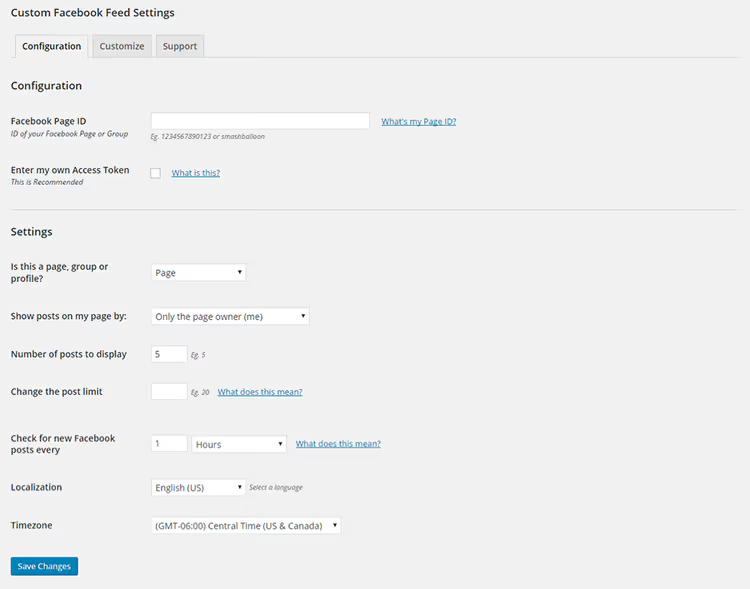
Custom Facebook Feed by Smash Balloon is the most popular Facebook feed plugin in the WordPress.org directory: 200,000+ active installations and 1,200+ five-star reviews. It displays posts from your Facebook page directly on your site as text rather than through an iframe.
The main difference from competitors: feed content gets indexed by search engines. Other plugins embed Facebook via iframe, so search bots see an empty block. Custom Facebook Feed renders post text as HTML, which Google reads and considers for ranking.
Setup is flexible: the shortcode [custom-facebook-feed] can be inserted into any page, post, or widget. You can connect one page, multiple pages, or groups. The free version provides a text feed with hashtags (clickable, linking to Facebook). Colors, fonts, and layout are configurable from the admin panel without code. Caching is built in, so the feed does not hit the Facebook API on every page load. In our experience, on a site with 300+ daily visitors, a 2-hour cache interval completely eliminates delays from the Facebook API.
- Pros: SEO-indexable feed, 200,000+ installations, fine-tuned appearance settings, built-in caching.
- Cons: The free version lacks photos, videos, and like/share counters; those are only in Pro for $49/year.
- Price: Free in the WordPress.org directory; Pro from $49/year.
- Download: 🔗 Custom Facebook Feed on WordPress.org | 🔗 Smash Balloon website
2. Feed Them Social: one feed for all social networks

Feed Them Social is a multi-platform plugin that displays feeds from Facebook, Instagram, TikTok, and YouTube. It has 638 reviews on WordPress.org, was last updated in May 2026, and is compatible with WordPress 7.0. If your site has Instagram and YouTube in addition to Facebook, this plugin covers everything at once.
The Facebook feed is configured via shortcode: page, albums, album covers, video. Format options include grid or classic feed. Caching is built in, responsive design is supported, and the feed does not break on mobile. The plugin pulls real data through the Facebook Graph API with authorization via your own app.
A separate advantage is support speed. In reviews, users note that responses from the developer arrive in 15-20 minutes rather than a full day, as with many other plugins. For those installing a feed on a commercial site who do not want to wait, this matters.
- Pros: Facebook + Instagram + TikTok + YouTube in one plugin, regular updates (4.4.2, May 2026), fast support, caching.
- Cons: Photo/video popup is Premium only; the abundance of tabs in settings may feel overwhelming for beginners.
- Price: Free in the directory; Premium from $50/year (all platforms + popup).
- Download: 🔗 Feed Them Social on WordPress.org | 🔗 Facebook feed demo
3. WP2Social Auto Publish: auto-posting from WordPress to Facebook

WP2Social Auto Publish (formerly Facebook Auto Publish) solves one task and solves it well: write a post in WordPress, and it automatically goes to your Facebook page. It has 643 reviews, updates regularly, and is compatible with Facebook API v19.0.
The mechanics are simple: create a Facebook app, authorize the plugin, set up filters (categories, post types, pages or profile), and posts publish automatically. The format is your choice: text, text with image, attached link, or full post. You can set a message template with variables like POST_TITLE, POST_EXCERPT, POST_CONTENT, PERMALINK, and others.
An important note: the plugin publishes new posts upon creation. It does not touch old posts; for that, there is Revive Social (see position 5). For scheduled posts, there is a "Use metabox settings" option that lets you choose whether to publish on scheduling or only on manual submission.
- Pros: Simple setup, flexible filters by category and post type, message templates, support for the latest Facebook API versions.
- Cons: Initial authorization through the Facebook app requires attention, as the Facebook for Developers interface changes periodically.
- Price: Free in the WordPress.org directory.
- Download: 🔗 WP2Social Auto Publish on WordPress.org
4. Ultimate Facebook: the Swiss army knife of Facebook integration
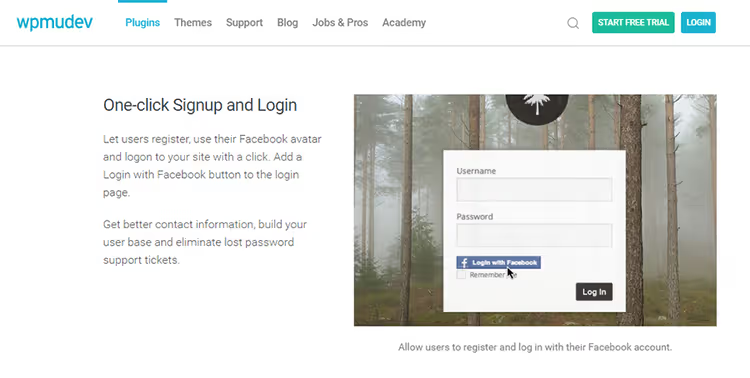
Ultimate Facebook by WPMU DEV is an all-in-one plugin that replaces three or four separate tools. In one package: Facebook login (with WordPress profile auto-fill using social network data), Facebook comment system, auto-posting to walls and events, activity feed, and Like and Share buttons.
Registration via Facebook is the main advantage for community sites. A user clicks "Log in with Facebook" and immediately gets a site profile without filling out forms. Data is pulled from Facebook: name, avatar, email. For the visitor, one click; for the site, more registrations and fewer abandoned forms.
Comment mirroring works like this: a comment left on Facebook automatically appears in the thread on your site. And vice versa: a comment from the site is duplicated on Facebook. The discussion lives in two places simultaneously, increasing reach. In practice, this is useful for discussion posts where comment count matters.
The plugin is part of the WPMU DEV subscription: according to pricing information on the WPMU DEV website, the first month costs $3, then the full price applies. The subscription also includes Smush (image optimization), Defender (security), Hummingbird (speed), and a dozen more plugins. If you already use the WPMU DEV ecosystem, Ultimate Facebook comes as part of the package.
- Pros: Facebook login + comments + auto-posting + feed in one plugin; comment mirroring; fewer separate plugins on your site.
- Cons: Only available as part of a paid WPMU DEV subscription; setup is more complex than single-purpose plugins (more tabs and options); tied to the WPMU DEV ecosystem.
- Price: Included in WPMU DEV subscription (14-day trial, then $3/month for the first month).
- Download: 🔗 Ultimate Facebook on WPMU DEV | 🔗 Source code on GitHub
5. Revive Social: old posts, new life

Revive Social (formerly Revive Old Post) solves the opposite problem: not new posts to Facebook, but old ones. Your site has accumulated 200 articles sitting in the archive generating no traffic. Revive Social takes them on a schedule and publishes them to Facebook, X (Twitter), LinkedIn, and other social networks at set intervals.
The mechanics: select categories or specific posts, set a schedule (every 2 hours, once a day), configure the message template, and the plugin starts methodically sharing content. For a site with a large archive, this works like a perpetual motion machine for social traffic: old articles get shares and clicks without manual posting.
With 30,000+ active installations and 340+ reviews, this plugin has been proven over the years. An important nuance: Facebook's latest API versions restrict automatic publishing to personal profiles. Pages and groups work without issues.
- Pros: Automatic archive reposting, support for Facebook + X + LinkedIn, flexible scheduling, message templates with variables.
- Cons: The free version is limited to one social network; auto-posting to a personal Facebook profile may face API restrictions.
- Price: Free in the directory; Pro from $99/year (all social networks, custom scheduling).
- Download: 🔗 Revive Social on WordPress.org
6. Facebook Page Plugin: the official Meta tool
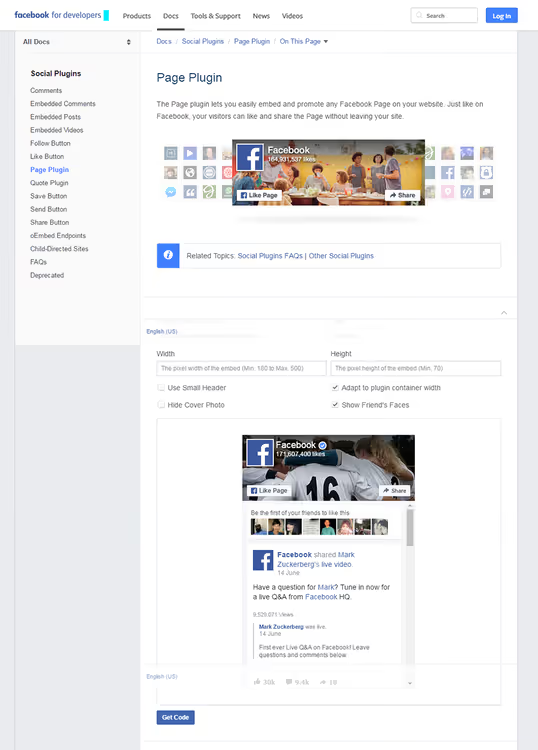
Facebook Page Plugin is not a WordPress plugin in the usual sense but an official tool from Meta (Facebook). It is code generated on the Facebook plugin page and inserted into your site. No middleman: a direct iframe from Facebook with your page, a Like button, and a Share block.
It works without third-party dependencies: no updates, no conflicts with other plugins, no breakage when the WordPress version changes. Simply copy your Facebook page URL, configure width and height, and get two code snippets: the JavaScript SDK (in your theme header or via a plugin like Code Snippets) and a div container (anywhere: widget, sidebar, post body).
Limitation: this is specifically a page block, not a post feed. Visitors see the page cover, the Like button, and can navigate to Facebook. For a full feed, you need Custom Facebook Feed or Feed Them Social. But for a quick "set it and forget it" solution, there is no better option.
- Pros: Official Meta tool, zero dependencies on third-party plugins, does not break with WordPress updates.
- Cons: Only a page block (not a feed), iframe (non-indexable content), manual setup via code.
- Price: Free.
- Download: 🔗 Facebook Page Plugin official page
The video provides step-by-step instructions for embedding Facebook content in WordPress: from creating an app to placing it on a page. It takes 8 minutes, and all steps are shown on screen.
⁉️🤔 Frequently asked questions
Do I need a Facebook App ID for every plugin?
Yes, most plugins on this list require an App ID. You create it once in the Facebook for Developers console: register an app, get the ID and secret key, and enter them in the plugin settings. One app can be used for multiple plugins on the same site. The process takes 5-7 minutes and requires no programming skills.
Which plugin should I choose if I only need a Facebook feed on my site?
For just a feed, use Custom Facebook Feed (position 1). It has the best SEO return (feed text is indexed), 200,000+ installations, and the free version covers the basic task. If you also plan to display Instagram or YouTube, consider Feed Them Social (position 2), which does everything at once.
Is it necessary to buy the Pro version of Custom Facebook Feed?
For a text feed, no, the free version is sufficient. Pro is needed if you want photos and videos from posts in the feed, like/share/comment counters, and if you want to display feeds from multiple pages or groups simultaneously. For most sites, a text feed with hashtags gets the job done.
What happened to Facebook Instant Articles and the Facebook Comments plugin?
Facebook shut down the Instant Articles program in April 2023. The
facebook-comments-pluginin the WordPress.org directory was permanently closed in March 2018 at the author's request. Instead of Instant Articles, use WP2Social Auto Publish (position 3), which publishes posts to Facebook with one click. Instead of the old comments plugin, use Ultimate Facebook (position 4), which has Facebook comments built in, or the official Facebook Comments Plugin from Meta.
Does a Facebook feed slow down my site?
Without caching, yes: each request to the Facebook API adds 200-400 ms to load time. All plugins on this list (Custom Facebook Feed, Feed Them Social, Ultimate Facebook) have built-in caching: the feed is requested once per hour or less, saved locally, and served instantly. Check the caching interval in plugin settings; for a site with 500+ daily visitors, set it to 2-4 hours.
Can I use multiple plugins from this list simultaneously?
Yes, if their tasks do not overlap. A working combination: Custom Facebook Feed (page feed on site) + WP2Social Auto Publish (new posts to Facebook) + Revive Social (old posts to Facebook). These three plugins do not conflict because they do different things. Do not install Custom Facebook Feed and Feed Them Social simultaneously for the same Facebook page; two feeds on one page serve no purpose.
Which Facebook plugin should you install on WordPress in 2026?
Six tools cover three main tasks: displaying a Facebook feed on your site, auto-publishing posts, and social login with comments. The choice comes down to what you need right now:
- Only a Facebook feed on your site: use Custom Facebook Feed. Over 200,000 users cannot be wrong, and the SEO benefit from indexable text feeds is an argument competitors lack.
- Facebook + Instagram + YouTube feed: Feed Them Social. One plugin instead of three, updated every few months, support responds in minutes.
- Auto-publishing new posts: WP2Social Auto Publish. Free, no unnecessary features, works with the latest Facebook API versions.
- Full integration: login + comments + posting: Ultimate Facebook. If you already pay for WPMU DEV or are willing to subscribe, it covers all needs at once.
- Automatic archive reposting: Revive Social. For sites with hundreds of articles, this means passive traffic without daily manual work.
- Quick official page block: Facebook Page Plugin. Five minutes to set up, zero dependencies, works for years without updates.
Start with one task. Install the plugin, connect your Facebook App ID, test the feed on mobile, and return to this list when you need to address the next requirement. What tool are you already using? Let us know in the comments.

A professional team of writers and editors specializing in creating quality content.