














🚚 17 best WooCommerce shipping plugins for online stores in 2026
A customer adds items to their cart, goes through checkout, and sees a shipping cost twice as high as expected. Or there's only one shipping option, and it doesn't work for them. The result: an abandoned cart. According to the Baymard Institute, unexpected shipping costs cause 48% of purchase abandonments.
Standard WooCommerce offers three methods: flat rate, free shipping, and local pickup. For a real store, that's not enough. You need weight-based calculations, carrier integrations, label printing from the admin panel, customer tracking, address verification at checkout, and a dozen other scenarios that don't work out of the box.
We've compiled 17 WooCommerce shipping plugins that cover all these needs: from flexible table rates to dropshipping. Each was verified through research in 2026: live pages, real interface screenshots, current pricing. The table at the beginning will help you filter options in under a minute, followed by a complete breakdown with pros, cons, and use cases.
💡 Quick overview:
- Identify your main need: real-time carrier rate calculation, flexible shipping rules, label printing, tracking, address verification, or dropshipping.
- Filter plugins by carrier: USPS, UPS, FedEx, DHL, Australia Post, or multi-carrier via EasyPost.
- For maximum rule flexibility, see items 2, 3, and 6. For conditional free shipping, 9. For label printing, 1, 8, and 14. For tracking, 15. For dropshipping, 17.
Plugin comparison table
Plugin | Type | Free version | Premium | Primary carrier |
|---|---|---|---|---|
1. ELEX USPS Shipping | Rates + printing | Yes | From $69 | USPS |
2. Woo Extra Flat Rate | Rate rules | Yes | $99/year | Any |
3. Conditional Shipping & Payments | Conditional rules | No | $79/year | Any |
4. ELEX DHL Express | Rates + printing | Yes | From $69 | DHL |
5. Easy Table Rate Shipping | Table rates | Yes | No | Any |
6. Flexible Shipping | Table rates | Yes | From $89/year | Any |
7. EasyPost Multi-Carrier | Rates + printing | Yes | From $69 | FedEx, UPS, USPS |
8. WooCommerce Shipping | Label printing | Yes | No | USPS, DHL |
9. Advanced Free Shipping | Free shipping conditions | Yes | $29 (one-time) | Any |
10. Address Validation | Address verification | Yes | From $59 | Google, UPS, USPS |
11. Weight Based Shipping | Weight-based rates | Yes | From $43/year | Any |
12. Hide Shipping Methods | Method hiding | Yes | From $49 | Any |
13. Order Delivery Date | Date selection | Yes | From $119/year | Any |
14. Australia Post | Rates + printing | Yes | From $69 | Australia Post |
15. Advanced Shipment Tracking | Tracking | Yes | No | 100+ carriers |
16. Address Book | Address book | Yes | No | Any |
17. WooCommerce Dropshipping | Dropshipping | No | $99/year | AliExpress, Amazon |
1. ELEX USPS Shipping Plugin with Print Label

If you ship orders via the United States Postal Service, this plugin from ELEX is one of the most feature-rich free options. It pulls current USPS rates via API and displays them to customers in the cart and at checkout. You can show all rates or only the cheapest one to avoid overwhelming buyers. It supports both standard and discounted USPS rates, with a fallback rate in case the API fails.
The free version covers rate calculation. The premium version adds EVS label printing and shipment tracking.
Pros:
- Free real-time USPS rate calculation
- Fallback rate when API fails
- Discounted rate support
Cons:
- USPS only, no other carriers supported
- Label printing only in premium version
Price: free version on ELEXtensions; premium from $69.
🔗 ELEX USPS Shipping on ELEXtensions
2. WooCommerce Extra Flat Rate
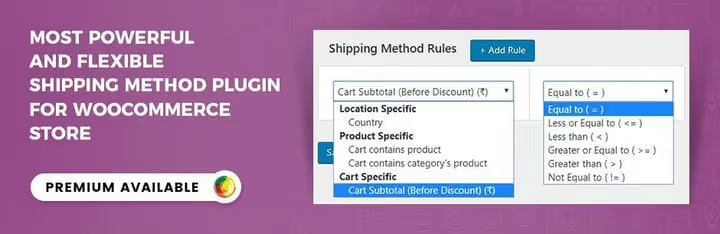
Standard WooCommerce flat rate calculates costs at three levels: order, item, and shipping class. When that's not enough, Woo Extra Flat Rate steps in. It adds rules based on product, category, cart total, and buyer location. You can set different costs for specific users and factor in item quantities. It works on top of native WooCommerce shipping zones and can be configured in 10 minutes without code.
The premium version on WooCommerce.com extends functionality with additional conditions and rule priorities.
Pros:
- Flexible rules on top of the native zone system
- Free version on WordPress.org
- Code-free setup in minutes
Cons:
- Flat rates only, no carrier API integration
- Some advanced conditions are in the premium version
Price: free on WordPress.org; premium $99/year.
🔗 Woo Extra Flat Rate on WordPress.org🔗 Live demo
3. WooCommerce Conditional Shipping and Payments

A challenge that nearly every growing store faces: not all shipping methods should be available to all customers. Express shipping doesn't work for remote regions. Cash on delivery is only for verified buyers. Bulky items can't be sent via standard carriers.
Conditional Shipping and Payments solves this with an "if-then" conditional rules engine. Country, order total, weight, user role, product category: any parameter becomes a trigger. Offer premium shipping to VIP customers, restrict options for items with special handling requirements.
The plugin is compatible with WooCommerce Subscriptions and Product Bundles. There's no free tier, but $79 per year pays for itself with the first dozen correctly processed orders.
Pros:
- Powerful "if-then" conditional rules engine
- Integration with other WooCommerce extensions
- Flexible configuration without programming
Cons:
- Paid version only, no free tier
- Requires time to think through rule logic
Price: $79/year on WooCommerce.com.
🔗 Conditional Shipping and Payments on WooCommerce.com
4. ELEX WooCommerce DHL Express
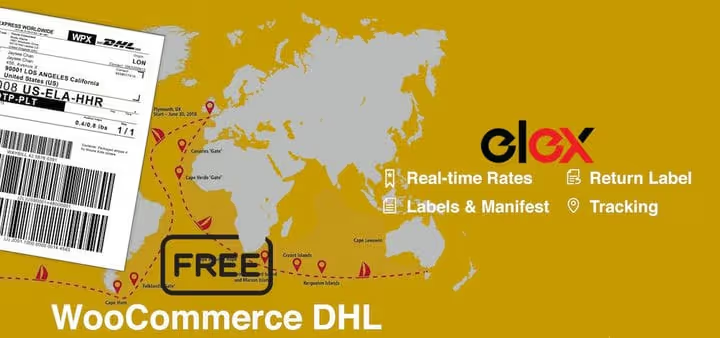
DHL covers more than 220 countries, making it the primary carrier for international trade. The plugin requests current rates from DHL based on weight and delivery address, then displays the cost, delivery times, and fee breakdown to customers: carrier rate, fuel surcharge, additional services.
The premium version adds label printing, tracking, and DHL Paket support for European destinations.
Pros:
- Real DHL rates via API
- Display of delivery times and fee breakdown
- Free version with basic functionality
Cons:
- DHL only, no other carriers supported
- DHL Paket only in premium
Price: free on ELEXtensions; premium from $69.
🔗 ELEX DHL Express on ELEXtensions🔗 Live demo
5. WooCommerce Easy Table Rate Shipping

When you need multiple shipping rules with different conditions, table rates are the most logical approach. This completely free plugin from WordPress.org creates multiple rate tables based on total order value and weight. You set the range, specify the cost, and the system applies the rule automatically. No premium upsell, no limited functionality.
It integrates with WooCommerce zones without conflicts. For most small and medium stores, it's more than enough. The only limitation: just weight and order total. For categories and shipping classes, see Flexible Shipping (item 6).
Pros:
- Completely free, no premium upsell
- Intuitive table configuration
- Clean integration with WooCommerce zones
Cons:
- Only weight and order total as conditions
- No carrier API integration
Price: free on WordPress.org.
🔗 Easy Table Rate Shipping on WordPress.org🔗 Live demo
6. Flexible Shipping

Another table rate plugin, but with broader capabilities. Flexible Shipping determines cost based on total weight and item quantity, with upper and lower bounds for each rule. You can add an order handling fee and create a cash-on-delivery option with its own markup. As of June 2026, version 6.8.0, with more than 100,000 active installations.
The premium version adds rules based on product categories, shipping classes, and time of day.
Pros:
- 100,000+ active installations
- Additional fees and cash on delivery
- Regular updates
Cons:
- Advanced conditions only in paid version
- Slightly steeper learning curve than Easy Table Rate
Price: free on WordPress.org; premium from $89/year.
🔗 Flexible Shipping on WordPress.org🔗 Live demo
7. ELEX EasyPost Shipping (FedEx, UPS, USPS)

If your customers are in the US and you want to give them carrier choice, this plugin combines FedEx, UPS, and USPS through a single EasyPost API. Rates are calculated automatically based on location and dimensions. For B2B stores, the option to split commercial and residential rates is useful.
An EasyPost account is required (with its own transaction fees). The premium version adds label printing and tracking for all three carriers from a single interface.
Pros:
- Three carriers through one plugin
- Automatic rate calculation
- Residential and commercial rate separation
Cons:
- EasyPost account required (separate pricing)
- Label printing only in premium
Price: free on ELEXtensions; premium from $69.
🔗 ELEX EasyPost on ELEXtensions
8. WooCommerce Shipping
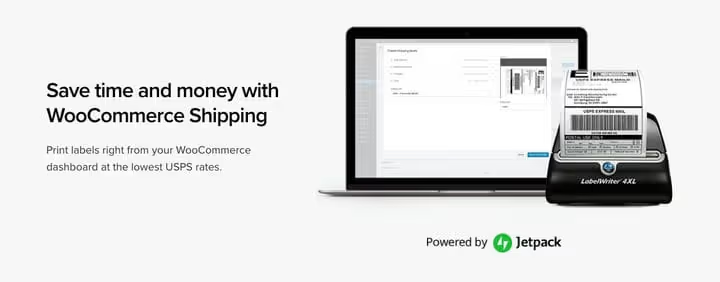
The official plugin from the WooCommerce team for printing USPS and DHL labels directly from the admin panel. No need to copy addresses to a third-party service: everything is done in one window. USPS commercial rates are applied automatically.
Important note: the plugin does NOT display rates in the cart or at checkout. It only handles label printing after the order is placed. To display real-time USPS rates, you need a separate USPS Shipping Method extension. Together, they cover the full cycle.
Pros:
- Official WooCommerce plugin
- USPS and DHL label printing from admin
- Automatic USPS discount application
Cons:
- Does not display rates in cart or at checkout
- Limited carrier selection
Price: free on WooCommerce.com.
🔗 WooCommerce Shipping on WooCommerce.com
9. WooCommerce Advanced Free Shipping
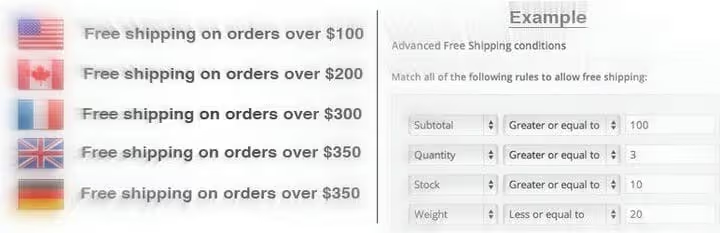
Free shipping boosts conversion, but blindly offering it to everyone leads to losses. Advanced Free Shipping configures dozens of conditions: subtotal, item quantity, location, user role, shipping class, and other parameters. Set a minimum amount so shipping pays for itself from your margin. Limit geography to your home region. Exclude heavy items.
It's extensible through hooks and filters for custom logic. The professional version on CodeCanyon adds coupons and rule priorities, but 90% of scenarios are covered by the free functionality.
Pros:
- Dozens of conditions to activate free shipping
- Extensibility through code
- Free version with core functionality
Cons:
- Pro version is on CodeCanyon, not WooCommerce.com
- Setting the threshold too low will eat into margins: configure carefully
Price: free on WordPress.org; pro version $29 (one-time payment).
🔗 Advanced Free Shipping on WordPress.org🔗 Live demo
10. ELEX Address Validation & Google Address Autocomplete

Sending a package to an incorrect address means a return and lost money. The ELEX plugin verifies address correctness and speeds up entry through Google Address Autocomplete. The buyer starts typing a street name, Google fills in the complete address, and postal code errors are eliminated. The free version uses EasyPost API for validation and Google for autocomplete.
The premium version adds validation via UPS and USPS APIs for more accurate US address verification.
Pros:
- Reduces returns due to address errors
- Speeds up checkout through autocomplete
- Free version with core functionality
Cons:
- UPS/USPS validation only in premium
- Google API key required
Price: free on ELEXtensions; premium from $59.
🔗 ELEX Address Validation on ELEXtensions
11. Weight Based Shipping for WooCommerce
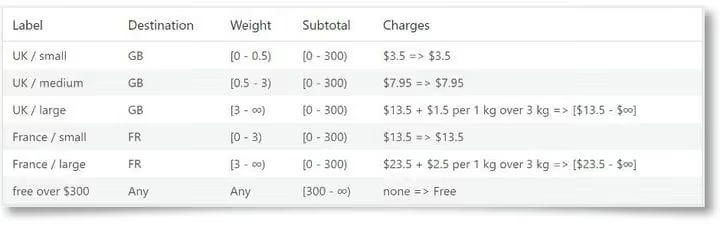
A simple and effective plugin for stores where shipping cost depends on weight. You set weight ranges and specify a fixed or progressive rate, and the system applies the appropriate rate automatically. It can be combined with conditions based on order total and destination country. Everything is configured through the standard WooCommerce zones interface. As of June 2026, version 6.15.3.
The premium version adds shipping class support and complex calculation scenarios.
Pros:
- Simple setup through WooCommerce zones
- Progressive rates with weight increments
- Free version covers basic needs
Cons:
- Shipping classes only in premium
- Does not account for dimensions, only weight
Price: free on WordPress.org; premium from $43/year.
🔗 Weight Based Shipping on WordPress.org🔗 Live demo
12. ELEX Hide WooCommerce Shipping Methods
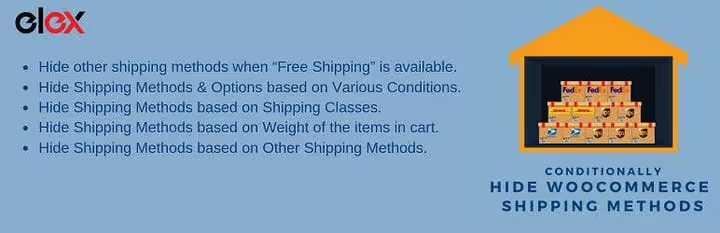
Sometimes you need to remove a shipping method rather than add one. Hide express shipping for heavy items, remove cash on delivery when free shipping is active, hide a courier service for uncovered regions.
The free version hides methods under conditions: free shipping is active, weight is exceeded, or a shipping class is set. The paid version extends conditions to products, categories, carriers, and locations. Updated in February 2026 (v1.4.8).
Pros:
- Cleans up checkout from irrelevant options
- Simple rule logic
- Free version covers main use cases
Cons:
- Advanced conditions in paid version
- Only hides, does not create new methods
Price: free on WordPress.org; paid from $49.
🔗 Hide Shipping Methods on WordPress.org🔗 Live demo
13. Order Delivery Date for WooCommerce

Customers want to know when their order will arrive and have the ability to choose a convenient date. Order Delivery Date adds a calendar to the checkout page, letting buyers select their delivery day. You can set minimum processing time (+1 day for assembly), mark non-working days, and set delivery limits per date to avoid overloading logistics.
The professional version adds time slots, holidays, and Google Calendar integration. As of June 2026, version 4.5.3.
Pros:
- Increases conversion through transparent timelines
- Delivery limits per day
- Flexible non-working day configuration
Cons:
- Time slots only in paid version
- Professional version is notably more expensive than basic
Price: free on WordPress.org; pro version from $119/year.
🔗 Order Delivery Date on WordPress.org🔗 Live demo
14. ELEX Australia Post Shipping

A specialized plugin for Australian stores. It integrates Australia Post services into the cart and checkout, showing customers current eParcel rates, including both contract and standard rates. You can selectively disable shipment types (remove Satchel and keep Own Packaging). It works directly with the Australia Post API without intermediary services.
The extended version adds label printing, tracking, and automatic box packing.
Pros:
- Direct integration with Australia Post API
- eParcel contract rates
- Selective shipment type disabling
Cons:
- Only for the Australian market
- Label printing in paid version
Price: free on ELEXtensions; extended from $69.
🔗 ELEX Australia Post on ELEXtensions
15. WooCommerce Advanced Shipment Tracking
After shipping an order, customers need a tracking number and tracking link. Advanced Shipment Tracking adds this functionality with a database of more than 100 carriers, from global players like FedEx and DHL to local services. It automatically inserts the carrier name, logo, and direct tracking link based on the tracking number.
You can add custom carriers, customize the block appearance in customer emails and the widget on the order page. There's integration with TrackShip for automatic status updates. As of June 2026, version 3.9.2, with more than 70,000 installations.
Pros:
- 100+ carriers out of the box
- Automatic tracking links
- Completely free
Cons:
- Does not add shipping methods, only tracking
- TrackShip is a separate paid service
Price: free on WordPress.org.
🔗 Advanced Shipment Tracking on WordPress.org🔗 Live demo
16. WooCommerce Address Book

A small but noticeably useful free plugin: customers save multiple shipping addresses in their account. Home, office, vacation home: all in one place, no need to re-enter each time. Especially valuable for stores with repeat purchases: consumables, pet food, office supplies. Regular customers select a saved address in two clicks instead of filling out five fields.
Important: the plugin does NOT ship a single order to multiple addresses. For that, see Shipping Multiple Addresses.
Pros:
- Completely free
- Improves repeat customer experience
- Minimalist and lightweight
Cons:
- Only saves addresses, no multi-address shipping
- Limited functionality
Price: free on WordPress.org.
🔗 WooCommerce Address Book on WordPress.org🔗 Live demo
17. WooCommerce Dropshipping
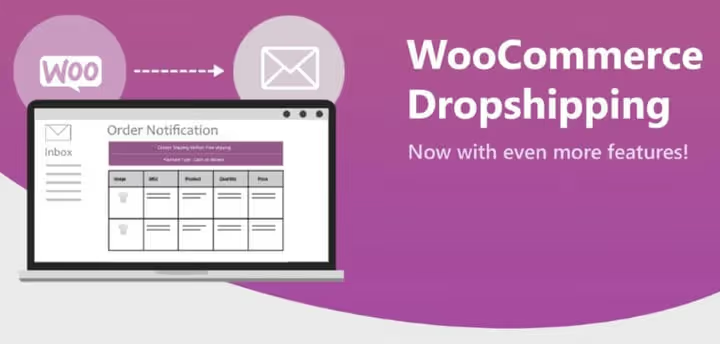
Rounding out the collection is the official dropshipping plugin from OPMC on WooCommerce.com. It automates the full cycle: importing products from suppliers, assigning orders to dropshippers, and sending notifications. It integrates with AliExpress via a Chrome extension and supports Amazon Affiliate. You can assign different suppliers to different categories, configure markups, and manage inventory from a single interface. As of April 2026, version 5.2.3.
Pros:
- Official plugin on WooCommerce.com
- Integration with AliExpress and Amazon
- Automatic order assignment to suppliers
Cons:
- Paid version only
- AliExpress import requires a separate Chrome extension
Price: $99/year on WooCommerce.com.
🔗 WooCommerce Dropshipping on WooCommerce.com
⁉️🤔 Frequently asked questions
Do I need a separate shipping plugin if WooCommerce already has built-in settings?
Yes, for the vast majority of stores. Built-in methods cover only the simplest scenarios. As soon as you need weight-based calculations, carrier API integration, label printing, or tracking, a plugin becomes essential. Even a small store with a hundred orders per month will notice the difference in processing speed.
Which plugin should I choose for a store that ships orders worldwide?
For international shipping, ELEX DHL Express (item 4) is optimal: DHL covers more than 220 countries. If your geography is narrower but you need multiple carriers in the US, look at ELEX EasyPost (item 7). For Australian stores, ELEX Australia Post (item 14). A universal option: Flexible Shipping (item 6) with table rates.
Can I use multiple shipping plugins simultaneously?
Yes, this is common practice. A typical stack: Flexible Shipping (item 6) for rates + WooCommerce Shipping (item 8) for label printing + Advanced Shipment Tracking (item 15) for tracking. Plugins from the same developer (ELEX) are tested together and conflict less often. When combining different vendors, always run a test order.
Are free shipping plugins inferior to paid ones?
Not always. Easy Table Rate Shipping (item 5) and Advanced Shipment Tracking (item 15) are completely free and among the best in their categories. Paid versions add label printing, tracking, and extended conditions. If you don't need those, free versions are sufficient. What matters is matching the task, not the price tag.
How do I properly set up free shipping without losing profit?
Use Advanced Free Shipping (item 9) with clear conditions. Set a minimum order amount noticeably above your average order value so shipping pays for itself from your margin. Limit geography to your home region with minimal rates. Exclude heavy items. A/B test with different thresholds, starting with a level above your average order value, and adjust based on conversion.
What should I do if a shipping plugin conflicts with my theme or another extension?
Check your stack versions: WooCommerce, shipping plugin, theme, PHP. Enable a standard theme (Storefront or Twenty Twenty-Five) and deactivate all plugins except WooCommerce and the problematic one. If the conflict disappears, enable components one by one. In most cases, the culprit is not the shipping plugin but a third-party extension interfering with checkout hooks.
What to install for your needs: the final matrix
There's no universal answer to "which plugin is best": it all depends on your store's specifics. Here's the selection logic in matrix form:
- Real-time USPS rates and label printing: ELEX USPS Shipping (item 1).
- Maximum rule flexibility: Conditional Shipping and Payments (item 3).
- Free table rates: Easy Table Rate Shipping (item 5).
- Worldwide shipping via DHL: ELEX DHL Express (item 4).
- Choice between FedEx, UPS, and USPS: ELEX EasyPost (item 7).
- Label printing only: WooCommerce Shipping (item 8).
- Free shipping without losing margin: Advanced Free Shipping (item 9).
- Dropshipping store: WooCommerce Dropshipping (item 17).
A basic stack for any store: Flexible Shipping for rates + Advanced Shipment Tracking for tracking + Order Delivery Date for date selection. It can be assembled from free versions and covers most typical scenarios.
Test 2-3 plugins for your task on staging, verify calculations on real carts. Any of the 17 options above is live and supported in 2026.

A professional team of writers and editors specializing in creating quality content.