













 AIIllustrative image: AI-generated
📅 14 WordPress event calendar plugins: complete 2026 review
A website without an event calendar is like a poster without dates. Everything seems written, but when to show up remains unclear. For WordPress, this problem is particularly acute: there are dozens of calendar plugins, but half are either abandoned or drag along half the site's dependencies.
Worse still, a poorly chosen calendar breaks theme layout, conflicts with caching, and turns the admin panel into a maze of settings. We've been down this road more than once: installing, testing, removing, searching again.
Below are 14 event calendar plugins that actually work in 2026. From the free giant The Events Calendar with 800,000+ installations to niche solutions like Conference Scheduler for multi-track conferences. Each has been tested on a live site: installation, configuration, a couple weeks of test events. By the end, you'll know which plugin to choose for your task, without guessing and without extra tabs.
💡 Quick overview:
- Determine your event type: one-time or recurring, paid or free, with speakers or without
- Check the comparison table, it will filter out unsuitable options in a minute
- Test 2-3 free versions on staging before installing on production
- For paid tickets and registrations, look toward EventPrime, WP Event Manager, or Amelia
Plugin comparison table
Plugin | Price | Active installations | Tickets / payments | Recurring events | Resource management |
|---|---|---|---|---|---|
The Events Calendar | Free / Pro from $99/year | 800,000+ | Yes (Pro) | Yes | No |
WP Event Manager | Free / addons from $39/year | 10,000+ | Yes (WooCommerce) | Yes (addon) | No |
EventPrime | Free / from $49/year | 8,000+ | Yes (PayPal, Stripe) | Yes | Yes (performers, venues) |
Events Manager | Free / Pro from $75/year | 100,000+ | Yes (Pro) | Yes | No |
EventOn | from $25 (CodeCanyon) | 63,000+ sales | Yes (addons) | Yes | No |
Amelia | Free (Lite) / Pro from $79/year | 50,000+ | Yes (Pro) | Yes (Pro) | No |
Event Organiser | Free / Pro from £40 | 10,000+ | Yes (addon) | Yes (complex patterns) | Yes (locations with maps) |
connectDaily | Free / Premium | 1,000+ | No | Yes | Yes (rooms, staff, equipment) |
1. The Events Calendar

🔗 The Events Calendar on WordPress.org | 🔗 Live demo
The Events Calendar from Modern Tribe, the undisputed leader among WordPress calendars. More than 800,000 active installations, a 4.7-star rating, and regular updates make it the most reliable choice for any site. The free version completely covers the "create event → show calendar" scenario: month, list, day, Google Maps, organizers, and venues.
The ecosystem of premium add-ons (Events Calendar Pro, Event Tickets, Filter Bar) adds ticket sales, advanced calendar views, and sophisticated search. The plugin works with any theme, supports microformats, and gives developers clean code with documented hooks. If you're just starting, take this one, you won't go wrong.
- Pros: huge community, regular updates, fully functional free version, Russian translation, works with popular themes
- Cons: advanced features (tickets, filters, recurring) only in paid add-ons
- Price: free (core), Pro from $99/year
2. WP Event Manager
🔗 WP Event Manager on WordPress.org | 🔗 Demo site
WP Event Manager, not just a calendar but a complete ecosystem for the event business. The core is available free on WordPress.org, and 37+ premium add-ons cover everything: calendar, ticket sales, registrations, Zoom, Google Maps, recurring events, QR codes, and even a mobile app for organizers.
In practice, the plugin impresses with deployment speed: shortcodes and widgets embed in any theme, search with filtering by keywords, locations, dates, and ticket prices works snappily, and registration forms configure without code. WooCommerce integration provides monetization flexibility, from paid tickets to commission from organizers.
- Pros: 37+ add-ons, lightweight core, WooCommerce integration, iCal and Google Calendar support, translations in 40 languages
- Cons: most features in paid add-ons, free version is more of a trial, support only for paid users
- Price: free (core), add-ons from $39/year
3. EventPrime

🔗 EventPrime on WordPress.org | 🔗 Live demo
EventPrime, one of the most modern calendars in the WordPress repository. The plugin from Metagauss (the same developers who make RegistrationMagic and ProfileGrid) is designed for visual convenience: events are created directly from the calendar by clicking on a date, color coding by event types is visible in both admin and frontend, and drag-and-drop changes dates without reloading.
The free version already includes: bookings with PayPal and Stripe, multiple ticket types, venues and performers with photos, custom registration fields, email notifications, and detailed sales analytics. Extensions add live seating, sponsors, coupons, and MailPoet integration. A separate plus, frontend participant dashboard with bookings and tickets in one place.
- Pros: modern UI, event creation directly from calendar, built-in analytics, tickets and payments in free version, active development
- Cons: 8,000+ installations (growing but not yet a giant), some extensions paid, ecosystem smaller than The Events Calendar
- Price: free (core), extensions from $49/year
4. Sugar Calendar
🔗 Sugar Calendar official site | 🔗 Demo
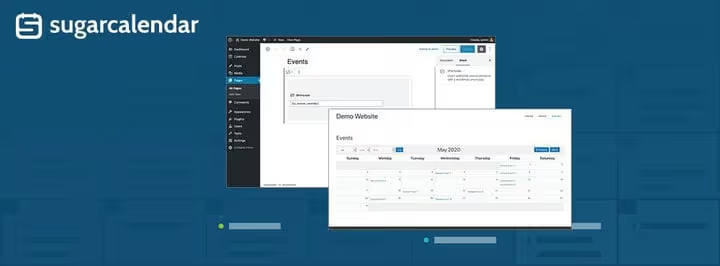
Sugar Calendar takes the opposite approach: instead of a feature-packed combine, a lightweight calendar that simply works. The plugin from Sandhills Development (the same folks who make Easy Digital Downloads) deliberately avoids feature bloat. Starting price, $29 for a single-site license.
In the base: date and time format settings, color coding of events by calendars, CSV/Excel import via WP All Import. Free add-ons add Google Maps and registration forms through Ninja Forms or Gravity Forms. Professional and Ultimate licenses ($99 and $199/year) unlock tickets, iCal feeds, and frontend event submission, but the core remains the same lightweight.
- Pros: minimalist and fast, simple setup, reasonable starting price, free add-ons, excellent documentation
- Cons: advanced features only in expensive tiers, smaller community, fewer third-party integrations
- Price: from $29/year
5. Events Manager

🔗 Events Manager on WordPress.org
Events Manager, a veteran in the WordPress calendar world, and its free version still outperforms many paid competitors. More than 100,000 active installations, regular updates, and active support from the author (@msykes) make it one of the most reliable options.
In the free version: calendar, event registration, multiple ticket types, locations with Google Maps, custom event attributes, BuddyPress integration, iCal feeds, shortcodes, and widgets. The Pro version adds WooCommerce, Stripe, PayPal, custom booking forms, PDF tickets, QR check-in, waiting lists, and an automation system with triggers (webhooks, SMS, Telegram, WhatsApp). Recently, AI integration via MCP and REST API.
- Pros: incredibly functional free version, 100,000+ installations, active development, BuddyPress, flexible templates, Pro with automation
- Cons: admin interface not the most modern, learning curve for advanced scenarios
- Price: free (core), Pro from $75/year
6. My Calendar

🔗 My Calendar on WordPress.org | 🔗 Screenshots
My Calendar, a free plugin with 30,000+ active installations that focuses on accessibility and flexibility. The built-in shortcode generator allows you to assemble a custom calendar view without code, and multisite support plus fine-grained permissions make it interesting for site networks.
The plugin's CSS and JavaScript are fully editable from the admin panel, designers and developers will appreciate this. The plugin supports recurring events, categories with color coding, widgets, and iCal export. Among obvious drawbacks: no built-in tickets and payments.
- Pros: free, accessibility out of the box, multisite, flexible customization via shortcodes, editable CSS/JS
- Cons: no tickets and payments, basic visual design, smaller community
- Price: free
7. EventOn
🔗 EventOn on CodeCanyon | 🔗 EventOn Lite on WordPress.org
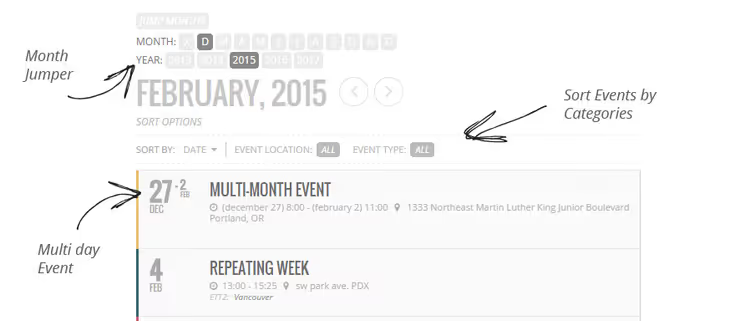
EventOn, this is when design matters. The plugin from CodeCanyon (from $25, 63,000+ sales) makes perhaps the most beautiful calendars in the WordPress ecosystem. Colored event tiles, animations, customizable taxonomies, and a built-in shortcode generator, the calendar looks like part of the design rather than a tacked-on widget.
Events can be single-day and multi-day, with repeats and without end dates (convenient for ongoing programs or fundraising). Visitors download events to Google Calendar or iCalendar via ICS file. Add-ons add Eventbrite, PayPal, WooCommerce, seating, and much more. For testing before purchase, there's EventOn Lite in the WordPress.org repository.
- Pros: best design among calendars, simple shortcode generator, ICS export, powerful visual settings, free Lite version
- Cons: core functionality paid (CodeCanyon), each addon purchased separately
- Price: one-time license from $25
8. Event Organiser

🔗 Event Organiser on WordPress.org | 🔗 Screenshots
Event Organiser from Stephen Harris, a solid free calendar that uses native WordPress mechanisms (custom post types) and doesn't impose its own architecture. The main feature, complex recurring event patterns: "every third Tuesday of the month" or "every two weeks on Thursdays" configure without workarounds.
Venues with Google Maps, category color coding, widgets and shortcodes (calendar, list, agenda) come in the free core. For extended functionality, there's a Pro version and add-ons: bookings, Stripe payments, frontend event submission, iCal sync, and CSV export. Developers will appreciate documented hooks, filters, and templates, the plugin is designed to be customizable without hacking the core.
- Pros: free core with powerful recurring patterns, clean architecture on custom post types, documented hooks and filters, Google Maps for venues
- Cons: admin interface not the most modern, some extensions paid, community smaller than leaders
- Price: free (core), Pro from £40
9. Calendarize It!

🔗 Calendarize It! on CodeCanyon | 🔗 Demo
Calendarize It! lives up to its name: it truly "calendarizes" anything. The plugin stands out with support for custom taxonomies and custom post types, plus an advanced filter system, you can build a calendar for events of a specific type, category, and author.
Recurring events are configured flexibly: daily, weekly, biweekly, monthly, annually. There are 6 free add-ons (CSS editor, Flat UI widget, custom buttons) and 11 premium add-ons. The plugin is compatible with WPBakery Page Builder.
- Pros: custom taxonomies and post types, advanced filters, WPBakery compatibility, visual CSS editor
- Cons: interface overloaded with options, paid only (CodeCanyon), learning curve for beginners
- Price: from $39 (one-time license)
10. Event Espresso

🔗 Event Espresso official site | 🔗 Demo
Event Espresso, this is not just a calendar plugin but a complete registration and event management system. If you run conferences, seminars, training sessions, or weddings and need a full cycle "registration → payment → confirmation → reminder → accounting," this is your tool.
The system automates the entire workflow: custom confirmation emails, reminders, payment management, registration tracking. Supports multiple ticket types, promo codes, group registrations, and integration with popular payment gateways.
- Pros: complete event management cycle, automated emails and reminders, multiple ticket types, group registrations
- Cons: expensive ($79/year starting), overkill for a simple calendar, learning curve
- Price: from $79/year
11. MotoPress Timetable and Event Schedule

🔗 MotoPress Timetable on WordPress.org | 🔗 Demo
MotoPress Timetable is designed for one scenario: beautiful weekly schedules. Fitness clubs with classes by hour, schools with lesson schedules, conferences with parallel sessions, the plugin does what regular calendars are inconvenient for. 30,000+ active installations, a 4.3-star rating, and an update in June 2026 confirm: the product is alive and maintained.
Flexible column and event setup, filtering by categories and tags, multiple display styles (dropdown or tabs), support for featured images for each event. Timetable block for Gutenberg and widget for Elementor allow you to insert a schedule on any page with one click. Color settings for background, text, and hover help match the schedule to brand guidelines.
- Pros: ideal for schedules (fitness, school, conferences), Gutenberg block and Elementor widget, color customization, retina-ready, free
- Cons: not a universal calendar (schedules only), no tickets and payments, limitation on displaying events beyond one year
- Price: free
12. connectDaily

🔗 connectDaily on WordPress.org | 🔗 Screenshots
connectDaily, the only plugin in this roundup that seriously tackles resource management. Rooms, vehicles, staff, equipment, each resource is assigned its own approver, and the system ensures the same hall isn't double-booked. Ideal for schools, universities, churches, and coworking spaces.
Beyond resource planning: responsive calendars, mini-calendars and event lists with filtering, iCal/JSON/CSV/RSS import and export, email and SMS reminders, Facebook and Twitter integration. The free version gives one calendar, premium gives unlimited. Important bonus: the engine runs on an external service and doesn't load your server.
- Pros: unique resource management (rooms, staff, equipment), SMS and email reminders, social networks, iCal/JSON/CSV/RSS, Gutenberg blocks
- Cons: free version limited to one calendar, interface not the most modern, small installation base
- Price: free (basic), Premium on request
13. Amelia

🔗 Amelia on WordPress.org | 🔗 Demo
Amelia, this is when an event calendar grows into a complete booking system. 50,000+ active installations and a 4.8 rating on WordPress.org speak for themselves. The plugin covers two scenarios at once: automatic appointment booking for services (salons, clinics, coaching) and event booking with custom ticket types, deposits, and group registrations.
The free Lite version gives an event calendar, booking forms, and payment acceptance via Square. The Pro version ($79/year) adds PayPal, Stripe, WooCommerce, Mollie, Razorpay, Zoom and Google Meet, recurring events and appointments, SMS and email reminders, client and employee dashboards, plus custom fields for registration forms. The interface, one of the best in the niche: mobile first, conversion forms, drag-and-drop calendar.
- Pros: modern UI, tickets and payments (Stripe, PayPal, Square), Zoom/Google Meet, SMS reminders, dashboards, mobile first
- Cons: advanced features only in paid version, can be overkill for a simple calendar, support only for paid users
- Price: free (Lite), Pro from $79/year
14. Conference Scheduler

🔗 Conference Scheduler on WordPress.org | 🔗 Screenshots
Conference Scheduler, highly specialized but brilliant tool for conferences. The plugin handles parallel sessions, groups workshops by locations and tracks, lets visitors build a personal schedule via "star" bookmarks, and filter talks by keywords, topics, and speakers.
The free version includes creating workshops with code, time, location, description, and speakers, attaching presentation files, frontend search and filtering, plus responsive design for mobile. Version 3.0.0 (June 2026) added multi-event support in Pro. The Pro version extends the plugin with Excel import/export, a registration system with waiting lists, and WPML/Polylang compatibility.
- Pros: narrow specialization on conferences, parallel sessions, personal schedule for attendees, responsive design, actively updated
- Cons: only for conferences (not a universal calendar), Pro with registration paid, modest installation base
- Price: free (core), Pro on conferencescheduler.com
A short video on installation and basic setup of the most popular free calendar, The Events Calendar. Visual, 15 minutes, all to the point.
⁉️🤔 Frequently asked questions
What fundamentally distinguishes free calendar plugins from paid ones?
Free plugins (The Events Calendar, Events Manager, My Calendar) provide a full-featured calendar with basic functions: event creation, multiple display views, categories, Google Maps. Paid ones add monetization (tickets, Stripe/PayPal/WooCommerce), extended customization, or automation (email/SMS reminders, webhooks). For a nonprofit site, the free The Events Calendar is completely sufficient, for event business look toward WP Event Manager, EventPrime, or Amelia.
Can you sell tickets through a free event calendar?
Yes, if the plugin supports it. Among free ones: EventPrime provides PayPal and Stripe in the free core, Events Manager, basic registration and bookings. Amelia Lite accepts payments via Square. The Events Calendar requires a paid Event Tickets add-on. For full monetization with multiple ticket types, coupons, and commission tracking, you almost always need a paid tier.
Do you need separate hosting for a high-traffic event calendar?
For most sites, no. Plugins like The Events Calendar and Events Manager are optimized and don't create significant load with thousands of events. But if you have tens of thousands of events with daily updates and thousands of visitors, enable caching (WP Rocket, LiteSpeed) and possibly move the calendar to a subdomain with a separate database. connectDaily wins in this regard: its engine runs on an external service and doesn't load your server.
Which plugin to choose if events are held in different cities and at different venues?
Look at location support with maps: The Events Calendar (Google Maps), Events Manager (locations with coordinates, radius search), EventPrime (venues with addresses and coordinates), Event Organiser (venues with Google Maps), connectDaily (geographic radius search). For multi-track conferences with parallel sessions, Conference Scheduler. For fitness clubs with schedules by room, MotoPress Timetable.
Can you migrate events from one calendar plugin to another?
Yes, but the process depends on the specific "from → to" pair. The most reliable path, export to iCal/CSV and import to the new plugin. Events Manager and connectDaily support iCal, JSON, CSV import/export out of the box. The Events Calendar requires the Event Aggregator add-on. Before migration, definitely make a full site backup.
What to do if the calendar plugin conflicts with the theme or other plugins?
First: switch to a default theme (Twenty Twenty-Six) and disable all plugins except the calendar. If the conflict disappears, enable plugins one by one to find the culprit. Second: check PHP version (need PHP 8.0+ for modern plugins). Third: write to support, The Events Calendar, Events Manager, and EventPrime have active forums on WordPress.org. Fourth: for theme conflicts, "Default Page Template" mode in plugin settings often helps.
Which event calendar plugin to choose in 2026?
The choice comes down to three questions. Do you need tickets and payments? If yes, WP Event Manager (flexible assembly with add-ons), EventPrime (all in one), or Amelia (beautiful UI with automation). Is calendar design important? EventOn makes the most beautiful calendars in the ecosystem, Calendarize It! gives advanced filters and taxonomies. Do you need resources (rooms, equipment, staff)? connectDaily, the only one that solves this task systematically.
If you're just starting, install The Events Calendar. The free version covers most scenarios, and when you need more, the add-on ecosystem lets you grow without migrating to another plugin.
For schedules and conferences, there are two clear paths: MotoPress Timetable, for weekly schedules (fitness, school), Conference Scheduler, for multi-track conferences with parallel sessions. Both are free in the base and actively updated.
And if you have experience with any of the plugins from this roundup, share in the comments. Your case will save time for someone who's choosing a calendar for their first event right now.

A professional team of writers and editors specializing in creating quality content.