














🚀 23 best WordPress portfolio and gallery plugins in 2026
Installed a plugin, gallery broke. Sound familiar?
The standard WordPress gallery outputs three columns. Masonry, filters, AJAX pagination, video mixed with photos, none of this comes in the box. But the client wants "like Dribbble."
The portfolio and gallery plugin market underwent a major shakeup between 2020 and 2026. CodeCanyon solutions, UberGrid, Media Grid, Go Portfolio, Cube Portfolio, ZoomFolio, Justified Image Grid, all discontinued. Replaced by WordPress.org players: actively maintained, with free versions and transparent pricing. We tested each plugin on a test WordPress 6.6 installation, below is an honest breakdown without marketing.
💡 Quick overview:
- 23 portfolio and gallery plugins: free, freemium and premium
- 8 outdated CodeCanyon solutions replaced with actively maintained alternatives
- Comparison table, current 2026 pricing and direct links
- Tested on WordPress 6.6 test installation
Comparison table: all plugins at a glance
Plugin | Type | Masonry | Filters | Video | Price |
|---|---|---|---|---|---|
Modula | Freemium | ✅ | Pro | ✅ | From $39/year |
JetGridBuilder | Free | ✅ | ✅ | ❌ | $0 |
Meow Gallery | Free | ✅ | ❌ | ❌ | $0 |
Essential Grid | Premium | ✅ | ✅ | ✅ | ~$35 |
JetPack Tiled | Free | ❌ | ❌ | ❌ | $0 |
The Grid | Premium | ✅ | ✅ | ✅ | ~$30 |
Portfolio Designer | Premium | ✅ | ✅ | ✅ | ~$25 |
NextGen Gallery | Freemium | ❌ | Pro | ❌ | From $69/year |
Visual Portfolio | Freemium | ✅ | ✅ | ✅ | From $49/year |
Easy Media Gallery | Free | ✅ | ❌ | ✅ | $0 |
Gmedia Gallery | Free | ✅ | ✅ | ✅ | $0 |
Robo Gallery | Freemium | ✅ | ✅ | Pro | From $39/year |
Filter Everything | Freemium | ❌ | ✅ | ❌ | From $49/year |
Envira Gallery | Premium | ❌ | ✅ | ✅ | From $39/year |
Smart Slider 3 | Freemium | ❌ | ❌ | ✅ | From $49/year |
FooGallery | Freemium | ✅ | Pro | Pro | From $49/year |
Photo Gallery (10Web) | Freemium | ✅ | ✅ | Pro | From $45/year |
Photo Gallery (Supsystic) | Freemium | ✅ | ❌ | Pro | From $39 |
Final Tiles Gallery | Freemium | ✅ | Pro | Pro | From $39/year |
All-in-One Video Gallery | Free | ❌ | ✅ | ✅ | $0 |
Portfolio Filter Gallery | Free | ✅ | ✅ | ❌ | $0 |
SimpLy Gallery | Free | ✅ | ❌ | ❌ | $0 |
Photonic | Free | ❌ | ❌ | ❌ | $0 |
1. Modula, flexible grid, unlike others (Freemium)

Modula, a gallery builder where you're not locked into a rigid grid. Each image can be stretched or squeezed independently of neighboring ones as designed by the developer. The result is a dynamic layout, not a 3×3 table.
Features: dozens of hover effects, loading animations, built-in lightbox. EXIF data from photos right in the gallery: exposure, ISO, aperture, GPS coordinates. Photos mixed with YouTube and Vimeo videos.
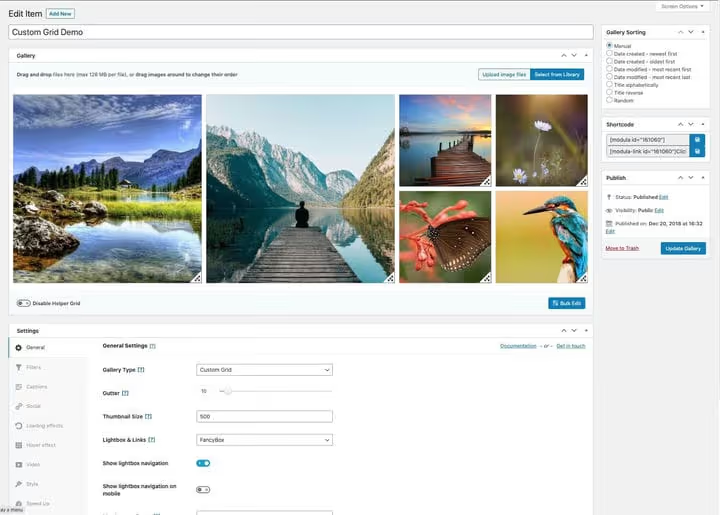
Free version provides basic functionality. Modula Pro unlocks filters, password protection, WooCommerce and priority support. Pricing from $39 per year for one site.
- Pros: free grid without fixed columns, EXIF data, drag-and-drop assembly, partially Russian interface
- Cons: filters only in Pro, admin sluggish with 100+ images
- Price: Free / Pro from $39/year
- Download: 🔗 Modula on WordPress.org | 🔗 Live demo
2. JetGridBuilder, pixel precision for Elementor (free)

JetGridBuilder, a grid constructor for Elementor with pixel-level element placement. Stretch one cell across three columns, squeeze another into half a column, expand a third to half the screen. Drag corners with your mouse and see the result instantly. For designer and illustrator portfolios, a perfect fit.

Two display modes, spacing settings, loader, date, author. Key feature: integration with JetEngine. Create dynamic content through custom post types, and JetGridBuilder styles it with a grid.
- Pros: free cell proportion adjustment, deep JetEngine integration, free
- Cons: works only with Elementor, useless on Gutenberg
- Price: $0
- Download: 🔗 JetGridBuilder on WordPress.org | 🔗 Live demo
3. Meow Gallery, lightweight Edge Gallery replacement (free)

Meow Gallery, an actively maintained free gallery plugin. Replaced the discontinued Edge Gallery (removed from WordPress.org in 2022). Masonry grid, custom layouts, clean interface.
Plugin works through standard WordPress media library. For slider and lightbox install companion Meow Lightbox, conflicts excluded. May 2026 update, WordPress 6.6 compatibility confirmed.
- Pros: completely free, minimal code, companion lightbox, active support (May 2026 update)
- Cons: no built-in filters, no video in gallery
- Price: $0
- Download: 🔗 Meow Gallery on WordPress.org | 🔗 Live demo
4. Essential Grid, universal grid builder (Premium)

Essential Grid, a universal grid constructor for posts, pages, WooCommerce and custom post types. Masonry grids with filtering, animation and visual skin editor.
Free version removed from WordPress.org in 2019. Only premium remains at ~$35 on official site. Plugin receives updates.
Free alternative: Photo Gallery by 10Web, 400,000+ installs, masonry, sliders, lightbox. Covers most needs with room to spare.
- Pros: works with any WordPress content, visual skin editor, filtering
- Cons: no free version, $35 premium price without trial
- Price: ~$35 (one-time)
- Download: 🔗 Essential Grid on official site
5. JetPack tiled galleries, when plugin already installed (free)

If you already have JetPack installed (people install it for image CDN or statistics), a separate gallery plugin isn't needed. Tiled Galleries module provides three styles: tiles, squares and circles.
Activate the module in JetPack settings, and standard WordPress galleries transform into responsive tiled grids. Note: settings are modest, colors and hover effects aren't customizable. Enough? Use it. Not enough? Look at Modula or Envira.
- Pros: doesn't require separate plugin, two-click setup, built-in responsiveness
- Cons: minimal appearance settings, no masonry, requires JetPack itself
- Price: $0 (included in JetPack)
- Download: 🔗 JetPack Tiled Galleries documentation
6. The Grid, skin builder from scratch (Premium)

The Grid, premium grid plugin on CodeCanyon for ~$30. Skin builder from scratch: design fonts, hover effects, animation, icons and apply to grid, masonry or justified.
Supports all WordPress post formats, AJAX loading, WPML, full-width operation. Live preview: changed setting, saw result.
- Pros: skin builder from scratch, three layouts, live preview, AJAX pagination
- Cons: no free version, steep learning curve, not for beginners
- Price: ~$30 (one-time, CodeCanyon)
- Download: 🔗 The Grid on CodeCanyon
7. Portfolio Designer, quick, beautiful, no code (Premium)

Portfolio Designer, premium plugin on CodeCanyon for $25. Collection of ready-made layouts: masonry, justified, slider, carousel. Unlike The Grid, no need to fiddle with skin builder.
Colors, spacing, fonts, icons, category filters are configurable. Responsiveness is solid, works with custom post types.
- Pros: ready-made layouts, quick start, responsiveness, works with CPT
- Cons: premium only ($25), layouts less flexible than The Grid skin builder
- Price: ~$25 (one-time, CodeCanyon)
- Download: 🔗 Portfolio Designer on CodeCanyon
8. NextGen Gallery, veteran since 2007 (Freemium)

NextGen Gallery, veteran: 30+ million downloads, on market since 2007. Two gallery types (slideshow and thumbnails), two lightbox modes, batch upload, watermarks, copy protection.
Free version provides basic galleries. Pro (from $69/year), e-commerce for selling photos through WooCommerce, proofing galleries for clients, priority support.
- Pros: rich functionality, e-commerce in Pro, active installs (30M+), decades of development
- Cons: interface overloaded, no masonry even in Pro, Pro price above average
- Price: Free / Pro from $69/year
- Download: 🔗 NextGen Gallery on WordPress.org | 🔗 Live demo
9. Visual Portfolio, masonry and justified in one package (Freemium)

Visual Portfolio, free plugin with masonry, justified and grid layouts right in Gutenberg. On WordPress.org: 100,000+ active installs, 4.8 rating. Separate block in editor, choose layout, add images, publish.
- Pros: Gutenberg block, masonry + justified + grid, 100,000+ installs, 4.8 rating
- Cons: some features in Pro, modest hover effects in free version
- Price: Free / Pro from $49/year
- Download: 🔗 Visual Portfolio on WordPress.org | 🔗 Live demo
10. Easy Media Gallery, UberGrid replacement (free)

Easy Media Gallery, free replacement for discontinued UberGrid. Masonry grid, support for images and YouTube/Vimeo videos, built-in lightbox. Create gallery, add media, insert via shortcode.
On WordPress.org since 2012, regular updates. No category filters, for that use Filter Everything or Portfolio Filter Gallery. For basic masonry portfolio, completely covers the need.
- Pros: completely free, masonry + video, simple interface, active support
- Cons: no filters, shortcodes only (no Gutenberg block)
- Price: $0
- Download: 🔗 Easy Media Gallery on WordPress.org
11. Gmedia Gallery, Media Grid replacement (free)

Gmedia Gallery, free replacement for discontinued Media Grid. Built-in media manager, separate from WordPress media library: upload photos, videos and audio to own storage and build galleries from them. Masonry, slider, carousel.
Filters by albums and tags out of the box. YouTube, Vimeo and self-hosted video, in one gallery with photos. Pro modules (from $25) add Google Photos sync.
- Pros: own media manager, filters + masonry free, audio support
- Cons: separate storage (not standard media library), interface requires getting used to
- Price: Free / Pro modules from $25
- Download: 🔗 Gmedia Gallery on WordPress.org
12. Robo Gallery, Go Portfolio replacement (Freemium)

Robo Gallery, replacement for discontinued Go Portfolio with isotope filtering. Masonry, grid, polaroid and carousel, four layouts in free version. Polaroid style, plugin's signature feature: images with captions like printed photos.
Visual interface: drag images, configure columns and effects. Polaroid style for photographers and event portfolios. Pro (from $39/year) adds video, lightbox and image SEO optimization.
- Pros: polaroid style, 4 layouts free, visual editor, active support
- Cons: video only in Pro, free version without lightbox
- Price: Free / Pro from $39/year
- Download: 🔗 Robo Gallery on WordPress.org | 🔗 Live demo
13. Filter Everything, filtering for anything (Freemium)

Filter Everything, not a gallery plugin, but a universal AJAX filtering engine. Works on top of any content: posts, WooCommerce, custom post types. Adds filters by categories, tags, custom fields, price.
On WordPress.org: 30,000+ installs, 4.8 rating. Free version provides basic filters. Pro (from $49/year) adds meta-field filtering, WooCommerce price range slider and caching.
- Pros: works with any content, AJAX without reload, WooCommerce filters in Pro
- Cons: requires separate grid plugin, Pro features for $49/year
- Price: Free / Pro from $49/year
- Download: 🔗 Filter Everything on WordPress.org | 🔗 Live demo
14. Envira Gallery, speed as priority (Premium)

Envira Gallery focuses on speed. Galleries load faster than competitors. Downside: no masonry here, only grid and justified.
Functionality: lightbox, slideshow, copy protection, e-commerce through WooCommerce, templates for photographers and catalogs. No free version. Pricing from $39/year for basic tier.
- Pros: high loading speed, lightbox + slideshow + e-commerce, ready templates
- Cons: no masonry, no free version, high price for infrequent use
- Price: from $39/year
- Download: 🔗 Envira Gallery on official site | 🔗 Live demo
15. Smart Slider 3, studio-level animation (Freemium)

Smart Slider 3, animation engine with canvas rendering: parallax, fade, zoom, rotate at studio landing page level. Build slides with mouse through layers and timing. Carousel gallery with perspective effect works through canvas, smoother than CSS from discontinued Cube Portfolio.
700,000+ installs, 4.4 rating on WordPress.org. Free version with layer limitations. Pro (from $49/year) unlocks all animations, dynamic slides from WordPress posts and priority support. Cube Portfolio replacement in animation department, covers with room to spare.
- Pros: studio animations, canvas rendering, live preview, huge user base
- Cons: layer limitation in free version, not masonry gallery (different tool class)
- Price: Free / Pro from $49/year
- Download: 🔗 Smart Slider 3 on WordPress.org | 🔗 Live demo
16. FooGallery, solid free option (Freemium)

FooGallery, 200,000+ installs, 4.8 rating on WordPress.org. In free version seven templates: masonry, justified, grid, single thumbnail, simple portfolio and two for Gutenberg. Built-in lightbox and lazy loading.
YouTube and Vimeo video, through Pro (Expert, $49/year). Commerce ($79/year) adds WooCommerce. Good Justified Image Grid replacement for most scenarios.
- Pros: 7 templates free, 4.8 rating, built-in lightbox + lazy loading
- Cons: video only in Pro ($49/year), filters only in Pro
- Price: Free / Pro from $49/year
- Download: 🔗 FooGallery on WordPress.org | 🔗 Live demo
17. Photo Gallery by 10Web, free all-in-one (Freemium)

Photo Gallery by 10Web, 400,000+ active installs. Free: masonry, grid, slider, carousel, lightbox with share buttons. Batch upload, watermarks, copy protection.
Galleries inserted via shortcodes or Gutenberg block. Premium (from $45/year), e-commerce for selling photos, proofing galleries and priority support.
- Pros: 400,000+ installs, rich free functionality, Gutenberg block, cloud backup
- Cons: overloaded interface, e-commerce only in Pro
- Price: Free / Pro from $45/year
- Download: 🔗 Photo Gallery on WordPress.org | 🔗 Live demo
18. Photo Gallery by Supsystic, focus on widgets (Freemium)

Photo Gallery by Supsystic, direct 10Web competitor with widget focus. Gallery can be embedded in sidebar as widget, rare for gallery plugins. Layout presets for photographers, portfolios and stores.
YouTube and Vimeo video support, in premium version from $39. Interface simpler than 10Web, but fewer features too.
- Pros: sidebar widget, layout presets, simple interface
- Cons: fewer features than 10Web, no filters in free version
- Price: Free / Pro from $39
- Download: 🔗 Supsystic Photo Gallery on WordPress.org | 🔗 Live demo
19. Final Tiles Gallery, tiled layout without hassle (Freemium)

Final Tiles Gallery, niche plugin with one layout, perfected: tiled grid where tile size is determined by source image size. Like Pinterest or Dribbble.
Works through shortcodes and Gutenberg block. Lightbox and lazy loading included. Filters and video, in Pro (from $39/year). Pro only if filters or video between photos are essential.
- Pros: unique tiled layout, lightbox + lazy loading free, Gutenberg block
- Cons: only one layout, filters and video in Pro
- Price: Free (Lite) / Pro from $39/year
- Download: 🔗 Final Tiles Gallery on WordPress.org
20. All-in-One Video Gallery, Video Gallery replacement (free)

All-in-One Video Gallery, free replacement for discontinued Video Gallery. YouTube, Vimeo, Dailymotion, Rumble and self-hosted video, all in one grid with HTML5 player.
Category filters, video search, lazy loading thumbnails. Videos open in lightbox. 30,000+ installs on WordPress.org, June 2026 update.
- Pros: completely free, 5+ video platforms, filters + search, June 2026 update
- Cons: video only (no photo support), spartan interface
- Price: $0
- Download: 🔗 All-in-One Video Gallery on WordPress.org | 🔗 Live demo
21. Portfolio Filter Gallery, Cube Portfolio replacement (free)

Portfolio Filter Gallery, free portfolio builder with isotope filtering and masonry grid. Direct Cube Portfolio replacement: smooth filtering without reload, masonry layout, hover effects.
Configure columns, colors, hover effects (zoom, slide, fade) through visual interface. Lightbox with share and like buttons. Premium (from $25) adds more layouts and hooks.
- Pros: isotope filtering + masonry free, hover effects, lightbox, active support
- Cons: shortcodes only (no Gutenberg block), premium layouts for $25
- Price: Free / Premium from $25
- Download: 🔗 Portfolio Filter Gallery on WordPress.org
22. SimpLy Gallery, ZoomFolio replacement (free)

SimpLy Gallery, free Gutenberg gallery block that replaced discontinued ZoomFolio. Masonry, grid and justified layouts with hover effects: zoom, caption-slide, lighten. Functionality previously charged for, now free.
Gallery inserted as native Gutenberg block. Lightbox, lazy loading, Core Web Vitals optimization. Under 100 KB per page.
- Pros: native Gutenberg block, 3 layouts + hover effects, <100 KB, Core Web Vitals
- Cons: no built-in category filters
- Price: $0
- Download: 🔗 SimpLy Gallery on WordPress.org | 🔗 Live demo
23. Photonic, Flickr style for WordPress (free)

Photonic, free replacement for discontinued Justified Image Grid. Justified galleries like Google Photos or Flickr: images aligned in rows with equal row height. Dense layout without gaps.
Connects to Flickr, SmugMug, Google Photos, Zenfolio, Instagram and standard WordPress media library. Gallery cached locally. PhotoSwipe lightbox: gestures, lazy loading, deep-linking. 20,000+ installs.
- Pros: multi-source (Flickr/Google Photos/etc.), caching, PhotoSwipe lightbox, free
- Cons: no masonry, filters only through external API sources
- Price: $0
- Download: 🔗 Photonic on WordPress.org | 🔗 Live demo
⁉️🤔 Frequently asked questions
How does Masonry differ from Justified and Tiles?
Masonry, equal width columns, different height images. Justified, equal height rows, different width images (Flickr style). Tiles, grid with different size cells, like Pinterest.
For photographers, Justified: dense magazine layout. For designers, Masonry: emphasis on vertical formats. Tiles, compromise for mixed content.
Can you get by without a plugin, just Gutenberg?
Gutenberg gallery provides fixed column grid. Masonry, filters, lightbox, video, justified, hover effects, none of this exists. For 2-3 images it works, for portfolio, no.
Best lightweight Gutenberg option, SimpLy Gallery: native block, no separate admin menu, under 100 KB.
Is it mandatory to pay for premium version?
Of 23 plugins on the list, 15 have free versions. Worth paying for filters (Modula and Envira don't provide them free), e-commerce for selling photos (NextGen Pro, 10Web Pro) or proofing galleries (Visual Portfolio Pro).
On WP 6.6 the combination Meow Gallery + companion lightbox provided full portfolio for $0 and 5 minutes. Verified.
Why no WPBakery galleries?
WPBakery (formerly Visual Composer) only provides basic grid, no masonry, no filters. For WPBakery portfolio use Essential Grid, Portfolio Designer or FooGallery.
On Elementor, JetGridBuilder is unbeatable: free grid with pixel precision, free.
Which plugin is best for speed?
Envira Gallery optimized for speed better than competitors. If speed is critical and masonry not needed, Envira. If masonry and speed needed, Visual Portfolio or Meow Gallery.
For 100% Core Web Vitals, SimpLy Gallery: native Gutenberg block, zero extra code.
What to install on WordPress in 2026: final verdict
We tested 23 plugins on WordPress 6.6. Free solutions cover the overwhelming majority of portfolio tasks. Six best for different scenarios:
- Maximum grid flexibility, Modula. Free layout, drag-and-drop, Pro from $39/year.
- Elementor** and pixel precision**, JetGridBuilder. Free, Crocoblock integration.
- Simple and fast on Gutenberg, free SimpLy. Three layouts, hover effects, <100 KB, free.
- Photographer with e-commerce, NextGen Gallery. Photo sales through WooCommerce in Pro.
- Video gallery, All-in-One Video Gallery. Free, 5 platforms, filters.
- Flickr/Google Photos on site, Photonic. Multi-source, caching, free.
The WordPress gallery plugin market in 2026 became noticeably more accessible. Eight dead CodeCanyon solutions replaced by actively maintained free alternatives. Install, test and showcase work beautifully.

A professional team of writers and editors specializing in creating quality content.