














😍 3 best emoji and emoji reaction plugins for WordPress 2026
Emojis haven't been just "smileys in messages" for a long time, today they're a working feedback tool. A reader's reaction to a post (😍, 🤯, 👎) says more about the content than a dozen comments. But standard WordPress doesn't offer anything like that "out of the box," at most a smiley in a comment.
The problem is also that most reaction plugins are either dead (closed on wordpress.org) or bring along external scripts weighing half a megabyte. We combed through the WordPress.org directory and selected three living, lightweight, and actually working plugins, no fluff.
Below is a comparison of the three best free plugins for emoji reactions in WordPress in 2026: Instant Emoji Reactions, Remoji, and ShareThis Reaction Buttons. Each installs in two clicks and immediately gives readers a "react" button without editing code or theme files.
💡 Quick overview:
- Find three living emoji reaction plugins in the WordPress.org directory
- Install Instant Emoji Reactions for built-in analytics and WooCommerce support
- Choose Remoji when visitor privacy and view counter are critical
- Go with ShareThis Reaction Buttons for six ready-made emojis and setup in a couple of clicks
- Use any of the three plugins on current WordPress versions without extra configuration
Comparison table: three plugins in 30 seconds
Criterion | Instant Emoji Reactions | Remoji | ShareThis Reaction Buttons |
|---|---|---|---|
Installations | 100+ | 300+ | 600+ |
Updated | 3 days ago | 8 months ago | 4 weeks ago |
WP up to | 7.0 | 6.8.5 | 7.0 |
Emojis | Customizable set | Standard Slack style | 6 fixed (Like, Love, Wow, LOL, Sad, Angry) |
AJAX | ✅ | ✅ | ❌ (external script) |
Guests | ✅ (via cookie) | Optional | ✅ |
Analytics | ✅ Built-in (top posts, trends) | ❌ (counter only) | ❌ (ShareThis data only) |
WooCommerce | ✅ Shortcode for products | ❌ | ❌ |
GDPR | ❌ (no IP obfuscation) | ✅ (MD5 hash IP) | ❌ (ShareThis tracking) |
Price | Free | Free | Free |
1. Instant Emoji Reactions, fresh with analytics and WooCommerce

If you're looking for a modern and actively maintained reaction plugin, Instant Emoji Reactions is currently the best candidate. Author Usama Khalid updated it literally 3 days ago (version 1.2.0, June 2026), adding an analytics page with top posts and reaction trends. With 100+ active installations, zero negative reviews.
The plugin works via the [instant_emoji_reactions] shortcode, insert it anywhere in a post, page, or WooCommerce product description. Reactions update via AJAX without reloading: a reader clicks an emoji, the counter changes instantly. Guest users react through a dynamic ID in a cookie, no authorization needed.
Customizable emoji set, in the admin panel you can enable/disable specific reactions (Agree, Disagree, Angry, Love, Laugh) and fine-tune which content types they appear on. For a WooCommerce store, this is a direct way to find out which product generates delight and which irritation, without a single comment.
Pros:
- Fresh release (June 2026), tested on WordPress 7.0
- Built-in analytics: total reactions, top posts, recent activity
- Works on WooCommerce products "out of the box"
- Lightweight, no external dependencies
Cons:
- 100+ installations, still a small community (but the plugin is actively developing)
- No IP obfuscation for GDPR (guest reactions via cookie)
🔗 Instant Emoji Reactions on WordPress.org
2. Remoji, minimalist with GDPR and view counter
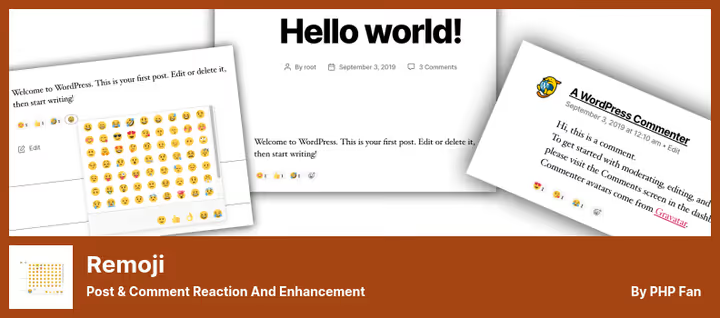
Remoji by WPDO, a niche veteran with 300+ active installations and a 5-star rating. Unlike Instant Emoji Reactions, it goes "wide" rather than "deep": emoji reactions are complemented by a post view counter, "Most Viewed" and "Recent Reactions" widgets, and the ability to disable comments on any post type.
Reactions in Slack style: compact, tidy, no garish MSN smileys. A user selects an emoji under a post or comment and sees the total counter. Guest reactions can be restricted (logged-in only), useful against manipulation.
Remoji's main feature is GDPR mode: when enabled, IP addresses are hashed via MD5. This isn't full anonymization (the hash is reversible), but better than nothing, especially for European traffic. The view counter is compatible with any cache plugins, including LiteSpeed Cache, as confirmed in reviews.
Updated 8 months ago, tested up to WordPress 6.8.5, for a reaction plugin this is a normal cycle (there's not much to break). But there's no version for 7.0 yet.
Pros:
- Post view counter + widgets included
- GDPR mode (IP hashing)
- Compatible with cache plugins, including LiteSpeed
- Disable comments on specific post types
Cons:
- No built-in reaction analytics
- Not tested on WordPress 7.0 (only up to 6.8.5)
- Can't retract your reaction (planned in TODO)
3. ShareThis Reaction Buttons, simplicity at the cost of external tracking script

ShareThis Reaction Buttons by the ShareThis team, the most "ready-made" option of the three. 600+ active installations, updated 4 weeks ago, tested on WordPress 7.0. Six fixed emojis (Like, Love, Wow, LOL, Sad, Angry) bundled with beautiful animated icons from EmojiOne.
The plugin is maximally simple to set up: installed, created a ShareThis account, selected button alignment (left/right/center/justify), and reactions are live on the site. Mobile layout "out of the box," separate Gutenberg block for insertion in the editor.
But you pay for simplicity. ShareThis embeds external JavaScript from its platform, a tracking script that collects data about user interactions with buttons. Several reviews from 2023-2026 complain about conflicts with the mobile version and unstable emoji loading after site migration. If speed and no third parties are critical for you, look at the first two plugins.
Pros:
- Most popular (600+ installations), tested on WP 7.0
- Ready-made beautiful emojis, no need to configure the set
- Separate Gutenberg block + mobile layout
- Doesn't require shortcodes for basic use
Cons:
- External ShareThis tracking script, additional loading and potential privacy risk
- Can't change your reaction after clicking
- Requires ShareThis account for setup
- Complaints about conflicts with mobile version (January 2026 review)
🔗 ShareThis Reaction Buttons on WordPress.org
⁉️🤔 Frequently asked questions
Do reaction plugins work with caching?
Yes, all three plugins claim compatibility with cache plugins. Remoji is confirmed in reviews as working with LiteSpeed Cache. Instant Emoji Reactions uses AJAX to update counters, dynamic content isn't cached. ShareThis lives entirely on an external script and doesn't depend on WordPress cache. If reactions aren't updating, exclude the plugin URL from caching.
Can I use two reaction plugins simultaneously?
Technically yes, but we don't recommend it. Two sets of buttons under one post confuse the reader, and one plugin's styles can override another's. If you need both analytics and a view counter, choose one plugin and supplement it with a separate lightweight solution for the counter.
Is registering with ShareThis mandatory for Reaction Buttons?
Yes, a ShareThis account is needed to activate buttons. After registration, the plugin pulls settings from the platform. It's through this account that ShareThis tracks interactions, which is both a plus (ready-made analytics on their side) and a minus (external tracking).
Which plugin is best for a WooCommerce store?
Definitely Instant Emoji Reactions, it's the only plugin of the three that works "out of the box" with WooCommerce products via shortcode. Reactions on products provide direct feedback from customers without needing to write a review. Built-in analytics shows which products collect the most Love reactions.
What to do if emojis stopped displaying after site migration?
The problem most often occurs with ShareThis (there are complaints in reviews from 2023-2026). Check: is the account active on platform.sharethis.com, is the external script blocked by the new hosting (CSP headers, firewall). For Remoji and Instant Emoji Reactions, the problem is solved by clearing cache and resaving plugin settings.
Which emoji reaction plugin to choose in 2026?
We tested three living free plugins from the WordPress.org directory on a test site, and each covers its scenario. In our experience, setting up any of them takes no more than a minute.
The short conclusion: install Instant Emoji Reactions, it's the freshest, actively developing plugin with built-in analytics and WooCommerce support. Free, no external tracking garbage, with AJAX reaction updates. 100+ installations, not a giant yet, but the update pace (three days ago!) and code quality speak for themselves.
If GDPR is critical and you need a built-in view counter, take Remoji. Three hundred installations and a 5-star rating don't lie: the plugin does exactly what it promises and doesn't break.
ShareThis Reaction Buttons is for those who need "set it and forget it" with beautiful icons "out of the box," and who are willing to live with an external tracking script.
Choose for your task, and give readers a "react" button.

A professional team of writers and editors specializing in creating quality content.