














🥇 3 best WordPress plugins for TripAdvisor 2026 (free and paid)
The review plugin update broke your widgets? Hotel, restaurant, and tour operator owners know that TripAdvisor reviews on your site directly impact bookings. But WordPress has no built-in tools for this, you need a plugin.
According to BrightLocal's 2025 data, 81% of travelers read reviews before booking, and displaying at least 5 fresh reviews on a page increases conversion by an average of 270%. TripAdvisor remains the #1 platform for hospitality and restaurant businesses, but they only issue API access to major partners. So for ordinary mortals, the right plugin isn't a luxury, it's the only way to showcase your reputation.
We tested three plugins for displaying TripAdvisor reviews on WordPress in 2026: two specialized widgets and one all-in-one solution that handles booking alongside review integration.
💡 Quick overview:
- Decide what you need: simply display TripAdvisor reviews on your site (choose the Trustindex widget or Review Slider) or organize a complete booking cycle with iCal synchronization (add Booking Calendar).
- Check the comparison table at the beginning of the article: it shows key differences in pricing, limits, and features in 30 seconds.
- Watch the video overview below to see the real process of setting up a TripAdvisor widget on WordPress in two minutes.
Comparison table
Plugin | Free version | Premium | Reviews free | Slider | Rating filter | Auto-update |
|---|---|---|---|---|---|---|
WP Tripadvisor Review Widgets | ✅ | from $65 | 10 | ✅ | ✅ | ❌ (in Pro, yes) |
WP TripAdvisor Review Slider | ✅ | from $29/year | 10 | ✅ | ✅ | ❌ (in Pro, yes) |
Booking Calendar | ✅ | from $79 | - | - | - | ✅ (iCal) |
1. WP Tripadvisor Review Widgets

If you need to quickly display beautiful TripAdvisor reviews on your site without messing with APIs, this is the best starting point. The plugin from Trustindex connects to your business profile on TripAdvisor without API keys and delivers a ready widget in two minutes.
In practice, the free version is enough for a small hotel or restaurant: 10 reviews, 40+ widget layouts, 25+ design styles. The widget doesn't slow down your site, reviews load through CDN with lazy loading. Works with Gutenberg, Elementor, Divi, WPBakery, and the classic editor.
The Pro version removes the 10-review limit and adds reviews from Google, Facebook, Yelp, Booking.com, Airbnb, and 15+ more platforms into one widget. You get auto-invitations for customers to leave reviews (email campaigns), a social media image generator from reviews, and detailed statistics.
- Pros: zero load on your server (CDN), 40+ widget layouts out of the box, connection without API key, Russian language interface.
- Cons: only 10 reviews and 1 widget for free; multi-platform reviews require Pro.
- Price: free / Pro, from $65 (Trustindex plan, includes all platforms).
- Download: 🔗 WP Tripadvisor Review Widgets on WordPress.org | 🔗 Trustindex, Pro version
2. WP TripAdvisor Review Slider

This plugin takes a different approach: instead of CDN, it downloads reviews from TripAdvisor once and stores them in your WordPress database. The result is ultra-fast loading, because the server doesn't make external calls on every page view. The plugin code is intentionally lightweight, without heavy scripts.
Out of the box: slider, grid, and list of reviews. You can download user photos from reviews, they open in a lightbox. The rating filter lets you hide reviews below a specified star rating. A dozen customizable templates with fine-tuning through CSS, for those who want to match their site design precisely.
Pro at $29 per year adds daily auto-checking for new reviews (cron), loading ALL reviews instead of just the last 10, floating badges and popup widgets, plus support for 50+ review platforms including Facebook, Google, Yelp, and even Zillow.
- Pros: reviews stored locally = instant loading, lightweight code, 134 real reviews on wordpress.org (average 4.9), child themes for complete customization.
- Cons: only the last 10 reviews for free; auto-update only in Pro.
- Price: free / Pro, from $29 per year.
- Download: 🔗 WP TripAdvisor Review Slider on WordPress.org | 🔗 WP Review Slider, Pro version
3. Booking Calendar
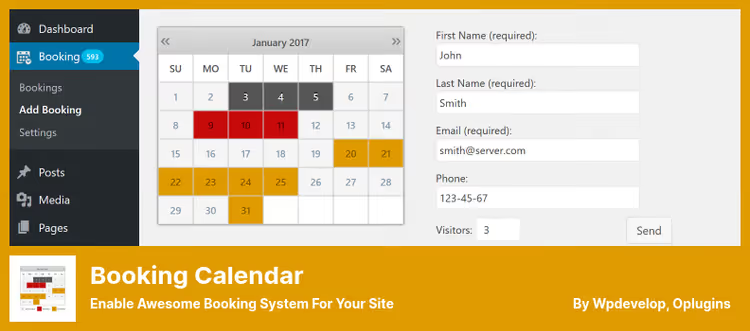
Booking Calendar solves a broader task: not just displaying reviews, but organizing a complete booking cycle. Guests check date availability, choose a room or service, and book directly on your site without third-party services.
What does this have to do with TripAdvisor? The plugin can synchronize with external calendars via iCal feeds, including Airbnb, Booking.com, HomeAway, VRBO, FlipKey, and Tripadvisor. In other words, you can accept bookings from multiple platforms into one calendar and avoid double bookings. TripAdvisor reviews themselves aren't displayed as a widget, but the fact of integration with the TripAdvisor ecosystem via iCal makes this plugin a logical complement to the two widgets above.
In the free version: full-day booking form, email confirmation, booking management from the admin panel. In Pro: time slots (booking for specific times), seasonal pricing, multiple resources (for example, different rooms or services), drag-and-drop form builder, multi-user mode, essentially your own mini-Airbnb.
- Pros: complete booking cycle without third-party services, iCal synchronization with TripAdvisor and 5+ platforms, drag-and-drop form builder, active installation on 80,000+ sites.
- Cons: doesn't display TripAdvisor reviews as a widget (you need one of the plugins above); Pro at $79 is more expensive than widgets.
- Price: free / Pro, from $79.
- Download: 🔗 Booking Calendar on WordPress.org | 🔗 WP Booking Calendar, Pro version
The video above provides a visual demonstration of setting up a plugin to display TripAdvisor reviews on WordPress. The entire process from installation to published widget takes less than three minutes.
⁉️🤔 Frequently asked questions
Why display TripAdvisor reviews on your own site if they're already on TripAdvisor itself?
Every user transition to an external site is a risk of losing a booking. By placing reviews directly on your hotel or restaurant page, you keep visitors in your funnel. Plus, fresh content from reviews positively impacts local SEO: Google sees that the page is regularly updated with real text containing keywords.
Getting TripAdvisor API access is nearly impossible, do the plugins really work without it?
Yes. All three plugins in this review work without the official TripAdvisor API. Trustindex connects through your public TripAdvisor profile (like a regular visitor), and WP TripAdvisor Review Slider downloads the HTML page of your business profile and parses reviews locally. Booking Calendar uses the publicly available iCal export, which doesn't require an API key. So the "closed" API is not an obstacle.
Can you filter reviews: show only 5 stars, hide negative ones?
Both widget plugins, Trustindex and Review Slider, allow filtering reviews by rating. You can set a threshold (for example, show only 4 and 5 stars) and hide everything below. You can also manually hide a specific review, anonymize the author's name, or exclude reviews without text. But keep in mind: from a visitor trust perspective, a complete absence of negative reviews looks unnatural, a couple of 4-star reviews only strengthen credibility.
Is it worth paying for Pro if the free version is enough?
For a small hotel or restaurant with a couple dozen reviews, probably not. Free versions of Trustindex and Review Slider display the last 10 reviews, which is enough for social proof. Pro makes sense when: a) you have more than 10 reviews and want to display them in random order; b) you need reviews from multiple platforms at once (Google + TripAdvisor + Yelp); c) auto-update (cron) is critical, so you don't have to update manually.
Is Booking Calendar a TripAdvisor plugin or not?
Formally, no. It's a booking plugin that can synchronize with TripAdvisor (and other OTAs) via iCal feeds. It does NOT display TripAdvisor reviews. But combined with one of the widget plugins, it covers the complete cycle: reviews attract guests → calendar accepts bookings → iCal synchronizes availability with TripAdvisor and other platforms. For a hotel or guesthouse, this is a logical combination.
What to install for your task in 2026
If you have a hotel, restaurant, or tour company and you simply want to display your TripAdvisor reviews on your site beautifully, choose WP Tripadvisor Review Widgets from Trustindex. It connects in minutes, doesn't load your server, and looks professional out of the box. The free version is enough to get started.
If loading speed is critical for you and you don't want to depend on a third-party CDN, your choice is WP TripAdvisor Review Slider. Reviews are stored locally in the database, the slider is instant, and the Pro version is one of the most affordable in the niche.
If you need not just to display reviews but to organize direct bookings through your site with synchronization across TripAdvisor, Booking.com, and Airbnb, install Booking Calendar alongside any widget above. The combination of "widget for reviews + calendar for bookings" covers the entire cycle: from social proof to confirmed booking.
Note: before installing any plugin, make a full site backup. On a test site, check how the widget looks on mobile, most guests access from their phones. And don't forget to update reviews at least once a month: three reviews from 2022 raise more questions than their absence.

A professional team of writers and editors specializing in creating quality content.