













🧾 WPForms review: the best contact form plugin for WordPress in 2026
A contact form on a website is not just a "write to us" box. It is a lead that either converts into a paid order or goes to a competitor. The cause might be a broken field on mobile that fingers cannot tap.
The WordPress forms market is oversaturated to the point where newcomers copy each other in circles. The free Contact Form 7 has officially entered maintenance mode: version 6.2 was the last to include new features, with only security patches going forward. Gravity Forms is more powerful feature-wise, but its admin interface is stuck in the WordPress 3.0 era. And dozens of "lightweight" alternatives crash on the first traffic spike.
WPForms stands out by balancing right in the middle: clients can actually configure it without a developer, yet it is not a stripped-down builder. It is a full-featured tool with conditional logic, payment processing, user registration, and AI-powered field generation. Six million active installations and a 4.8 rating on WordPress.org are not marketing spin but actual statistics.
In this review: what WPForms can do in 2026, how the versions differ from each other, and in which scenarios the plugin pays for itself within the first month.
💡 Quick overview:
- Install WPForms Lite from the WordPress.org directory for free, with no limits on forms or submissions.
- Build your first form using drag-and-drop: pick a template, add fields, configure notifications. Takes less than two minutes.
- Test Stripe or PayPal payment collection: available in Lite with a 3% platform fee, removed in Pro (source: WPForms pricing).
- If you need conditional logic, file uploads, surveys, or digital signatures, upgrade to Pro ($199.50/year, 5 sites) (see Pro pricing).
- For agencies with a stream of clients and CRM integrations (Salesforce, HubSpot, ActiveCampaign), Elite at $299.50/year with unlimited sites (see Elite pricing).
Pricing and plans: what each tier includes
WPForms sells annual subscriptions across four tiers. The official website almost always displays a 50% discount off the full price. An important nuance most reviews ignore: the discount applies only to the first year, and renewal is at full price.
Plan | Discounted price | Full price | Sites | Key difference |
|---|---|---|---|---|
Basic | $49.50/year | $99/year | 1 | Core: fields, templates, AI, file uploads |
Plus | $99.50/year | $199/year | 3 | Basic + email marketing integrations (Mailchimp, Brevo, ConvertKit) |
Pro | $199.50/year | $399/year | 5 | Plus + fee-free payments, conditional logic, surveys, signatures, Zapier |
Elite | $299.50/year | $599/year | Unlimited | Pro + Salesforce, HubSpot, ActiveCampaign, Multisite, Client Management |
Changes over the past two years: Elite lost its $299 lifetime license, which is now an annual subscription (see current pricing). Pro was reduced in site count: it was 20, now it is 5. If you manage 20+ sites, one Pro license used to suffice; now you need Elite or multiple licenses.
The free WPForms Lite on WordPress.org does not limit the number of forms or submissions. The only restrictions are a 3% commission on payments and the absence of advanced fields. More than enough for testing before purchasing or for a business card site with a contact form.
Form builder: how a form is assembled
WPForms does not try to integrate into the native WordPress editor. It has its own interface, and that is a plus: everything related to the form is collected on one screen, with no jumping between Gutenberg tabs.
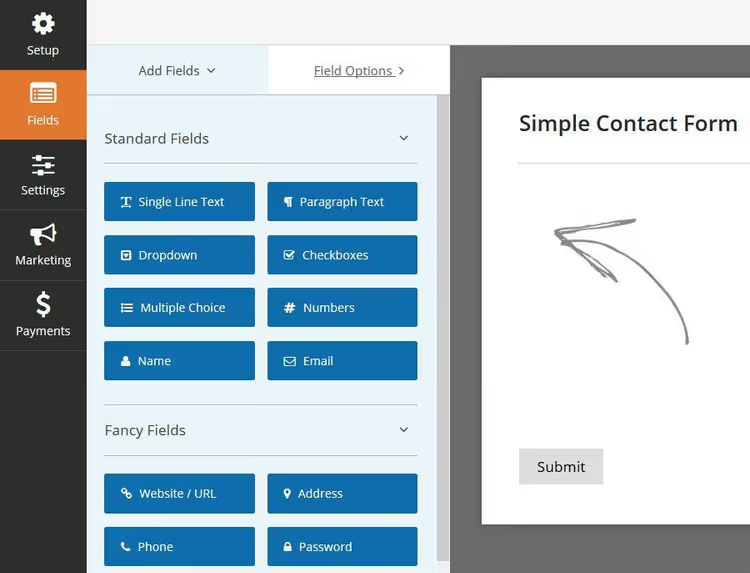
The interface is clean: available fields panel on the left, form canvas on the right. Adding a field is done by dragging; reordering works the same way. No code required.
Fields: 22 types for different tasks
WPForms divides fields into three categories: standard, fancy fields, and payment fields. The basic set is available in Lite and includes everything a contact form needs: single-line and multi-line text, dropdown, checkboxes, radio buttons, file upload, password, and page break.
Pro adds fields that transform WPForms from a "contact builder" into a working tool: a "smart" phone field with automatic country code detection, an address field with autocomplete via Google Maps, date and time, calculator, Rich Text, digital signature field, sections with dividers, and hidden fields. Separately, a repeater for field groups: you configure a block once, and the user clones it on the form as many times as needed.
Each field is configurable down to the details. Clicking on the title opens the options panel:
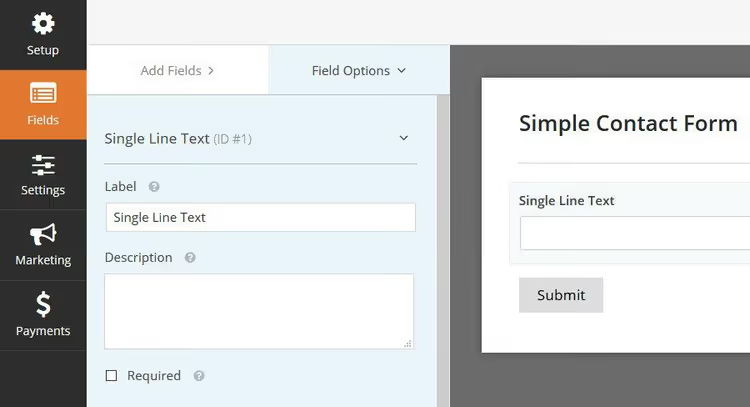
Top section: label, description, and "required" flag. Bottom section (Advanced): field size, placeholder, default values, and CSS classes for customization. CSS classes are a gift for those who code: attach your own style to a specific field without editing the template.
Templates and AI generator
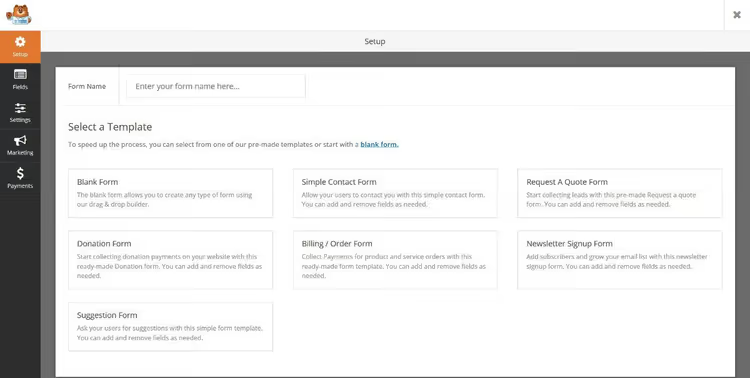
The plugin ships with a template library that saves real hours. The free Lite version has over 600 templates; Pro has 2,100+. Ready-made forms for contact, lead capture, subscription, order, donation, event registration, and booking.
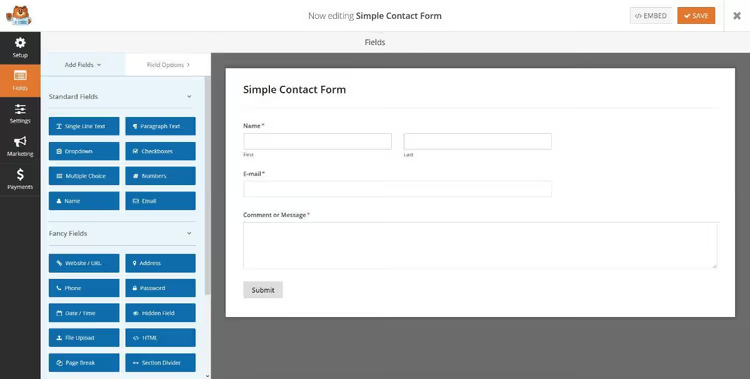
Select "Simple Contact Form" and you get a ready form with Name, Email, and Message. Fifteen seconds from click to embedding on a page. If that simplicity is enough, you can stop there. For non-standard tasks, there is a blank canvas and building from scratch.
WPForms AI deserves a separate mention: the built-in form generator introduced in version 1.10. Describe a form in words: "customer satisfaction survey with five questions on a scale of 1 to 5." The AI creates a draft. Available in both Lite and Pro. There is also AI Choices, which auto-fills options for dropdowns and checkboxes based on the field name. Works fast and saves time on routine forms.
Settings and embedding: from draft to page
Form settings
Before publishing, a form goes through the Settings panel: three tabs, each self-explanatory without documentation.
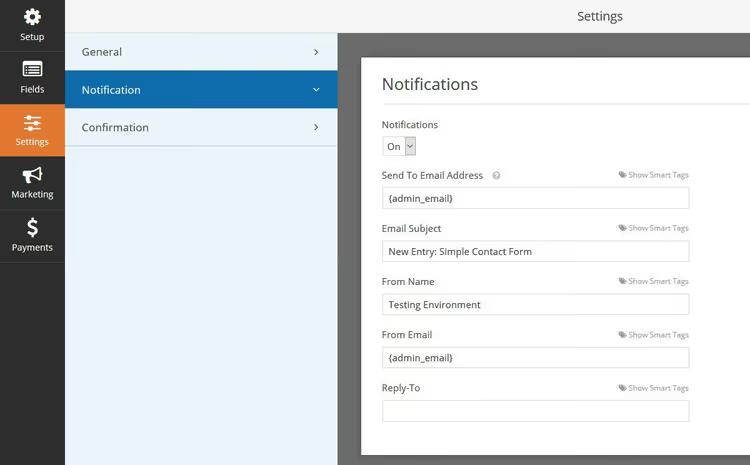
General: form name, submit button text, anti-spam honeypot. Notifications: email for submissions (multiple addresses separated by commas). Confirmation: success message or redirect to a separate "thank you" page.
Three ways to embed a form
WPForms offers three placement options, all without manual shortcode copying.
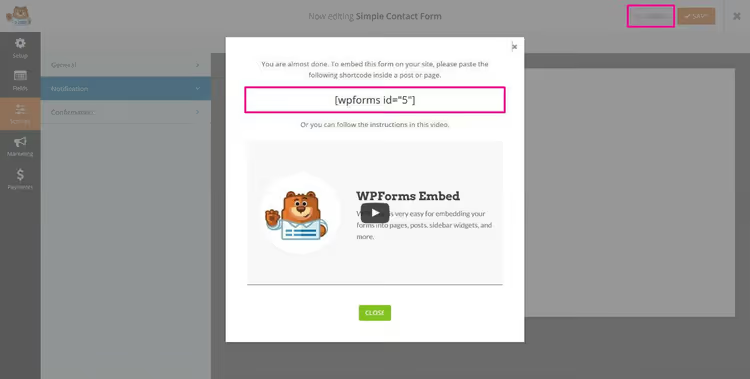
First, the Embed button in the builder itself. A lightbox opens with a ready shortcode; copy and paste it into any post or page.
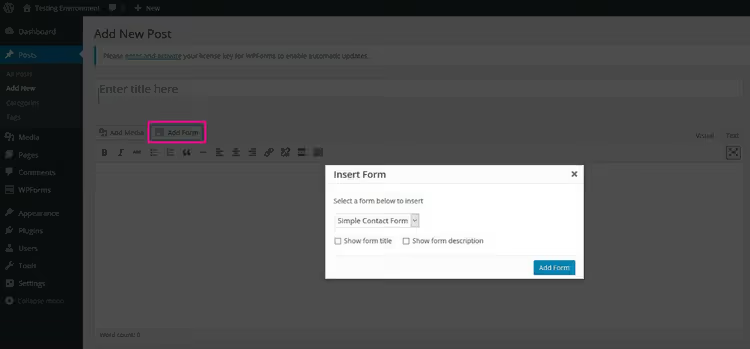
Second, the "Add Form" button directly in the WordPress editor, next to "Add Media." Select a form from the dropdown, optionally show the title and description, and the shortcode is added automatically.
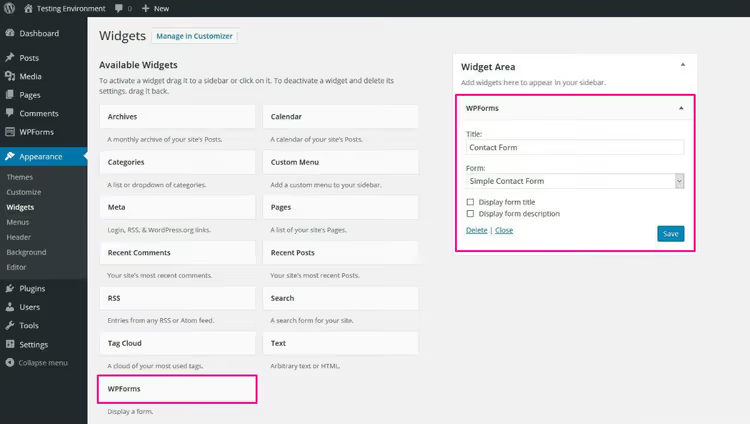
Third, the WPForms widget (Appearance → Widgets). Drag it to a sidebar or footer, select the form, done. Convenient for subscription forms: they sit in the sidebar and do not take up space in the content.
Add-ons: what Pro and Elite unlock
The WPForms core is a contact form with basic fields. Add-ons turn it into a checkout, registration, survey, or CRM integration. The available set depends on the plan.
Payment add-ons: Stripe, PayPal, Square
The strongest part of Pro and Elite. WPForms accepts payments through Stripe, PayPal Commerce, and Square without any additional platform commission, only the payment gateway fee.
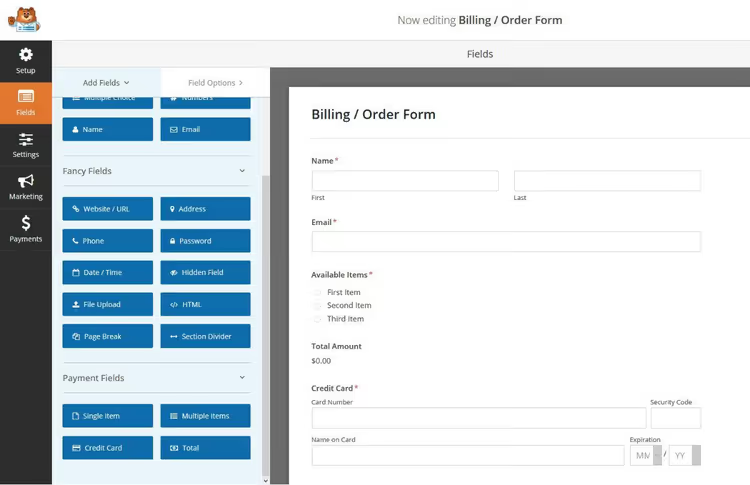
Four types of payment fields: single item with a fixed price, multiple items with different prices, total field with auto-summing, and credit card. This is enough for an online storefront without WooCommerce: collecting pre-orders, accepting service payments, receiving donations.
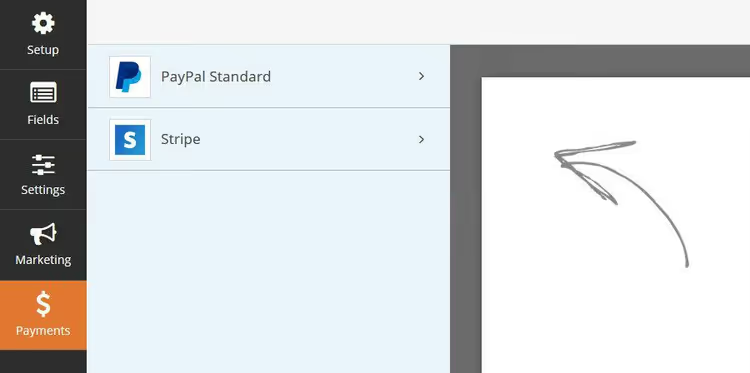
Pro also includes recurring payments and coupons. For the US market, integration with Authorize.Net.
Conditional logic: fields that appear based on conditions
The number one reason for upgrading from Lite to Pro. Conditional logic works on every field: show or hide depending on previous answers.
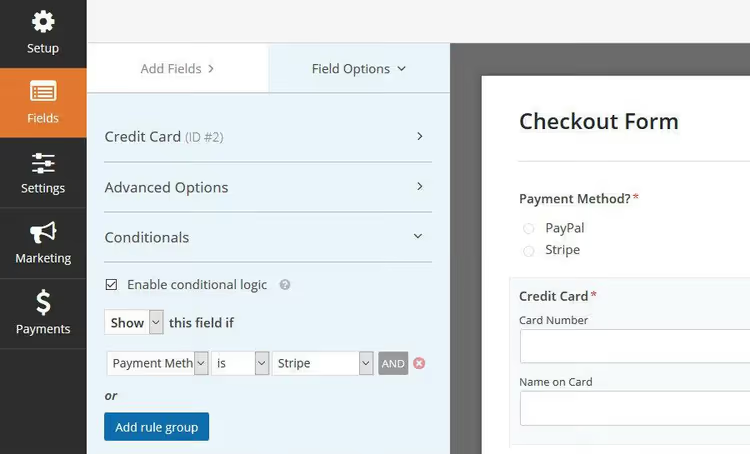
Example: the user selects PayPal payment, and the credit card field disappears. They choose "courier delivery," and the address field appears. Without conditional logic, you would have to create separate forms for each scenario.
Logic also works in marketing integrations: send data to a CRM only if the user checked a specific checkbox, or send an email to the admin only when a particular plan is selected.
Marketing integrations and CRM
WPForms integrates with major email marketing services: Mailchimp, Brevo, ConvertKit, Klaviyo, Constant Contact, ActiveCampaign, AWeber, GetResponse. The point is that you do not need a separate plugin for subscription forms.

Setup is simple: Marketing tab → Add New Connection → service API key. For a subscription template, only name and email are left: minimum fields, maximum conversion.
The Elite tier unlocks CRM: Salesforce, HubSpot, Pipedrive, Zoho CRM sync leads directly. Webhooks for custom integrations, Entry Automation for auto-deleting old entries under GDPR, Multisite Support, and Client Management for agencies.
Installing add-ons
Previously, each add-on had to be downloaded as a separate zip and uploaded manually. Now everything is done from the admin: activate your license key in WPForms → Settings, go to WPForms → Addons, and the system shows extensions available for your plan.
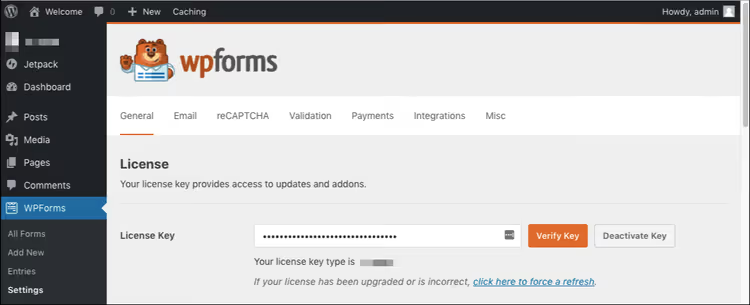
After saving the key, go to Addons, and the system automatically shows extensions available for your plan. Installing any add-on takes one click.
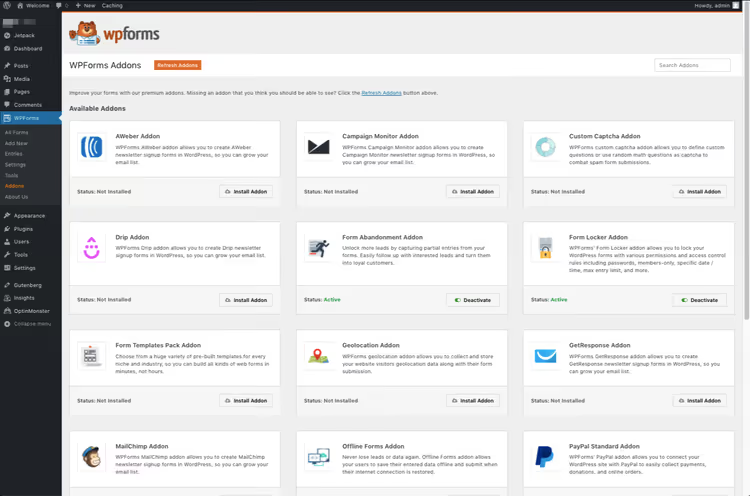
This approach saves half an hour per project, especially when many add-ons are involved.
User experience: what delights and what frustrates
We have been installing WPForms for clients for over two years; three dozen projects have passed through our hands. Not a single support request about forms. A client unfamiliar with WordPress follows the steps "upload, activate, select template, embed" without calling the developer.
The interface is exactly what Gravity Forms lacks. That plugin is more powerful in calculations and hooks for developers, but its admin looks like a relic from WordPress 3.0: cramped tables, small font, a constant feeling that "something will break." WPForms, by contrast, is modern with proper spacing, and building a form requires no mental preparation.
Forms load fast. By our measurements, a page with an eight-field contact form adds about 50 KB to total weight, less than Gravity Forms (68 KB) and on par with Fluent Forms (47 KB). Not a render-blocking resource, and First Contentful Paint barely suffers.
Now for the downsides. There are three, and all are serious.
First: renewal pricing. The first year with 50% off looks attractive, but the second year Pro costs $399 instead of $199.50 (see renewal pricing). Gravity Forms at $59 per year does not pull this trick: the price is fixed (see Gravity Forms pricing). If your project budget is tight, calculate using the full price, not the discounted one.
Second: no built-in email designer. Notifications arrive in plain text, without styling. To make an email look decent, you need a separate plugin like WP Mail SMTP, from the same developers, by the way. Strange that for $399 per year they did not cover this out of the box (see Pro pricing).
Third: some integrations are locked in Elite. Salesforce, HubSpot, ActiveCampaign, and Zoho CRM are unavailable in Pro. That is excessive for a small business that needs CRM but does not need 30+ sites. There is no intermediate "Pro + CRM" tier.
The database behaves predictably: two tables (wp_wpforms_entries and wp_wpforms_entry_meta), no dozens of custom post types. After 10,000 submissions, entries grows to 4 MB, entry_meta to 18 MB. On high-traffic sites with hundreds of submissions per day, you should set up auto-cleanup or export-and-purge; there is no built-in tool for this.
Comparison with competitors
WPForms is not the only form plugin for WordPress. Here is how it stacks up against the main alternatives in 2026:
Plugin | Builder | Conditional logic | Payments | AI | Price |
|---|---|---|---|---|---|
WPForms Pro | Drag-and-drop, modern | On all fields | Stripe, PayPal, Square + recurring | Built-in (Lite and Pro) | $199.50/year |
Gravity Forms | Functional, outdated interface | Yes | Via paid add-ons | No | $59/year (basic) |
Fluent Forms Pro | Drag-and-drop, fast | Yes | Stripe, PayPal, Razorpay | No | $59/year |
Formidable Forms | Drag-and-drop + calculations | Yes | Stripe, PayPal | No | $79/year |
Ninja Forms | Drag-and-drop | Via add-on ($49+) | Via add-ons | No | Free + add-ons |
Gravity Forms wins on ecosystem: thousands of community add-ons, dozens of payment gateways, powerful calculations. The interface is its weak spot. Fluent Forms is the best value for money: the free version includes conditional logic and multi-step forms, Pro at $59 adds payments and integrations (see Fluent Forms pricing). Formidable Forms excels at calculators and complex calculations. Ninja Forms is cheap to start, but each necessary add-on is purchased separately, and the price quickly catches up to WPForms Pro.
WPForms wins on balance: everything a typical site needs is included out of the box, with no juggling add-ons or searching for the right plugin for each scenario.
⁉️🤔 Frequently asked questions
Is WPForms free or paid?
There is a free WPForms Lite in the WordPress.org directory with no limits on forms and submissions. It includes a drag-and-drop builder, basic fields, AI generator, and Stripe/PayPal payment collection with a 3% platform fee. Pro adds conditional logic, file uploads, surveys, digital signatures, and removes the fee. For a contact form on a business card site, Lite is fully sufficient.
How is WPForms better than Contact Form 7?
Contact Form 7 is a text-based shortcode editor without a visual builder: to add a field, you write
[text* your-name]manually. WPForms offers drag-and-drop: drag a field, and it works. At WordCamp Asia 2026, the CF7 developer announced that version 6.2 was the last with new features, with only security patches going forward. If you administer a site yourself and value your time, choose WPForms. If dozens of CF7 forms have been working for years, they still receive updates, but no new features are coming.
Does WPForms work with Elementor, Divi, and Gutenberg?
Yes, WPForms has native integrations with Elementor and Divi: a dedicated widget for inserting forms appears in the builder. There is also a native WPForms block in Gutenberg, Classic Editor support, and shortcode insertion in any builder. With Brizy, Beaver Builder, and Oxygen, use shortcodes without restrictions.
Can I accept payments without WooCommerce?
Yes, this is one of the main WPForms Pro use cases. Create an order form with product and price fields, connect Stripe or PayPal, and receive payments to your account. No WooCommerce, no product cards needed. Ideal for donations, pre-orders, one-time service payments, or consultations.
What about renewal pricing? Is the second year really twice as expensive?
Yes. The 50% discount applies only to the first year. Pro: $199.50 the first year, $399 for renewal. Elite: $299.50 the first year, $599 for renewal (see the WPForms pricing table). Gravity Forms and Fluent Forms have fixed pricing at $59/year with no surprises (see Gravity Forms, Fluent Forms). When planning your budget, factor in renewal at full price.
Buy or skip: the bottom line

WPForms solves the main pain point for site owners: creating a form that works instead of becoming a project that starts with "send me the admin password, I will configure it."
For a single site where the task is a contact form, start with the free Lite. Six million installations and a 4.8 rating are enough to not doubt its stability. Upgrading to Pro makes sense when at least one of five scenarios applies: conditional logic, fee-free payment processing, file uploads, user registration, or CRM integration.
Pro for 5 sites is a fair price for a tool that replaces at least three separate plugins: forms, subscriptions, and payments. Elite is for agencies with dozens of client sites and a need for Salesforce or HubSpot.
If your budget is tight but you need Pro functionality, look at Fluent Forms Pro at $59 (see Fluent Forms Pro). But be prepared for a slightly rougher interface and 200 templates instead of 2,100. The price difference is the polish difference.
As for replacing Contact Form 7 with WPForms, now is the best time to migrate. CF7 has entered maintenance mode (its creator is building a new product, Contactable.io on Cloudflare Workers), while WPForms gained an AI generator, Klaviyo integration, and an updated survey engine over the past year. The user experience difference between them is like the difference between a command line and a proper interface.
Check current pricing at wpforms.com/pricing, where first-year discounts are almost always available.

A professional team of writers and editors specializing in creating quality content.