














🔖 4 best bookmark plugins for WordPress 2026 (free and Pro)
You opened ten articles this morning. You want to reread three of them, save two as a cheat sheet, and one more will be useful for Friday's report. Browser bookmarks drown mixed in with recipes and package trackers, and the "share to Telegram" button turns favorites into a chaotic log. In a week, you can't find anything.
A bookmark plugin for WordPress solves this at the site level. The reader clicks "Save" under a post or product, and the material lands in their personal list tied to their profile on the site. Not to a device, not to a browser, not to a third-party service. Logged in from a phone on the subway, the list is there. Opened a laptop in the evening, same list. For the site owner, this means direct growth in repeat visits: a person returns not because they remembered the URL, but because you gave them a tool to come back.
We tested 4 current bookmark plugins for WordPress in 2026. In our experience, each covers its own scenario without workarounds: a universal all-in-one with categories, a niche tool for the UserPro ecosystem, a super lightweight free option, and a specialized wishlist for WooCommerce.
💡 Quick overview:
- Define your scenario: universal bookmarks for any content or product wishlist for a WooCommerce store.
- Install the plugin from the WordPress.org catalog (or from the developer's site for premium solutions) and place the bookmark button via shortcode.
- For sites with a community, connect integrations: BuddyPress and bbPress via CBX Bookmark Pro, for a store, WooCommerce Wishlist Collection.
Plugin comparison table
Plugin | Free version | Pro price | WordPress.org | BuddyPress / bbPress | WooCommerce | Elementor / Gutenberg |
|---|---|---|---|---|---|---|
CBX Bookmark & Favorite | Yes | From $29/year | Yes | Yes (Pro) | Yes (Pro) | Yes |
User Bookmarks | No | $11 one-time | No | No | No | No |
Easy Bookmark | Yes | No Pro | Yes | No | No | Yes |
Wishlist Collection | No | $23 one-time | No | No | Yes | No |
1. CBX Bookmark & Favorite
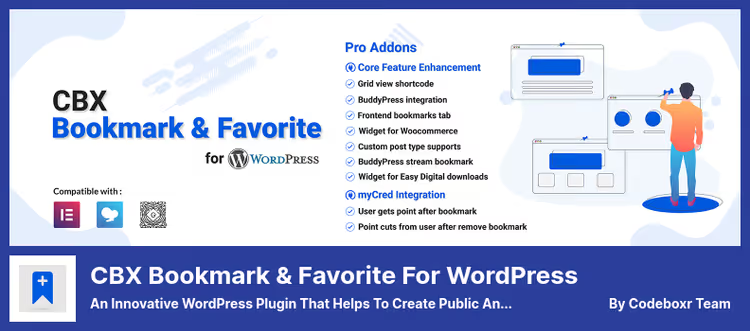
CBX Bookmark, the most feature-rich bookmark plugin for WordPress. The mechanics are inspired by YouTube playlists: a user creates categories (public or private), then sorts posts, pages, and custom post types into them. In practice, we see three working scenarios. A blogger gives subscribers a personal "reading list" sorted by topic. An educational site builds a "favorite lessons" system in a student's personal account. A WooCommerce store adds a "My bookmarks" tab to the buyer's profile, they save products and return to them without searching the catalog.
The free version covers the basic scenario completely: a bookmark button under content, [cbxwpbookmarkbtn] shortcodes for placement anywhere in the theme, classic widgets and Gutenberg blocks. The Pro addon (from $29 per year) adds custom post types, integration with BuddyPress (bookmarks in user profile), bbPress (forum topic bookmarks), myCred and GamiPress. Current version 2.0.7 is tested with WordPress 6.9 as of June 2026.
Pros:
- Three modes to choose from: user categories, global admin categories, or one-click bookmark without categories.
- Shortcodes, widgets and blocks for Elementor, WPBakery and Gutenberg, integrates with any page builder.
- BuddyPress and bbPress "out of the box" in the Pro version, no additional bridges.
- Active development: last update April 2026, 8,000+ active installations.
Cons:
- Free version doesn't work with custom post types, Pro is required for them.
- Settings panel is crowded: a beginner will spend half an hour getting oriented before setting the right button behavior.
Price: free version on WordPress.org; Pro from $29 per year on the Codeboxr site.
🔗 CBX Bookmark on WordPress.org | 🔗 Pro version on Codeboxr
2. User Bookmarks
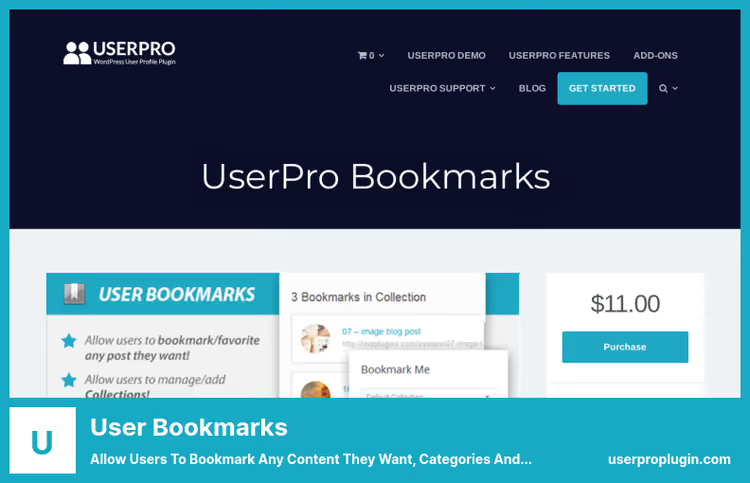
User Bookmarks, a product from the UserPro team known for membership and user profile plugins. Here the focus shifts toward privacy: a user creates collections and decides themselves whether to make them public or visible only to themselves. This fits perfectly with paid access sites. A subscriber assembles favorites in their personal account, sorts them into collections, and doesn't worry that someone will see their private list.
The plugin works on Ajax: a bookmark is added without page reload, the interface doesn't blink. Under the hood, support for any custom post types, three ways to display the widget (dynamic sidebar, auto mode under content, and [userpro_bookmark] shortcode), proprietary REST API for developers. The plugin is paid, one-time payment of $11, CodeCanyon Regular license.
Pros:
- Private and public collections with flexible visibility settings for each.
- Ajax interface: the button works instantly, without reload and page jumps.
- Simple integration: shortcodes, PHP methods and REST API for custom solutions.
Cons:
- Only a paid version, no free tier or trial period.
- Tight coupling to the UserPro ecosystem: a significant part of advanced scenarios works only with the main UserPro plugin installed.
Price: for $11 on the UserPro site (one-time payment, CodeCanyon Regular license).
🔗 User Bookmarks on the UserPro site
3. Easy Bookmark

Easy Bookmark, the simplest and completely free plugin from the WordPress.org catalog. No Pro versions, no settings with a dozen tabs. Installed, activated, the "Bookmark" button appears under each post automatically. The user clicks, the post is saved. Clicks again, it's removed. That's it.
To display the bookmark list, one shortcode is used: [easy_bookmark_counter]. Place it on a separate page or in a sidebar widget, the user will see all saved materials in one list. The plugin is compatible with any custom post types, works with both classic themes and the block editor. Version 1.0.3, last update November 2025.
Pros:
- Absolutely free: no ads, no upsells, no limited functionality.
- Two-click installation: activated, it works, no configuration.
- Lightweight code, doesn't add load to the admin panel and doesn't conflict with themes.
Cons:
- No categories and collections: all bookmarks are in one flat list.
- Modest community: around 100 active installations, support through the WordPress forum.org can be slow.
- No integrations with BuddyPress, bbPress or WooCommerce, purely bookmarks for content.
Price: free.
🔗 Easy Bookmark on WordPress.org
4. WooCommerce Wishlist Collection & Bookmark

If you have an online store on WooCommerce, this plugin covers the "save for later and come back to purchase" scenario. The buyer adds products to a wishlist, distributes them into collections, private, public or accessible to a specific group, and shares the selection with friends via email. For the seller, each saved item is a repeat visit and an additional chance for conversion: a person returned not to dig through the catalog again, but to finalize what they already chose.
The interface is minimalist, doesn't conflict with most WooCommerce themes. The plugin supports shortcodes, custom email templates for wishlist sharing and technically works with any post types, although in practice it's used strictly for products. Price: $23 one-time, CodeCanyon Regular license.
Pros:
- Three collection types: private, public and group, more flexible than most wishlist alternatives.
- Built-in "share collection" function via email, no additional plugins.
- Simple setup and clean interface "out of the box", no CSS tweaks required.
Cons:
- Only paid tier for $23 on CodeCanyon, no free version or demo period.
- Tightly tied to WooCommerce: completely useless for a blog or forum.
- Updates infrequently, check compatibility with your WordPress version on staging before purchasing.
Price: for $23 one-time (one-time payment, CodeCanyon Regular license).
🔗 Wishlist Collection on CodeCanyon | 🔗 Live demo
📺 Video: CBX Bookmark setup from the Codeboxr team
Official tutorial from the developers shows the full cycle: from plugin installation to creating categories, placing bookmark buttons via shortcodes and displaying the saved list on the frontend. Nine minutes, English, step by step.
⁉️🤔 Frequently asked questions
Is a bookmark plugin needed if the browser already has bookmarks?
Browser bookmarks are tied to a device. Saved an article on a work laptop, it's not at home. The plugin stores bookmarks in the profile on the site: the user logged in from any device, the list is there. Besides, the browser doesn't show the site owner what content is actually interesting to the audience. With a plugin, you see which posts and products are saved most often, and can strengthen that direction.
How does CBX Bookmark differ from User Bookmarks?
CBX Bookmark, a universal all-in-one: categories, BuddyPress, bbPress, WooCommerce, Elementor, Gutenberg, WPBakery, 8,000+ active installations. User Bookmarks, a niche tool: private collections without extra settings, tailored to the UserPro ecosystem. The conclusion is straightforward: need maximum functionality and active support, take CBX. Site already lives on UserPro and need a simple "save" button, User Bookmarks is enough.
Can the free Easy Bookmark be used on a commercial site?
Yes, the plugin is distributed under the GPL license and has no restrictions by site type. The only nuance: around 100 active installations so far, the community is small. Before deploying to production, thoroughly test the plugin on staging, especially if the site is high-traffic or uses a non-standard theme.
What to do with the old Pinboard Bookmarks plugin?
The Pinboard Bookmarks plugin was closed permanently in September 2022 and removed from the WordPress.org catalog. If it's still active for you, replace it with CBX Bookmark or Easy Bookmark. The Pinboard.in service itself continues to work as an independent bookmark service ($22 per year), but integration with WordPress via the official plugin no longer exists.
How to add a bookmark button to a custom place in the theme?
All three universal plugins support shortcodes. For CBX Bookmark it's
[cbxwpbookmarkbtn], for User Bookmarks its own[userpro_bookmark], for Easy Bookmark its own[easy_bookmark_counter]. Insert the needed shortcode in the template file viado_shortcode()or in a Gutenberg text block, the button will appear exactly where you specified.
🏆 What to install in 2026: final breakdown

The choice comes down to a simple formula: evaluate your ecosystem and take the tool that integrates into it without workarounds.
If you need one plugin for all cases, CBX Bookmark & Favorite. The free version covers most typical tasks, Pro unlocks BuddyPress, bbPress and custom post types. For sites on UserPro, the logical choice is User Bookmarks: tight integration with profiles and private collections "out of the box" for $11 one-time. Those who want free and without bells and whistles will fit Easy Bookmark: one button, one shortcode, zero costs. And for a WooCommerce store, Wishlist Collection is optimal: product wishlists with sharing for $23 one-time.
Install the plugin today, and tomorrow's visitor will return to you not because they remembered the URL, but because you gave them a "Save" button.

A professional team of writers and editors specializing in creating quality content.