














💬 bbPress forums for WordPress: complete guide 2026
What bbPress is and why you need it
bbPress is a forum plugin for WordPress created by the same developers behind WordPress itself. Unlike bulky standalone forum engines like phpBB or vBulletin, bbPress runs directly inside your WordPress site with no external databases, complex server configuration, or extra infrastructure.
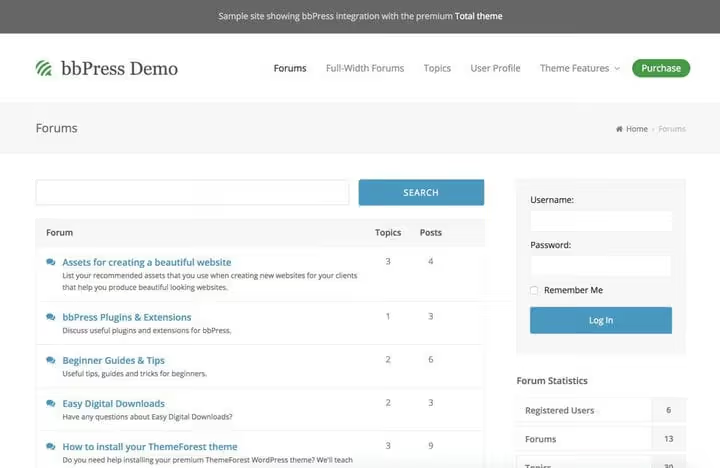
The plugin is extremely lightweight: under the hood, three custom post types (forums, topics, and replies), a few display templates, a shortcode system, a couple of widgets, and CSS code. No bloated code eating server resources. The current bbPress version, 2.6.14, is tested up to WordPress 7.0 and has over 100,000 active installations.
Key advantages of bbPress:
Full WordPress integration. bbPress uses WordPress's built-in user system, works with most themes, and opens access to thousands of plugins from the repository. For example, BuddyPress, a social network platform for WordPress, uses bbPress as the foundation for its forums.
Easy setup. Since bbPress is a WordPress plugin, you can change the forum's appearance through the standard theme customizer or CSS editor. No digging through server configuration files.
Flexibility through shortcodes. 19 built-in bbPress shortcodes let you display forum lists, recent replies, login forms, or search anywhere on the site, on a page, in the sidebar, or footer.
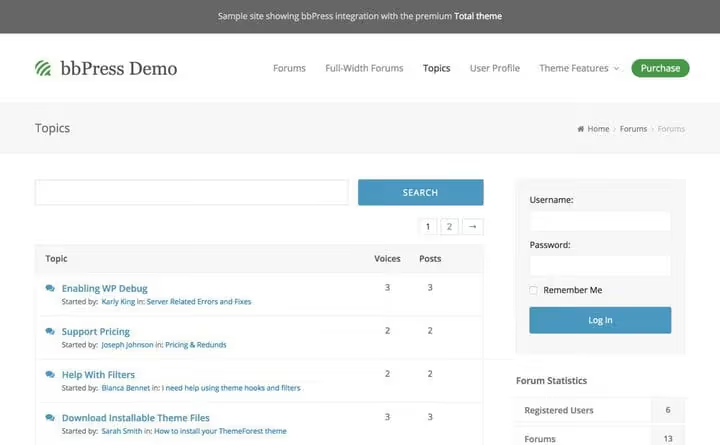
bbPress is not for those who want a Reddit clone or a classic BBS bulletin board. But if you need a community element in an existing blog, a support section for clients, or a clean discussion space, bbPress handles the task without extra weight.
💡 Quick overview:
- Install bbPress through the WordPress plugin directory or alongside the Total theme
- Configure basic parameters: spam protection, anonymous posting, user permissions
- Match your forum's appearance to your brand style through the customizer or CSS editor
- Add useful extensions: notifications, styling, BBCode, user signatures
- Launch first test discussions and check mobile display
Installing bbPress
You can install bbPress in two ways. The basic method through the WordPress plugin directory takes less than a minute.
Installation through the plugin directory
Go to "Plugins → Add New", type "bbPress" in the search, click "Install" and then "Activate". After activation, you'll see a welcome page with a brief introduction.
The plugin is also available for manual download from the WordPress.org repository, download the zip archive and upload it through "Plugins → Add New → Upload Plugin".
Installation through the Total theme
Some premium themes include ready-made demos with bbPress. The Total theme (one of the most popular themes for WPBakery, with 50,000+ users) offers one-click bbPress demo import.

Purchase and install Total from ThemeForest (from $59), then go to "Total → Demo Importer".

Find the "bbPress" demo in the list and click it. Total will offer to install all necessary plugins, including bbPress itself.

After installing plugins, check everything for import: XML demo data, images, customizer settings, and widgets.

Done, the forum is installed, populated with test content, and looks just like the Total live demo.
Basic configuration
After activating bbPress, three new sections appear in the admin menu: "Forums", "Topics", and "Replies", plus a settings page under "Settings → Forums".

First, configure spam protection:
Throttle Time, the minimum interval in seconds between replies from one user. A value of 10-15 seconds blocks most spam bots.
Anonymous posting, disable this option to require users to register before creating a topic or reply. This drastically reduces junk messages.
**Integration with **Akismet, if you have the Akismet plugin active, enable integration on this same page. bbPress automatically runs new topics and replies through the anti-spam filter.
Before launching a real forum, create several test forums, topics, and replies (preferably from different accounts). With dummy data, you'll immediately spot layout problems, especially on mobile devices, and can fix them before real users arrive.
Configuring forum appearance
bbPress inherits styles from the active WordPress theme, so by default the forum looks like the rest of the site. But if you want to tweak details, button colors, fonts, spacing, there are two paths, and neither requires programming skills.
Option 1: Theme customizer
If your theme supports extended bbPress settings (like Total), go to "Appearance → Customize". In the bbPress section, choose a layout for forum pages, topics, and user profiles.
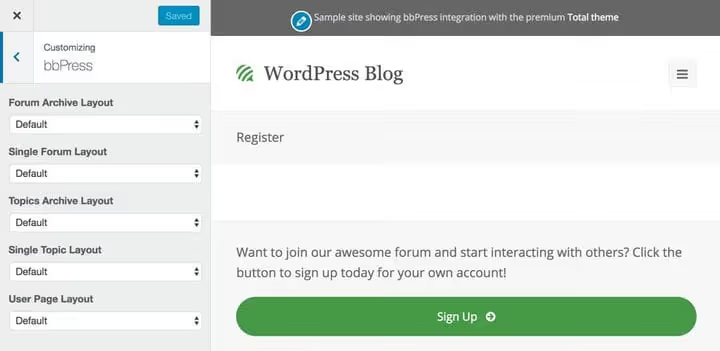
Then through the "Typography" and "General Parameters" sections, configure fonts, accent colors, and button styles to match your brand.
Option 2: Visual CSS editor
If the theme doesn't provide the necessary options, install a visual CSS editor. It lets you click on a page element and change its style through a properties panel, without a single line of code.
Two popular options:
Visual CSS Style Editor (formerly Yellow Pencil), over 60 CSS properties, visual drag-and-drop, undo changes. The free version covers basic styles; Pro ($39/year) adds Google Fonts, animations, and gradients. More details in our Yellow Pencil guide.
CSS Hero, an editor with live preview, Google Fonts and TypeKit support, CSS export. Works on any theme, doesn't modify files. Price from $29/year for 1 site. Suitable for those who need more professional control.
Useful add-ons for bbPress
bbPress can be extended with dozens of specialized plugins. Here are four that cover the key needs of most forums.
bbPress Notify (No-Spam), customizable email notifications for new topics and replies. Unlike bbPress's built-in subscription, this plugin gives flexible control: notifications by user roles, HTML emails, background sending without timeouts, preview mode. bbPress Notify on WordPress.org
bbp Style Pack, a Swiss Army knife for bbPress styling. Changes fonts and colors, manages forum layout (vertical lists, "Create Topic" buttons), adds quoting, topic preview, unread posts section, and dozens of other small settings. bbp Style Pack on WordPress.org
GD bbPress Tools, a toolkit for advanced forums: BBCode (30 tags), user signatures, reply quoting, quick moderation, HTML tag management. The Pro version adds TinyMCE editor, SEO features, post reports, and auto-closing inactive topics. GD bbPress Tools on WordPress.org
Ultimate Member** + bbPress extension**, a combo for membership sites. Ultimate Member adds registration, user profiles, member directory, and content restriction, while the bbPress extension integrates the forum with this system: member profiles display next to their posts, forum access rights sync with membership level.
Disadvantages and limitations of bbPress
Despite all the advantages, bbPress has weak spots worth knowing before installation:
Minimalist design out of the box. The standard bbPress look is functional but outdated compared to modern forum platforms like Discourse or Flarum. Manual styling through CSS editor or a bbPress-supporting theme will be required.
Slow development. The plugin updates infrequently: the last major 2.6 release came out several years ago, and although security patches come out regularly, new features are almost never added. Part of the community considers the plugin semi-abandoned.
No built-in post editor. In the standard package, forum users write in a plain text field, no WYSIWYG. A visual editor is added only through third-party plugins like GD bbPress Tools Pro.
Performance on large forums. bbPress stores everything in standard WordPress tables, so on forums with hundreds of thousands of posts, database queries can slow down the site. For such scales, consider Discourse or XenForo instead.
⁉️🤔 Frequently asked questions
Does bbPress work with my WordPress theme?
bbPress is compatible with most correctly written WordPress themes. The plugin uses the theme compatibility API and adapts to your theme's markup automatically. If your theme follows WordPress standards (uses
wp_headandwp_footerhooks, correct loops), there will be no display problems. For FSE themes, bbp Style Pack adds compatibility mode from version 6.0.
Can I migrate an existing forum to bbPress?
bbPress includes built-in import tools. Go to "Tools → Forums → Import Forums", converters are available from phpBB, vBulletin, Simple:Press, FluxBB, Mingle, and other systems. Before migration, make a full site backup. Importing a large forum (50,000+ posts) takes several minutes, don't close the page during the process.
How does bbPress differ from BuddyPress?
These are different tools with different tasks. bbPress is purely a forum plugin: forums, topics, replies. BuddyPress is a social network platform: user profiles, groups, activity feed, private messages. They work great together: BuddyPress uses bbPress for forum functionality within groups. If building a community from scratch, install both.
How do I protect the forum from spam?
Enable Akismet integration in bbPress settings, set throttle time between posts (10-15 seconds), and disable anonymous posting. Additionally install the free CleanTalk plugin, it blocks spam registrations without captcha. The combo of Akismet + Throttle Time + required registration + CleanTalk blocks the vast majority of automated spam.
Is bbPress suitable for a commercial support site?
Absolutely. bbPress is often used for client support portals, especially in combination with WooCommerce or Easy Digital Downloads. You create a private forum for authorized users and organize sections by products. To strengthen, add bbPress Notify (No-Spam), it will send a notification to the support agent when a new question appears, and Ultimate Member with bbPress extension will link client profiles to their forum topics.
Is bbPress worth installing in 2026
bbPress remains a justified choice for those who need a simple forum natively integrated with WordPress. It doesn't claim to be a "Discourse killer" and doesn't try to copy commercial platform functionality, and that's its strength.
Choose bbPress if: you run a blog and want to add a discussion section, are launching a knowledge base with a support forum, or building a niche community on WordPress. Lightweight, fast, doesn't require a separate server.
Look for an alternative if: you need a modern interface with WYSIWYG editor "out of the box", a forum on the scale of 500,000+ posts, or a full-fledged social network. In these cases, look at Discourse (powerful but requires separate hosting), Flarum (lightweight, modern, PHP), or BuddyPress for social networking functionality.
Try bbPress on a test site, installation takes two minutes, and you'll immediately see how well it fits your workflow. If you like it, strengthen with the plugin combo above, and you'll get a performant forum that won't slow down the site or scare away users.

A professional team of writers and editors specializing in creating quality content.