














🧑💼 4 best plugins for HR management on WordPress 2026: from free HR to ERP
When your headcount crosses three people, tracking time off in a Google spreadsheet breaks down. One person forgets to update it, another messages "I'm not coming in today," the third goes on sick leave without filing a request. HR or the manager spends Friday evening manually reconciling hours and piecing together conversations across three channels.
WordPress has long been capable of more than blogs and landing pages. Personnel management with employee profiles, time-off tracking, attendance logs, and payroll reports can run directly in the admin panel, without a zoo of SaaS subscriptions that bill per head. We've gathered four plugins that handle HR inside WordPress: from a lightweight HR core to an ERP powerhouse with built-in CRM and accounting.
Each plugin was tested on a live WordPress 6.9 installation. Three of the four are actively updated in 2026. Pricing ranges from completely free core versions to $999.99 per year for Professional enterprise editions. We'll break down which tool fits a specific business size.
💡 Quick overview:
- Determine your scale: for basic HR (profiles, time off, attendance), WP-HR Manager or Staff Directory will suffice; for end-to-end automation of HR + CRM + accounting, WP ERP.
- Check the key characteristics in the table below: price, free version, mobile access, integrations, the answer is visible at a glance.
- Install the free version on staging: three plugins are available in the WordPress.org directory, the fourth (Employee and HR Manager) is sold on CodeCanyon. Half an hour of testing tells you more than any review.
- Configure roles: Admin ↔ HR Manager ↔ Employee. All four plugins enforce permissions so employees don't see what they shouldn't in the admin.
Plugin comparison table
Feature | WP-HR Manager | WP ERP | Staff Directory | Employee and HR Manager |
|---|---|---|---|---|
Free version | ✅ Yes (core) | ✅ Yes (core) | ✅ Yes (lite) | ❌ No ($19) |
HR management | ✅ Full | ✅ Full | ✅ Profiles + search | ✅ Full |
CRM | ❌ | ✅ Built-in | ❌ | ❌ |
Accounting | ❌ | ✅ Built-in | ❌ | ❌ |
Mobile app | ✅ Check-in (Pro) | ✅ Android/iOS (Pro) | ❌ | ❌ |
Self-service (ESS) | ✅ | ✅ (HR Frontend Pro) | ❌ | ❌ |
LDAP / Active Directory | ❌ | ❌ | ✅ (Pro add-on) | ❌ |
Active installs | ~300 | 10,000+ | 2,000+ | CodeCanyon |
Pro price (from) | Extensions sold separately | $9.99/mo | $999.99/yr | $19 (one-time) |
1. WP-HR Manager

WP-HR Manager, a fork of WP ERP by the wphrmanager team, focuses exclusively on HR. No CRM, no accounting, just personnel management. The idea is honest: if you don't need an ERP suite, don't pay for modules you won't use.
What the free core does. Employee profiles with complete records, departments and roles, time-off and leave tracking with configurable policies for different positions, staff announcements, audit log of changes. Employees can view their profile and remaining time off from the frontend without accessing the admin. Support for 44 currencies for payroll data, multilingual out of the box (Russian, German, Japanese and a dozen more languages).
Pro extensions. Sold individually: WP-HR Attendance (shift-based clock-in and clock-out tracking), WP-HR Mobile Check-in (mobile clock-in), WP-HR Recruitment (job postings and hiring directly on the site), WP-HR GDPR Pro (consents, training audit, data subject request log), and WP-HR Documents (company and employee document library). You pay only for what you actually need.
In practice. We installed WP-HR Manager on a web studio site with 12 people, time-off and leave tracking was up in 10 minutes, the Russian interface loaded without editing .po files. Downsides: the plugin has not been tested with the last three major WordPress versions (warning in the directory), around 300 active installs. In April 2025 users complained about lack of support. In January 2025 CVE-2025-23843 was disclosed, a reflected XSS, patch released.
Verdict. Works for small businesses that need HR without extras. If support speed and compatibility with current WordPress are critical, look at WP ERP (section 2), from which WP-HR Manager forked and which is actively maintained.
💵 Price: Free core. Pro extensions sold separately, price depends on module.
🔗 WP-HR Manager on WordPress.org🔗 Developer site (Pro version)
2. WP ERP
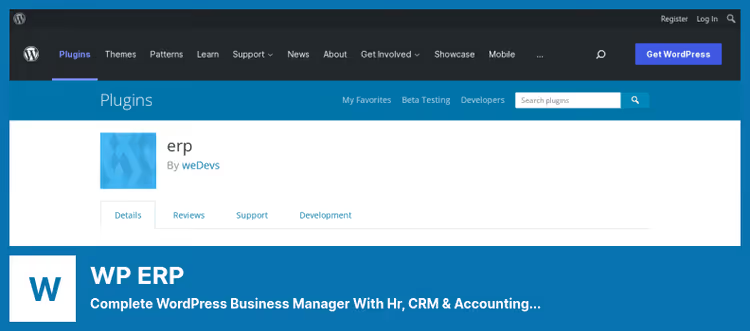
WP ERP by weDevs, the most powerful player in this roundup. This is not an HR plugin but a full ERP system inside WordPress: three modules (HR, CRM, Accounting) work together on one engine. Over 10,000 active installs, compatible with WordPress 6.9, active development, the main signal the product is alive and will stay alive.
HR module (free). Employee profiles, departments, positions, time-off calendar with policies (sick leave, casual leave, earned leave), attendance tracking, announcements, reports by gender, age, salary and tenure. Recruitment module: publish job openings on the site, screening questionnaires, candidate pipeline by hiring stage, a complete ATS inside WordPress.
CRM and accounting (free). CRM is built around contacts with lifecycle stages (lead → customer → recurring), logs calls and meetings, groups and filters. The accounting module provides a visual dashboard of income and expenses, invoices, quotes, accounts, partial payments, ledgers and support for 44+ currencies. WooCommerce integration syncs customers and orders with CRM and accounting, out-of-the-box integration for an online store.
Pro at the $9.99/mo tier. Nine premium extensions in one subscription: Advanced Leave Management (flexible time-off rules), HR Frontend (employees work from the frontend only, no admin access), Zendesk / Help Scout / Awesome Support Sync (tickets in CRM contact card), Gravity Forms Sync (auto-create contact from form), Salesforce / HubSpot / Mailchimp Sync. Mobile app for Android and iOS included in the subscription.
In practice. WP ERP shines when business processes intertwine: a manager invoices a client (Accounting), the client calls, call history in CRM, the manager takes time off, logged in HR. Without ERP this chain splits across three different services, with it everything lives in one admin panel.
💵 Price: Free core (HR + CRM + Accounting). Pro: from $9.99/mo for 1 user, annual discount.
🔗 WP ERP on WordPress.org🔗 WP ERP Pro (weDevs site)
3. Staff Directory
Staff Directory by emarket-design solves a narrower task than the first two plugins: not full HR management with time off and payroll, but a structured employee directory with search, filters and profiles. If a company needs a "who's who" directory, with photos, titles and departments, Staff Directory handles this more elegantly than universal HR suites.
Free version. Employee profiles with photo, bio, title, department, address. Search by name, attributes and any custom field with sorting. "Featured Employee" and "Recent Employee" widgets in the sidebar. Shortcodes for displaying groups of employees on any page. Onboarding notifications to new employees by email. Responsive layout, mobile-friendly cards.
Pro and enterprise add-ons. Key differentiator from the rest: LDAP / Active Directory / Microsoft Entra ID (Azure AD) integration via official add-ons. Employee data syncs from a centralized directory automatically, no manual entry. Org structure with hierarchy and org charts, bulk CSV import and export, and configurable workflow automation are available in the Professional version. The plugin is tested with WordPress 6.9 (version 4.5.5), active development continues.
The fly in the ointment. The Professional version costs $999.99 per year, two orders of magnitude more expensive than WP ERP Pro. Unjustifiable for small business, justifiable for enterprise with LDAP infrastructure exactly to the extent it saves hours of manual directory sync.
In practice. A company with 50+ people and Active Directory: Staff Directory Professional eliminates double data entry. A small studio: the free version is enough for a nice team directory on the site.
💵 Price: Free core (lite). Professional: annual license $999.99. LDAP and Azure AD add-ons licensed separately.
🔗 Staff Directory on WordPress.org🔗 Professional version (emarket-design site)
4. Employee and HR Manager Plugin
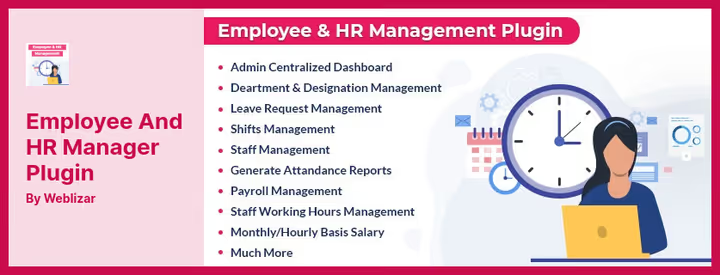
Employee and HR Manager Plugin (EHRM) by weblizar on CodeCanyon, the only completely paid plugin in the roundup. No free core, but the price, $19 one-time, with no recurring payments. For those who want to pay once and forget about subscriptions, an attractive model.
Functionality. Shift-based time tracking, one-click clock-in and clock-out, monthly and hourly payroll calculation, leave request management. Employees grouped by department and position, banking and personal data stored in the employee card. Unified management panel, no jumping between screens.
Customization. You can upload your own logo to the HR panel and adapt the interface to company branding. Technical support via CodeCanyon ticket system.
Limitations. Unlike WP ERP or Staff Directory, EHRM does not have open source code on WordPress.org, a security audit on your own is not possible. No mobile app. No integrations with external services (CRM, accounting, LDAP) are declared. For a company planning to scale, these are serious limitations.
In practice. EHRM is a working tool for a small office or retail location where you need shift and payroll tracking without extra complexity. For a growing business, better to look at WP ERP: for the same $9.99/mo you get not only HR but also CRM with accounting, plus a mobile app.
💵 Price: $19 (one-time purchase on CodeCanyon).
🔗 Employee and HR Manager Plugin on CodeCanyon
Video: setting up an HR portal with WP ERP in 20 minutes
Instead of describing every click in text, here's a visual video from the WP ERP team: a complete setup cycle of an employee self-service HR frontend, from plugin installation to a working portal with leave requests and profile viewing.
⁉️🤔 Frequently asked questions
Can you get by without a plugin and use standard WordPress roles?
Standard WordPress roles (Administrator, Editor, Subscriber, etc.) don't provide HR management: no employee profiles with complete records, no time-off tracking, no attendance log. Roles control content access but don't manage personnel. Even for a five-person team, a plugin saves hours of manual tracking in the very first month.
Which plugin should I choose if employees should not access the WordPress admin at all?
WP ERP with the HR Frontend extension (Pro, subscription from $9.99/mo) gives employees a separate frontend portal: login, view their profile, request time off, clock in, all without access to
/wp-admin/. WP-HR Manager also supports frontend profiles out of the box (free), but without the Pro Attendance extension there's no clock-in and clock-out tracking.
What to do if the plugin conflicts with the theme or another plugin?
Install on staging (a site copy) and test before production, a rule that saves nerves. WP-HR Manager in WordPress.org reviews mentions a conflict with Elementor Pro. If you use Elementor, check compatibility on staging before installing on the live site. WP ERP and Staff Directory have no conflicts with popular themes and plugins in recent reviews.
Can you migrate employee data from one plugin to another?
There is no direct automated migration tool between any of the plugins in this roundup. WP-HR Manager (Pro) and Staff Directory (Pro) support CSV import and export, this is the main path: export data from the old plugin to CSV, clean the columns, import into the new one. WP ERP supports employee import via CSV in the free version. The migration itself is a manual operation taking an hour or two depending on the number of records.
Does it make sense to install an HR plugin on WordPress if the company already uses a cloud HRIS (BambooHR, Zoho People, Personio)?
It makes sense if part of the team does not have access to the cloud HRIS (external contractors, freelancers, interns on temporary accounts), for them you can set up lightweight profiles in WordPress without buying additional cloud service licenses. Plus a WordPress plugin stores data on your server, not with a third party, an argument for GDPR-sensitive companies. But if you already have BambooHR set up with integrations to Slack, Jira and a payroll provider, duplicating data in WordPress is unjustified.
What to install for your task: final breakdown
We've covered four plugins with different architectures and pricing, now we assemble the picture into one decision framework.
If you have a small business or web studio with a team up to 15 people and need strictly HR management (time off, profiles, attendance) without CRM and accounting, take WP-HR Manager. The free core covers most needs, Pro extensions are purchased as needed. But remember the slow support and lack of testing with recent WordPress versions.
If business processes are intertwined (sales → client → invoice → manager payroll), your choice is WP ERP. Three modules in one core for $0, or from $9.99/mo for Pro with mobile app and HR frontend. The best "functionality per dollar" ratio in the roundup.
If you don't need HR management as such but need a nice public team directory with search, filters and automatic sync from Active Directory, Staff Directory. The free version is good for a directory on a brochure site, Professional at $999.99/year is for enterprise with LDAP.
If the budget is tight, subscriptions are not for you, and management boils down to shifts and payroll, Employee and HR Manager Plugin for a one-time payment of $19 covers basic small office needs. But remember: for this money you get exactly what's in the description, no mobile app, no CRM, no open source.
Test the free version of the plugin that fits your task. All except EHRM install from the WordPress.org directory in two clicks. Configure roles, create a handful of test employees and live in the plugin for a working week, real experience scheduling time off and reconciling hours will tell you more than any review.

A professional team of writers and editors specializing in creating quality content.