













 AIIllustrative image: AI-generated
🔝 5 best free WordPress voting plugins 2026
A reader came in, read the post, and silently closed the tab. You don't know if the content resonated, if that person will come back, or if the post was even worth writing. Sound familiar?
A "Like" button or mini-poll solves the problem in one click. A visitor clicks the button, you get a signal: this works, this doesn't. Reddit, Product Hunt, and Digg are built on reader voting, and your WordPress site can work exactly the same way.
We tested a dozen and a half free plugins for voting and selected 5 that actually work in 2026. No marketing fluff, only those that are updated, don't conflict with themes, and don't bog down the server.
💡 Quick overview:
- WP ULike: the most powerful all-in-one, likes, dislikes, built-in stats, 60,000+ active installs
- Posts Like Dislike: lightweight alternative without dashboards and extra database tables, 6,000+ sites
- bbPress Voting: Reddit-style voting for forums, works via AJAX
- YOP Poll: classic polls, rewritten from scratch in v7, 10,000+ installs
- Poll Maker: visual poll builder with 7 themes, ratings, and charts
Plugin comparison table
Plugin | Type | Active installs | Free / Pro | Russian language |
|---|---|---|---|---|
WP ULike | Likes / dislikes | 60,000+ | Free + Pro | Yes |
Posts Like Dislike | Likes / dislikes | 6,000+ | Free | Yes |
bbPress Voting | Voting ↑↓ | 1,000+ | Free + Pro | Yes |
YOP Poll | Polls | 10,000+ | Free + Pro | Yes |
Poll Maker | Polls / ratings | 10,000+ | Free + Pro | Yes |
1. WP ULike, flagship likes and dislikes plugin

WP ULike, the most popular free plugin for like/dislike voting in the WordPress directory. 60,000+ active installs, updated in June 2026 (v5.0.6), full compatibility with WordPress 6.7+. In practice, this means the plugin is not abandoned and will work with your site tomorrow, not just today.
Buttons appear automatically under posts right after activation. No manual setup, just enable and it works. For fine-tuning there's a built-in live preview: change colors, spacing, fonts, and see the result immediately.

The plugin provides a built-in stats panel: you can see which posts get the most likes, which products engage the audience, and which go unnoticed. For blogs and online stores, this is a direct replacement for reading tea leaves.

Out of the box: 2 Gutenberg blocks (ULike button and top list), [wp_ulike] shortcode, integration with WooCommerce, BuddyPress, and bbPress. Pure JavaScript code, no jQuery, lightweight, works well with WP Rocket, W3 Total Cache, and LiteSpeed Cache.

Pros:
- Automatic button display, set and forget
- Detailed real-time content statistics
- Pure JavaScript, doesn't slow down the site
- Full RTL language support
Cons:
- No dislike button in the free version (only like)
- May seem excessive for a simple blog
Price: free. Pro from $49 per year, dislikes, 25+ templates, view tracking, REST API.
🔗 WP ULike on WordPress.org🔗 Official WP ULike site
2. Posts Like Dislike, lightweight alternative

Posts Like Dislike, the complete opposite of WP ULike. If the first is an all-in-one with stats and dashboards, then Posts Like Dislike does exactly one task: adds "Like" and "Dislike" buttons under posts. No statistics, no Gutenberg blocks, just buttons.
The plugin doesn't create separate database tables, all data is stored in wp_postmeta. After removing the plugin, no clutter remains. Updated in May 2026 (v1.1.6), tested with WordPress 7.0.
Four built-in icon sets: thumbs up/down, heart, checkmark/cross, emoji. You can upload custom icons. Position setting: before or after content. Both buttons or only like/dislike separately are available. Vote restriction by cookie or IP.
Pros:
- Extremely simple, doesn't clutter the admin panel
- Doesn't create its own database tables
- Both buttons (like + dislike) available for free
- Lightweight, a couple kilobytes of CSS and JS
Cons:
- No statistics and dashboard
- No ready integrations with WooCommerce and BuddyPress
- Only display under posts, no shortcode insertion anywhere
Price: completely free.
🔗 Posts Like Dislike on WordPress.org
3. bbPress Voting, Reddit-style voting for forums
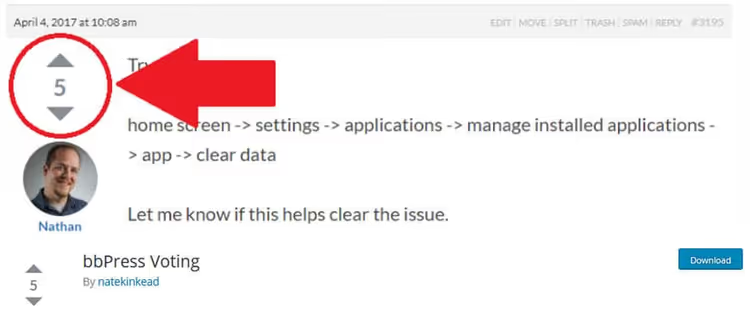
bbPress Voting, a niche but indispensable plugin if the site has a bbPress forum. Adds "up" and "down" arrows to every topic and reply, exactly like Reddit. Each user votes once per topic or reply, vote manipulation excluded.
Voting works via AJAX, the page doesn't reload, the counter updates instantly. The plugin is compatible with AMP and BuddyBoss. There's GamiPress integration: you can award points for upvotes and deduct for downvotes.
Everything is flexibly controlled in settings: disabling voting on specific forums, hiding the counter, sorting topics by rating, read-only mode for closed topics. Pro version for $39 adds accepted answer marking, voter avatars, and Q&A microdata.
Pros:
- Full Reddit-like voting
- Works via AJAX, no reloads
- Permission settings for each forum separately
- GamiPress integration for gamification
Cons:
- Requires installed bbPress, useless without a forum
- Very niche, not for a regular blog
Price: free. Pro for $39, accepted answers, trending sort, email notifications.
🔗 bbPress Voting on WordPress.org
4. YOP Poll, classic polls and surveys

YOP Poll, a WordPress directory veteran with 448 reviews, completely rewritten from scratch in version 7.0. Old code discarded, interface reworked in a modern way: everything works in real time, without page reloads. All existing polls and votes migrate automatically on update.
The plugin is designed specifically for polls: one question, multiple answer options. Supports single and multiple choice, "Other answer" option with custom text from the voter, answer sorting in any order. Scheduling: a poll can be started and stopped by date.
Fraud protection at the level: restriction by cookie, IP, or username. Built-in Cloudflare Turnstile support. Detailed logs of each vote with search, sorting, and export. Result display: numbers, percentages, or both. Results can be shown before voting, after, on a set date, or never.
Pros:
- Rewritten from scratch, modern code, fast interface
- Detailed logging of each vote
- Flexible result visibility management
- Shortcodes for poll archive and random active poll
Cons:
- Only one question per poll
- No visual builder, text-based settings
Price: free. Pro adds custom fields, CSV export, priority support.
5. Poll Maker by AYS, visual poll and rating builder

Poll Maker covers scenarios that YOP Poll can't handle. Where YOP Poll provides a text interface, Poll Maker offers a visual builder with 7 ready themes, 30+ style settings, and live preview.
Five poll types in the free version: classic option choice, rating (stars or emoji), like/dislike voting, plus audio and video polls. Pro adds versus duels (two options head-to-head), slider rating, and open text answers.
Voting can be restricted by WordPress user roles and password-protected (Pro). There are email notifications for new votes, social sharing, and several result display methods: bar, pie, or line chart.
Pros:
- Visual builder with themes and live preview
- Five poll types, including ratings and media polls
- Chart results to choose from
- Integrations: MailChimp, Slack, Google Sheets, Zapier (Pro)
Cons:
- Some key features only in Pro (versus, anonymity, text answers)
- Free version shows Pro feature ads in settings
Price: free. Pro from $39, versus polls, anonymous polls, CSV export, 10+ integrations.
Video: voting plugin comparison in action
Short video in English showing installation and setup of popular WordPress voting plugins:
⁉️🤔 Frequently asked questions
Does a user need to register to like a post?
No. All plugins from the roundup work without registration. The vote is tracked by cookie or IP, the visitor just clicks the button and moves on. If desired, in WP ULike and Poll Maker you can restrict voting to logged-in users only.
Do the plugins work with any WordPress theme?
Yes, without problems. All plugins in the roundup don't depend on a specific theme and work through standard WordPress hooks. If the theme is written according to WordPress Coding Standards, buttons will appear automatically. For custom themes you can display buttons via shortcode:
[wp_ulike]for WP ULike or[posts_like_dislike]for Posts Like Dislike.
How does a like plugin differ from a poll plugin?
A like plugin (WP ULike, Posts Like Dislike) adds a permanent "Like" button under each post, it's passive collection of content reactions. A poll plugin (YOP Poll, Poll Maker) creates a separate poll with a specific question and answer options, it's active collection of opinions on a topic. For a blog, likes are usually enough, for research and feedback you need polls.
Won't voting plugins slow down the site?
No. WP ULike is written in pure JavaScript without jQuery, Posts Like Dislike weighs just a few kilobytes. YOP Poll in version 7.0 was rewritten from scratch with a focus on performance. All plugins are tested with major caching plugins: WP Rocket, W3 Total Cache, LiteSpeed Cache. AJAX requests when voting are asynchronous and don't block page loading.
Can multiple plugins be used simultaneously?
Possible, but not necessary. WP ULike and Posts Like Dislike solve the same task, choose one. A combo of "like plugin + poll plugin", a normal scenario: WP ULike for permanent reactions and YOP Poll for one-time polls coexist perfectly on one site.
What to install on the site: final breakdown
The choice comes down to three scenarios.
If you only need likes under posts, take WP ULike. 60,000+ sites aren't wrong: auto-display buttons, statistics, compatibility with everything. Want simpler and without dashboards, Posts Like Dislike will handle it and won't leave clutter in the database.
If the site has a bbPress forum, bbPress Voting is mandatory. Reddit-like voting for topics and replies instantly increases forum activity.
For polls and surveys: YOP Poll, a time-tested tool rewritten in 2025 on modern code. Need a visual builder with themes and ratings, Poll Maker will cover all wishes from stars to audio polls.
Likes and polls are not decoration, but a working tool. Install one plugin today and check the stats in a month. You'll be surprised which content actually engages your audience.

A professional team of writers and editors specializing in creating quality content.