














🚀 5 best Rich Snippets plugins for Schema.org in WordPress 2026
Rating stars, prices, and FAQ dropdowns in Google search results: you see them every day. And you click on them more often. According to Backlinko, rich snippets boost CTR by 20-30% at the same positions: the result looks more noticeable and inspires more trust than a plain text link.
But Google doesn't guess stars and prices on its own. It needs a machine-readable layer, structured data from Schema.org in JSON-LD format. Without it, your plugin review or product page looks no different from a regular text snippet in search results. Writing JSON-LD manually through functions.php takes time, and making mistakes in the structure is easier than you might think.
We tested 5 current schema plugins for WordPress in 2026: from fully automatic solutions to free starting points and privacy-first SEO powerhouses. Each solves the problem differently, and the right choice depends on what your site needs: simplicity, schema type coverage, or price.
💡 Quick overview:
- Schema Pro, best choice for automation: JSON-LD without touching code, 20+ schema types, inclusion and exclusion rules for mass deployment, paid
- Rank Math SEO, maximum coverage for free: 16+ schema types, Content AI, auto-generation of alt texts, one-click import from Yoast and AIOSEO
- WP Review Pro, best for review sites: 14 schema types, beautiful front-end rating block, user ratings in comments, paid
- All in One Schema.org Rich Snippets, best free option to start: 8 schema types, metabox in editor, setup in a minute
- SEOPress, best for privacy-first SEO with built-in schema: 350,000+ installs, white label, modular architecture, schema editor with live preview
What is Schema.org markup and why does your WordPress site need it
Schema.org is a structured data vocabulary understood by Google, Bing, Yahoo, and Yandex. Essentially, you speak to the search engine in its language: "this block is a 4.7 out of 5 rating, this one is a $29 price, and that one is an office address with business hours."
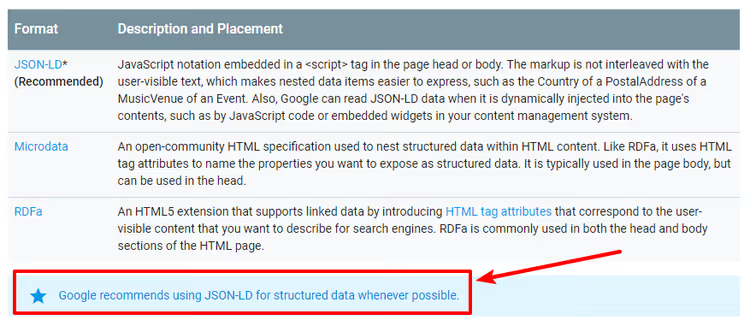
Technically, this appears as a JSON-LD script in the page's <head>. Google directly recommends JSON-LD as the primary format: it doesn't interfere with layout, lives separately, and validates more easily through Google Rich Results Test. When the search engine sees valid schema, it gains the right to display a rich snippet with stars, price, event date, or author photo. Schema doesn't guarantee anything, but without it your chances are zero.
In WordPress, structured data can be added in three ways:
- Manually: through
functions.phpor a custom plugin. Full control over markup, but every schema change means editing code. - Through an SEO plugin: Yoast SEO and Rank Math have built-in schemas with a limited set of types in free versions.
- Through a specialized schema plugin: maximum Schema.org type coverage, deep mapping configuration, automation.
Below are the 5 best solutions for different scenarios.
5 best schema plugins for WordPress in 2026
1. Schema Pro
Schema Pro from Brainstorm Force (the team behind Astra theme with 2+ million installs) works on the "set it once and schema pulls everywhere" principle. You select a schema type, set display conditions (category, post type, specific page), and map fields. The plugin automatically adds JSON-LD to all matching pages.
The key feature is data mapping without manual filling. Author, date, title, and featured image fields are pulled from WordPress automatically. Specific data (rating, price, address) is set up through custom fields once and applies to all posts matching the conditions.
As of 2026, Schema Pro supports over 20 schema types: Review, Article, Product, FAQ, How-To, Local Business, Recipe, Event, Job Posting, Course, Person, Book, Software Application, Video Object, and others. Inclusion and exclusion rules provide granular control: for example, automatically apply Review schema to all posts in the "Reviews" category but exclude a couple of specific pages.
Pros:
- Doesn't add visible blocks to the front end; schema stays in
<head>, invisible to users - Automatic field mapping from WordPress without tedious work
- Integration with Yoast SEO without conflicts: plugins divide responsibilities
- Built-in field validation and quick access to Google Rich Results Test
Cons:
- No free version, only a 14-day refund policy
- Cost of $59/year for a single site feels significant for smaller projects
Price: from $59/year for 1 site; included in Astra Agency Bundle from $149/year
🔗 Schema Pro on official website
2. Rank Math SEO

Rank Math is a full-featured SEO powerhouse with a powerful schema module inside. The free version includes 16+ Schema.org types: Article, Review, Product, FAQ, How-To, Local Business, Recipe, Course, and others. PRO adds 20+ types plus a custom schema builder and schema import from any website.
Unlike Schema Pro, Rank Math adds schema at the individual post level through a metabox in the editor. For each post, you select a schema type and fill in the fields. This means slightly more manual work but also more control: each page can be marked up differently.
Content AI stands apart: 40+ AI tools for SEO content optimization, auto-generation of alt texts for images, and a keyword assistant. According to official statistics, over 4 million sites use Rank Math in 2026.
Pros:
- Free version covers 90% of schema needs
- Seamless one-click migration from Yoast, AIOSEO, SEOPress, All in One Schema
- Content AI for SEO text optimization and alt generation
- Google Search Console and Analytics right in the WordPress admin
Cons:
- Schema is configured for each post separately; tedious with 500+ pages (automation in PRO)
- Full AI toolkit requires a separate Content AI subscription
Price: free (basic version); PRO from $6.99/month; Content AI, separate subscription
🔗 Rank Math on WordPress.org | 🔗 Rank Math PRO
3. WP Review Pro
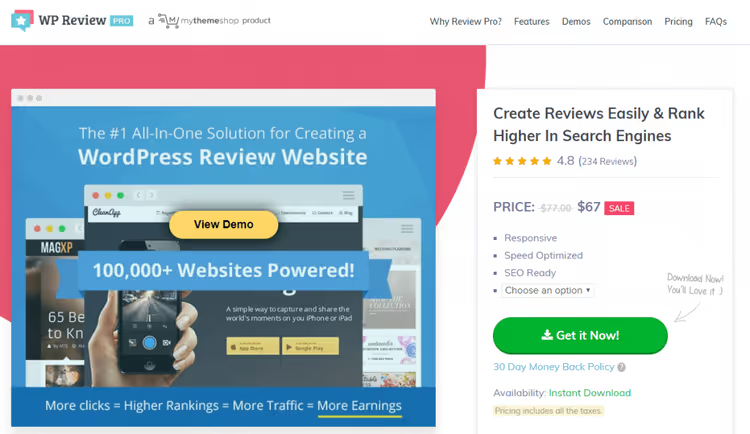
WP Review Pro from MyThemeShop occupies a unique niche: it's both a schema plugin and a visual review tool. Unlike Schema Pro, which hides markup in the <head>, WP Review Pro displays a beautiful front-end block with stars, percentages, or points; users see the rating right in the content.
Under the hood, it supports 14 schema types: Review, Product, Recipe, Restaurant, Software Application, Event, Movie, Book, and others. Plus user ratings in comments (readers can submit their own rating) and integration with Google Places, Yelp, Facebook Reviews, and WooCommerce. You can choose from 16 preset designs for the rating block.
The plugin sells on MyThemeShop for $67 one-time. It's stable and compatible with current WordPress, but hasn't received major feature updates since 2021. For new projects where long-term support is critical, consider more actively developed alternatives.
Pros:
- 16 ready-made review block designs with stars, percentages, and points
- User ratings in comments increase engagement
- Integration with Google Places, Yelp, Facebook, and WooCommerce
- One-time payment of $67, no annual subscription
Cons:
- Hasn't received major updates since 2021; support is uncertain
- Adds a visible block to the page, which may not fit your design without CSS tweaks
- Fewer schema types than Schema Pro (14 vs 20+)
Price: from $67 one-time (1 site) or from $97/year for the full MyThemeShop plugin bundle
🔗 WP Review Pro on MyThemeShop
4. All in One Schema.org Rich Snippets

A free plugin from Brainstorm Force, the younger sibling of Schema Pro. It has over 100,000 active installs and supports 8 schema types: Review, Event, Person, Product, Recipe, Software Application, Video, and Article.
The workflow is simple: a metabox in the post editor, select a schema type from a dropdown, fill in the fields. An info block appears on the front end, and corresponding JSON-LD markup appears in the page code. The plugin receives regular updates: version 1.7.7 from 2026 added security hardening, PHP 8.3 compatibility, and WordPress 6.8 support.
Pros:
- Completely free, no premium feature restrictions
- Simple setup and configuration in 5 minutes
- Compatible with current WordPress and PHP versions
- From Brainstorm Force, a team with reputation and long-term support
Cons:
- Only 8 schema types; Schema Pro needed for advanced scenarios
- Front-end block is visible to users; looks basic without styling
- Manual field filling for each post
Price: free
🔗 All in One Schema on WordPress.org
5. SEOPress

SEOPress is a privacy-first SEO plugin with 350,000+ active installs that includes a full-featured schema editor. Unlike Rank Math, SEOPress focuses on privacy (no telemetry, no ad banners in admin) and modular architecture: unneeded modules can be disabled with one click without losing settings.
The free version supports basic schema types: Article, Local Business, Service, How-To, FAQ, Course, Recipe, Software Application, and others. The PRO version from $49/year adds automatic schemas with conditional rules (AND/OR, by post types and taxonomies), an editor with live JSON-LD preview, custom schemas, and WooCommerce integration with global identifiers (GTIN, MPN, brand).
In version ten (July 2026), developers added a built-in AI assistant in the block editor, metadata generation via OpenAI and Claude, and native support for llms.txt (a guide file for AI search engines like ChatGPT and Perplexity). This is the first SEO plugin seriously entering Generative Engine Optimization territory.
Pros:
- Privacy-first: no tracking, white label out of the box, ideal for agencies
- Modular architecture: disable what you don't need without losing settings
- Schema editor with live JSON-LD preview in PRO
- Automatic schemas with conditional rules (AND/OR, post types)
- Free version covers basic needs
Cons:
- Automatic schemas and custom types only in PRO ($49/year)
- Fewer schema types in free version than Rank Math
- Schema functionality is spread across modules, requiring initial setup
Price: free (basic version); PRO from $49/year per site; unlimited, $149/year
🔗 SEOPress on WordPress.org | 🔗 SEOPress PRO
Plugin comparison table
Plugin | Schema types | Price | Output method | Automation | Free version |
|---|---|---|---|---|---|
Schema Pro | 20+ | from $59/year | JSON-LD in head | Yes (rules) | No |
Rank Math SEO | 16+ | $0 | JSON-LD in head | PRO (templates) | Yes |
WP Review Pro | 14 | $67 | Front-end block | No | No |
All in One Schema | 8 | $0 | Front-end block | No | Yes |
SEOPress | 10+ | $0 | JSON-LD in head | PRO (conditions) | Yes |
Useful video on the topic
Watch this 12-minute tutorial on implementing Schema Markup in WordPress: from plugin installation to checking rich snippets through Google Rich Results Test.
⁉️🤔 Frequently asked questions
Does schema guarantee rich snippets in Google?
No, schema creates the opportunity but not a guarantee. Google decides when and for which queries to show rich snippets. The plugin merely provides the search engine with properly structured data in a format it understands. In practice, valid schema plus quality content plus domain authority give you high chances of rich snippets. From our experience: after implementing Schema Pro and clearing errors in Search Console, rich snippets appear within 2-4 weeks for review and how-to articles. Recipes and product pages get indexed with rich snippets faster, sometimes in 3-5 days.
JSON-LD, Microdata, or RDFa: which should you choose?
JSON-LD. Google directly recommends it as the preferred format: it doesn't interfere with HTML markup, is easier to read and validate. Microdata and RDFa are embedded in HTML attributes and work, but complicate maintenance. All plugins in this roundup use JSON-LD. WP Review Pro and All in One Schema additionally display a visible front-end block, but Google takes one of the two markups, usually JSON-LD. No conflict occurs if the data in both representations is identical.
Can you use two schema plugins simultaneously?
Not recommended. Two plugins means two JSON-LD markups on the same page. If the data matches, Google ignores the duplicate. If it differs (different ratings or prices), the search engine may not show a rich snippet at all because it can't determine which value is correct. Exception: Yoast SEO + Schema Pro. Yoast handles basic Article/WebSite schema while Schema Pro handles specific types (Review, FAQ, Recipe). They don't conflict if you specify in Schema Pro which plugin is "primary" for which types.
What should you do if Google shows the wrong stars or description?
Check through the Google Rich Results Test tool, which shows what schema fields Google parses and what values it sees. A common problem: Review schema pulls the rating not from the plugin's custom field but from another source (for example, comment average). This is solved by configuring field mapping in Schema Pro or Rank Math. Another common problem is multiple schema blocks on a page with different values. Remove the duplicates.
Do you need to update schema after switching plugins?
Absolutely. When migrating, old JSON-LD scripts may remain in cache or in the theme. New schema will layer on top of the old, creating a conflict. The correct order: deactivate the old plugin, clear cache (both server and CDN), enable the new one, test one page through Rich Results Test, and only then enable site-wide. Rank Math and SEOPress offer automatic schema import from other plugins, which is the safe path.
Does schema work for ChatGPT, Perplexity, and AI search engines?
Partially. ChatGPT Search and Perplexity use structured data as one signal for understanding content but not as a primary ranking factor. FAQ schema, HowTo, and Article with clear structure help AI models extract facts more accurately. However, AI search engines rely more on semantic text analysis than JSON-LD. Schema is a supplementary tool for AI visibility, not a replacement for quality content. Plugins like SEOPress already add native support for llms.txt, a guide file specifically for AI crawlers.
Final verdict: schema plugins for WordPress in 2026

The choice comes down to three questions: budget, number of pages, and required depth of configuration.
If you have a review site and it's important for readers to see stars in the content, your choice is WP Review Pro. A front-end block with 16 designs and user ratings in comments provide maximum engagement. $67 one-time is a reasonable price. But keep in mind: the plugin hasn't received active updates since 2021, so for new projects consider alternatives.
If you need a complete SEO ecosystem for free, install Rank Math SEO. 16+ schema types in the free version, Content AI, built-in Google Search Console and Analytics, one-click import from Yoast and AIOSEO. The only nuance: schema is configured for each post separately. Tolerable for 20-30 pages, tedious for 500+.
If you need schema automation for a large site, only Schema Pro will do. Inclusion and exclusion rules, auto field mapping, and 20+ schema types make the annual subscription pay for itself in the first week of time saved. Hundreds and thousands of pages get marked up without manual intervention.
If your budget is zero and your needs are simple, choose All in One Schema.org Rich Snippets. 8 basic types, one-minute setup, stable operation since 2015. For a blog with reviews and recipes, this is enough.
If privacy, white label, and AI readiness matter, choose SEOPress. Modular architecture, schema editor with live preview, llms.txt support, and 350,000+ active installs. The free version covers basic scenarios; PRO from $49/year covers advanced ones.
Start with free Rank Math or All in One Schema. If after a month you realize manual filling isn't enough or you need more specific schema types, upgrade to Schema Pro or SEOPress PRO. Most importantly, don't delay: every month without schema means missed clicks in search results.
🔗 Schema Pro, from $59/year | 🔗 Rank Math, free | 🔗 SEOPress, from $0

A professional team of writers and editors specializing in creating quality content.