














🥇 5 product feed plugins for WooCommerce 2026 (free and paid)
Every rejected product in Google Merchant Center is money thrown away. You pay for clicks, but ads don't show: the feed fails validation. In an average WooCommerce store, 15-20% of products are rejected by Google specifically due to data errors, broken image links, price mismatches, and missing GTINs.
The right feed plugin solves this problem completely. It automatically maps attributes to Google Shopping taxonomy, monitors data accuracy, updates the feed via cron and doesn't crash on large catalogs. A bad one generates rejected products, burns budget and frustrates.
We tested 5 product feed plugins for WooCommerce, from the official Google integration to multichannel platforms covering 220+ marketplaces. Two plugins from the 2022 roundup have left the market, replaced by current alternatives. Here's what actually works in 2026.
💡 Quick overview:
- Compared 5 plugins by channels, customization, large catalog handling and price
Google for WooCommerce, official integration, 900,000+ installations, freeProduct Feed PROby AdTribes, 100+ channels with WooCommerce variable product bug fixCTX Feedby WebAppick, 220+ channels with batch processing, doesn't crash on 50,000+ SKUsWPMR Google Feed Manager, free and unlimited, but Google onlyProduct Feed Managerby RexTheme, best for getting started: 3 clicks to a ready feed
Plugin | Channels | Free limit | Batch processing | Pro price | For whom |
|---|---|---|---|---|---|
Google for WooCommerce | Google only | Unlimited | No | Free | Official Google integration |
Product Feed PRO (AdTribes) | 100+ | Unlimited | No | $99.50/year | Multichannel strategies |
CTX Feed (WebAppick) | 220+ | Unlimited | Yes | $119/year | Large catalogs (50,000+ SKUs) |
WPMR Google Feed Manager | Google only | Unlimited | No | $69/year | Google-only stores |
Product Feed Manager (RexTheme) | 200+ | Unlimited | Yes | $59/year | Beginners and small stores |
Step-by-step breakdown of generating a product feed for Google Shopping with interface demonstration, in the video above. The RexTheme channel author shows the full cycle: from plugin installation to sending the feed to Merchant Center.
1. Google for WooCommerce, official integration by Woo

Google for WooCommerce, the official plugin from the WooCommerce team (Automattic). 900,000+ active installations, and it's deserved: no third-party plugin is integrated with Google infrastructure this deeply.
The plugin syncs the catalog with Google Merchant Center directly, without intermediary files. Free listings on Google Shopping, Performance Max campaigns right from the WooCommerce admin, automatic price and stock synchronization. And with a recent update, YouTube Shopping support.
For multilingual stores with WPML, integration is in development, announced by the Woo team in May 2026. Once it's out, this will close the plugin's main gap: the ability to create separate feeds for different languages and currencies for each country.
Pros:
- Official integration, no compatibility issues with Google API
- Free listings and Performance Max campaigns from admin
- Direct sync with Merchant Center, no intermediary files
- 900,000+ installations, the largest community among feed plugins
Cons:
- Google only, Facebook, TikTok and marketplaces not supported
- WPML integration still in development
Price: free
🔗 Google for WooCommerce on WordPress.org
2. Product Feed PRO, 100+ channels out of the box

Product Feed PRO by AdTribes, the most popular product feed plugin in the WordPress repository: 80,000+ active installations, 1,057 ratings. It covers Google Shopping, Meta (Facebook/Instagram), Bing, PriceRunner, Billiger.de and 100+ more channels from a single panel.
The main advantage is depth of customization. Attribute mapping, category mapping, rule-based filters (price, stock, tags), custom fields with static and dynamic values. Plus built-in support for UTM tags for Google Analytics and Facebook Pixel, CAPI and Google Dynamic Remarketing pixels.
For Google Shopping, the plugin solves a critical variable product issue. WooCommerce has a bug: the price of the cheapest variation ends up in structured data for all variations. Google sees the mismatch and rejects the product. AdTribes fixes this at the JSON-LD level, variable products pass moderation.
Pros:
- 100+ preconfigured channel templates for roughly 200 countries
- WooCommerce structured data bug fix for variations
- Flexible filtering rules: excluding low-margin products, out-of-stock items
- Built-in Facebook pixels, CAPI and Google Dynamic Remarketing
Cons:
- WPML, Polylang, TranslatePress and multi-currency only in Elite
- Interface requires getting used to: lots of options on one screen
Price: free version with basic functionality; Elite from $99.50 per year
🔗 Product Feed PRO on WordPress.org
3. CTX Feed, 220+ channels and batch processing
CTX Feed by WebAppick, the choice of 70,000+ stores. Supports 220+ channels: from Google Shopping and Facebook to TikTok Shop, Amazon, eBay and Snapchat. Six output formats: XML, CSV, TSV, XLS, TXT, JSON.
The key feature is batch processing. On catalogs with 50,000+ products, other plugins crash due to timeout or eat memory. CTX Feed breaks the task into batches and generates the feed without a single failure. In practice, store owners with 45,000+ SKUs confirm: the plugin handles it where competitors break.
Smart category mapping automatically links WooCommerce categories to official Google taxonomy, this eliminates 60%+ of errors in Merchant Center. Attributes can be pulled from ACF, Yoast SEO, Rank Math and internal WooCommerce fields. For complex scenarios there are dynamic attributes: field merging, price manipulation, conditional logic.
Pros:
- Batch processing, doesn't crash on large catalogs
- 6 output formats, including JSON
- Smart category auto-mapping to Google taxonomy
- 220+ preconfigured channel templates
Cons:
- Pro version needed for dynamic attributes and FTP/SFTP upload
- Interface is dense, a beginner will need half an hour to get oriented
Price: free version; Pro from $119 per year
🔗 CTX Feed website, Pro version
4. WPMR Google Feed Manager, Google only, no compromises

WPMR Google Feed Manager by AukeJomm is tailored for one task, Google Merchant Center, and solves it without excess. No attempts to cover 200+ channels: only Google Shopping, and only working feeds from the first try.
The plugin supports all 7 Google feed types: Primary, Supplemental, Promotions, Local Inventory, Manufacturer Center, Dynamic Remarketing and Product Ratings. Automatically fills in required attributes, maps categories and schedules updates via cron. No limits on product count or feed quantity, even on the free version.
In practice, this means you create your first Google Shopping feed in 5 minutes. Choose feed type, check attribute auto-mapping, press "Generate", and the URL is ready to send to Merchant Center. No XML, no spreadsheets, no developer.
Pros:
- Unlimited products and feeds in free version
- Automatic mapping of all required Google attributes
- Smart product ranking by actual WooCommerce sales
- Filters to exclude low-margin and out-of-stock items
Cons:
- Google only, multichannel strategy requires a second plugin
- WPML and Polylang only in Pro version
Price: free version with full functionality; Pro from $69 per year
🔗 WPMR Google Feed Manager on WordPress.org
5. Product Feed Manager, 200+ channels for beginners
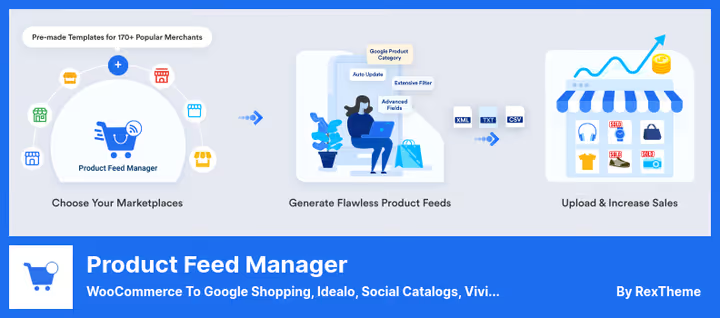
Product Feed Manager by RexTheme, 17,000+ users, 4.8/5 rating on 230+ reviews. The easiest entry among all plugins in this roundup: chose template, configured mapping, generated feed. Three clicks, and products go to Google Shopping, Facebook, TikTok, eBay and 200+ more channels.
The plugin includes a built-in feed validator that catches errors before sending to Merchant Center. This is critical: 15-20% of products in an average store are rejected by Google precisely because of minor data errors. Preview and validation save hours of manual debugging.
Auto-sync with Google Shopping works directly, no need to download and upload the file manually. Plus support for UTM tags for Google Analytics, filters by category, tags, price and product creation date. Five output formats: XML, CSV, TSV, TXT and RSS.
Pros:
- Built-in feed validator, errors visible before sending to Merchant Center
- Auto-sync with Google Shopping without manual file upload
- 200+ preconfigured templates
- Lowest entry barrier among competitors
Cons:
- Less customization depth compared to AdTribes and CTX Feed
- Multilingual requires WPML (supported)
Price: free version; Pro from $59 per year
🔗 Product Feed Manager on WordPress.org
🔗 RexTheme website, Pro version
⁉️🤔 Frequently asked questions
Why do I even need a product feed plugin if I can export products manually via CSV?
Manual export works exactly until the first price or stock change. In WooCommerce with a hundred products, that's half an hour of hell per week. A feed plugin updates data automatically via cron, fills in required Google attributes and maps categories to Merchant Center taxonomy. You'll save 4-6 hours per month on routine alone.
How does Google for WooCommerce differ from third-party plugins like CTX Feed?
Google for WooCommerce is the official integration by Automattic that syncs the catalog with Merchant Center directly, without intermediate XML files. It's free and provides basic Google Shopping functionality out of the box. CTX Feed and similar are multichannel platforms: 220+ marketplaces, flexible attribute customization, batch processing. Take the first for a simple Google Shopping launch, the second when you need Facebook, TikTok, Amazon and eBay simultaneously.
Which plugin can handle a catalog with 50,000+ products?
CTX Feed by WebAppick. Batch processing is its key feature: the plugin breaks feed generation into portions and doesn't crash on timeout. Product Feed Manager by RexTheme also supports batch processing, but on very large catalogs CTX Feed is more stable according to user reviews. Other plugins from this roundup may hit memory limits at these volumes.
Do all plugins need Pro or are free versions enough?
For a store with up to 500 products with one channel (Google Shopping), free versions are more than enough. Pro features become necessary when: a) you're launching products on multiple marketplaces simultaneously, b) you need multilingual and multi-currency, c) you need dynamic attributes and FTP/SFTP feed delivery. The cheapest Pro is RexTheme ($59/year), the most functional is CTX Feed ($119/year).
What to do if Google rejects products from the feed?
First, check category mapping, 60%+ of errors are there. The plugin should automatically match WooCommerce categories to Google taxonomy. Second, prices on variable products: standard WooCommerce substitutes the cheapest variation price, Google sees the mismatch and rejects. Product Feed PRO by AdTribes fixes this at the structured data level. Third, GTIN and brand: for many categories Google requires them, and the plugin should be able to fill them from custom fields.
Which product feed plugin to install in 2026
If the store works only with Google Shopping, get Google for WooCommerce. Official integration, free, 900,000+ installations don't lie.
Need Facebook, TikTok and marketplaces in addition to Google, Product Feed PRO by AdTribes. The variable product bug fix alone pays for switching to it.
Large catalog, 50,000+ SKUs, dozens of channels, CTX Feed. Batch processing and 220+ templates solve it.
Starting from scratch and want a ready feed in 3 clicks, Product Feed Manager by RexTheme. Error validator before sending to Merchant Center will save you hours.
Choose the plugin for your task, not someone else's rating. And test the feed through the built-in validator before launching ads, one broken feed can cost you a day's budget on empty clicks.

A professional team of writers and editors specializing in creating quality content.