













 AIIllustrative image: AI-generated
🍞 7 best breadcrumb plugins for WordPress 2026 (free and paid)
Breadcrumbs are not just a navigation strip at the top of the page. They are a second chance to retain a visitor who is already about to leave. Without them, a person loses context: where they are and how to get back to the catalog.
Standard WordPress does not provide such a mechanism. A theme can be customized with code, but when you change the theme the logic is lost, and edits in functions.php become outdated. A plugin provides a ready-made tool that works independently of the theme, especially important for stores and knowledge bases with dozens of nesting levels.
💡 Quick overview:
- For a simple site or blog, use Breadcrumb NavXT or Flexy Breadcrumb: free, schema.org out of the box.
- Need SEO and snippets in search results, install Yoast SEO: full BreadcrumbList markup and 5 million installations.
- On Divi or Elementor, breadcrumbs are already built into the builder, no separate plugin needed.
- WooCommerce store: combination Yoast SEO (markup) + Breadcrumbs for WooCommerce (clean HTML).
Comparison table of plugins
Plugin | Price | Active installations | Last update | SEO markup | Shortcode |
|---|---|---|---|---|---|
Flexy Breadcrumb | Free | 20,000+ | January 2025 | Schema.org | ✅ |
Breadcrumb NavXT | Free | 100,000+ | December 2025 | RDFa + Schema.org | ❌ (widget) |
Breadcrumbs for WooCommerce | Free | 6,000+ | May 2026 | ❌ (HTML wrapper) | ❌ |
Breadcrumb by PickPlugins | Free / Pro $9 | 10,000+ | December 2025 | Schema.org | ✅ |
Breadcrumbs Divi Module | Free | 10,000+ | June 2026 | RDFa | ❌ (Divi module) |
Yoast SEO | Free / Premium $99/year | 5,000,000+ | May 2026 | Schema.org (full) | ✅ via block |
Elementor Breadcrumbs Widget | Part of Elementor Pro $59/year | - | 2026 | Via Yoast SEO | ❌ (widget) |
1. Flexy Breadcrumb

Flexy Breadcrumb by PressTigers, a simple yet flexible breadcrumb plugin with shortcode [flexy_breadcrumb]. Inserts anywhere: in header.php, in page body, in a widget. The output gives you an SEO-friendly chain with schema.org markup.
Settings are divided into three tabs. In General, you set the "Home" text, end text, home page URL and word limit. Typography handles link colors, text, separator and background. Font Awesome provides a home icon, with hundreds of variants to choose from.
Downsides: the plugin has not been updated since January 2025 and is marked as not tested with the latest WordPress versions. However, in practice it works stably, 20,000+ active installations and a 4.7/5 rating confirm this.
Pros:
- Shortcode, no need to dig into PHP templates
- Schema.org out of the box
- Flexible customization of colors and fonts
Cons:
- No support for hover effects
- A year without updates, may require replacement in the future
🔗 Flexy Breadcrumb on WordPress.org
2. Breadcrumb NavXT

Breadcrumb NavXT, the oldest and most authoritative breadcrumb plugin for WordPress. Author John Havlik has been maintaining it since 2009, and the pace has not slowed: version 7.5.1 was released in December 2025, and 7.5.0, a month earlier. Over 100,000 active installations, 132 reviews.
The plugin generates location breadcrumbs with RDFa markup (Schema.org BreadcrumbList). Settings, among the most detailed in the class: separate tabs for post types, taxonomies, author archives, 404 pages. There is network mode for multisites, you can set global parameters for all child sites.
Breadcrumb NavXT does not use a shortcode. The call is made through the bcn_display() function in the theme template, or through the built-in widget and "Breadcrumb Trail" block for the editor. Developers will appreciate the wide set of actions and filters, code-level extensibility is one of the best in the niche. Compatible with WPML, Polylang, bbPress, BuddyPress.
Pros:
- Most detailed customization among breadcrumb plugins
- Active development and support
- Network settings for multisites
Cons:
- No shortcode, harder integration for non-programmers
- Excessive for simple sites
🔗 Breadcrumb NavXT on WordPress.org
3. Breadcrumbs for WooCommerce

This plugin solves a narrow but important task: customizing the HTML wrapper around standard WooCommerce breadcrumbs. It does not generate breadcrumbs itself, WooCommerce already knows how to do this. Instead, it gives fine control over what they are wrapped in.
Available options: separator between links, opening and closing HTML tags before and after the entire chain, as well as before and after each link. Plus text and URL for the "Home" element. For example, wrapping breadcrumbs in <ul> and each link in <li>, you get a semantically correct list instead of a line with separator >.
Author Anthony Hortin keeps the plugin up to date: version 1.3.0 was released 4 weeks ago, compatibility with the latest WordPress and WooCommerce HPOS versions is declared. Useful nuance: the plugin can completely disable breadcrumbs, just uncheck "Enable breadcrumbs".
Pros:
- The only solution for customizing WooCommerce breadcrumbs without code
- Actively supported
- Can completely disable breadcrumbs
Cons:
- Does not add breadcrumbs, only changes HTML wrapper
- With WooFramework themes, fewer options
🔗 Breadcrumbs for WooCommerce on WordPress.org
4. Breadcrumb by PickPlugins
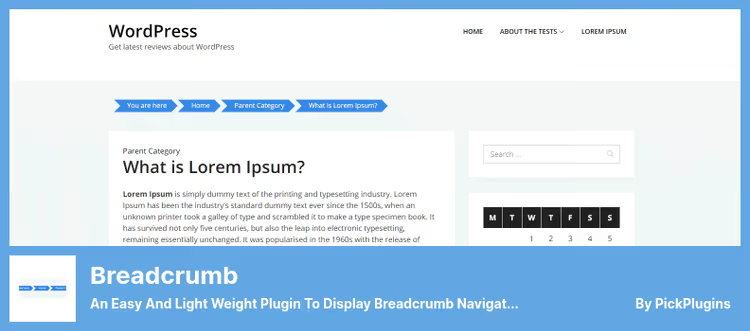
Breadcrumb by PickPlugins, a lightweight universal plugin with shortcode [breadcrumb]. Works on all page types: posts, pages, archives, categories, tags, custom post types, WooCommerce products and categories, search, author pages.
The main advantage, Breadcrumb Builder. In the free version, a basic set of elements (Home, Post, Category, Tag, Archive) is available, which can be arranged in a chain by dragging. The Pro version adds pinpoint hiding of breadcrumbs by post IDs, post types and archives.
The plugin is actively developed: version 1.5.54 from December 2025 fixes builder bugs, and 1.5.50 adds screen reader support. In the backend, convenient settings for colors, fonts, spacing, separator. Schema.org markup is built in.
Pros:
- Breadcrumb Builder with visual chain assembly
- Schema.org markup out of the box
- Works everywhere, from blog to WooCommerce
Cons:
- Pro features (hiding by ID) are paid
- Fewer installations than NavXT
🔗 Download Lite version 🔗 Buy Pro version ($9)
5. Breadcrumbs Divi Module
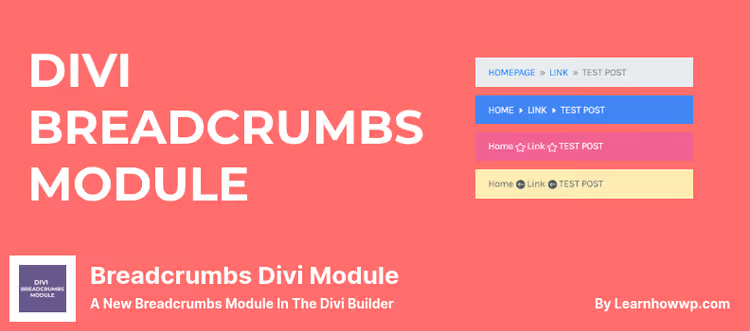
Plugin by learnhowwp adds a separate "Breadcrumbs" module to Divi Builder, drag it into the layout and you are done. Version 2.0.0 from June 14, 2026 brought Divi 5 support: the module works in both old Divi 4 and the new Visual Builder of the fifth version.
Settings are typical for Divi modules and completely visual: link color (with hover), separator color, current element color, separator icon from the Divi library, "Home" text, custom URL for the home link. Breadcrumbs automatically pick up the hierarchy of pages and categories.
Important nuance: in the visual builder, demo data is displayed, real breadcrumbs are visible only on the frontend after exiting the editor. This is how the hierarchy logic works: Divi Builder does not know the page context before publication.
Pros:
- Full visual integration with Divi Builder
- Divi 5 support
- RDFa markup
Cons:
- Only for Divi, does not work with other themes
- In the builder shows demo data, not real breadcrumbs
🔗 Breadcrumbs Divi Module on WordPress.org
6. Yoast SEO

Yoast SEO needs no introduction: 5 million active installations, status of "number one plugin" for SEO on WordPress. Breadcrumbs here are just one of dozens of features, but it is implemented at a level unavailable to niche plugins.
Yoast SEO breadcrumbs get full schema.org "BreadcrumbList" markup, automatically recognized by Google. Setup is simple: in the Search Appearance section enable Breadcrumbs, choose separator, prefix for categories and position. Insertion is done through the "Yoast Breadcrumbs" block in the editor or through the yoast_breadcrumb() function in the PHP template.
The main bonus, synergy with other Yoast SEO tools: canonical URLs, XML sitemaps, Open Graph markup. Everything works in a single system. Premium version adds AI-generated metadata, smart internal links and premium 24/7 support. Worth noting separately: Yoast is compatible with Elementor, breadcrumbs are displayed and managed through the Elementor Breadcrumbs Widget.
Pros:
- Full SEO ecosystem, not just breadcrumbs
- Schema.org without manual setup
- Block for Gutenberg + compatibility with Elementor
Cons:
- Excessive if you only need breadcrumbs
- Premium features are paid
🔗 Download free version🔗 Yoast SEO Premium ($99/year)
7. Elementor Breadcrumbs Widget

The "Breadcrumbs" widget is built into Elementor Pro. It is not a separate plugin, but it is a full-fledged tool for everyone who builds sites on Elementor.
The widget uses Yoast SEO data to generate breadcrumbs, so installed and configured Yoast is required. But control is completely visual: colors, shadows, typography, backgrounds and alignment are set directly in Elementor Editor. On the frontend, breadcrumbs are output with correct schema.org markup and automatically track page hierarchy.
The main advantage, zero entry barrier. You do not write a single line of code. Drag the widget into the layout, customize for the brand, done. Ideal for client sites where visual result is important.
Pros:
- Completely visual setup without code
- Schema.org via Yoast SEO
- Unified style with other Elementor elements
Cons:
- Requires Elementor Pro + Yoast SEO
- Not a separate plugin, tied to Elementor ecosystem
🔗 Elementor Pro, Breadcrumbs widget page
⁉️🤔 Frequently asked questions
Do breadcrumbs need a small site of 5 pages?
Probably not. On a flat structure, the user already sees all sections in the menu. But if the site grows, blog, product catalog, courses, breadcrumbs become useful: they reduce bounce rate and give search engines a signal about the structure. For content projects with 20+ pages, install Breadcrumb NavXT or Flexy Breadcrumb, they minimally load the system and provide schema.org markup.
Can you connect breadcrumbs without a plugin?
Yes, if you are ready to write PHP code. Breadcrumbs are added through a filter in functions.php with schema markup.org. For themes on Genesis or Astra, there are built-in functions. But the downsides are obvious: when changing the theme, the code is lost, customization requires programming, there is no visual editor.
Without a plugin, breadcrumbs are made through
wp_get_nav_menu_items()or a custom class with schema.org. But for a typical site, a plugin saves 2-3 hours of development and provides a ready-made settings interface. If the site is non-standard and requires special breadcrumb logic (for example, displaying a chain from the root section of a custom taxonomy), NavXT with its hooks covers these scenarios too.
Which plugin to choose for an online store on WooCommerce?
WooCommerce has built-in breadcrumbs, but their HTML wrapper is primitive: links through a separator, without a list. For minimal customization, Breadcrumbs for WooCommerce is enough, it will wrap breadcrumbs in semantic <ul> and provide separator settings. For full control with SEO markup, use Breadcrumb NavXT or Breadcrumb by PickPlugins.
For a WooCommerce store, the optimal combination: Yoast SEO (breadcrumbs + SEO) + Breadcrumbs for WooCommerce (HTML customization). Yoast provides schema.org and snippets in search results, and Breadcrumbs for WC, clean HTML with
<ol vocab="https://schema.org/" typeof="BreadcrumbList">. Result: the search engine sees the structure, the user, stylish navigation.
Do breadcrumbs affect SEO?
There is no direct impact on positions, Google does not add points for the presence of breadcrumbs. But the indirect effect is significant: a snippet with breadcrumbs in search results is more clickable, and internal linking through breadcrumbs improves indexing of deep pages. Plus schema.org "BreadcrumbList" markup, an officially supported Google format.
Breadcrumbs with schema.org markup increase snippet CTR in search results by 5-10% according to Search Engine Journal research (2024). They also serve as internal links: each breadcrumb is a link to the parent page, which helps Google crawl deeply nested URLs. For large stores, this is critical: without breadcrumbs, products at 4-5 nesting levels are indexed slower.
What to do if the breadcrumb plugin conflicts with the theme?
Half of the support requests for breadcrumb plugins are conflicts with themes that already output their own breadcrumbs. Symptoms: duplicate chains or incorrect layout. Solution depends on the theme: for Genesis disable genesis_do_breadcrumbs through a filter; for Astra, in the customizer; for themes on WooFramework, the breadcrumb plugin may not have access to some settings.
First check if the theme outputs breadcrumbs itself. Look in header.php or single.php, if you see a function like
breadcrumb_trail()orwoocommerce_breadcrumb(), comment it out. Then enable the plugin. For Breadcrumb NavXT there is comprehensive documentation on integration with themes, usebcn_display()instead of built-in theme functions.
Is it worth installing breadcrumbs in 2026?
If the site has more than one nesting level, definitely yes. Implementation cost is zero (all plugins from the list are free or have a free version), and the benefit is twofold: navigation convenience for the visitor and a structural signal for search engines.
For a quick start without diving into settings, use Breadcrumb NavXT, 16 years of development, schema.org out of the box, multisite support. If the site is on Divi, use Breadcrumbs Divi Module (visual integration, Divi 5-ready). If on Elementor, the Breadcrumbs widget inside Elementor Pro with binding to Yoast SEO. Online store on WooCommerce, start with Breadcrumbs for WooCommerce for HTML customization, and close SEO markup through Yoast.
Breadcrumbs will not make the site successful by themselves. But without them, the site loses in usability and indirectly, in SEO. Installation takes 10 minutes, and works for years.

A professional team of writers and editors specializing in creating quality content.