













 AIIllustrative image: AI-generated
🔗 What are breadcrumbs and how to add them to WordPress
A visitor lands on your site, reads an article, and wants to return to the parent category. Without navigation, they hit the browser's "Back" button and leave the site. For the site owner, that's a lost pageview; for SEO, it's a signal that the content didn't retain the user.
Breadcrumbs solve this problem with a single line of navigation. They display the path from the homepage to the current page, help Google understand your site structure, and directly contribute to lower bounce rates. Adding them to WordPress takes about 10 minutes, even if you've never edited theme code before.
Below is a step-by-step guide covering everything from understanding breadcrumb types to inserting ready-to-use code into your template. No fluff, with real screenshots and proven plugins.
💡 Quick overview:
- Learn about the four types of breadcrumbs and choose the one that fits your site structure
- Add breadcrumbs via Yoast SEO (the most popular method) or Breadcrumb NavXT (maximum flexibility)
- Set up Schema.org structured data; without it, Google won't display breadcrumbs in search results
What are breadcrumbs
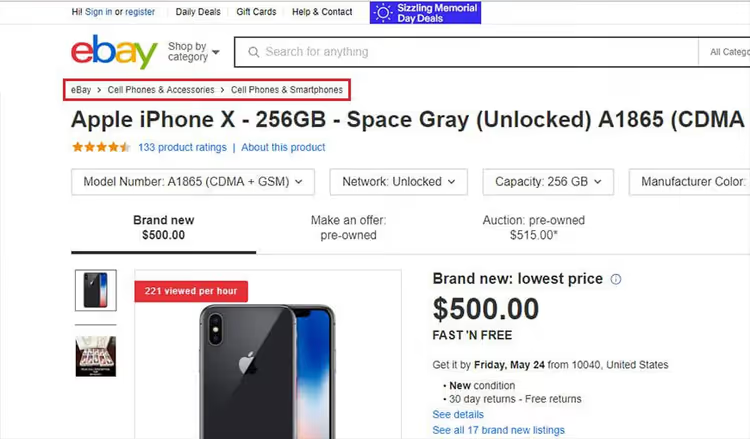
Breadcrumbs are a navigation trail that shows users their current position within a site's hierarchy. The name references the fairy tale of Hansel and Gretel, where the children dropped bread crumbs to find their way home. On the web, this mechanism works the same way: a chain of links leads from the current page back to the homepage.
The standard breadcrumb format uses the > separator between levels. For example, if a reader is viewing an article about URL structure within the "WordPress Tutorial" section, they see: Home > WordPress Tutorial > URL Structure in WordPress. The trail is usually placed at the top of the content, less commonly at the bottom.
Technically, each crumb is a link to the corresponding level in the hierarchy. The last element (the current page) is typically non-clickable since the user is already there. For search engines, this trail becomes structured data using the BreadcrumbList standard from Schema.org.
Types of breadcrumbs
Websites use four types of navigation trails. The choice depends on your site architecture and user scenarios.
Location-based
The most common type. It shows the user's current position within the site's tree structure. The example above is a location-based breadcrumb. This type is especially useful for sites with deep hierarchies: e-commerce stores, documentation portals, and news hubs. Users always understand which section they're in and can move up one level with a single click.
Attribute-based
Used primarily on e-commerce sites. Instead of a fixed path, it displays active product filters. The structure looks like this: Home > Mobile Phones > Apple > iPhone 15 > 128 GB > Black. Each attribute is a clickable filter that allows users to quickly roll back their selection. Convenient for catalogs with dozens of filtering parameters.
History-based
Displays the route the user has taken since entering the site. It essentially duplicates the browser's "Back" button, which is why this type is rarely used. UX designers prefer standard browser navigation: it's more familiar and doesn't clutter the interface.
Path-based
A hybrid type that combines visit history with an attribute-based approach. Structure: Return to previous > Category > Color > Size. This type is rare and found mainly in niche interfaces where combining context and path is important.
Why your site needs breadcrumbs
Google uses breadcrumbs for two purposes: understanding site structure and displaying the navigation trail directly in search results. Instead of a bare URL, users see a readable path: techblog.sdstudio.top > WordPress > Plugins. This increases snippet click-through rates since visitors understand where the page is located before clicking.
From a UX perspective, breadcrumbs solve two problems. First, orientation: users instantly see their location on the site and don't feel lost. Second, navigation: moving to a parent section takes just one click, without using the browser's back button. The result is lower bounce rates and increased page depth.
An important note: breadcrumbs don't replace the main menu. They complement it as a secondary navigation tool for second and third-level pages. They're usually not shown on the homepage.
How to add breadcrumbs in WordPress
There are several main methods: through an SEO plugin, through a specialized navigation plugin, or manually with code. The first method is the simplest and covers most use cases. The second is for those who need fine-tuned control. The third is for developers.
Method 1. Yoast SEO
The most popular WordPress SEO plugin includes a built-in breadcrumb module. It's disabled by default; you need to add one line to your theme template.
Copy the code below and paste it into single.php, page.php, or header.php in your theme. Do not add it to functions.php, as this may cause conflicts when updating the theme.
1 <?php 2 if (function_exists('yoast_breadcrumb')) { 3 yoast_breadcrumb('<p id="breadcrumbs">', '</p>'); 4 } 5 ?>
After inserting the code, go to the admin panel: Yoast SEO** → Settings → Advanced → Breadcrumbs**. Toggle "Enable breadcrumbs for your theme" to the active position.

In this same section, you can configure the separator, prefix for the homepage, and taxonomy bindings for custom post types. Yoast automatically generates BreadcrumbList structured data, so no additional steps are needed.
Method 2. Breadcrumb NavXT
If Yoast isn't installed or you need more flexible configuration, Breadcrumb NavXT gives you full control over the appearance and behavior of the trail. The plugin is actively maintained: version 7.5.1 (December 2025) patched vulnerability CVE-2025-13842, so make sure to install the latest version.
Install the plugin from the Breadcrumb NavXT repository, activate it, and go to Settings → Breadcrumb NavXT.

Configure the breadcrumb templates to match your structure. Then add the function call to your theme template:
1 <div class="breadcrumbs" typeof="BreadcrumbList" vocab="https://schema.org/"> 2 <?php if (function_exists('bcn_display')) { 3 bcn_display(); 4 } ?> 5 </div>

The plugin supports Schema.org structured data out of the box and works with WPML, Polylang, bbPress, and BuddyPress. To output via widget: Appearance → Widgets, drag "Breadcrumb Trail" to the desired area.
Method 3. Rank Math SEO
An alternative to Yoast with built-in breadcrumbs. After installing Rank Math, go to Rank Math** SEO → General Settings → Breadcrumbs**. Enable the option and add the shortcode [rank_math_breadcrumb] to the desired location in your template. It works similarly to Yoast: automatic structured data and flexible appearance settings.
Method 4. Built-in theme functionality
Some themes (GeneratePress, Astra Pro, Kadence) include breadcrumbs in the customizer settings. Check Appearance → Customize → Layout → Breadcrumbs; you might not even need a plugin.
Testing and debugging

After adding the code, verify the results in two places. First, open any internal page on your site: the trail should appear above the heading or below the header. Second, run the Rich Results Test from Google, enter the page URL, and confirm that the "BreadcrumbList" element is detected without errors.
If breadcrumbs don't appear, check that the template file where you inserted the code is actually being used for that page. In some themes, single.php is overridden by singular.php or blocks in the Site Editor (FSE). For block themes, use the Breadcrumb NavXT widget or the Rank Math shortcode.
⁉️🤔 Frequently asked questions
Do breadcrumbs affect Google rankings?
Not directly. Breadcrumbs are not an official ranking factor. However, they have an indirect effect: Google displays breadcrumbs in the snippet instead of the URL, which increases visibility and improves CTR. Additionally, BreadcrumbList structured data helps search engines understand your site architecture more accurately, which affects the indexing of deep pages. Sites with breadcrumbs typically have 5-10% lower bounce rates compared to similar sites without them.
Can I add breadcrumbs without a plugin?
Yes. Add a function to
functions.phpthat builds the trail based onwp_get_nav_menu_items()or category hierarchy. Then call it in your template. The downside of the manual approach: you need to generate Schema.org structured data yourself, handle edge cases (homepage, 404, attachments), and update the code when changing site structure. For most projects, a plugin is faster and more reliable.
Which separator is best: >, /, or →?
The
>separator is the de facto standard. It intuitively reads as "going one level deeper" and is used by Google in search results. The/symbol is visually lighter but can be confused with URLs. The→arrow looks nicer to designers, but Google may not recognize it in structured data. Recommendation: use>for maximum compatibility.
Is it necessary to show breadcrumbs on mobile?
Screen space is limited on mobile devices, but breadcrumbs are actually even more useful there. Smartphone users don't see a sidebar menu, so breadcrumbs become the only quick way to navigate up the hierarchy. Most themes automatically adapt the trail for mobile: reducing font size and truncating intermediate levels to a format like "... > Current".
What if my site uses a custom URL structure?
Breadcrumb NavXT allows you to manually set the hierarchy for custom post types and taxonomies. In the plugin settings, go to the Post Types tab and select the parent taxonomy for each CPT. For highly non-standard cases, use the
bcn_breadcrumb_trailfilter, which gives you full control over each element in the trail.
Should you add breadcrumbs in 2026
Absolutely yes. This isn't a trend or an experiment: it's a navigation pattern proven over years that improves UX and indirectly helps SEO. The implementation cost is 10 minutes to install a plugin and insert one line of code. The payoff is clear navigation for visitors and clean snippets in Google search results.
If you already have Yoast SEO or Rank Math installed, you're literally two clicks away from a finished result. If not, Breadcrumb NavXT will cover your needs with flexibility to spare. Choose the method that fits your stack and add breadcrumbs today: your visitors will thank you silently through lower bounce rates and longer time on site.

A professional team of writers and editors specializing in creating quality content.